
ClaudeLines
Community registry of Claude Code status lines you can install with one prompt
Gallery
About ClaudeLines
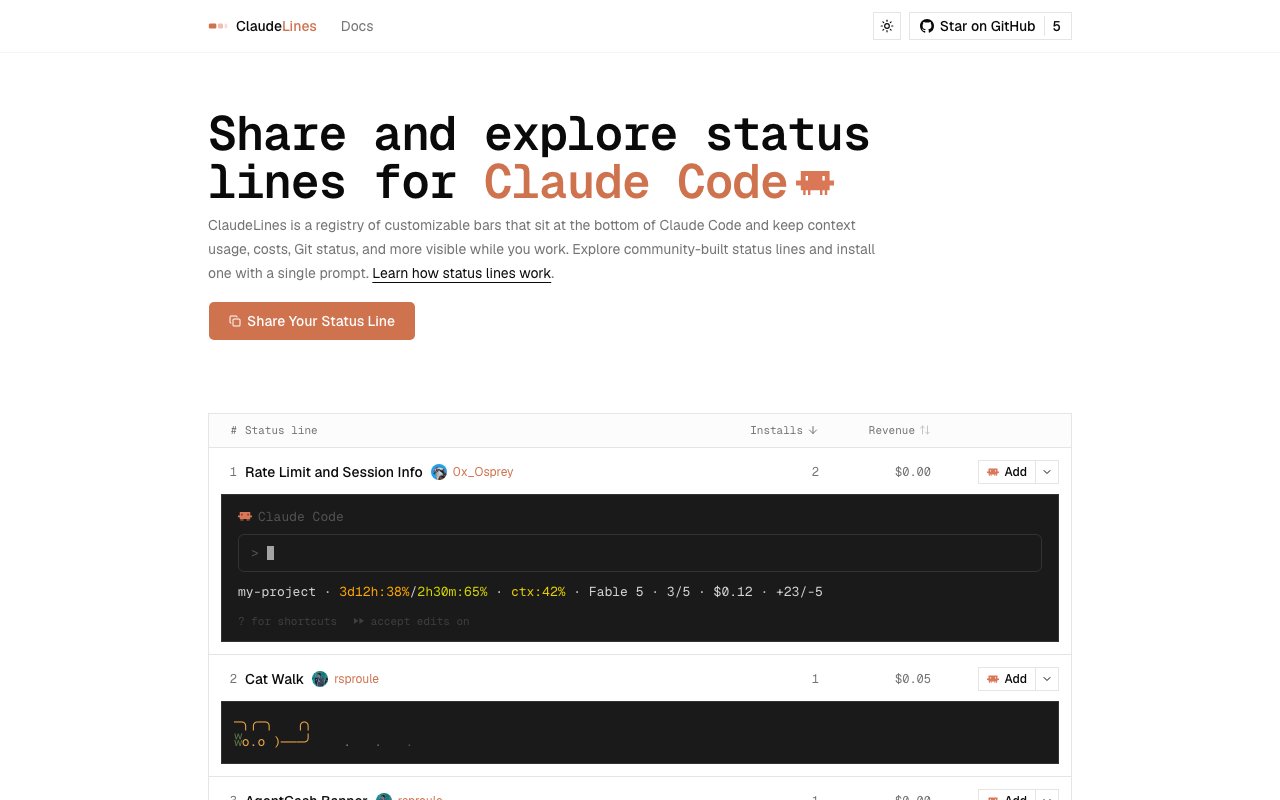
ClaudeLines is a community registry of status lines for Claude Code, Anthropic's terminal coding assistant. Claude Code shows a thin bar at the bottom of the terminal while you work, and that bar can display whatever you configure it to show. The catch is that setting one up usually means writing and wiring your own script, so most people just leave the default in place and never touch it. ClaudeLines closes that gap by collecting ready-made status lines in one browsable place. You can look through what other developers have built, see exactly what each one renders, and install the one you like with a single prompt, no scripting required. A status line is the small bar that sits under the Claude Code prompt during a session. It can surface the things that actually matter while you're deep in a task, like how much of the context window you've burned through, the running cost of the conversation, your current Git branch and working-tree state, how close you are to a rate limit, and details about the session itself. Because that information stays on screen the whole time, you don't have to stop and ask for it or run a separate command. ClaudeLines treats each of these configurations as a shareable object, so a setup one person perfects becomes something everyone else can adopt in seconds.
The site itself works like a gallery. Each entry carries a name, a preview of what it renders, and clear attribution to the person who made it, complete with a verification badge tied to their X account. You can sort the listings by how many times they've been installed or by revenue, which pushes the popular and well-supported options toward the top. The examples on offer run from strictly practical to genuinely fun, with entries such as Usage Bars, Rate Limit and Session Info, and a playful one called Cat Walk. When something catches your eye, ClaudeLines hands you a single prompt to paste into Claude Code, and the assistant handles the wiring for you rather than making you hand-edit configuration files.
Part of what makes the registry work is that it turns a niche configuration into something social. Claude Code's status line is a real, documented feature, but plenty of people never realize how much it can show, or they don't want to spend an afternoon scripting one. By putting a shelf of finished options in front of them, complete with previews and install counts, ClaudeLines lets the good ideas spread. You see what's popular, you see who made it, and you borrow the work instead of starting from a blank file every single time.
Keeping installation to one prompt matters because it stays inside the tool you're already using. You don't leave the terminal, clone a repository, or wade through setup docs just to try a different bar. The project also publishes documentation, including notes on the security checks it runs, so you can understand what a given status line does before you add it. That's a fair concern, since a status line executes on your own machine, and ClaudeLines is upfront about vetting rather than pretending the question doesn't come up. For anyone cautious about running community scripts, that transparency is worth having.
The audience is straightforward. It's built for people who already live in Claude Code and want more signal without more effort. If you've ever squinted at a long session wondering how much context you had left, or wished your Git state were visible without another command, this is the sort of small quality-of-life upgrade that pays for itself almost immediately. It's just as handy for tinkerers who enjoy shaping their environment and like seeing what other developers have come up with.
What sets it apart is the community layer sitting on top of a simple idea. ClaudeLines is open source, built by Merit Systems, with its code available on GitHub under the Merit-Systems organization. Anyone can contribute through the Share Your Status Line flow, publishing their own configuration so other users can find and install it. There's a revenue dimension as well, since creators can be credited and rewarded for popular work, which is what the revenue sort on the listings reflects.
On access, the registry is free to browse and most listed status lines cost nothing to install, so you can explore without an account and try a few before settling on one. Because the whole thing is open source, the mechanics are inspectable rather than hidden behind a service you have to trust blindly. For a Claude Code user, the pitch is simple, a better status bar in a couple of seconds, chosen from a growing shelf of options that real developers actually use.
Key Features
- Registry of Claude Code status lines
- Single-prompt installation
- Sort by installs or revenue
- Creator attribution with verification badges
- Community submission flow
- Open source with documented security checks
Pros & Cons
What we like
- Installs a status line with one prompt, no manual config
- Brings context usage, cost, and Git state into view while you work
- Free to browse and most status lines cost nothing
- Open source with published security notes
Room for improvement
- Only useful if you already use Claude Code
- Younger project with a small community
- Quality depends on what creators publish
- Some monetization details are lightly documented
Frequently Asked Questions
What is ClaudeLines?
Is ClaudeLines free?
Who is ClaudeLines for?
How does installing a status line work?
Best For
Featured in
Alternatives to ClaudeLines

1Lookup
Real-time data verification API for phone, email, IP, and domain validation to fight fraud

Codedex
A gamified, story-driven platform that teaches Python, web dev, and more like an RPG quest
Hack2hire
Practice real SDE interview questions from top tech companies with expert worked solutions
Cloudflare Pages
Free Jamstack hosting on Cloudflares edge with unlimited bandwidth and tight integration with Workers.
Reviews (8)
Good, with a few caveats
Found ClaudeLines on a Show HN thread and I am glad I clicked. Where it really wins is community submission flow. The core workflow is smooth once you are set up. My only gripe is some monetization details are lightly documented. No regrets so far.
Exactly what I needed
ClaudeLines has quietly become part of my daily flow. Where it really wins is open source with documented security checks. It does what it says, which is rarer than it should be. Easy yes for anyone weighing the same trade offs.
It just works
Hadn't planned on switching, but ClaudeLines was hard to ignore. The sort by installs or revenue is more useful than I expected.
Pulled its weight from week one
ClaudeLines solves a real problem for me without making a fuss about it. What stands out is how it handles brings context usage, cost, and git state into view while you work. Found it works best for adding live context and cost tracking to claude code.
Powerful once it clicks
Started using ClaudeLines casually, now it is pinned in my dock. Got real value out of installs a status line with one prompt, no manual config. It fits well for watching rate-limit and session details at a glance. The catch is some monetization details are lightly documented. Glad I made the switch.
Quietly excellent
ClaudeLines solves a real problem for me without making a fuss about it. The interface stays out of my way, which I appreciate. Would sign up again without thinking twice.
It just works
Tried ClaudeLines on a side project first, then rolled it out everywhere. Got real value out of sort by installs or revenue. Found it works best for watching rate-limit and session details at a glance. No regrets so far.
Pulled its weight from week one
ClaudeLines solves a real problem for me without making a fuss about it. The free to browse and most status lines cost nothing is more useful than I expected. The output quality holds up better than I expected. Hard to imagine going back to my old setup.
Badge builder
Add ClaudeLines to your website
Choose a badge style and size, preview it here, then copy the generated HTML. Badge images are self-contained SVGs and do not require an external script.

<a href="https://toolindex.net/tools/claudelines?ref=badge" target="_blank" rel="noopener">
  <img src="https://toolindex.net/badge/claudelines/medium.svg" alt="ClaudeLines - Listed on Tool Index" width="180" height="50" />
</a>How to use the badge
- 1. Pick the style, size, and theme that fit your layout.
- 2. Copy the generated HTML from the code block.
- 3. Paste it into your footer, homepage, or press page.
Standard badge available
The standard listing badge is available now. Score and circle badges are limited to tools currently ranked in the top 10 of a category.
Badge clicks return visitors to this profile with a referral tag so the source remains identifiable.
Related Tools

Kevin Gabeci
Solo developer building web apps, cozy browser games, and AI creator toolkits.

Coolify
Self-hostable, open source alternative to Heroku and Netlify

Warp
The modern terminal reimagined with AI and collaboration

Bolt.new
Prompt-to-deployed full-stack app inside the browser
Work on ClaudeLines? Request listing access or correction