
Cobalt
AI developer running on its own cloud computer that ships code to your GitHub while you close your browser
Gallery
About Cobalt
Cobalt is a platform that runs AI coding agents on their own cloud computers, so you can describe a task in plain language and come back to a working pull request. The idea is that instead of pair programming with an AI assistant in your local editor, you hand off the work entirely and let it run in isolation. You can close your browser, work on something else, and check back when the task is done. This is a fundamentally different model from chat-based coding assistants that require you to stay engaged throughout the process, copy-pasting snippets and managing context. The asynchronous nature means you are not blocked waiting for the AI to finish, and the AI is not blocked waiting for you to review each step.
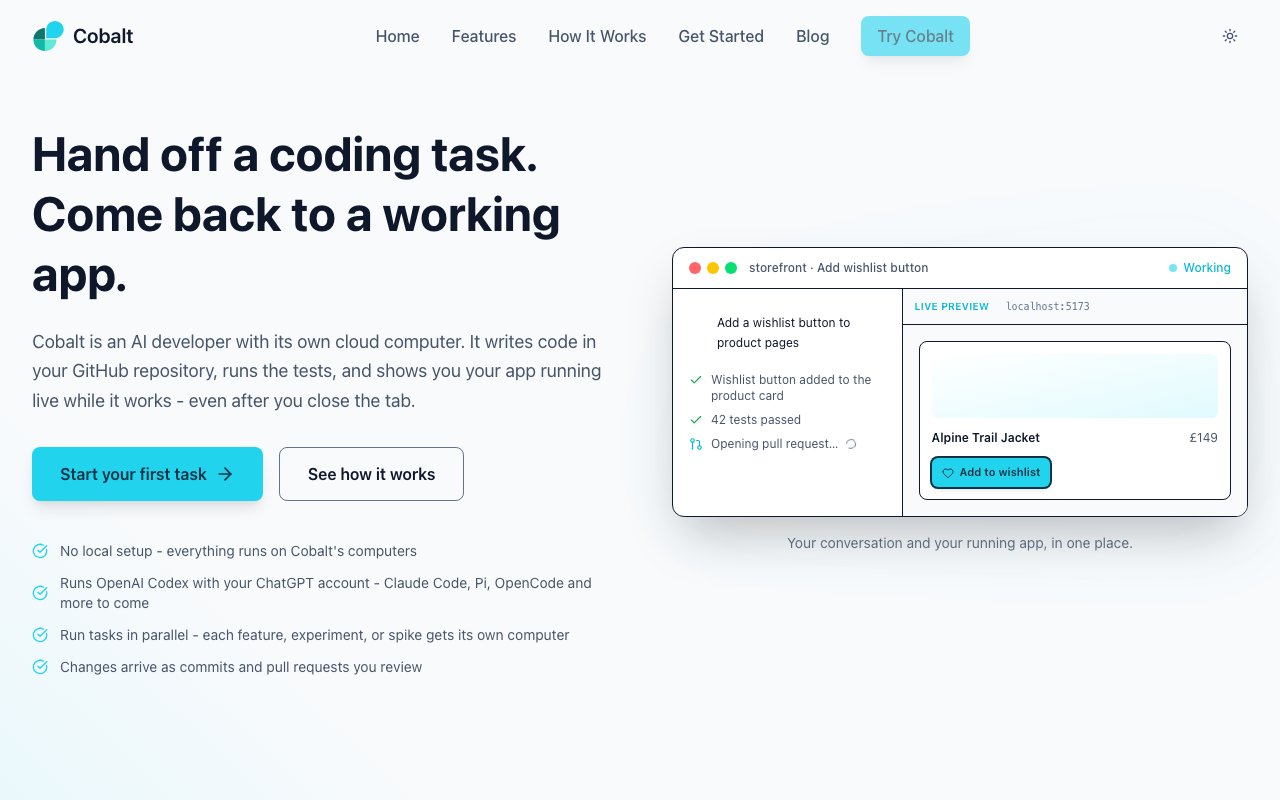
Each task runs on a separate cloud machine with its own environment, which means there is no setup on your end. You connect a GitHub repository and your ChatGPT account, describe what you want built or fixed, and Cobalt handles the implementation. It clones your repo, sets up dependencies, creates commits, opens pull requests, runs tests, and shows live previews of the app as code changes. This is not a suggestion engine that generates snippets for you to paste. It writes real code in a real environment and pushes it to your repo. You maintain full control through the normal pull request review process, merging only what passes your inspection. The GitHub integration means the output fits into your existing workflow rather than requiring you to adopt a new code review process.
The live preview capability sets it apart from text-only coding assistants. As Cobalt writes code, you can watch your application running in a preview window without pulling the branch locally. This lets you catch direction errors early and give feedback before the pull request is finalized. If the agent misunderstood your request or took the wrong approach, you see it immediately rather than discovering the problem after the code is already merged. The preview runs the actual application, not a simulation, so you are testing real behavior with real dependencies. For full-stack applications with databases, multiple services, or Docker configurations, the cloud environment handles all of that setup rather than expecting you to configure it locally.
The platform supports multiple coding agents. It uses OpenAI Codex through your ChatGPT subscription by default, but also works with Claude Code, Pi, OpenCode, and others. This flexibility means you can bring whichever model you prefer or switch between them as new ones become available. The underlying infrastructure handles environment setup, dependency installation, and execution regardless of which agent you choose, so the model selection is about reasoning capability rather than runtime support. If a new model comes out that performs better on your type of codebase, you can switch to it without changing anything else about your workflow.
Because each task runs in isolation, you can spin up multiple tasks in parallel on separate machines. This is useful for tackling several features at once or letting the system work through a backlog while you focus on design or planning. The work persists across sessions, so you do not lose progress if you disconnect. Tasks continue running on cloud machines whether your browser is open or not, and you can check back later to see completed pull requests waiting for review. The parallel execution model is particularly valuable when you have a list of independent improvements that would be tedious to implement sequentially but do not depend on each other.
The target audience is developers and small teams who want to offload routine coding work. The pitch is not that it replaces your judgment but that it handles the tasks you keep postponing because they are not interesting enough to prioritize. Bug fixes, refactors, boilerplate features, and prototype builds are the sweet spot. If you have a clear specification and a codebase structured enough for an agent to navigate, you can hand off the implementation and focus on the work that actually requires your attention. Product teams exploring whether an idea is worth building can use it to generate working prototypes before committing to full development, since the cost of trying is just the time it takes to describe what you want.
Pricing is not listed publicly on the site, which suggests it may be in early access or operating on a waitlist model. The interface is available at app.cobaltcode.ai, and the product appears functional. Cobalt is built by Amaretto Software Labs, which also works on related products spanning UI prototyping and AI sandboxes. For teams already comfortable with AI coding assistants but frustrated by context limits and the need to babysit every change, Cobalt offers a different model where you trade real-time control for asynchronous output. The tradeoff works best when the task is well-defined enough that the agent can make progress without constant guidance, but the potential productivity gain is significant if your backlog is full of work that fits that profile.
Key Features
- Isolated cloud computer per task
- Automatic commits and pull requests
- Live app preview during coding
- Support for multiple AI coding agents
- Parallel task execution
- Persistent work across sessions
Pros & Cons
What we like
- Tasks run in the background after you close your browser
- No local environment setup required
- Supports multiple coding models including Codex and Claude
- Live previews let you catch errors before merging
Room for improvement
- Pricing not publicly listed
- Requires ChatGPT or compatible subscription
- New product with limited track record
- Works best with well-defined, scoped tasks
Frequently Asked Questions
What is Cobalt?
How does Cobalt work?
What coding models does Cobalt support?
Do I need to keep my browser open?
Best For
Featured in
Alternatives to Cobalt
View allCursor
VS Code fork built around an AI pair-programmer

Replit
Browser IDE plus Replit Agent that builds and deploys apps from a prompt
Windsurf
Codeium's AI editor with Cascade agent and deep IDE integration

Treena
Mobile-first IDE with AI coding agents, terminal, and GitHub sync built for your phone
Our take
Tool Index Editorial · Oct 2026· 4.0/5
Cobalt gives each coding-agent task a persistent cloud computer with its own repository state, services, preview, diff, and pull request. Teams can choose among Codex, Claude Code, Cursor, Copilot, Gemini, and other agents while keeping one review workflow. We found a mature feature set on the public pages, including parallel tasks, scheduled Loops, multiple compute profiles, GitHub and Azure DevOps support, and documentation that tells users to review before relying on a result.
Pricing is clear. Free includes 200 monthly credits, Plus is $30 per workspace for 2,500 credits, and Pro is $100 for 10,000, with agent accounts purchased separately and credits not rolling over. The main risk is cost and credential exposure across cloud environments. For well-scoped tasks that benefit from isolation and asynchronous work, though, Cobalt is one of the more convincing agent harnesses we reviewed.
Editorial opinion from the Tool Index team, written from the public product pages. Not a user review.
Reviews (0)
Badge builder
Add Cobalt to your website
Choose a badge style and size, preview it here, then copy the generated HTML. Badge images are self-contained SVGs and do not require an external script.

<a href="https://toolindex.net/tools/cobaltcode?ref=badge" target="_blank" rel="noopener">
  <img src="https://toolindex.net/badge/cobaltcode/medium.svg" alt="Cobalt - Listed on Tool Index" width="180" height="50" />
</a>How to use the badge
- 1. Pick the style, size, and theme that fit your layout.
- 2. Copy the generated HTML from the code block.
- 3. Paste it into your footer, homepage, or press page.
Standard badge available
The standard listing badge is available now. Score and circle badges are limited to tools currently ranked in the top 10 of a category.
Badge clicks return visitors to this profile with a referral tag so the source remains identifiable.
Related Tools

Bolt.new
Prompt-to-deployed full-stack app inside the browser

Tabnine
Privacy-first enterprise AI code assistant you control, with SaaS, VPC, on-prem, or fully air-gapped deployment
Cursor
VS Code fork built around an AI pair-programmer

Skeezo
Agent-native macOS IDE for coordinating Claude Code and AI agents
Work on Cobalt? Request listing access or correction