
Ekselio
Build repeatable, auditable finance workflows that run in your browser
Gallery
About Ekselio
Ekselio is an AI-assisted workflow builder for accounting and corporate finance work. A user connects QuickBooks Online or drops in files, describes the analysis in plain English, and gets a visual sequence of calculation steps. It is aimed at recurring jobs such as financial statement generation, budget comparisons, accounts receivable and payable aging, cash flow analysis, working capital reviews, and multi-entity consolidation. The important distinction is that the language model designs the steps while a query engine executes the calculations. Ekselio isn't asking the model to guess a number or compose a one-off answer. It turns the request into SQL that can be inspected, run against the source data, saved, and used again.
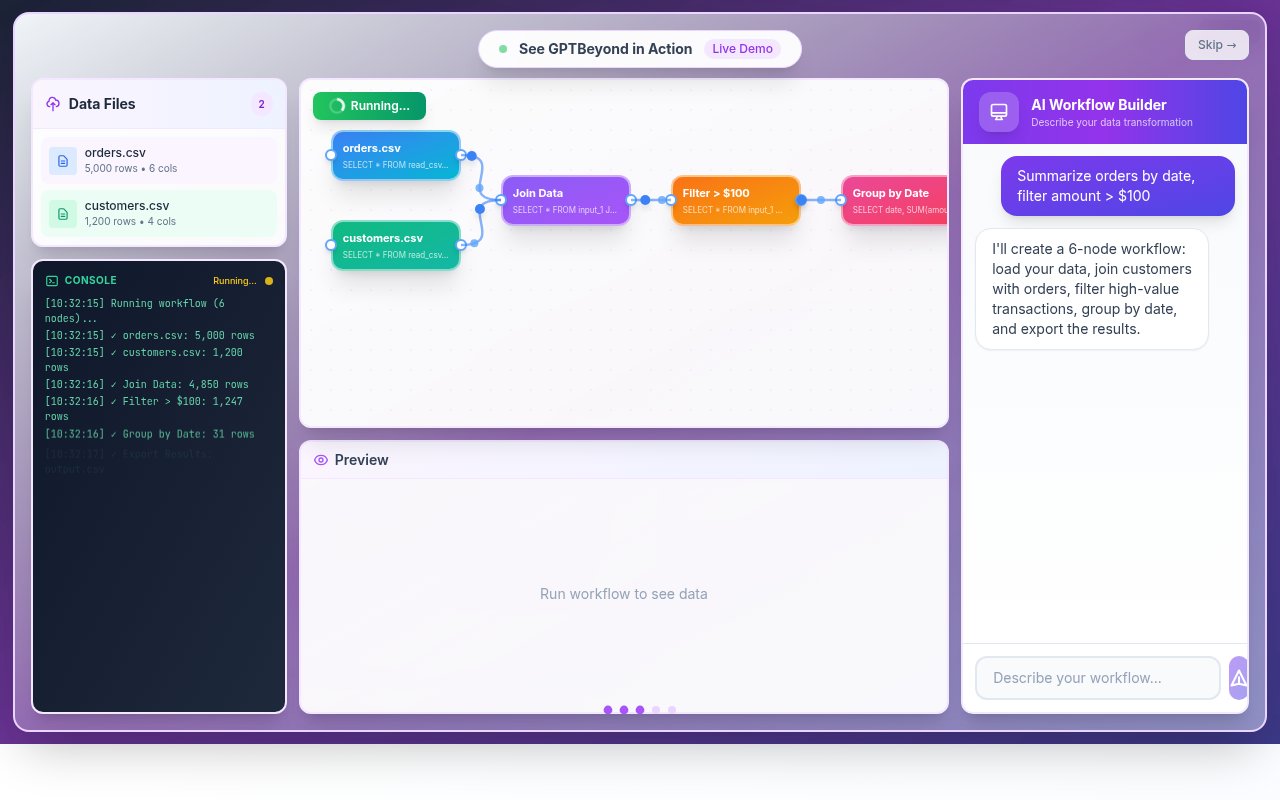
The workflow appears on a canvas, where each node represents a visible transformation or output. Users can open a step, read its SQL, preview the result, and trace a reported figure back to the underlying rows. That gives a finance professional something more concrete to review than a chat response. Once the logic is accepted, the workflow can be saved and run on the next period's files without another planning call to the model. The same input and the same steps should produce the same output, which makes the setup useful for month-end routines where definitions need to remain stable. Templates can provide a starting point, while plain-language prompts let a nontechnical user ask for a custom analysis.
Ekselio handles CSV, multi-sheet Excel, JSON, and Parquet files in the browser, with the product site describing files around 50 to 100 MB as comfortable working sizes. QuickBooks Online has a live, read-only connection for Profit and Loss, General Ledger, and company information. Exports from Xero, NetSuite, Sage, SAP, Dynamics, Shopify, or another system can be analyzed as files today, but those products don't yet have equivalent live connections. The site says Xero is next on the connection roadmap. This makes Ekselio most complete for QuickBooks users, though its underlying workflow engine isn't tied to one ledger format.
Its local processing model is a central part of the design, but it needs a precise explanation. Uploaded files and full datasets remain in browser memory, and DuckDB-WASM performs the joins, pivots, totals, and intermediate calculations locally. The AI does receive the user's prompt, column names and types, and up to three sample rows per file so it can understand the schema and write the workflow. A final summary table of up to 60 rows can also be sent for written commentary, along with small helper requests. QuickBooks reports pass through the company's server on their way from Intuit to the browser, although the site says they aren't stored. Users with sensitive headers or top rows should mask or rename them before analysis and confirm that this model fits their employer's policy.
The strongest audience is a QuickBooks ProAdvisor, outsourced accounting firm, fractional CFO, controller, or small finance team that repeats similar analysis across periods or clients. They get the speed of a prompt without giving up the ability to examine the logic. Ekselio can export a workflow as an Excel model containing the input data, documented SQL, Power Query M logic, outputs, and a tie-out sheet. Refreshing that workbook recomputes the results in Excel and checks them against the workflow output. That is especially useful when a partner, auditor, client, or diligence team needs to reproduce the work without learning a new application.
Ekselio is still a young product with a narrower integration set than mature finance platforms. It doesn't yet advertise compliance certifications, single sign-on, or organization-level controls, and its privacy page describes individual card billing for the current paid plan. It also doesn't remove the need for professional review. Generated SQL can be read and tested, but the user remains responsible for deciding whether the requested logic and resulting analysis are appropriate. The visible canvas and tie-out export make that review practical rather than automatic.
Anyone can try the browser canvas without signing up or entering a card. Ongoing access to the QuickBooks product is sold as one monthly plan at $49.99, with 75 plain-English AI questions per month and unlimited workflow runs, charts, analyses, and Excel exports. Saved reruns don't consume another AI question because they use the existing local SQL. That combination makes the product best viewed as a paid finance workflow system with an open trial, not a general spreadsheet assistant or a free reporting dashboard.
Key Features
- Plain-language workflow building
- Visible SQL workflow canvas
- Browser-local calculation engine
- Reusable monthly workflow runs
- Excel models with tie-outs
- Live QuickBooks Online connection
Pros & Cons
What we like
- Separates AI planning from deterministic calculation
- Makes every transformation available for review
- Keeps uploaded files in browser memory
- Exports independently verifiable Excel models
Room for improvement
- Only QuickBooks has a live ledger connection today
- Sample rows and summary tables can reach the AI
- No current compliance certifications or team controls
- Generated workflow logic still needs professional review
Frequently Asked Questions
What is Ekselio?
Does Ekselio upload financial files?
Which accounting systems does Ekselio support?
Is Ekselio free?
Best For
Featured in
Alternatives to Ekselio



Our take
Tool Index Editorial · Oct 2026· 3.5/5
Ekselio is a browser based finance workflow canvas that turns a plain language request into visible data steps and SQL. It is aimed at controllers, accountants, and analysts who repeat work such as aging schedules, joins, filters, charts, and period reporting. The public demo lets visitors inspect a sample workflow and shows file inputs plus a QuickBooks connection, but the captured page did not expose a current paid price.
The promising part is inspectability. A finance user can open each transformation instead of accepting a number from a chat response. We would still treat every generated query and conclusion as draft work that needs reconciliation by a qualified reviewer. The public material we saw was light on team controls, supported live integrations beyond QuickBooks, and compliance details, so regulated or multiuser teams should verify those areas before adoption.
Editorial opinion from the Tool Index team, written from the public product pages. Not a user review.
Reviews (0)
Badge builder
Add Ekselio to your website
Choose a badge style and size, preview it here, then copy the generated HTML. Badge images are self-contained SVGs and do not require an external script.

<a href="https://toolindex.net/tools/ekselio?ref=badge" target="_blank" rel="noopener">
  <img src="https://toolindex.net/badge/ekselio/medium.svg" alt="Ekselio - Listed on Tool Index" width="180" height="50" />
</a>How to use the badge
- 1. Pick the style, size, and theme that fit your layout.
- 2. Copy the generated HTML from the code block.
- 3. Paste it into your footer, homepage, or press page.
Standard badge available
The standard listing badge is available now. Score and circle badges are limited to tools currently ranked in the top 10 of a category.
Badge clicks return visitors to this profile with a referral tag so the source remains identifiable.
Related Tools

Simple RMD
Calculate, aggregate, and manage your annual IRA required minimum distributions.
FreshBooks
Cloud accounting designed for service-based small businesses and freelancers
Deel
Global payroll, contractor, and EOR platform
Chargebee
Subscription billing and revenue management for B2B SaaS
Work on Ekselio? Request listing access or correction