
FinZot
Build detailed US financial plans with taxes, scenarios, and historical stress tests
Gallery
About FinZot
FinZot is do-it-yourself financial planning software for people who want to model a US household in much more detail than a basic retirement calculator allows. It brings income, spending, investments, pensions, Social Security, property, debt, and taxes into one long-range plan. The goal isn't to replace every decision with a single score. It lets a person see how the parts of a financial life interact over time, then compare the consequences of changing retirement dates, spending rules, conversions, withdrawals, or other assumptions. The service is built specifically for US taxpayers and models federal rules along with income tax rules for 41 states and Washington, DC.
The planning engine works year by year. Users can enter salaries, side income, pensions, benefits, investment accounts, real estate, loans, expenses, family events, and life expectancy. Investments can use real index fund history or custom return and volatility assumptions. FinZot tracks cost basis at the tax-lot level, treats fund income according to its tax character, and calculates items such as capital gains, Social Security taxation, Medicare IRMAA, ACA premium credits, required distributions, and multiple federal taxes. Its formula system can tie a value to age, balances, net worth, returns, or timing events, so a plan can react instead of holding every assumption fixed for decades.
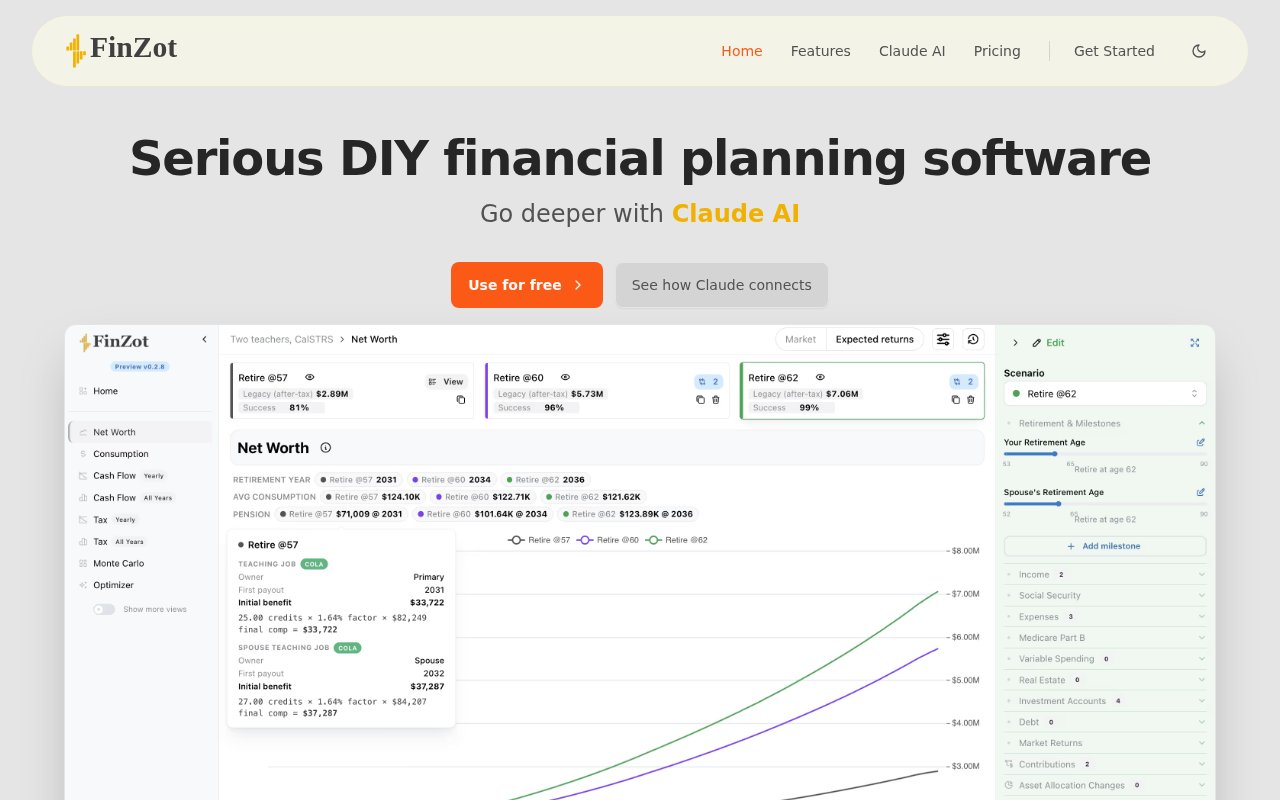
Testing alternatives is central to the product. A paid Plus plan can hold several scenarios for a household and show them side by side, with every changed setting highlighted. Users can copy a change between scenarios and compare Monte Carlo results across them. Each simulation runs one thousand trials assembled from consecutive blocks of real market history, rather than relying only on a smooth average return. A historical replay can also show what the same plan would have done through a period such as the market conditions beginning in 1966. Results cover net worth, yearly cash flow, taxes by bracket, retirement spending, and when a plan fails under a fixed budget.
FinZot is especially relevant to households approaching retirement with decisions that cross several systems at once. Someone can compare pension elections, Social Security timing, an early retirement health insurance gap, Roth conversions, withdrawal order, or the sale of taxable investments without treating each question in isolation. It also supports planning details such as employer matches, HSAs, 529 plans, rental property depreciation, mortgage terms, survivor benefits, and state moves. Variable spending offers another view of retirement. Instead of judging only whether a fixed budget survives, it can amortize available assets over the remaining years and show a range of sustainable consumption across trials.
The interface is built for hands-on exploration. Moving a value can recalculate the plan, followed by a new set of Monte Carlo trials. Yearly cash flow views show where income comes from and where spending, tax, insurance, and investments go. Scenario comparison makes it possible to identify the exact assumption behind a changed outcome, which is more useful than comparing two unexplained success percentages. Version history supports undo and rewind. That matters in a model with many connected inputs, since users can explore a strategy without losing the plan they had before.
Plus also includes a connector for Claude. A user can describe a household in plain English, let Claude ask for missing facts, and have it create or update a FinZot plan. The connector can run projections, inspect results, build scenarios, and analyze tax or withdrawal choices. Its actions are undoable, and the resulting plan stays available in the user's FinZot account. This is a practical alternative to filling every field by hand, though the quality of the plan still depends on complete inputs and careful review. FinZot presents planning software, not a substitute for individualized tax, legal, or investment advice.
Access is freemium. The Free plan costs nothing and includes one complete plan, one scenario, the full tax engine, historical Monte Carlo analysis, pensions, Social Security, health care thresholds, version history, and cloud backup after registration. Plus costs $100 per year and expands the account to four plans with twelve scenarios per plan. It adds sharing, scenario comparison, conversion and withdrawal optimization, tax-targeted sizing, and the Claude connector. The free plan is unusually substantive, while Plus is aimed at households that need repeated comparison, family planning, or AI-assisted editing.
Key Features
- Tax-aware lifetime projections
- Historical Monte Carlo testing
- Side-by-side scenario comparison
- Roth conversion optimization
- Dynamic planning formulas
- Claude AI connector
Pros & Cons
What we like
- Models detailed US taxes and retirement rules
- Free plan includes the complete planning engine
- Historical trials expose sequence risk clearly
- Scenario differences remain visible and reversible
Room for improvement
- Built only for US taxpayers
- Free accounts get one plan and one scenario
- Detailed inputs require time and financial context
- Claude integration requires the Plus plan
Frequently Asked Questions
What is FinZot?
Is FinZot free?
How does FinZot test retirement risk?
Can Claude build a FinZot plan?
Best For
Featured in
Alternatives to FinZot



Our take
Tool Index Editorial · Oct 2026· 4.0/5
FinZot is detailed financial planning software for US households that want to model taxes, retirement income, investments, property, debt, and spending over time. We found a serious engine behind the interface, including lot level tax treatment, historical Monte Carlo trials, scenario history, Roth conversion rules, and an optional Claude connector. It suits careful do it yourself planners more than someone seeking a quick retirement number.
The free tier includes one complete plan, one scenario, the full tax engine, and 1,000 historical trials. Plus costs $100 a year for more plans and scenarios, comparisons, sharing, an optimizer, and the AI connector. That is strong value, but setup is manual and assumption heavy. It only models US tax law, and detailed output can create false confidence if the inputs or future policy assumptions are poor.
Editorial opinion from the Tool Index team, written from the public product pages. Not a user review.
Reviews (0)
Badge builder
Add FinZot to your website
Choose a badge style and size, preview it here, then copy the generated HTML. Badge images are self-contained SVGs and do not require an external script.

<a href="https://toolindex.net/tools/finzot?ref=badge" target="_blank" rel="noopener">
  <img src="https://toolindex.net/badge/finzot/medium.svg" alt="FinZot - Listed on Tool Index" width="180" height="50" />
</a>How to use the badge
- 1. Pick the style, size, and theme that fit your layout.
- 2. Copy the generated HTML from the code block.
- 3. Paste it into your footer, homepage, or press page.
Standard badge available
The standard listing badge is available now. Score and circle badges are limited to tools currently ranked in the top 10 of a category.
Badge clicks return visitors to this profile with a referral tag so the source remains identifiable.
Related Tools

Simple RMD
Calculate, aggregate, and manage your annual IRA required minimum distributions.
FreshBooks
Cloud accounting designed for service-based small businesses and freelancers
Deel
Global payroll, contractor, and EOR platform
Chargebee
Subscription billing and revenue management for B2B SaaS
Work on FinZot? Request listing access or correction