
Firedeck
Native iPhone and iPad app for managing Firebase services on the go
Gallery
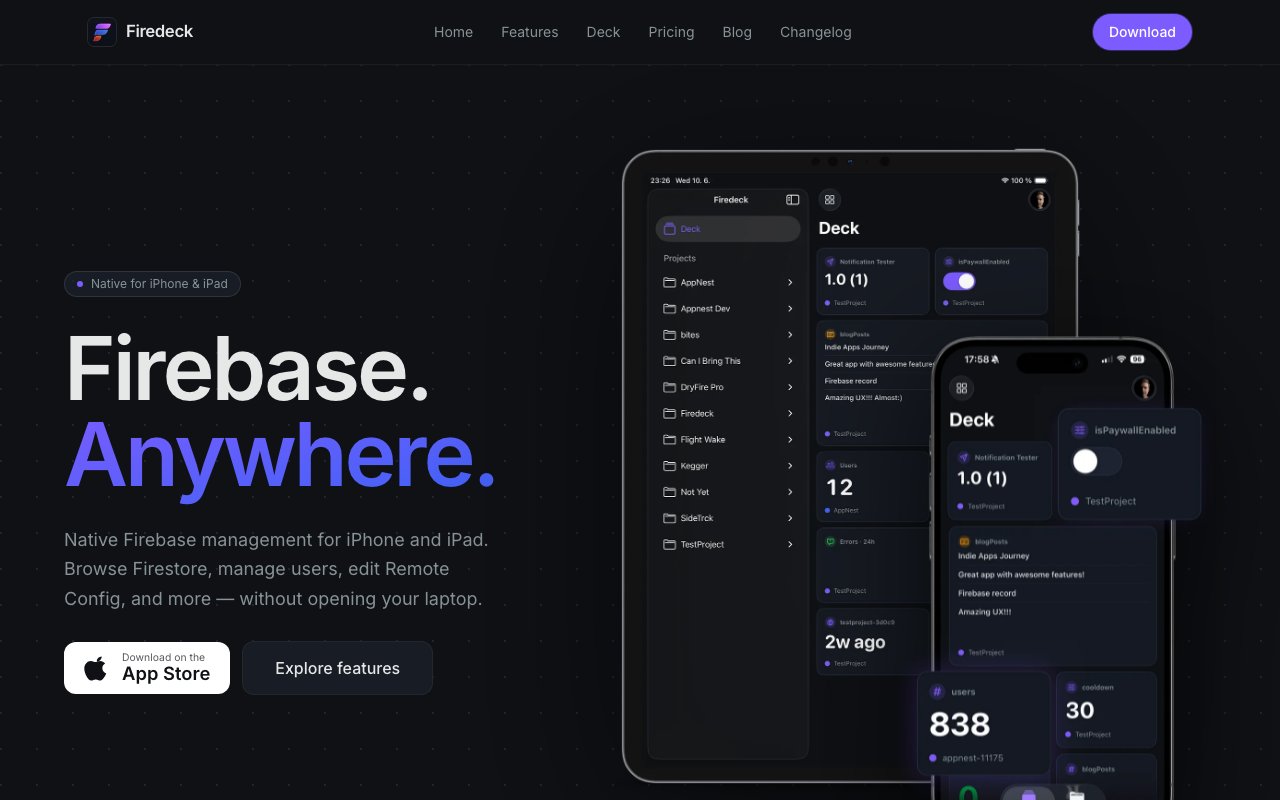
About Firedeck
Firedeck brings Firebase project management to iPhone and iPad through a native application built specifically for mobile workflows rather than simply wrapping the web console. It solves a practical problem that developers encounter more often than they'd like to admit. Production issues don't wait for convenient moments when you're at your desk with a laptop open, and sometimes you need to check a Firestore document, update a Remote Config parameter, or investigate authentication problems when you're on a train, at a coffee shop, or dealing with an alert that came in during dinner. The Firebase web console exists but it wasn't designed for mobile browsers, and fighting with a desktop interface on a phone screen wastes precious time during incidents. Firedeck reimagines the entire interface for touch interaction and smaller screens.
The application covers fourteen Firebase services with varying levels of functionality. Firestore gets comprehensive treatment including collection and document browsing through an intuitive hierarchy, inline editing for quick data fixes, and query execution directly from your device so you can filter and find specific records. Cloud Storage supports file browsing with folder navigation, previews for common formats like images and PDFs, plus upload and download capabilities. Remote Config lets you update parameters and publish changes to production immediately, which matters enormously when you need to toggle feature flags or adjust thresholds without pushing a new build through app store review. Cloud Functions monitoring shows execution logs and lets you test function endpoints to verify they're working correctly.
Beyond these core services, Firedeck provides access to Real Time Database with JSON tree navigation for legacy projects, Firebase Authentication for user management and account operations like password resets, Hosting deployment status, Extensions configuration, Security Rules viewing, App Distribution tracking for beta builds, IAM controls for managing team permissions, App Check monitoring for fraud detection, and Cloud Logging for reviewing application events. The breadth of coverage means most Firebase administration tasks that developers perform regularly can happen on mobile without functional degradation compared to the web console.
The Deck feature represents the application's most distinctive contribution to mobile Firebase tooling. It functions as a customizable home screen where you pin widgets from across multiple Firebase projects simultaneously. Each widget surfaces specific information from a particular service and project combination. You might pin a Cloud Functions error log from your production project, a Remote Config parameter you adjust frequently during feature rollouts, a Firestore collection you monitor for customer data issues, and an authentication user count from your staging environment all on a single screen. The Deck turns Firedeck from a project browser that requires drilling down through menus into a personalized monitoring dashboard that loads instantly when you open the app.
iPad optimization takes the experience further with multi column navigation layouts that put browsing and detail views side by side, full hardware keyboard support for developers who pair their iPad with a Magic Keyboard, and interface designs that take advantage of larger screens rather than simply scaling up the phone layout. This makes the iPad version feel like a legitimate workstation for Firebase management rather than a scaled up mobile afterthought. Developers who use iPad as a secondary device for travel or as their primary machine for certain tasks get particular value from this level of implementation care.
Pricing follows a straightforward structure without artificial urgency tactics or hidden costs. The free tier provides read only browsing across all your Firebase projects, three Deck widgets to test the monitoring concept, and single Google account support. Pro subscriptions unlock write access for actual modifications, unlimited widgets for comprehensive dashboards, and multiple Google account support for contractors or developers working across different organizations. Monthly billing runs five ninety nine, annual costs twenty nine ninety nine with a seven day trial available, and a lifetime purchase option at sixty nine ninety nine provides permanent access with no renewal concerns.
Adam Gelatka built Firedeck as an iOS engineer who clearly understood what developers actually need from mobile Firebase tooling rather than what sounds good on a feature list. The native implementation shows throughout the interface in ways that matter for daily use. Animations feel responsive and fluid. Navigation patterns match iOS conventions so you're not relearning interaction paradigms. The app respects system features like Dark Mode and Dynamic Type accessibility settings. This attention to platform design distinguishes Firedeck from web based approaches that treat mobile as an afterthought.
Key Features
- Firestore collection browsing and editing
- Authentication user management
- Cloud Storage file handling
- Remote Config value updates
- Cloud Functions monitoring
- Push notification sending
Pros & Cons
What we like
- Native iPad layouts with multi-column navigation
- Free tier covers read-only access for all services
- Lifetime purchase option at reasonable price
- Built specifically for iOS rather than adapted from web
Room for improvement
- iOS only, no Android version available
- Write access requires paid subscription
- Indie product with single developer
- Limited to Firebase, no other cloud providers
Frequently Asked Questions
What is Firedeck?
Is Firedeck free?
Does Firedeck work on iPad?
Who is Firedeck for?
Best For
Featured in
Alternatives to Firedeck
View all
1Lookup
Real-time data verification API for phone, email, IP, and domain validation to fight fraud

Kevin Gabeci
Solo developer building web apps, cozy browser games, and AI creator toolkits.

Codedex
A gamified, story-driven platform that teaches Python, web dev, and more like an RPG quest
Hack2hire
Practice real SDE interview questions from top tech companies with expert worked solutions
Reviews (10)
It just works
Tried Firedeck on a side project first, then rolled it out everywhere. Their take on cloud storage file handling is genuinely good. The defaults are sensible, so I was not fighting settings on day one. Hard to imagine going back to my old setup.
Exactly what I needed
Picked Firedeck for the price, stayed for the quality. The interface stays out of my way, which I appreciate. The core workflow is smooth once you are set up. Would sign up again without thinking twice.
Genuinely impressed
Firedeck solves a real problem for me without making a fuss about it. It slotted into my routine without much fuss. Found it works best for monitoring cloud functions status from anywhere. Hard to imagine going back to my old setup.
Recommended without reservation
Came to Firedeck after getting frustrated with what I had before. Their take on free tier covers read-only access for all services is genuinely good. It slotted into my routine without much fuss. Would sign up again without thinking twice.
Genuinely impressed
Firedeck has quietly become part of my daily flow. The authentication user management is more useful than I expected. It earns its place in my stack.
Recommended without reservation
Three months of Firedeck later, here is what holds up. Where it really wins is push notification sending. The interface stays out of my way, which I appreciate. Mostly using it for monitoring cloud functions status from anywhere.
Decent with some rough edges
Started using Firedeck casually, now it is pinned in my dock. It slotted into my routine without much fuss. The defaults are sensible, so I was not fighting settings on day one. It would be a five if not for limited to firebase, no other cloud providers. Would sign up again without thinking twice.
Quietly excellent
Three months of Firedeck later, here is what holds up. What stands out is how it handles cloud storage file handling. What stands out is how little babysitting it needs. It fits well for updating remote config values in an emergency.
Exactly what I needed
Picked Firedeck for the price, stayed for the quality. What stands out is how little babysitting it needs. Mostly using it for checking firestore data while away from your desk.
Exactly what I needed
Found Firedeck on a Show HN thread and I am glad I clicked. The firestore collection browsing and editing is more useful than I expected. The output quality holds up better than I expected. Easy yes for anyone weighing the same trade offs.
Badge builder
Add Firedeck to your website
Choose a badge style and size, preview it here, then copy the generated HTML. Badge images are self-contained SVGs and do not require an external script.

<a href="https://toolindex.net/tools/firedeck?ref=badge" target="_blank" rel="noopener">
  <img src="https://toolindex.net/badge/firedeck/medium.svg" alt="Firedeck - Listed on Tool Index" width="180" height="50" />
</a>How to use the badge
- 1. Pick the style, size, and theme that fit your layout.
- 2. Copy the generated HTML from the code block.
- 3. Paste it into your footer, homepage, or press page.
Standard badge available
The standard listing badge is available now. Score and circle badges are limited to tools currently ranked in the top 10 of a category.
Badge clicks return visitors to this profile with a referral tag so the source remains identifiable.
Related Tools
Kevin Gabeci
Solo developer building web apps, cozy browser games, and AI creator toolkits.

Coolify
Self-hostable, open source alternative to Heroku and Netlify

Warp
The modern terminal reimagined with AI and collaboration

Bolt.new
Prompt-to-deployed full-stack app inside the browser
Work on Firedeck? Request listing access or correction