Froging AI
Generate watermark-free AI videos and images with Kling, Veo, Seedance, and more in one place
Gallery
About Froging AI
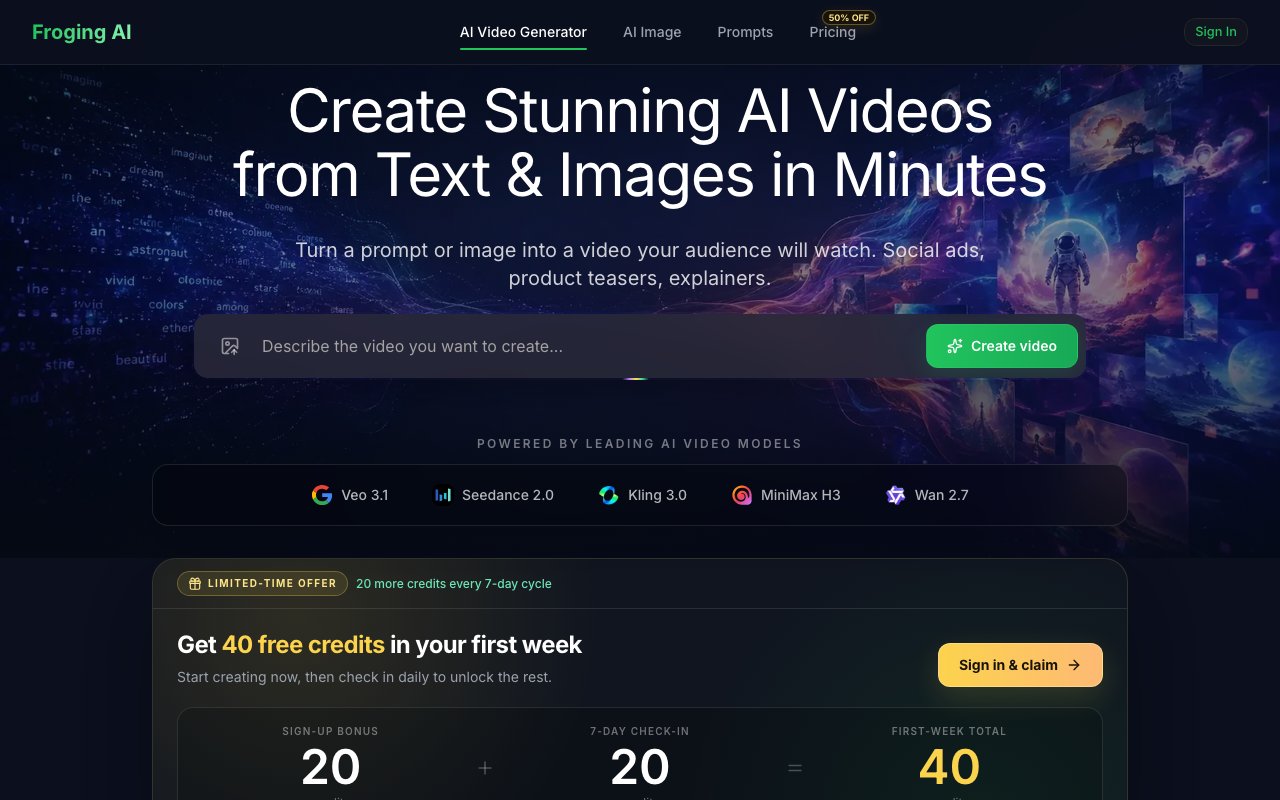
Froging AI is a web platform for generating videos and images with AI. You type a description or upload a picture, pick a model and settings, and get a finished clip back in minutes with no watermark. Instead of committing to one vendor's model and one vendor's subscription, it puts several of the current frontier video generators behind a single interface and one credit balance, so you match the model to the job rather than the other way around. There's no software to install and nothing to configure, the whole thing runs in the browser.
The model lineup is the main draw. On the video side it offers Kling 3.0 with output up to 4K and clips of 5 to 15 seconds, Veo 3.1 with native audio at 4 to 12 seconds, MiniMax H3 at 2K with stereo audio, Wan 2.7 at 1080p for visual-only work, and Seedance 2.0 at 1080p with optional audio and 5 to 15 second clips. Alongside video there's 2K and 4K image generation, so stills and motion live in the same account. That roster matters because these models genuinely have different personalities. One handles physical motion better, another nails audio, another is cheaper for drafts, and anyone who has juggled separate subscriptions just to compare them knows exactly what problem this consolidation solves.
The workflow keeps the barrier deliberately low. Text-to-video is three steps, describe the video you want, a sunset cityscape or a product rotating 360 degrees, choose a model plus settings like duration and resolution, then sign up with Google and hit generate. Image-to-video takes a JPG, PNG, or WebP upload, lets you add a motion description, and exports an HD result, which is the fastest route from a static product photo to something that moves in a feed. Output ships as MP4 with the full spread of practical aspect ratios, 16:9 for YouTube and web, 9:16 for TikTok, Reels, and Shorts, 1:1 for Instagram feed, plus 4:3, 3:4, and 21:9 for everything else. Standard delivery runs up to 1080p, with higher resolutions coming from specific models like Kling. There are no timeline editors or layer panels to learn, which is rather the point, the craft moves into the prompt and the model choice instead of the edit.
It fits social media creators cranking out vertical shorts, e-commerce sellers who need product demos and ads without a film shoot, educators and course creators building visual material, marketing teams filling content calendars, and filmmakers or digital artists using generation for previz and experiments. The common thread is people who care more about getting usable clips out the door than about being loyal to any one model, since the best generator for a talking product shot isn't necessarily the best one for an atmospheric landscape, and the right answer changes every few months as new models land. It's also a sane on-ramp for anyone who has watched AI video flood their feeds and wondered what the tooling actually looks like, since the free credits mean the curiosity costs nothing.
What separates it from single-model tools is the ability to rerun the same prompt across different engines from one balance and pick the winner. What separates it from raw API access is that there's no setup at all, just a Google sign-in. And the licensing is unambiguous, every paid plan includes full commercial rights and watermark-free downloads, which matters when the output is going into client work, ads, or monetized channels rather than a personal feed. The models themselves come from outside vendors, so the quality ceiling is set upstream, but the plumbing, the licensing, and the single bill are the parts Froging actually owns, and they're the parts that make the multi-model habit practical.
Access is freemium with a credit system, and the free path is real rather than decorative. New accounts get 20 flexible trial credits at signup, and a daily check-in scheme adds up to 20 more credits in each recurring 7-day cycle, which is enough to keep testing models week after week before spending anything. Paid plans are Starter at $23.33 a month for 800 monthly credits, Pro at $35 for 1,600 credits with priority support, and Enterprise at $50 for 4,000 credits plus early access to new models. Effective cost per credit drops from about $0.029 on Starter to $0.013 on Enterprise, so heavier generation gets meaningfully cheaper per clip. Different models burn credits at different rates, which takes a little learning before you can budget a big batch confidently, but the recurring free credits make that easy to feel out firsthand. Support is reachable at support@froging.ai if you get stuck.
Key Features
- Kling 3.0 video generation up to 4K
- Veo 3.1 clips with native audio
- Seedance, MiniMax, and Wan model options
- Image-to-video from JPG, PNG, or WebP
- 2K and 4K image generation
- Watermark-free MP4 export in six aspect ratios
Pros & Cons
What we like
- Multiple frontier video models under one credit balance
- Free trial credits plus recurring check-in credits
- Full commercial rights on all paid plans
- Covers vertical, square, and widescreen output for every platform
Room for improvement
- Clips cap out at roughly 15 seconds per generation
- Credit costs vary by model, so budgeting takes some learning
- Standard delivery tops out at 1080p on most models
- Requires a Google account to generate
Frequently Asked Questions
What is Froging AI?
Is Froging AI free?
Can I use the videos commercially?
Who is Froging AI for?
Best For
Featured in
Alternatives to Froging AI
View allKling AI
Kuaishou's video model that punches above its weight on motion
Luma Dream Machine
Fast, photoreal video generation from the team behind Genie 3D
HeyGen
Generate talking-head avatar videos in dozens of languages

Runway
Video generation, editing, and effects in one creative suite
Our take
Tool Index Editorial · Oct 2026· 3.0/5
Froging AI is a browser workspace for generating images and short videos through several third-party models, including Kling, Veo, Seedance, MiniMax, and Wan. It suits creators who want to compare engines without maintaining separate accounts. Captured annual pricing starts at $99 for 200 monthly credits, rises to $280 for 800, and reaches $600 for a Pro allowance selected at checkout.
A shared credit balance and clear per-generation cost are convenient, and paid plans include no-watermark downloads and commercial-use terms. The public pages are inconsistent about free access, however. The studio excerpt says new accounts start with zero credits, while the listing copy claims trial credits. Output quality, latency, and model availability also depend on upstream providers, and credit burn changes by model and settings. We would buy the smallest plan only after testing the exact workflow and rights needed.
Editorial opinion from the Tool Index team, written from the public product pages. Not a user review.
Reviews (0)
Badge builder
Add Froging AI to your website
Choose a badge style and size, preview it here, then copy the generated HTML. Badge images are self-contained SVGs and do not require an external script.

<a href="https://toolindex.net/tools/froging-ai?ref=badge" target="_blank" rel="noopener">
  <img src="https://toolindex.net/badge/froging-ai/medium.svg" alt="Froging AI - Listed on Tool Index" width="180" height="50" />
</a>How to use the badge
- 1. Pick the style, size, and theme that fit your layout.
- 2. Copy the generated HTML from the code block.
- 3. Paste it into your footer, homepage, or press page.
Standard badge available
The standard listing badge is available now. Score and circle badges are limited to tools currently ranked in the top 10 of a category.
Badge clicks return visitors to this profile with a referral tag so the source remains identifiable.
Related Tools
Pika
Playful AI video generator known for fun effects and short clips

Vidu
AI video generator built around reference-to-video, keep characters, props and styles consistent across every clip
Luma Dream Machine
Fast, photoreal video generation from the team behind Genie 3D
Seedance
ByteDance's benchmark-leading AI video model that delivers cinematic, audio-synced clips at a fraction of rival pricing
Work on Froging AI? Request listing access or correction