Limits
Track AI coding tool usage limits with widgets and smart notifications on iOS
Gallery
About Limits
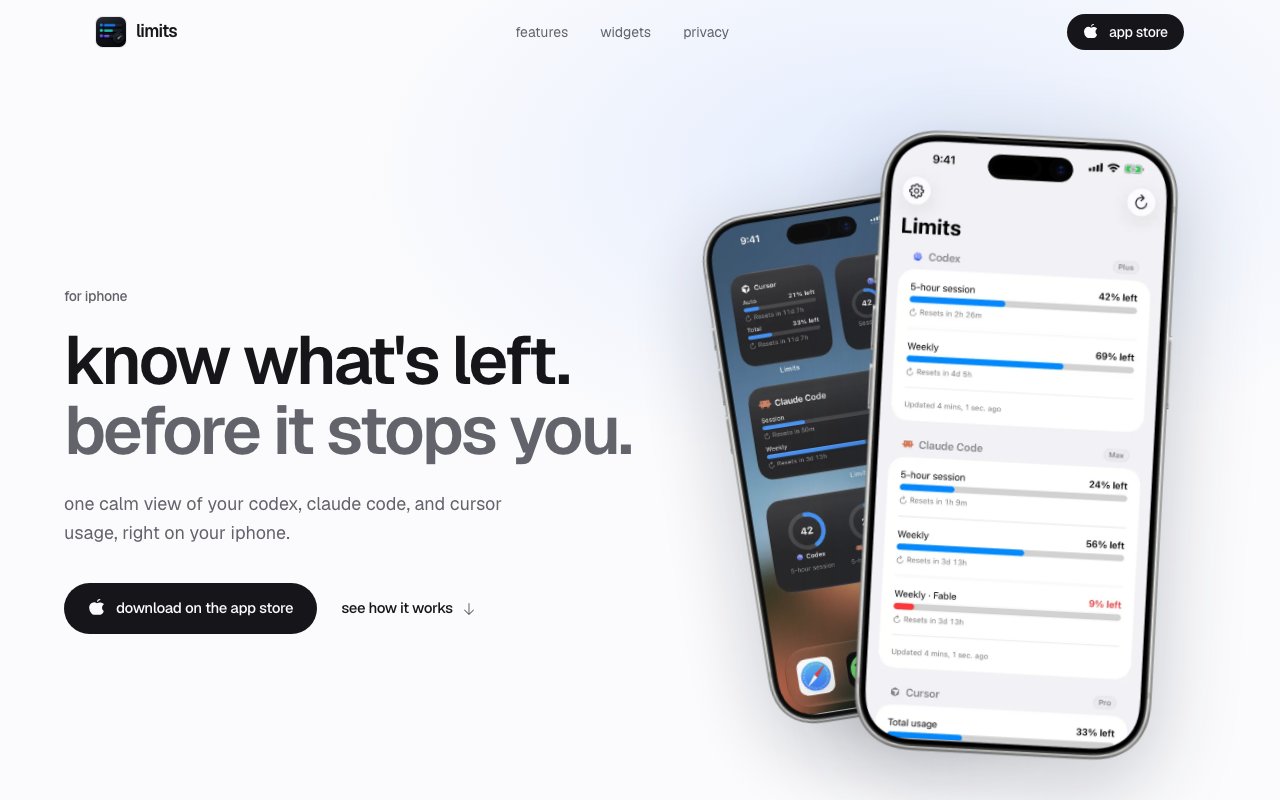
Limits is an iPhone app built for developers who use multiple AI coding assistants throughout the day and want to know exactly where their usage stands at any moment. It tracks session and weekly quotas across services like Codex, Claude Code, and Cursor, giving you real time visibility into how much capacity remains before a rate limit kicks in and slows you down. The app surfaces that information through home screen and lock screen widgets, so you can check your remaining allowance at a glance without unlocking your phone or opening an app. For anyone who has been surprised by a sudden block mid session because they blew through their allowance without realizing it, this solves the guessing game around how much you've used and how much you have left to work with before the next reset.
The problem Limits addresses is one of attention and workflow continuity. Each AI coding tool has its own usage policy, reset schedule, and quota structure, and none of them make that information particularly easy to access at a glance. Codex works differently from Claude Code, which works differently from Cursor. Keeping track of all that manually means either constantly checking each service's dashboard in a browser tab or just hoping you don't hit a wall at an inconvenient moment. Limits consolidates that information into a single view. You get a unified dashboard that shows your standing across every connected service, updated automatically through background refresh. The widgets come in ring and bar styles, so you can choose a layout that fits your home screen aesthetic and gives you the information density you prefer without cluttering your screen.
Authentication is handled carefully, with an architecture designed around privacy. The app doesn't collect your credentials directly or store them on its own servers. Instead, it routes you through each provider's official login flow in Safari, where you authenticate on the provider's own page and grant read access. The resulting tokens are stored in the iOS Keychain, encrypted on device, and Limits only uses those tokens to hit read only usage endpoints. It cannot send messages, execute code, or modify your subscription. No data passes through the developer's servers at any point. There are no analytics SDKs, no ad tracking, and no user profiling bundled into the app. If privacy is a concern when connecting third party apps to your AI tool accounts, this architecture is designed to minimize exposure and keep everything local to your device.
The free tier covers the essentials and is genuinely usable without paying. You get widgets, multi provider tracking, and alerts when your limits reset. The Pro upgrade adds predictive warnings, which is where the app becomes more proactive about helping you manage your workflow. Instead of just telling you when a reset happened, Pro monitors your usage trajectory and warns you when you're on pace to exhaust your quota before the next reset window arrives. If you're deep in a coding session and want to know whether you can keep going at your current pace or should slow down to preserve capacity for later in the day, that forecast can save you from an unexpected interruption. Pro also surfaces expiring Codex reset credits with countdown timers, so you know when free rate limit resets are about to disappear and can use them before they expire.
The target audience is fairly specific and won't appeal to everyone. You need to be using AI coding tools frequently enough that rate limits actually affect your workflow in practice. If you touch Claude Code once a week, you probably don't need a dedicated tracker for it. But if you're bouncing between Cursor and Codex throughout the day and treating these tools as core infrastructure for how you write and review code, the visibility Limits provides starts to matter. It's especially useful during crunch periods when you're leaning hard on AI assistance and don't want to discover you've burned through your quota at the worst possible time, like right before a deadline or in the middle of debugging a production issue.
Limits is available on the App Store for free download. The developer, Pranav Karthik, provides support through email and appears to be actively expanding the app based on user requests. Grok and Antigravity are listed as coming soon on the product page, which suggests the provider list will grow as the AI coding tool landscape continues to shift and new services gain traction. The app does one thing well, it tracks your limits and keeps you informed, and it does it entirely on device without requiring trust in a third party server. For developers who value that combination of focused utility and privacy conscious design, it fills a gap that the AI tool providers themselves haven't addressed with their own native limit tracking features.
Key Features
- Home and lock screen widgets
- Multi provider usage tracking
- Smart reset notifications
- Predictive quota warnings in Pro
- Codex reset credit countdowns
- On device encrypted token storage
Pros & Cons
What we like
- All data stays on device with no server calls
- Widgets let you check limits without opening the app
- Tracks multiple AI coding tools in one place
- Pro tier adds predictive warnings before you hit limits
Room for improvement
- iOS only, no Android or desktop version
- Limited to a handful of supported providers for now
- Pro upgrade required for predictive features
- Depends on provider APIs that could change
Frequently Asked Questions
What is Limits?
Is Limits free?
Does Limits access my AI tool accounts?
Which AI tools does Limits support?
Best For
Featured in
Alternatives to Limits
View all
1Lookup
Real-time data verification API for phone, email, IP, and domain validation to fight fraud

Kevin Gabeci
Solo developer building web apps, cozy browser games, and AI creator toolkits.

Codedex
A gamified, story-driven platform that teaches Python, web dev, and more like an RPG quest
Hack2hire
Practice real SDE interview questions from top tech companies with expert worked solutions
Reviews (10)
Powerful once it clicks
Tried Limits on a side project first, then rolled it out everywhere. Got real value out of multi provider usage tracking. It has shaved real time off my week. Mostly using it for pacing ai assistant usage across a work week. The catch is limited to a handful of supported providers for now. Worth it for what I get out of it.
Worth a look
Limits has quietly become part of my daily flow. The on device encrypted token storage is more useful than I expected. It has shaved real time off my week. Found it works best for avoiding mid session rate limit surprises. It earns its place in my stack.
Decent with some rough edges
Have been running Limits for a while, here is where I land. Where it really wins is home and lock screen widgets. It just works, day after day, without surprises. Mostly using it for tracking expiring codex reset credits. It would be a five if not for pro upgrade required for predictive features.
Pulled its weight from week one
Hadn't planned on switching, but Limits was hard to ignore. Where it really wins is pro tier adds predictive warnings before you hit limits. Mostly using it for pacing ai assistant usage across a work week. It earns its place in my stack.
Powerful once it clicks
Limits has quietly become part of my daily flow. What stands out is how it handles predictive quota warnings in pro. It slotted into my routine without much fuss. Found it works best for tracking expiring codex reset credits. It would be a five if not for depends on provider apis that could change.
Two months in, no regrets
Hadn't planned on switching, but Limits was hard to ignore. It has shaved real time off my week. It earns its place in my stack.
Quietly excellent
Have been running Limits for a while, here is where I land. Got real value out of codex reset credit countdowns. The defaults are sensible, so I was not fighting settings on day one. Recommending it to people in a similar spot.
Finally something that fits
Have been running Limits for a while, here is where I land. What stands out is how little babysitting it needs. Mostly using it for tracking expiring codex reset credits. Glad I made the switch.
It just works
Hadn't planned on switching, but Limits was hard to ignore. The thing I keep coming back to is how reliable it is. It does what it says, which is rarer than it should be. Mostly using it for pacing ai assistant usage across a work week. No regrets so far.
Pulled its weight from week one
Picked Limits for the price, stayed for the quality. Got real value out of codex reset credit countdowns. The interface stays out of my way, which I appreciate. Found it works best for monitoring daily cursor and claude code usage. No regrets so far.
Badge builder
Add Limits to your website
Choose a badge style and size, preview it here, then copy the generated HTML. Badge images are self-contained SVGs and do not require an external script.

<a href="https://toolindex.net/tools/getlimits?ref=badge" target="_blank" rel="noopener">
  <img src="https://toolindex.net/badge/getlimits/medium.svg" alt="Limits - Listed on Tool Index" width="180" height="50" />
</a>How to use the badge
- 1. Pick the style, size, and theme that fit your layout.
- 2. Copy the generated HTML from the code block.
- 3. Paste it into your footer, homepage, or press page.
Standard badge available
The standard listing badge is available now. Score and circle badges are limited to tools currently ranked in the top 10 of a category.
Badge clicks return visitors to this profile with a referral tag so the source remains identifiable.
Related Tools
Kevin Gabeci
Solo developer building web apps, cozy browser games, and AI creator toolkits.

Coolify
Self-hostable, open source alternative to Heroku and Netlify

Warp
The modern terminal reimagined with AI and collaboration

Bolt.new
Prompt-to-deployed full-stack app inside the browser
Work on Limits? Request listing access or correction