
MiniMax H3 Max
Generate short AI videos from written directions or still images with practical shot controls
Gallery
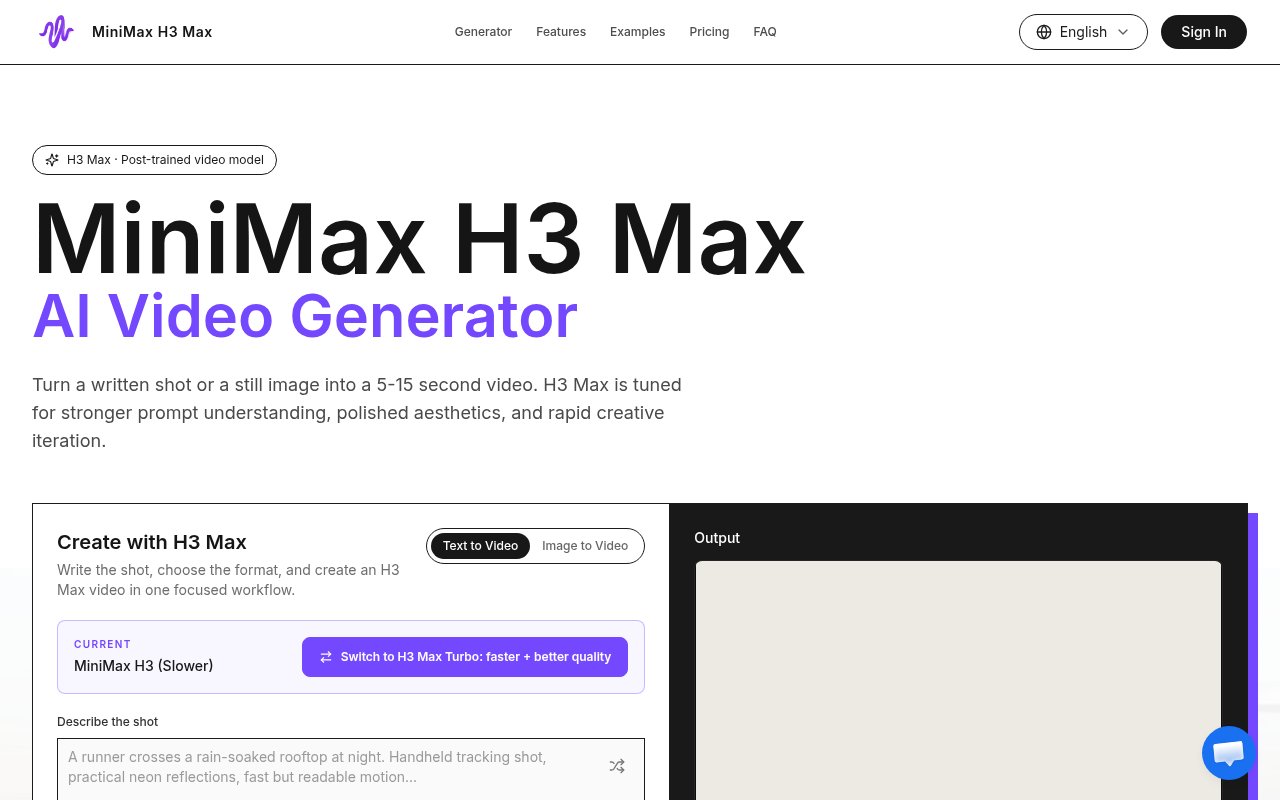
About MiniMax H3 Max
MiniMax H3 Max is an independent AI video creation platform for turning a written shot description or a still image into a short rendered clip. It supports text-to-video and image-to-video work in one focused workspace, with current generation lengths from 5 to 15 seconds. The product is aimed at creators who want to make a motion study, advertising concept, social clip, or storyboard beat visible before committing to a larger production. It is independently operated and explicitly says it isn't affiliated with a third-party model provider.
The workflow begins with a shot brief. Users describe the subject, action, camera, light, timing, and intended feeling, then choose generation settings before rendering. Available controls include the mode, duration, resolution, aspect ratio, prompt expansion, and seed. A source image can anchor the opening composition, and an optional end frame can guide where the movement should finish. The site encourages changing one control at a time and rendering another take, which gives creative teams a more deliberate iteration loop than repeatedly adding unrelated style words to a prompt.
Its direction tools cover several practical parts of short video generation. Camera motion can be expressed as a tracking movement, slow push, locked frame, or change of pace. Art direction can specify palette, material, texture, and visual language. Character-focused prompts are intended to keep a recognizable subject central while the setting, lighting, or camera distance changes. Transformation controls help move an image from one visual state to another with a defined rhythm and destination. These are creative guidance mechanisms rather than timeline editing tools, so the output is best treated as a generated shot to review, download, share, or use as the basis for another variation.
The clearest use cases are early creative exploration and compact finished assets. A marketing team can test a product close-up or opening hook before a campaign is locked. Social teams can create vertical, square, or wide clips for posts and launches. Directors and designers can animate a storyboard frame for a treatment, pitch, or early edit discussion. Character and motion design studies can test performance, transitions, kinetic compositions, and visual continuity while the concept is still flexible. Starting from a still is particularly useful when a product, person, or composition already looks right and only needs movement.
Current output options are deliberately limited. The site lists 480P and 768P as the resolutions available now, with 1080P, 2K, and 4K identified only as future options. That distinction matters for buyers who need delivery-ready high resolution rather than concept material or online clips. Generation duration is also capped at 15 seconds, so longer sequences require separate shots and outside editing. The platform does include generation history, previews, and downloads, which helps organize iterative work, compare recent takes over time, and preserve useful results, but the public pages don't describe a full editor, audio workflow, collaboration system, or enterprise administration features.
H3 Max uses prepaid credits rather than a recurring subscription on the published pricing section. The Plus pack costs $19 for 1,000 credits, Standard costs $49 for 2,500 credits, and Pro costs $99 for 6,000 credits. Each is described as a one-time purchase. The site says packs provide estimated ranges for 5-second videos, though exact consumption depends on the selected generation settings and isn't exposed in the homepage text reviewed for this listing. There is no published free tier, so a prospective user should expect to buy credits when moving from exploration into actual rendering.
The platform makes the most sense for solo creators, marketers, and small creative teams that value fast visual iteration over a deep post-production environment. Its strengths are the combination of prompt direction, optional reference frames, adjustable formats, and an uncomplicated credit model. Its constraints are equally clear. Clips are short, present resolutions top out at 768P, and the product is an independent interface rather than an official service from the underlying model provider. For concept testing, social experiments, and previsualization, that focused scope can be useful. Buyers producing final high-resolution campaign footage will need to judge whether the current output ceiling fits their delivery standard.
Key Features
- Text-to-video clip generation
- Image-to-video still image animation
- First and end frames
- Camera motion direction
- Seed and aspect controls
- Generation history and downloads
Pros & Cons
What we like
- Supports prompts and still image inputs
- Shot controls encourage focused iteration
- One-time credit packs avoid subscriptions
- Multiple aspect ratios suit social formats
Room for improvement
- Current clips stop at 15 seconds
- Current resolution tops out at 768P
- No published free tier
- Independent platform with no provider affiliation
Frequently Asked Questions
What is MiniMax H3 Max?
What video lengths and resolutions are available?
Can it control the beginning and end of a shot?
How much does H3 Max cost?
Best For
Featured in
Alternatives to MiniMax H3 Max
View allKling AI
Kuaishou's video model that punches above its weight on motion
Luma Dream Machine
Fast, photoreal video generation from the team behind Genie 3D
HeyGen
Generate talking-head avatar videos in dozens of languages

Runway
Video generation, editing, and effects in one creative suite
Our take
Tool Index Editorial · Oct 2026· 3.5/5
MiniMax H3 Max is an independent video workspace for turning text or a still image into a 5 to 15 second generated clip. It supports prompt expansion, seed and aspect controls, camera direction, source and end frames, recent render history, and 480p or 768p output. We found the shot oriented workflow better suited to concept studies and social experiments than to open ended prompt guessing.
The current home page offers two free five second videos per day. One time credit packs start at $19 for 1,000 credits and expire after 12 months, with usage rising for longer or higher resolution renders. The 768p ceiling and 15 second limit rule out many finished production uses, and the platform is explicit that it is not affiliated with the underlying model provider. It is a reasonable previsualization tool, but buyers should test consistency and exact credit consumption before funding a large batch.
Editorial opinion from the Tool Index team, written from the public product pages. Not a user review.
Reviews (0)
Badge builder
Add MiniMax H3 Max to your website
Choose a badge style and size, preview it here, then copy the generated HTML. Badge images are self-contained SVGs and do not require an external script.

<a href="https://toolindex.net/tools/h3max?ref=badge" target="_blank" rel="noopener">
  <img src="https://toolindex.net/badge/h3max/medium.svg" alt="MiniMax H3 Max - Listed on Tool Index" width="180" height="50" />
</a>How to use the badge
- 1. Pick the style, size, and theme that fit your layout.
- 2. Copy the generated HTML from the code block.
- 3. Paste it into your footer, homepage, or press page.
Standard badge available
The standard listing badge is available now. Score and circle badges are limited to tools currently ranked in the top 10 of a category.
Badge clicks return visitors to this profile with a referral tag so the source remains identifiable.
Related Tools
Pika
Playful AI video generator known for fun effects and short clips

Vidu
AI video generator built around reference-to-video, keep characters, props and styles consistent across every clip
Luma Dream Machine
Fast, photoreal video generation from the team behind Genie 3D
Seedance
ByteDance's benchmark-leading AI video model that delivers cinematic, audio-synced clips at a fraction of rival pricing
Work on MiniMax H3 Max? Request listing access or correction