
Hailuo AI
MiniMax's AI video generator that turns text prompts and still images into cinematic 1080p clips
Gallery
About Hailuo AI
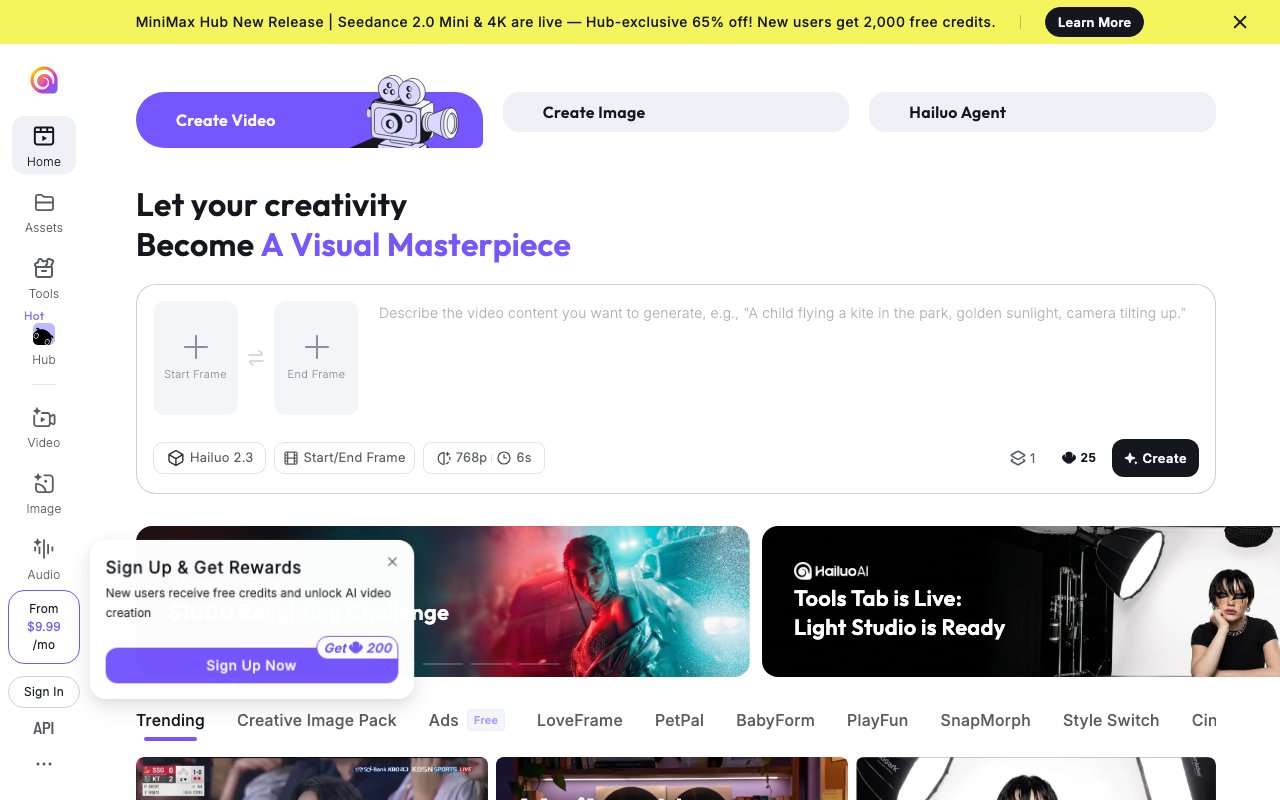
Hailuo AI is a video generation platform built by MiniMax, a Chinese AI company backed by over $850 million in funding from Tencent, Alibaba, and miHoYo. The tool produces short video clips from text prompts or still images, typically running six to ten seconds in length. It competes directly with platforms like Runway and Sora but positions itself as significantly more affordable, costing roughly four times less per video than Runway and ten times less than Sora. The core workflow is straightforward. You either type a description of what you want to see, or you upload a static image you want animated. Hailuo handles the rest, generating a complete video clip in thirty to ninety seconds depending on server load and the complexity of your request. This speed advantage matters for iterative creative work where you need to test multiple concepts quickly rather than waiting extended periods for each render to complete.
What sets Hailuo apart from most competitors is its character animation quality. The platform consistently ranks among the best for animating human figures with natural body movement and convincing facial expressions. Version 2.3, released in February 2026, expanded these capabilities with improved micro-expressions, more fluid body mechanics, and broader style support covering anime, illustration, and game cinematics. The physics simulation is another technical strength that distinguishes the platform from alternatives. On the WorldModelBench benchmark, Hailuo ranked first for physics simulation, meaning objects in its videos interact with gravity, momentum, and spatial relationships more realistically than what you get from competing tools. This matters if you need footage where things actually look like they belong in the same physical space rather than floating unnaturally or moving through each other. The combination of strong character animation and physics handling makes Hailuo particularly effective for scenes involving people interacting with objects or environments.
The platform works well for content creators, marketers, and indie developers who need short video clips without the budget or timeline for traditional production. Social media managers use it for attention-grabbing promotional content that would be expensive to produce with live action or traditional animation. Game developers use it for concept visualization and early prototyping, testing how characters and environments might look in motion before committing to full production pipelines. YouTubers and TikTokers use it to generate B-roll or visual elements that would be costly to produce otherwise. The speed factor is significant here. Thirty to ninety seconds per generation means you can iterate quickly, testing different prompts and approaches without waiting hours for renders. This rapid feedback loop changes how you approach creative work, making experimentation practical rather than prohibitively time-consuming.
Pricing follows a tiered credit system designed to scale with usage volume. The free plan gives you a daily allocation of credits with slower queue times, mandatory watermarks on all outputs, and no commercial use rights. This tier works for testing the platform and understanding its capabilities but not for any professional or commercial application. The Standard plan at $7.99 per month works for casual creators making a handful of videos per week, providing faster generation times and watermark-free exports. Pro at $24.99 per month unlocks 4K resolution and sixty-second video generation for creators who need longer or higher-quality output than the standard tiers provide. Master at $63.99 per month increases credit allocations substantially for higher volume work, targeting creators who produce content daily rather than weekly. The Max plan at $199.99 per month removes practical credit constraints for studios and heavy users, offering unlimited access to the core Hailuo 01 and 02 models plus twenty thousand monthly credits for premium features.
Credit costs vary based on resolution and output settings. Base videos at 512p resolution and six seconds length cost twelve credits, representing the most economical option for quick tests and drafts. Premium renders at 1080p or with cinematic quality settings run fifty to eighty credits due to resolution multipliers that reflect the increased computational cost. Understanding this credit structure helps you budget effectively across different project types. One thing to watch is that pricing has shifted without clear communication from MiniMax. The Standard plan has appeared at $9.99, $12.99, and $14.99 across different periods in 2025 and 2026, and third-party comparison sites frequently show outdated numbers that no longer match current rates. Always check the official pricing page before committing to a plan rather than relying on external reviews. The platform runs entirely through its web interface with no downloadable software required. You upload source materials, configure generation settings, and download finished outputs directly from the browser. For teams or businesses needing programmatic API access for integration into production pipelines, MiniMax offers enterprise agreements separately from the consumer subscription tiers.
Key Features
- Text-to-video generation from written prompts
- Image-to-video that animates a single still
- Up to 1080p output on the Hailuo 02 and 2.3 models
- Director-style camera controls via bracketed keywords
- First and last frame keyframe control
- Built-in AI image generator alongside the video maker
Pros & Cons
What we like
- Fast generation, often 30 to 90 seconds per clip
- Strong realistic physics and motion handling
- Free tier lets you test before paying
- Paid plans remove the watermark and grant commercial rights
Room for improvement
- Clips are short, capped around 6 to 10 seconds
- Free outputs are watermarked and limited to lower resolution
- 1080p costs far more credits than lower settings
- Failed or filtered generations can still burn credits
Frequently Asked Questions
What is Hailuo AI?
Is Hailuo AI free?
Who is Hailuo AI for?
How long are Hailuo AI videos?
Best For
Featured in
Alternatives to Hailuo AI
Kling AI
Kuaishou's video model that punches above its weight on motion
Seedance
ByteDance's benchmark-leading AI video model that delivers cinematic, audio-synced clips at a fraction of rival pricing

Vidu
AI video generator built around reference-to-video, keep characters, props and styles consistent across every clip

Runway
Video generation, editing, and effects in one creative suite
Reviews (7)
It just works
Tried Hailuo AI on a side project first, then rolled it out everywhere. Their take on built-in ai image generator alongside the video maker is genuinely good. Mostly using it for b-roll and background footage for editors. Recommending it to people in a similar spot.
The kind of tool you forget you are paying for
Hadn't planned on switching, but Hailuo AI was hard to ignore. Real selling point for me was paid plans remove the watermark and grant commercial rights. It has been a fit for short cinematic clips for social media. Would sign up again without thinking twice.
Finally something that fits
Hailuo AI solves a real problem for me without making a fuss about it. Support actually answered when I had a question, which surprised me. The output quality holds up better than I expected. It fits well for short cinematic clips for social media. It earns its place in my stack.
Good, with a few caveats
Started using Hailuo AI casually, now it is pinned in my dock. What stands out is how it handles free tier lets you test before paying. My only gripe is clips are short, capped around 6 to 10 seconds.
Onboarded the team in a day
Hadn't planned on switching, but Hailuo AI was hard to ignore. It slotted into my routine without much fuss. It just works, day after day, without surprises. Mostly using it for b-roll and background footage for editors.
Onboarded the team in a day
Hailuo AI solves a real problem for me without making a fuss about it. Real selling point for me was strong realistic physics and motion handling. It has been a fit for storyboarding and previsualization for video projects. Recommending it to people in a similar spot.
Genuinely impressed
Have been running Hailuo AI for a while, here is where I land. The director-style camera controls via bracketed keywords is more useful than I expected. The output quality holds up better than I expected. Would sign up again without thinking twice.
Badge builder
Add Hailuo AI to your website
Choose a badge style and size, preview it here, then copy the generated HTML. Badge images are self-contained SVGs and do not require an external script.

<a href="https://toolindex.net/tools/hailuo-ai?ref=badge" target="_blank" rel="noopener">
  <img src="https://toolindex.net/badge/hailuo-ai/medium.svg" alt="Hailuo AI - Listed on Tool Index" width="180" height="50" />
</a>How to use the badge
- 1. Pick the style, size, and theme that fit your layout.
- 2. Copy the generated HTML from the code block.
- 3. Paste it into your footer, homepage, or press page.
Score badge available
Hailuo AI qualifies for the score and circle badges based on its current top-10 positionin AI Video Generators.
Badge clicks return visitors to this profile with a referral tag so the source remains identifiable.
Related Tools
Pika
Playful AI video generator known for fun effects and short clips
Vidu
AI video generator built around reference-to-video, keep characters, props and styles consistent across every clip
Luma Dream Machine
Fast, photoreal video generation from the team behind Genie 3D
Seedance
ByteDance's benchmark-leading AI video model that delivers cinematic, audio-synced clips at a fraction of rival pricing
Work on Hailuo AI? Request listing access or correction