
Instabooks
Query QuickBooks Online data through a read-only PostgreSQL connection
Gallery
About Instabooks
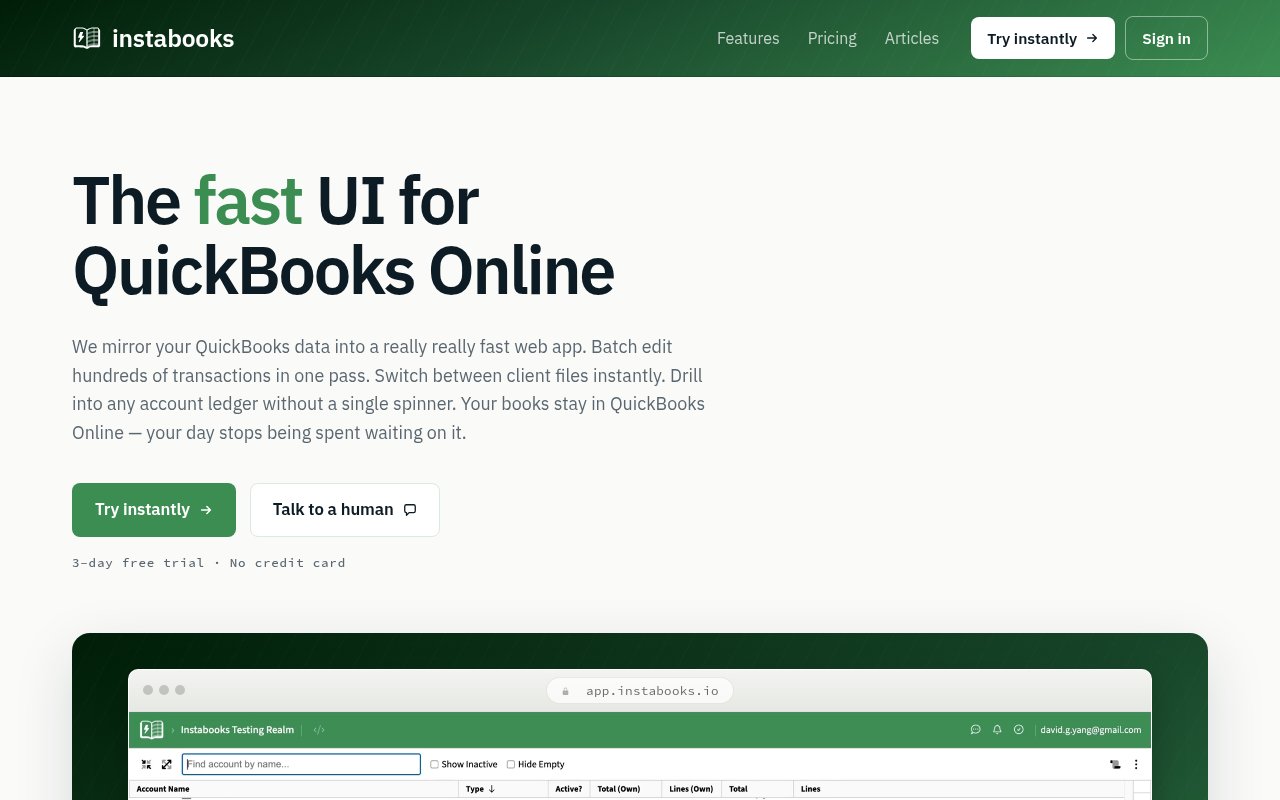
Instabooks is a faster working interface for QuickBooks Online, with direct read-only PostgreSQL access for people who need to analyze the books outside the usual accounting screens. It turns a connected company's transactions, transaction lines, chart of accounts, classes, departments, customers, and vendors into SQL tables that stay synchronized with QuickBooks Online. That gives accountants, bookkeepers, analysts, and developers a familiar way to explore ledger-backed data without exporting a succession of CSV files or building a custom QuickBooks API integration. QuickBooks remains the source of truth, while Instabooks provides a responsive interface and a query layer around it.
The database connection uses the PostgreSQL wire protocol, so it works with ordinary clients that already know how to speak Postgres. A user generates a company-specific database password in Instabooks, then connects with the supplied host, port, database identifier, email address, and password. That opens the data in tools such as psql, Postico, DBeaver, TablePlus, pgAdmin, Excel through Power Query, or scripts and notebooks written in languages with a Postgres driver. TLS is required, and clients that ask for an unencrypted connection are refused. There isn't an extra proprietary connector to install beyond the driver's normal setup.
Instabooks presents a focused analytical subset of PostgreSQL rather than claiming to be a full database server. It supports the operations that matter for reporting work, including joins, filters, grouping, aggregates, and date bucketing. Its double-entry schema is designed to make the QuickBooks Online data model more consistent to query. A monthly revenue analysis, for example, can join transaction lines to income accounts and group their amounts by month. The published table reference documents columns, supported SQL, and known limitations, and unsupported syntax returns a SQL error. The connection doesn't support writes or schema changes, so an experimental query can't change the books.
The SQL access is especially useful when a finance team wants repeatable analysis in Excel or a notebook, when an operator needs a custom report that the QuickBooks interface doesn't expose cleanly, or when a developer is grounding an internal application or agent in accounting records. The broader Instabooks interface is aimed at hands-on accounting work. It includes a filterable general ledger, quick switching between client companies, batch editing for transactions, chart-of-accounts management, CSV export, and links back to each transaction's native QuickBooks page. Edits made through that main interface sync both ways, while the database connection itself stays strictly read-only.
The two interfaces cover different jobs without forcing a data handoff. An accountant can use the web application to recategorize large transaction selections, reorganize account relationships, or inspect a ledger, while an analyst can query the same synchronized records from a reporting client. The web ledger is designed to handle accounts with more than 100,000 lines without pagination, and any filtered view can be exported to CSV. People working in separate browsers see updates from each other and from QuickBooks Online. For a bookkeeping firm with many clients, quick company switching keeps those sets of books accessible from one working environment.
That separation is an important part of the product's shape. Instabooks mirrors QuickBooks data into a faster local projection and ingests updates in real time, but it doesn't position itself as a replacement ledger. Users sign in through Intuit OAuth, can revoke access from their Intuit account, and keep their canonical accounting records in QuickBooks Online. Database passwords are scoped to one company, checked against the user's access on each connection, shown only once when generated, and individually revocable. This is a practical fit for teams that want the flexibility of SQL but don't want every reporting client to have a route for changing financial data.
Access is paid after a three-day trial that doesn't require a credit card. The public Starter price is $15 per month for one QuickBooks company and one user, with unlimited transactions and batch edits in the main product. Firm pricing reduces the monthly rate per company as more client files are connected, while larger organizations can ask for multi-user access, training, priority support, and tailored integrations. Instabooks is therefore most compelling for people who already rely on QuickBooks Online and regularly lose time to slow navigation, repeated exports, or one-off reporting work. It isn't a general SQL service, and it won't help with accounting platforms outside that ecosystem.
Key Features
- Read-only PostgreSQL access
- QuickBooks Online data sync
- Double-entry SQL schema
- Company-scoped database passwords
- Standard Postgres client support
- Encrypted TLS connections
Pros & Cons
What we like
- Works with familiar PostgreSQL clients and drivers
- Read-only queries can't alter accounting records
- Keeps QuickBooks Online as the source of truth
- Supports repeatable reporting beyond manual exports
Room for improvement
- Only works with QuickBooks Online data
- Supports a focused subset of PostgreSQL
- Requires a paid plan after three days
- Each company needs its own database password
Frequently Asked Questions
What is Instabooks?
Can an SQL query change my QuickBooks data?
Which database clients work with Instabooks?
Is Instabooks free?
Best For
Featured in
Alternatives to Instabooks
View all


Our take
Tool Index Editorial · Sep 2026· 4.0/5
Instabooks is a faster working layer for QuickBooks Online, with batch editing, large ledger views, quick company switching, and read only PostgreSQL access for analysis. We found the database documentation particularly solid. It explains the supported SQL subset, TLS requirement, company scoped credentials, and use with standard Postgres clients, Excel, or notebooks. A three day trial needs no card, then one company and one user cost $15 a month.
This holds up for bookkeepers and finance teams that repeatedly export CSV files or wait on slow QuickBooks screens. Keeping QuickBooks as the canonical ledger while exposing safe analytical queries is a sensible boundary. It remains a narrow product, however. It supports only QuickBooks Online, not arbitrary accounting systems, and the database endpoint can't write or run every PostgreSQL feature. Firms also pay separately as they add client companies.
Editorial opinion from the Tool Index team, written from the public product pages. Not a user review.
Reviews (0)
Badge builder
Add Instabooks to your website
Choose a badge style and size, preview it here, then copy the generated HTML. Badge images are self-contained SVGs and do not require an external script.

<a href="https://toolindex.net/tools/instabooks?ref=badge" target="_blank" rel="noopener">
  <img src="https://toolindex.net/badge/instabooks/medium.svg" alt="Instabooks - Listed on Tool Index" width="180" height="50" />
</a>How to use the badge
- 1. Pick the style, size, and theme that fit your layout.
- 2. Copy the generated HTML from the code block.
- 3. Paste it into your footer, homepage, or press page.
Standard badge available
The standard listing badge is available now. Score and circle badges are limited to tools currently ranked in the top 10 of a category.
Badge clicks return visitors to this profile with a referral tag so the source remains identifiable.
Related Tools

Simple RMD
Calculate, aggregate, and manage your annual IRA required minimum distributions.
FreshBooks
Cloud accounting designed for service-based small businesses and freelancers
Deel
Global payroll, contractor, and EOR platform
Chargebee
Subscription billing and revenue management for B2B SaaS
Work on Instabooks? Request listing access or correction