Invovanta
AI-assisted invoicing with receipt scanning, payment tracking and a client portal for freelancers and teams
Gallery
About Invovanta
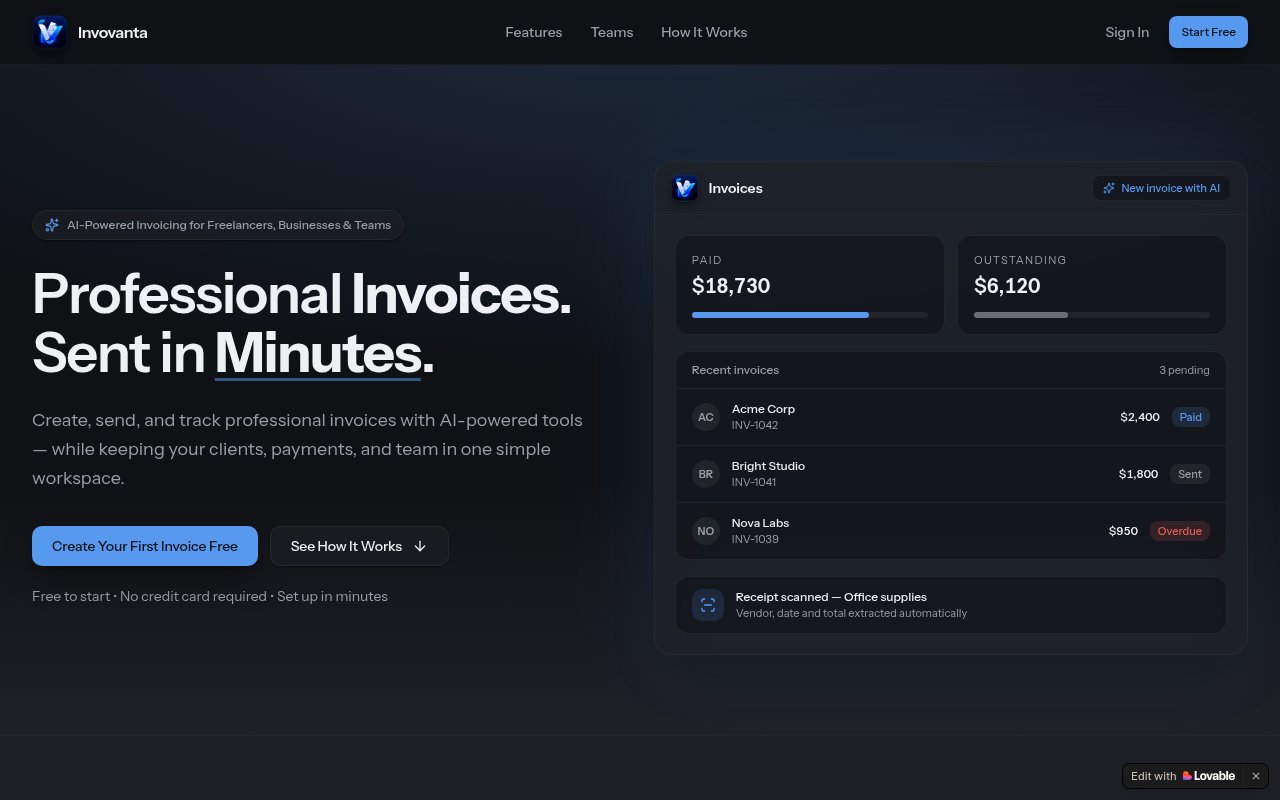
Invovanta is an invoicing and light business management app for freelancers and small teams, with AI doing the tedious data entry. It creates and sends professional invoices, tracks whether they've been paid, extracts line items and totals from receipts, and keeps clients, payments and team members in one workspace. The problem it goes after is the evening spent typing numbers from a pile of receipts into a spreadsheet, and the client who says the invoice never arrived. The site's own line is that you create, send and track invoices with AI tools while keeping clients, payments and your team in one simple workspace, and the product does about that, no more and no less.
The workflow has three steps. You add a client, create an invoice, then send it and track its status. The AI shows up in two places. It drafts invoice lines from plain notes, so a scribbled description of a week's work becomes itemised rows, and it scans receipts to pull the vendor, amount and date into your expenses. Invoices export as clean PDFs, estimates can be issued alongside them, and paid plans add recurring invoices for retainers, custom branding, and a client portal where customers see their invoices and payment status. Higher tiers add profit and loss and cash flow analytics, project management, a conversational AI assistant you can ask about your numbers, and team seats with role-based permissions.
The client portal changes the shape of the chasing. Instead of a PDF attached to an email that gets lost, a customer opens a page where their invoices and their payment status live. On the Business plan the analytics side reads across everything to show profit and loss and cash flow, and project management keeps the work an invoice refers to next to the invoice itself. The conversational assistant on the same tier is the plain-language layer over those numbers, the place to ask about your figures without building a report first.
It's for freelancers first, then small businesses and teams that have outgrown a template but don't want full accounting software. The free plan is sized for someone with a couple of clients, and the team features on the top tier are aimed at a small agency or studio where an assistant raises invoices and an owner approves them, which is where the permissions and collaboration features earn their keep.
What sets it apart from the crowd of invoice generators is that the AI is applied to input rather than decoration. Drafting lines from notes and reading receipts are the two jobs that actually eat time, and both are covered on every plan, with the monthly scan allowance rising by tier. Compared with the alternatives, the fit is the middle of the range. A template in a word processor is free and fine for one invoice a month, but it tracks nothing and remembers nothing. Full accounting software tracks everything and asks you to learn bookkeeping to do it. Invovanta sits between them, with invoicing, tracking, expenses and a light reporting layer, and it stops short of accounting proper, so a general ledger and tax filing still live elsewhere.
The limits are straightforward. The free tier is small, three invoices, three estimates and three receipt scans a month across two clients. Unlimited invoicing, the client portal and the analytics start on the Business plan, and team seats beyond one only arrive on Enterprise. The site doesn't publish a contact email or mention a trial period, the plans page shows monthly prices without stating a currency or whether annual billing exists, and the product lives at an unrelated-sounding domain, invoiceflowdesign.app, which is worth knowing when you go looking for it. It's a younger product with a shorter track record than the established invoicing names.
Access is freemium and no credit card is needed to start. Free is $0 with three invoices and three estimates a month, two clients, one seat and three AI receipt scans. Pro is $12 a month and adds custom branding, recurring invoices and 25 scans. Business is $29 a month for unlimited invoices and clients, the client portal, advanced analytics, project management, the conversational assistant and 100 scans. Enterprise is $79 a month with three team seats, role-based permissions, collaboration features, priority processing and 300 scans, with additional seats at $10 a month each. Getting started is the free account, a first client and a first invoice, which is the whole loop on the free plan, and the three monthly receipt scans are enough to see how the extraction handles your suppliers' formats before paying for more.
Key Features
- AI drafting of invoice lines from notes
- AI receipt and expense extraction
- Invoice and estimate PDFs with payment tracking
- Client portal for invoices and payment status
- Profit and loss and cash flow analytics
- Team seats with role-based permissions
Pros & Cons
What we like
- AI handles the data entry, not just the layout
- Free plan needs no credit card
- Client portal and recurring invoices for retainers
- Grows from solo invoicing to a small team
Room for improvement
- Free tier is capped at three invoices a month
- Unlimited invoicing starts at $29 a month
- Extra team seats only on the top tier
- No published contact email or trial details
Frequently Asked Questions
What is Invovanta?
Is Invovanta free?
Who is Invovanta for?
What does the AI actually do?
Best For
Featured in
Alternatives to Invovanta
View all

Our take
Tool Index Editorial · Oct 2026· 3.0/5
Invovanta covers the practical invoicing loop for freelancers and small teams, including clients, estimates, PDF invoices, payment status, expenses, receipt extraction, and role-based collaboration. We found the tier progression sensible. The free plan allows two clients and three invoices, estimates, and receipt scans per month, while $12 Pro adds branding and recurring invoices.
Business costs $29 per month for unlimited volume, reminders, a client portal, multi-currency support, and deeper reports. Enterprise is $79 with three seats. The free PDFs carry a watermark, and this remains lighter than full accounting software, so ledgers, tax filing, and professional reconciliation still sit elsewhere. The public plans also omit a currency label and trial details, which makes the young product feel less settled than established rivals.
Editorial opinion from the Tool Index team, written from the public product pages. Not a user review.
Reviews (0)
Badge builder
Add Invovanta to your website
Choose a badge style and size, preview it here, then copy the generated HTML. Badge images are self-contained SVGs and do not require an external script.

<a href="https://toolindex.net/tools/invovanta?ref=badge" target="_blank" rel="noopener">
  <img src="https://toolindex.net/badge/invovanta/medium.svg" alt="Invovanta - Listed on Tool Index" width="180" height="50" />
</a>How to use the badge
- 1. Pick the style, size, and theme that fit your layout.
- 2. Copy the generated HTML from the code block.
- 3. Paste it into your footer, homepage, or press page.
Standard badge available
The standard listing badge is available now. Score and circle badges are limited to tools currently ranked in the top 10 of a category.
Badge clicks return visitors to this profile with a referral tag so the source remains identifiable.
Related Tools

Simple RMD
Calculate, aggregate, and manage your annual IRA required minimum distributions.
FreshBooks
Cloud accounting designed for service-based small businesses and freelancers
Deel
Global payroll, contractor, and EOR platform
Chargebee
Subscription billing and revenue management for B2B SaaS
Work on Invovanta? Request listing access or correction