
JP the Cat
A menu bar cat that tracks your Claude Code and Codex spend on macOS
Gallery
About JP the Cat
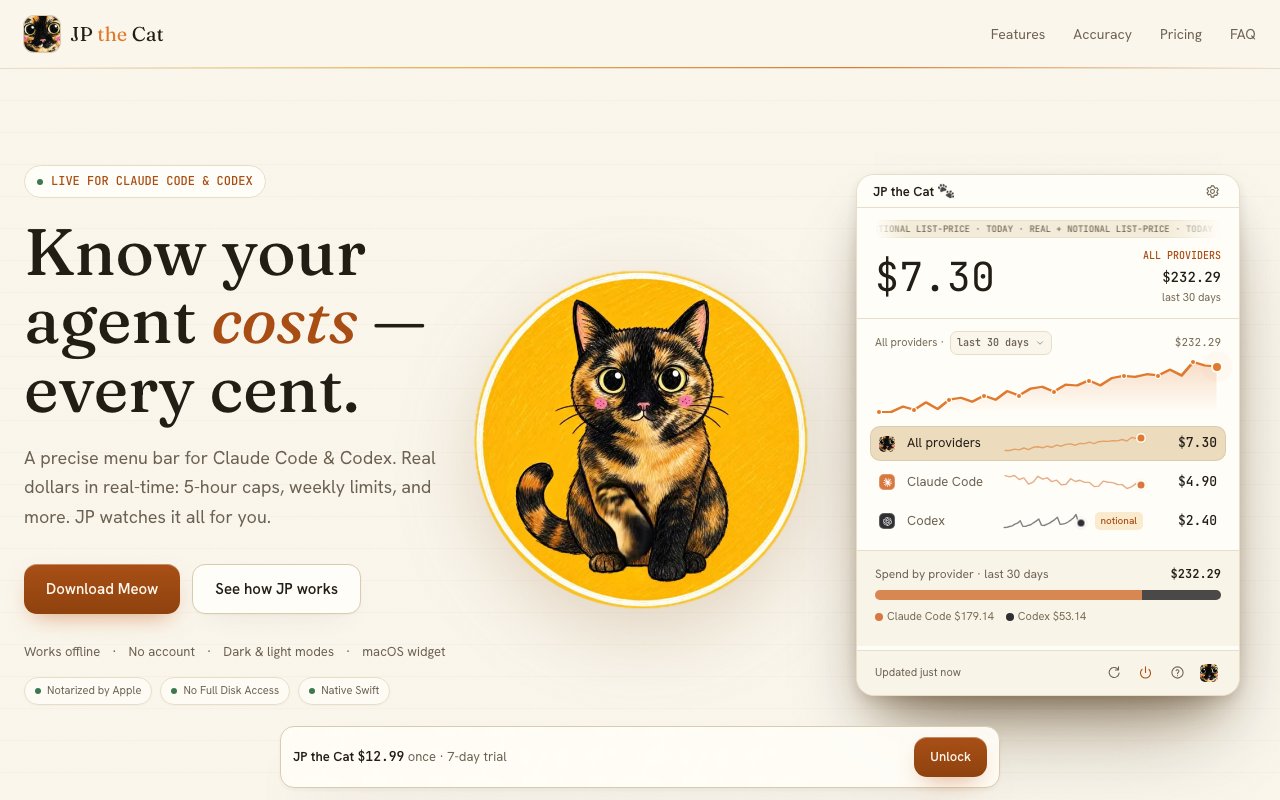
JP the Cat is a small macOS app that sits in your menu bar and keeps an eye on what your AI coding agents are costing you. If you run Claude Code or Codex all day, the spend and the usage limits are easy to lose track of right up until a bill or a rate cap catches you off guard. JP watches quietly in the background and shows today's total alongside how close you are to your limits, with a cat as the mascot doing the counting for you.
The clever part is that it needs no API keys and no account. Claude Code and Codex already write detailed usage logs to your Mac as you work, and JP simply reads them. From those logs it calculates real costs in actual dollars using the official per-model rates, and it does the accounting properly, handling cache splits and de-duplication so the number reflects what you're truly spending rather than an inflated or rounded-off guess. All of that processing happens locally on your machine, and the only thing that ever contacts a remote server is license validation, so your prompts and code never go anywhere.
The always-visible piece is a menu bar pill that shows today's total spend right next to your limit percentages, so a glance at the top of your screen tells you where you stand. It reads the official 5-hour and weekly usage percentages straight from Codex logs, and Claude limits are available through an opt-in Live Limits feature. When you cross 80 percent of a limit it fires a single native macOS notification, one clear nudge rather than a stream of interruptions, so you get the warning you need to slow down before you run into a wall mid-task.
Beyond the pill there's a fuller dashboard for when you want the whole picture. It breaks spending down per provider and charts your history over rolling 7, 14, 30, or 90-day windows, so you can see whether your costs are trending up or holding steady instead of only ever seeing today's figure. For anyone who likes to keep an eye on the numbers, detailed gauges lay out exactly how much of each limit you've used and what it has cost so far.
There's also a native macOS widget that comes in small, medium, and large sizes with both light and dark themes, so you can pin your burn rate to the desktop or the notification center and keep it in view without opening anything. It's the same underlying data as the pill and the dashboard, just presented wherever you find it most useful to glance at during a long working session.
The reason the numbers can be trusted comes down to how the costs are worked out. Rather than estimating loosely from token counts, JP applies the official per-model rates and accounts for the way prompt caching splits a request into cached and fresh portions, then de-duplicates so the same usage is never counted twice. The result is a figure that lines up with what you'll actually be billed, not a ballpark. Because everything is read from logs already sitting on disk, there's nothing to configure, no keys to paste, and no risk of your prompts being sent off to a third party just so you can watch a dollar figure tick up. The app stays out of the loop of your real work and only reports on it. For a solo developer that's peace of mind for the price of a coffee, and for a team it means everyone is looking at the same honest number instead of arguing over rough estimates.
It's for developers and teams who lean on Claude Code or Codex and want to avoid an ugly surprise at the end of the month. If you've ever finished a marathon agent session and genuinely wondered what it just cost, or wished for a heads-up before you burn through a weekly cap and lose access at the worst possible moment, that's precisely the low-level anxiety this app is built to remove. It doesn't change how you work, it just makes the cost of the work visible.
JP the Cat runs on macOS 14 Sonoma or newer on Apple Silicon Macs. Pricing stays simple and refreshingly old-fashioned. It's a one-time $12.99 for one Mac and $9.99 for each additional Mac, with no subscription anywhere in sight. There's a 7-day free trial with every feature unlocked and no card required, plus a free-forever tier that keeps the live menu bar pill showing today's total and your official limits even after the trial ends. The paid unlock is what adds the dashboard, the widget, the detailed gauges, and the alerts. The split is honest about what you're paying for, the always-on pill that shows today's spend and where your limits stand stays free for good, and the one-time purchase simply buys the deeper reporting on top of it. Support is reachable directly at support@jpthecat.com.
Key Features
- Menu bar spend and limit pill
- Reads local logs, no API keys
- Real dollar costs at official rates
- Official 5-hour and weekly limit tracking
- macOS widget in three sizes
- Single alert at 80 percent of a limit
Pros & Cons
What we like
- No API keys or accounts to set up
- Accurate costs including cache and dedup
- One-time price with no subscription
- Free-forever menu bar pill after the trial
Room for improvement
- macOS 14 and Apple Silicon only
- Covers Claude Code and Codex specifically
- Full dashboard needs the paid unlock
- Claude limits require an opt-in feature
Frequently Asked Questions
What is JP the Cat?
Is JP the Cat free?
Does JP the Cat need my API keys?
Who is JP the Cat for?
Best For
Featured in
Alternatives to JP the Cat

1Lookup
Real-time data verification API for phone, email, IP, and domain validation to fight fraud

Codedex
A gamified, story-driven platform that teaches Python, web dev, and more like an RPG quest
Hack2hire
Practice real SDE interview questions from top tech companies with expert worked solutions
Cloudflare Pages
Free Jamstack hosting on Cloudflares edge with unlimited bandwidth and tight integration with Workers.
Reviews (10)
Exactly what I needed
Started using JP the Cat casually, now it is pinned in my dock. Setup was painless and I was productive the same day. Performance has been steady even when I lean on it hard.
Finally something that fits
Started using JP the Cat casually, now it is pinned in my dock. Where it really wins is one-time price with no subscription. Support actually answered when I had a question, which surprised me. It fits well for reviewing 30-day cost trends per provider.
Decent with some rough edges
JP the Cat has quietly become part of my daily flow. Support actually answered when I had a question, which surprised me. The core workflow is smooth once you are set up. My only gripe is macos 14 and apple silicon only.
It just works
Picked JP the Cat for the price, stayed for the quality. Got real value out of no api keys or accounts to set up. Mostly using it for keeping burn rate visible on the desktop. No regrets so far.
Worth a look
Picked JP the Cat for the price, stayed for the quality. The defaults are sensible, so I was not fighting settings on day one. Would sign up again without thinking twice.
Solid but not perfect
Started using JP the Cat casually, now it is pinned in my dock. The accurate costs including cache and dedup is more useful than I expected. Setup was painless and I was productive the same day. It fits well for catching a weekly usage cap before you hit it. My only gripe is covers claude code and codex specifically. Glad I made the switch.
It just works
Started using JP the Cat casually, now it is pinned in my dock. Got real value out of real dollar costs at official rates. Mostly using it for keeping burn rate visible on the desktop. It earns its place in my stack.
Quietly excellent
Started using JP the Cat casually, now it is pinned in my dock. Where it really wins is single alert at 80 percent of a limit. The defaults are sensible, so I was not fighting settings on day one. Would sign up again without thinking twice.
It just works
Came to JP the Cat after getting frustrated with what I had before. The no api keys or accounts to set up is more useful than I expected. The defaults are sensible, so I was not fighting settings on day one. Would sign up again without thinking twice.
Good, with a few caveats
JP the Cat solves a real problem for me without making a fuss about it. Where it really wins is no api keys or accounts to set up. My only gripe is full dashboard needs the paid unlock. Would sign up again without thinking twice.
Badge builder
Add JP the Cat to your website
Choose a badge style and size, preview it here, then copy the generated HTML. Badge images are self-contained SVGs and do not require an external script.

<a href="https://toolindex.net/tools/jpthecat?ref=badge" target="_blank" rel="noopener">
  <img src="https://toolindex.net/badge/jpthecat/medium.svg" alt="JP the Cat - Listed on Tool Index" width="180" height="50" />
</a>How to use the badge
- 1. Pick the style, size, and theme that fit your layout.
- 2. Copy the generated HTML from the code block.
- 3. Paste it into your footer, homepage, or press page.
Standard badge available
The standard listing badge is available now. Score and circle badges are limited to tools currently ranked in the top 10 of a category.
Badge clicks return visitors to this profile with a referral tag so the source remains identifiable.
Related Tools

Kevin Gabeci
Solo developer building web apps, cozy browser games, and AI creator toolkits.

Coolify
Self-hostable, open source alternative to Heroku and Netlify

Warp
The modern terminal reimagined with AI and collaboration

Bolt.new
Prompt-to-deployed full-stack app inside the browser
Work on JP the Cat? Request listing access or correction