
LearnPG
Interactive PostgreSQL course with a real database engine running in your browser
Gallery
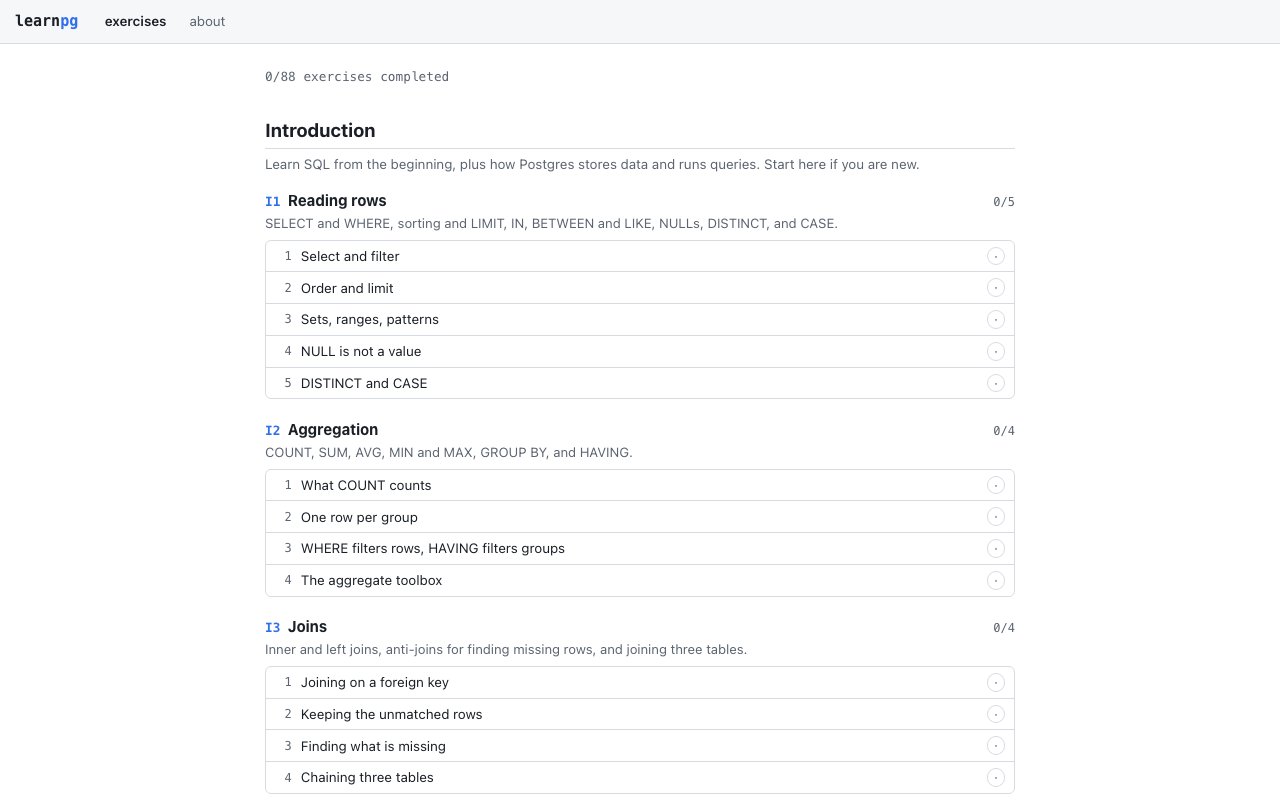
About LearnPG
LearnPG solves the most frustrating part of learning PostgreSQL: getting a working database environment set up before you can even write your first query. Most tutorials expect you to install Postgres locally, configure users and permissions, create databases, load sample data, and troubleshoot connection issues. That setup friction kills momentum for beginners and wastes time for experienced developers who just want to practice a specific technique. LearnPG eliminates all of it by running a real PostgreSQL engine directly in your browser. You open the site, pick an exercise, and start writing SQL immediately. No downloads, no configuration files, no Docker containers, no waiting for services to start.
The platform achieves this by compiling PostgreSQL to WebAssembly and executing it entirely client-side. When you submit a query, it runs against an actual Postgres engine with real syntax validation, real query planning, and real error messages. This isn't a simplified SQL simulator that only understands basic SELECT statements and chokes on anything advanced. It's the genuine database engine running in your browser tab. The skills you develop transfer directly to production environments because there's no abstraction layer or simplified dialect. If your query works in LearnPG, it'll work in your actual Postgres database. If you get an error, it's the same error message you'd see in pgAdmin or psql.
The exercise format focuses on practical skill building through immediate feedback. Each challenge presents a scenario, a pre-populated database schema, and a goal you need to accomplish with SQL. You write the query, submit it, and get instant grading. Correct solutions pass and you move on. Incorrect solutions show you exactly what went wrong. Sometimes that's a syntax error caught by the parser. Sometimes your query runs but returns the wrong results, and the grader shows you the difference between your output and the expected output. This tight feedback loop accelerates learning dramatically compared to traditional approaches where you might wait hours for a grader or spend twenty minutes second-guessing whether your approach was even on the right track.
The target audience spans from complete beginners to experienced database administrators brushing up on features they rarely use. Beginners benefit most from the zero-setup experience. They can focus entirely on understanding SELECT syntax, JOIN logic, and WHERE clauses without fighting their local environment. Mid-level developers moving from MySQL or SQLite to PostgreSQL can practice Postgres-specific syntax in a safe environment. PostgreSQL has powerful features that other databases lack or implement differently. Common table expressions, window functions, JSON operators, array handling, and recursive queries all work correctly because you're using the real engine. Senior engineers use LearnPG to prototype complex queries before running them against production data or to experiment with query optimization approaches.
What makes LearnPG stand out from alternatives is the combination of authentic engine execution with browser-based convenience. Other online SQL trainers fall into two categories. Some use toy databases with simplified SQL parsers that don't match real-world behavior. You learn patterns that don't transfer, encounter missing features, and develop false confidence about query correctness. Others connect to remote servers, introducing network latency, availability concerns, and questions about what happens to the data you submit. LearnPG sidesteps both problems. Everything runs locally in your browser session. Your queries and data never leave your machine. The engine responds instantly because there's no network round-trip. And edge cases work correctly because there's no simplified parser between you and the real Postgres codebase.
The platform requires JavaScript to function since the entire execution environment runs client-side, but that's the only requirement. Any modern browser across desktop and mobile devices works. The PostgreSQL engine loads once when you start, then subsequent exercises execute immediately against the in-memory database. You can work through challenges on a laptop, a tablet, or even a phone if you have a keyboard attached. Sessions are independent, so each exercise starts fresh with its own schema and sample data designed to test the concept being taught.
LearnPG is completely free with no strings attached. There's no subscription tier that unlocks advanced exercises. There's no credit card required to access content. There's no limit on how many attempts you can make or how long you can spend practicing. The model is simple: free PostgreSQL education powered by genuine PostgreSQL execution. For anyone who has bounced off database tutorials because the setup was too tedious, anyone who wants a quick way to test query ideas without spinning up a local instance, or anyone teaching SQL who needs students to practice without managing infrastructure, LearnPG removes every barrier between you and productive practice with real queries against a real database engine.
Key Features
- Real PostgreSQL engine via WebAssembly
- Instant query grading in the browser
- No installation or account required
- Interactive exercises with feedback
- Runs entirely client-side
- Full Postgres syntax support
Pros & Cons
What we like
- Uses real Postgres, not a simplified simulator
- Zero setup, works instantly in any modern browser
- Immediate feedback on every query
- Free with no visible paywalls
Room for improvement
- Limited visibility into course depth and topic coverage
- No certificates or formal completion tracking
- Requires JavaScript and a modern browser
- Focused on Postgres only, not general SQL
Frequently Asked Questions
What is LearnPG?
Is LearnPG free?
Do I need to install PostgreSQL to use it?
Who is LearnPG for?
Best For
Featured in
Alternatives to LearnPG

1Lookup
Real-time data verification API for phone, email, IP, and domain validation to fight fraud

Kevin Gabeci
Solo developer building web apps, cozy browser games, and AI creator toolkits.

Codedex
A gamified, story-driven platform that teaches Python, web dev, and more like an RPG quest
Hack2hire
Practice real SDE interview questions from top tech companies with expert worked solutions
Reviews (6)
Finally something that fits
Came to LearnPG after getting frustrated with what I had before. Where it really wins is free with no visible paywalls. Mostly using it for learning postgresql syntax without local setup. It earns its place in my stack.
It just works
Have been running LearnPG for a while, here is where I land. Setup was painless and I was productive the same day. Hard to imagine going back to my old setup.
Solid daily driver
Hadn't planned on switching, but LearnPG was hard to ignore. It handles the boring parts so I can focus on the work that matters. The defaults are sensible, so I was not fighting settings on day one.
Solid but not perfect
Came to LearnPG after getting frustrated with what I had before. The interface stays out of my way, which I appreciate. It just works, day after day, without surprises. My only gripe is limited visibility into course depth and topic coverage. Easy yes for anyone weighing the same trade offs.
Solid but not perfect
Came to LearnPG after getting frustrated with what I had before. The output quality holds up better than I expected. The catch is limited visibility into course depth and topic coverage.
Genuinely impressed
Started using LearnPG casually, now it is pinned in my dock. What stands out is how it handles instant query grading in the browser. The core workflow is smooth once you are set up. Would sign up again without thinking twice.
Badge builder
Add LearnPG to your website
Choose a badge style and size, preview it here, then copy the generated HTML. Badge images are self-contained SVGs and do not require an external script.

<a href="https://toolindex.net/tools/learnpg?ref=badge" target="_blank" rel="noopener">
  <img src="https://toolindex.net/badge/learnpg/medium.svg" alt="LearnPG - Listed on Tool Index" width="180" height="50" />
</a>How to use the badge
- 1. Pick the style, size, and theme that fit your layout.
- 2. Copy the generated HTML from the code block.
- 3. Paste it into your footer, homepage, or press page.
Standard badge available
The standard listing badge is available now. Score and circle badges are limited to tools currently ranked in the top 10 of a category.
Badge clicks return visitors to this profile with a referral tag so the source remains identifiable.
Related Tools
Kevin Gabeci
Solo developer building web apps, cozy browser games, and AI creator toolkits.

Coolify
Self-hostable, open source alternative to Heroku and Netlify

Warp
The modern terminal reimagined with AI and collaboration

Bolt.new
Prompt-to-deployed full-stack app inside the browser
Work on LearnPG? Request listing access or correction