
List55
Voice transcription app that converts audio recordings into formatted text lists
Gallery
About List55
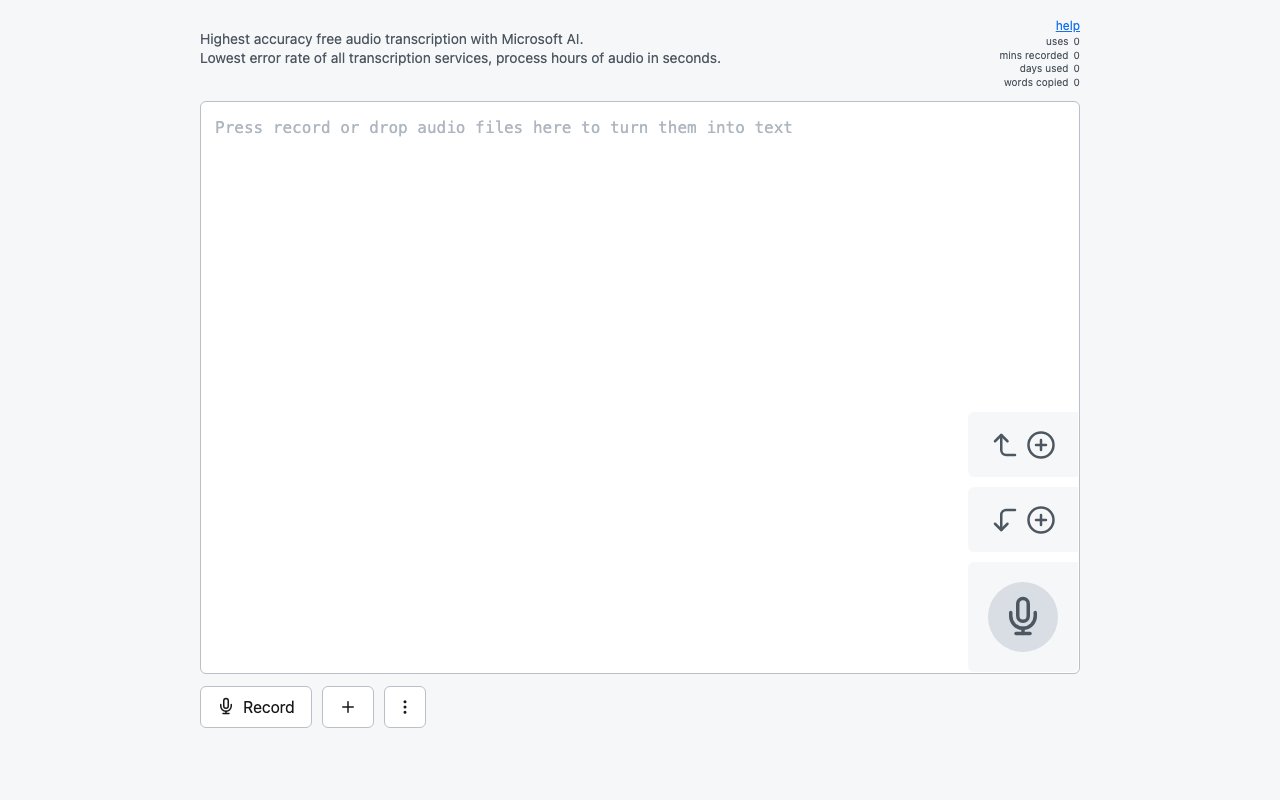
List55 converts audio and video recordings into transcribed text formatted as clean, copyable lists. Users can record voice input directly through their microphone or upload existing media files, and the platform transcribes the content into newline-separated items ready for pasting into notes, task managers, or other applications. The focus on list formatting distinguishes it from general transcription services that output prose paragraphs requiring manual restructuring for users who think and organize in bullet points rather than flowing sentences.
The transcription engine uses Microsoft's MAI API and processes audio with speed claims of fifteen seconds to transcribe one hour of audio with less than two percent error rate. Audio gets converted to MP3 format before cloud API submission, standardizing the input regardless of original file format. Supported upload formats include MP3, WAV, FLAC, M4A, AAC, OGG, WebM, MP4, and other common audio and video containers. The platform accepts media URL input for transcribing content hosted elsewhere without downloading first, which helps when working with files stored in cloud services or shared via link.
Language support covers fifteen languages including English, Spanish, Portuguese Brazilian, German, French, Japanese, Indonesian, Hindi, Korean, Italian, Turkish, Simplified Chinese, Arabic, Bengali, and Russian. This multilingual capability extends the platform beyond English-only use cases to international teams and multilingual content creators who work across different language contexts. The transcription accuracy claims apply across supported languages rather than just English input, though accuracy may vary by language and audio clarity.
Batch processing handles multiple files simultaneously for users with recording backlogs to work through. Folder scanning supports both one-level and recursive directory options, letting users point at entire collections rather than selecting files individually from file pickers. The paid tier processes up to ten files concurrently compared to single-file processing on the free tier, which significantly speeds up bulk transcription work. SHA-1 file hashing detects duplicates to avoid reprocessing the same content and wasting quota. Error tracking surfaces any files that fail transcription within a batch so users know what needs attention without manually checking each result.
Recording features include real-time visual feedback during capture, append options for adding content to the top or bottom of existing lists, duration display showing elapsed time, wake lock to maintain screen during recording sessions, and MP3 conversion with download capability for keeping local copies. The recording interface works on both desktop and mobile browsers with keyboard detection adjusting the layout appropriately for touch versus keyboard input. Dark mode support handles low-light usage scenarios and personal preference for darker interfaces.
Cross-platform sharing integrates with ChatGPT, Claude, Gemini, and other AI assistants through direct text sharing buttons in the interface. iOS Shortcuts support enables automation workflows on Apple devices for users who build personal productivity systems. The Web Share API integration allows sharing to any application that accepts text input on supported platforms and browsers. These export pathways make List55 useful as a voice-to-AI pipeline where spoken thoughts get transcribed and immediately sent to language models for processing without intermediate copy-paste steps or context switching between applications.
Privacy features include local storage for saved text and recent recordings accessible without constant server connectivity. No account is required for basic functionality, reducing friction for quick transcription tasks that don't warrant creating yet another login and password combination. The platform tracks usage statistics including session count, minutes recorded, days active, words copied, and remaining quota percentage for users who want visibility into their usage patterns and consumption over time.
The free tier provides limited minutes with restrictions on file length and single-file processing. A paid subscription at nine dollars monthly unlocks five hundred transcription minutes, support for much longer and larger audio files, and concurrent processing for up to ten files simultaneously. Additional quota is available for purchase when monthly allowances run short of what users need. Download limits apply at 100MB per file and 1GB daily per IP address to prevent abuse. Recording playback and download capabilities let users review their audio alongside the transcribed output, useful for verifying accuracy or extracting specific segments that need correction. For anyone who thinks in lists and speaks faster than they type, List55 offers a direct path from voice to structured text without manual formatting work.
Key Features
- Direct microphone recording with transcription
- Audio file upload in MP3, WAV, and FLAC
- Automatic newline formatted list output
- Batch folder processing for multiple files
- Support for over sixteen languages
- Copy, share, and export transcription results
Pros & Cons
What we like
- Outputs as a formatted list, not raw text
- Supports live recording and file uploads
- Batch processing for multiple files at once
- No installation, runs entirely in the browser
Room for improvement
- Free tier has limited minutes
- Best suited for lists, not long form transcription
- Depends on Microsoft speech recognition accuracy
- No dedicated mobile app
Frequently Asked Questions
What is List55?
Is List55 free?
What audio formats does List55 support?
Who is List55 for?
Best For
Featured in
Alternatives to List55
View all
Cartesia
Ultra-low-latency real-time text-to-speech powered by the Sonic model, built for live voice AI agents
ElevenLabs
The voice cloning and text-to-speech service everyone benchmarks against

Listnr
Ultra-realistic AI text-to-speech and voiceover platform with 1,000+ voices across 142+ languages

NexSub
Offline real time subtitle translation using local Whisper models for any video source
Our take
Tool Index Editorial · Sep 2026· 3.0/5
List55 is a small web app that turns microphone input into a clean text list and also exposes language selection and folder processing. We could verify the core recording interface and list focused purpose, which makes it a plausible fit for spoken shopping lists, quick task capture, or a backlog of voice notes.
The captured public page was too thin to verify pricing, language breadth, file limits, speed, or accuracy claims. It also showed no transcript editor or source linked review workflow. That keeps our rating cautious. The list first output is convenient when it matches the job, but anyone handling long interviews or text that must be exact should choose a fuller transcription workspace.
Editorial opinion from the Tool Index team, written from the public product pages. Not a user review.
Reviews (0)
Badge builder
Add List55 to your website
Choose a badge style and size, preview it here, then copy the generated HTML. Badge images are self-contained SVGs and do not require an external script.

<a href="https://toolindex.net/tools/list55?ref=badge" target="_blank" rel="noopener">
  <img src="https://toolindex.net/badge/list55/medium.svg" alt="List55 - Listed on Tool Index" width="180" height="50" />
</a>How to use the badge
- 1. Pick the style, size, and theme that fit your layout.
- 2. Copy the generated HTML from the code block.
- 3. Paste it into your footer, homepage, or press page.
Standard badge available
The standard listing badge is available now. Score and circle badges are limited to tools currently ranked in the top 10 of a category.
Badge clicks return visitors to this profile with a referral tag so the source remains identifiable.
Related Tools
NexSub
Offline real time subtitle translation using local Whisper models for any video source
Listnr
Ultra-realistic AI text-to-speech and voiceover platform with 1,000+ voices across 142+ languages

WellSaid Labs
Enterprise text-to-speech with studio-quality AI voice avatars trained on consenting voice actors
Cartesia
Ultra-low-latency real-time text-to-speech powered by the Sonic model, built for live voice AI agents
Work on List55? Request listing access or correction