
NexSub
Offline real time subtitle translation using local Whisper models for any video source
Gallery
About NexSub
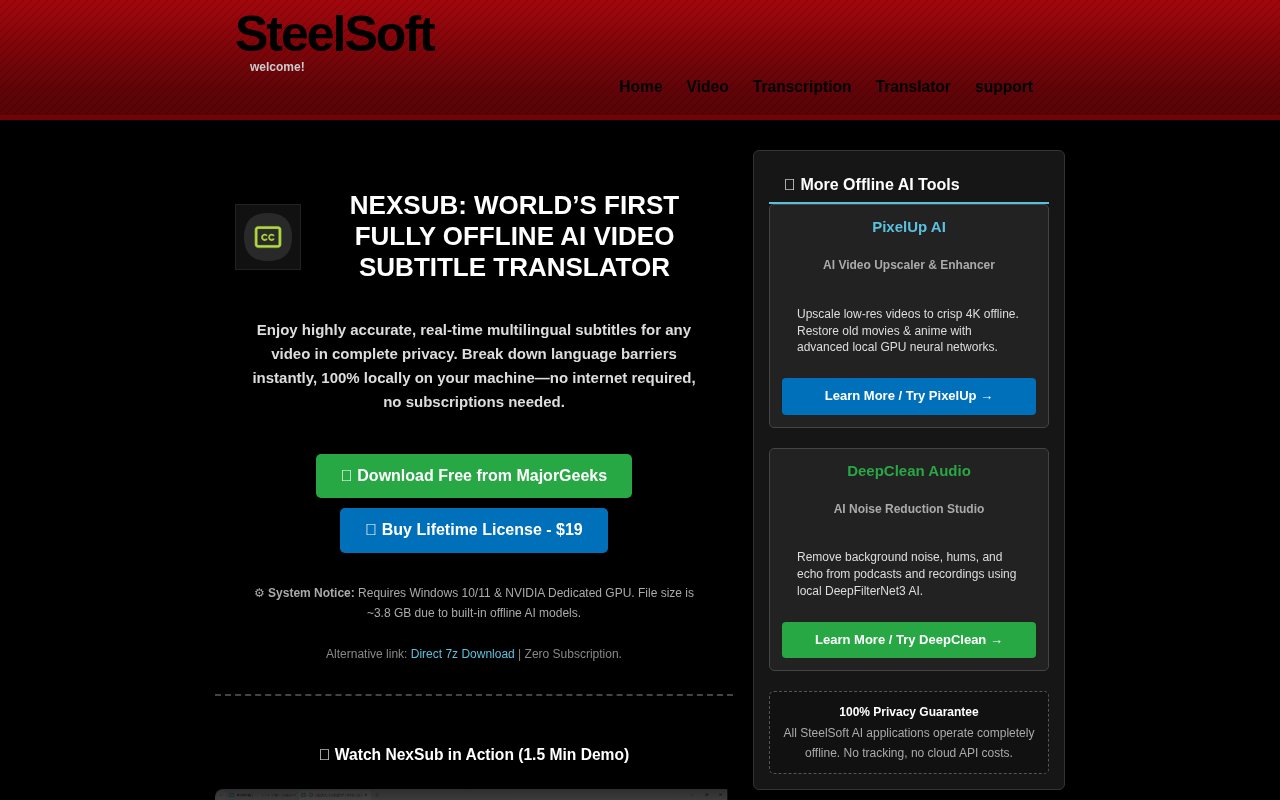
NexSub is an AI powered video subtitle translator that runs entirely offline on your computer. It generates real time multilingual subtitles for any video content without requiring internet connectivity or sending your data to cloud services. Every second of video and every byte of audio stays strictly on your machine, which makes it suitable for confidential corporate content, sensitive materials, medical or legal recordings, or any situation where privacy compliance matters. The offline architecture also serves travelers without reliable internet access, remote workers in areas with poor connectivity, and anyone who simply prefers keeping their video processing local rather than streaming audio to external servers for transcription. Unlike cloud based subtitle services that charge per minute of processed video and require constant uploads, NexSub works anywhere your laptop goes.
The tool captures system audio directly through Windows Stereo Mix and processes it using built in AI models to generate subtitles in real time as the video plays. This isn't post processing where you wait for the entire video to finish before seeing results. Subtitles appear with latency under 1.5 seconds from when words are spoken, making it practical for live viewing sessions rather than just batch transcription jobs. NexSub supports over 100 languages ranging from major world languages to regional dialects and less common language pairs, and it can display bilingual subtitles simultaneously showing both the original spoken language and your chosen translation. This dual language display helps language learners follow along with unfamiliar audio while still understanding the content, and it lets viewers verify translations against the original when accuracy matters. When you need a permanent record of the transcript, the software exports in standard SRT or VTT subtitle formats compatible with most video editors, media players, and publishing platforms.
Compatibility spans the applications where people actually watch and work with video content. NexSub works with YouTube playback in your browser, Netflix streaming, Zoom meetings and calls, Coursera and other educational platforms, VLC playback of local files, and essentially any application that routes audio through your system. This universal approach means you don't need different tools for different video sources or worry about whether a particular streaming service supports the language options you need. If it plays audio on your computer, NexSub can subtitle it. Language learners get to watch foreign content with side by side translations showing original and translated text together. International teams can follow meetings with real time captioning in their preferred language regardless of what language the speaker uses. Accessibility needs get addressed for any video that lacks proper subtitles or only has captions in a language the viewer doesn't understand.
The pricing model keeps things simple and doesn't try to extract ongoing revenue for a tool that runs entirely on your hardware. NexSub offers a free download available through MajorGeeks, a software distribution site that tests downloads for malware before listing them. A lifetime license costs $19 as a one time purchase with no recurring subscriptions, usage limits, or per minute charges. This positions NexSub as an affordable alternative to cloud subtitle services that charge monthly fees, per minute processing rates, or both. For anyone who processes significant amounts of video for work, education, or personal consumption, the one time cost pays for itself quickly compared to ongoing subscription models that charge based on usage volume. You own the license permanently rather than renting access that disappears when payments stop.
Technical requirements include Windows 10 or 11 with an NVIDIA dedicated GPU since the AI models require graphics processing power to generate subtitles fast enough for real time display. The minimum supported cards are GTX 1660 or RTX 2060 with at least 6GB of VRAM, and the installation footprint runs about 7.7GB to accommodate the language models that enable offline operation. These requirements reflect the genuine computing demands of real time AI subtitle generation, but they're reasonable for anyone with a gaming capable PC, creative workstation, or business laptop from the past several years. The GPU requirement ensures processing happens fast enough to maintain that sub 1.5 second latency that makes real time viewing practical rather than awkward. For users who meet the hardware specifications and value offline privacy without ongoing subscription costs, NexSub delivers professional quality subtitle translation with multilingual support that doesn't compromise on speed, privacy, or affordability.
Key Features
- 100 percent offline operation with local Whisper models
- Real time bilingual subtitle display
- System audio capture for any video source
- Export to SRT and VTT formats
- Support for over 100 languages
- Draggable subtitle overlay positioning
Pros & Cons
What we like
- Completely offline after initial model download
- One time $9 payment with no subscriptions
- Works with any audio source, not just specific platforms
- Bilingual display helps language learners follow along
Room for improvement
- Requires NVIDIA GPU with at least 6 GB VRAM
- No free tier or trial to test before buying
- Latency of around 1.5 seconds may lag behind fast dialogue
- Windows only based on current documentation
Frequently Asked Questions
What is NexSub?
Does NexSub require an internet connection?
What are the hardware requirements?
How much does NexSub cost?
Best For
Featured in
Alternatives to NexSub

Cartesia
Ultra-low-latency real-time text-to-speech powered by the Sonic model, built for live voice AI agents

LOVO AI
AI voice generator and video studio with 500+ voices across 100+ languages, plus voice cloning
ElevenLabs
The voice cloning and text-to-speech service everyone benchmarks against

Orate
On-device text-to-speech for Mac with listening queue and playback controls
Reviews (13)
Quietly excellent
NexSub solves a real problem for me without making a fuss about it. What stands out is how it handles support for over 100 languages.
Recommended without reservation
Came to NexSub after getting frustrated with what I had before. Got real value out of export to srt and vtt formats. What stands out is how little babysitting it needs. Recommending it to people in a similar spot.
Powerful once it clicks
Three months of NexSub later, here is what holds up. What stands out is how it handles one time 9 payment with no subscriptions. My only gripe is latency of around 1.5 seconds may lag behind fast dialogue. Recommending it to people in a similar spot.
Good, with a few caveats
Found NexSub on a Show HN thread and I am glad I clicked. The system audio capture for any video source is more useful than I expected. The catch is no free tier or trial to test before buying.
Solid but not perfect
Have been running NexSub for a while, here is where I land. Got real value out of bilingual display helps language learners follow along. The catch is latency of around 1.5 seconds may lag behind fast dialogue. It earns its place in my stack.
Solid daily driver
Three months of NexSub later, here is what holds up. Where it really wins is completely offline after initial model download. It does what it says, which is rarer than it should be. Worth it for what I get out of it.
Decent with some rough edges
Three months of NexSub later, here is what holds up. What stands out is how it handles completely offline after initial model download. Support actually answered when I had a question, which surprised me. It would be a five if not for latency of around 1.5 seconds may lag behind fast dialogue. Glad I made the switch.
Solid daily driver
Three months of NexSub later, here is what holds up. Got real value out of support for over 100 languages. Mostly using it for watching foreign language shows with real time translation. Easy yes for anyone weighing the same trade offs.
Worth a look
Came to NexSub after getting frustrated with what I had before. What stands out is how it handles draggable subtitle overlay positioning. Found it works best for generating srt files from local video files offline.
Good, with a few caveats
Three months of NexSub later, here is what holds up. Performance has been steady even when I lean on it hard. It slotted into my routine without much fuss. Mostly using it for learning a language by following bilingual subtitles. The catch is requires nvidia gpu with at least 6 gb vram. Easy yes for anyone weighing the same trade offs.
Good, with a few caveats
NexSub solves a real problem for me without making a fuss about it. Where it really wins is one time 9 payment with no subscriptions. It fits well for generating srt files from local video files offline. My only gripe is no free tier or trial to test before buying. No regrets so far.
Genuinely impressed
NexSub has quietly become part of my daily flow. Their take on bilingual display helps language learners follow along is genuinely good.
Good, with a few caveats
Started using NexSub casually, now it is pinned in my dock. Their take on works with any audio source, not just specific platforms is genuinely good. It just works, day after day, without surprises. My only gripe is windows only based on current documentation.
Badge builder
Add NexSub to your website
Choose a badge style and size, preview it here, then copy the generated HTML. Badge images are self-contained SVGs and do not require an external script.

<a href="https://toolindex.net/tools/nexsub?ref=badge" target="_blank" rel="noopener">
  <img src="https://toolindex.net/badge/nexsub/medium.svg" alt="NexSub - Listed on Tool Index" width="180" height="50" />
</a>How to use the badge
- 1. Pick the style, size, and theme that fit your layout.
- 2. Copy the generated HTML from the code block.
- 3. Paste it into your footer, homepage, or press page.
Score badge available
NexSub qualifies for the score and circle badges based on its current top-10 positionin AI Voice Generators.
Badge clicks return visitors to this profile with a referral tag so the source remains identifiable.
Related Tools

Listnr
Ultra-realistic AI text-to-speech and voiceover platform with 1,000+ voices across 142+ languages
List55
Voice transcription app that converts audio recordings into formatted text lists

WellSaid Labs
Enterprise text-to-speech with studio-quality AI voice avatars trained on consenting voice actors
Cartesia
Ultra-low-latency real-time text-to-speech powered by the Sonic model, built for live voice AI agents
Work on NexSub? Request listing access or correction