Orate
On-device text-to-speech for Mac with listening queue and playback controls
Gallery
About Orate
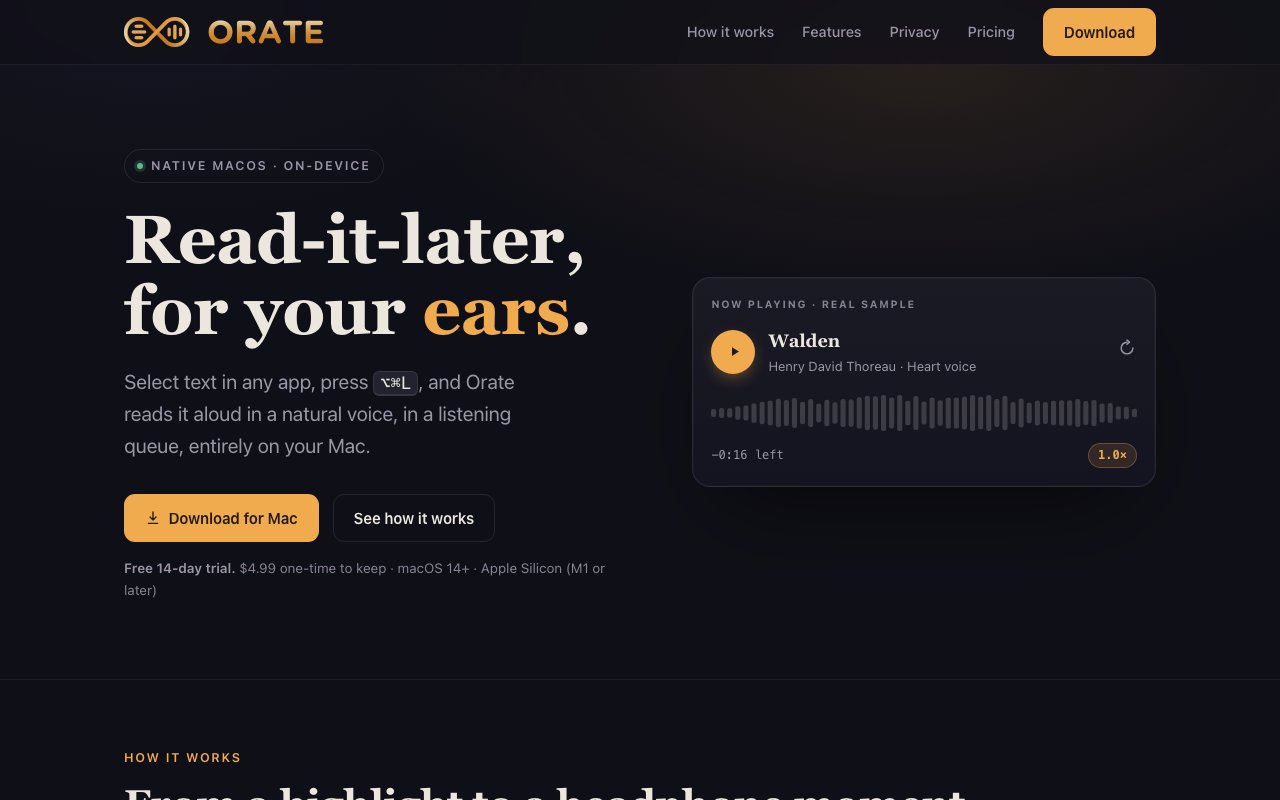
Orate is a macOS text to speech application that converts any selected text into audio playback with a single keyboard shortcut. The core workflow couldn't be simpler. You highlight text anywhere on your Mac, press Option Command L, and the app reads it aloud while organizing your clips into a persistent listening queue. Unlike browser extensions or online TTS services that route your text through external servers, Orate synthesizes speech entirely on device. Your text and the resulting audio never leave your computer, which matters both for privacy sensitive content and for situations where you're working offline. The on device processing also means there's no latency waiting for server responses and no usage caps tied to cloud API costs.
The app includes 14 built in voices with adjustable playback speed ranging from half speed to double speed, plus an optional high definition voice for clearer output. Playback controls live in the menu bar rather than the dock, keeping your workspace uncluttered while still providing quick access to pause, resume, skip, and queue management. Everything you capture goes into a library where you can add tags, write notes, and resume from exactly where you left off. This persistence means you can treat Orate as a read later service for audio, queuing up articles, documentation pages, or email threads throughout the day and listening to them during commutes or while doing housework. The tagging system helps organize clips by topic or project, and notes let you annotate important sections for later reference.
One of the more thoughtful features is iPhone synchronization through your personal iCloud account. Clips you queue on your Mac appear on your phone automatically, and since this uses your existing iCloud rather than a third party sync service, there's no additional subscription or account setup required. The sync is bidirectional so you can continue listening on either device without losing your place. For people who regularly transition between desk work and mobile contexts, this bridges the gap without requiring manual export or file management. You might queue up a long report at your desk and listen to it on your commute, picking up right where you stopped. The sync happens through files you control rather than accounts you create.
The target audience includes people with dyslexia, low vision, ADHD, and chronic eye strain who benefit from audio alternatives to visual reading. It's also useful for multitaskers who want to consume written content while cooking, exercising, or handling tasks that occupy their eyes and hands. Writers often use TTS to proofread their work by ear since hearing prose read aloud reveals awkward phrasing that visual scanning misses. Language learners can use it to hear correct pronunciation and flow. The accessibility focus shapes the entire product design, from the single shortcut activation to the offline operation that doesn't depend on network conditions. This isn't a tool that assumes you'll always have perfect connectivity or uninterrupted attention.
Orate requires an Apple Silicon Mac running macOS 14 or later, which means M1 chips and newer. The focus on recent hardware allows the app to leverage the neural engine for higher quality voice synthesis without the latency that cloud based services sometimes introduce. The voices sound notably better than older system TTS because they're taking advantage of Apple's recent investments in on device machine learning. There's no account creation, no telemetry, and no recurring subscription. The business model is refreshingly simple by modern standards, and the privacy stance is genuine rather than marketing language.
Pricing is a one time purchase of $4.99 with a 14 day free trial that doesn't require a credit card. All minor updates are included indefinitely, and the license persists as long as you're using compatible hardware. For anyone who's dealt with subscription fatigue from productivity tools that charge monthly for features that should be permanent, this pricing structure is a welcome alternative. The trial is long enough to actually evaluate whether the tool fits your workflow, and the price point is low enough that you're not agonizing over the decision. The combination of privacy respecting design, thoughtful sync features, accessibility focus, and permanent licensing makes Orate a strong choice for Mac users who want reliable text to speech without complexity, ongoing costs, or data leaving their machine.
Key Features
- On-device speech synthesis with no cloud
- Listening queue with resume and tagging
- 14 built-in voices plus HD option
- Playback speed from 0.5x to 2x
- Menu bar and library window controls
- Fully offline after installation
Pros & Cons
What we like
- All processing happens locally with no data upload
- One-time purchase with no subscription
- Works offline once installed
- Simple queue system for batch listening
Room for improvement
- Requires Apple Silicon, no Intel Mac support
- macOS 14 or later only
- Voice selection limited to built-in options
- No cross-device sync for listening queue
Frequently Asked Questions
What is Orate?
Does Orate send my text to the cloud?
What Macs does Orate support?
Is Orate a subscription?
Best For
Featured in
Alternatives to Orate

Cartesia
Ultra-low-latency real-time text-to-speech powered by the Sonic model, built for live voice AI agents
ElevenLabs
The voice cloning and text-to-speech service everyone benchmarks against

WellSaid Labs
Enterprise text-to-speech with studio-quality AI voice avatars trained on consenting voice actors

NexSub
Offline real time subtitle translation using local Whisper models for any video source
Reviews (7)
It just works
Came to Orate after getting frustrated with what I had before. What stands out is how it handles on-device speech synthesis with no cloud. Support actually answered when I had a question, which surprised me. It fits well for listening to articles and documentation while doing other tasks. Recommending it to people in a similar spot.
Good, with a few caveats
Three months of Orate later, here is what holds up. The thing I keep coming back to is how reliable it is. My only gripe is requires apple silicon, no intel mac support. Hard to imagine going back to my old setup.
Genuinely impressed
Tried Orate on a side project first, then rolled it out everywhere. The fully offline after installation is more useful than I expected. Found it works best for converting selected text to audio for accessibility. Glad I made the switch.
Solid daily driver
Hadn't planned on switching, but Orate was hard to ignore. Their take on 14 built-in voices plus hd option is genuinely good. The core workflow is smooth once you are set up. It fits well for queuing up reading material for commutes or walks. It earns its place in my stack.
Finally something that fits
Started using Orate casually, now it is pinned in my dock. The listening queue with resume and tagging is more useful than I expected. It fits well for listening to articles and documentation while doing other tasks. Hard to imagine going back to my old setup.
Worth a look
Orate has quietly become part of my daily flow. Where it really wins is 14 built-in voices plus hd option. It does what it says, which is rarer than it should be. Would sign up again without thinking twice.
Finally something that fits
Found Orate on a Show HN thread and I am glad I clicked. The on-device speech synthesis with no cloud is more useful than I expected. The output quality holds up better than I expected. Worth it for what I get out of it.
Badge builder
Add Orate to your website
Choose a badge style and size, preview it here, then copy the generated HTML. Badge images are self-contained SVGs and do not require an external script.

<a href="https://toolindex.net/tools/orate?ref=badge" target="_blank" rel="noopener">
  <img src="https://toolindex.net/badge/orate/medium.svg" alt="Orate - Listed on Tool Index" width="180" height="50" />
</a>How to use the badge
- 1. Pick the style, size, and theme that fit your layout.
- 2. Copy the generated HTML from the code block.
- 3. Paste it into your footer, homepage, or press page.
Score badge available
Orate qualifies for the score and circle badges based on its current top-10 positionin AI Voice Generators.
Badge clicks return visitors to this profile with a referral tag so the source remains identifiable.
Related Tools
NexSub
Offline real time subtitle translation using local Whisper models for any video source

Listnr
Ultra-realistic AI text-to-speech and voiceover platform with 1,000+ voices across 142+ languages
List55
Voice transcription app that converts audio recordings into formatted text lists
WellSaid Labs
Enterprise text-to-speech with studio-quality AI voice avatars trained on consenting voice actors
Work on Orate? Request listing access or correction