
Mailchimp
All-in-one marketing platform built around email campaigns, automations, and audience insights for growing brands.
Gallery
About Mailchimp
Mailchimp is the email marketing platform your aunt's bakery uses. That's not an insult. Mailchimp won the small business email category by being the easiest path from "I should send an email" to "the email is sent."
The product has grown well past newsletters. Automation flows, landing pages, postcards, SMS, CRM lite. Some of it is genuinely good. Some of it is bolt on. The newsletter side remains the heart.
It's not the cheapest. It's not the most loved. But Mailchimp is still the default for millions of small businesses, and the feature set covers most of what an SMB ever needs from a marketing stack.
What Mailchimp does
You build an audience. You design an email in the drag and drop builder. You schedule or send it. Mailchimp handles delivery, tracking opens and clicks, and reports back on what worked.
The automation builder lets you set up welcome series, abandoned cart flows, post purchase emails, and re engagement campaigns. The flows can be simple drips or branching journeys with conditionals.
Mailchimp also includes landing pages, signup forms, basic CRM features, transactional email through Mandrill, postcards via mail, SMS, and an Etsy style website builder. The kitchen has expanded.
Who Mailchimp is for
Small businesses. Solopreneurs. Bloggers. Etsy sellers. Local nonprofits. The interface is forgiving and the templates look respectable without a designer.
E commerce shops on Shopify use Mailchimp's automation flows. Restaurants send weekly specials. Newsletters with under 10,000 subscribers find the free tier workable.
Where Mailchimp loses the user is at scale. Above 50,000 contacts, the bill spikes and bigger players go shopping for Klaviyo, Customer.io, or HubSpot.
Pricing in 2026
The free plan covers up to 500 contacts and 1,000 sends per month. It's tighter than it used to be but still enough for a tiny project.
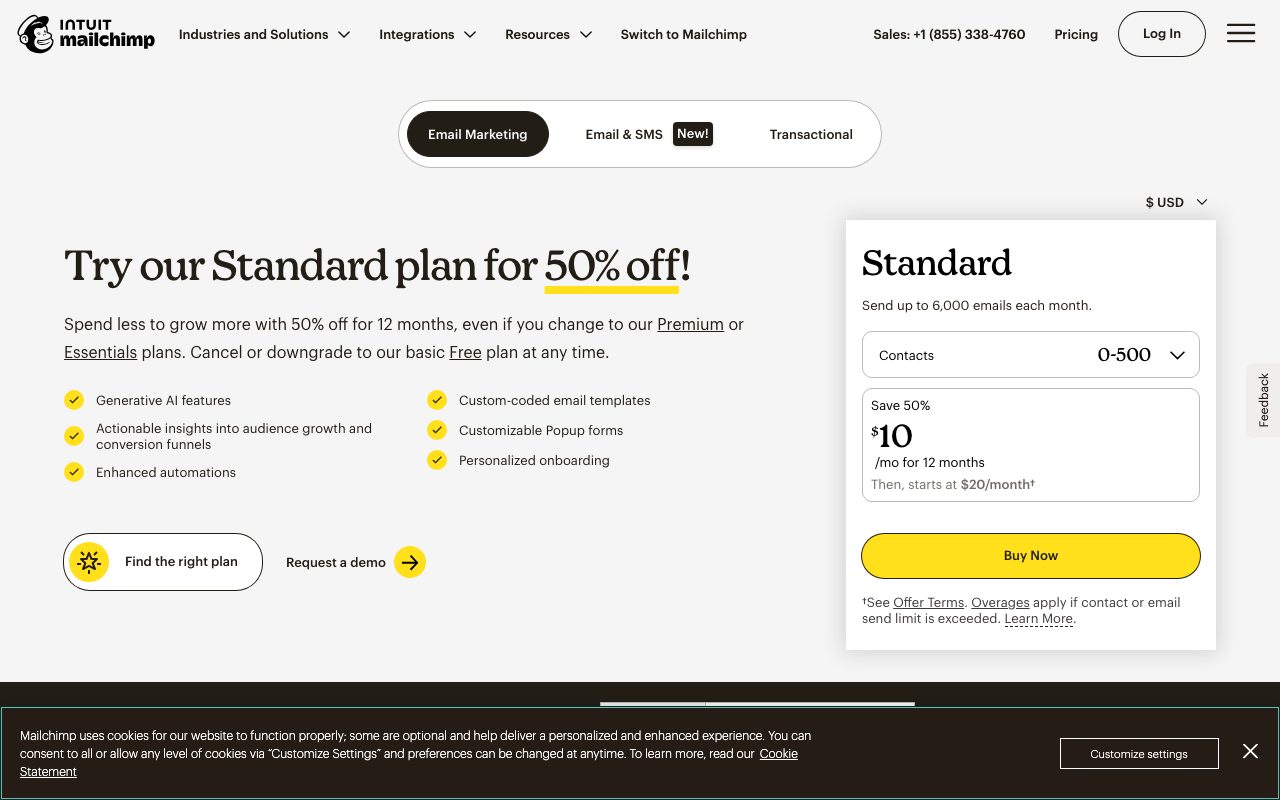
Essentials starts around $13 per month for 500 contacts and scales by list size. Standard adds automation and lands around $20 per month for the same starter list. Premium is for larger lists and adds advanced segmentation.
The pricing climbs steeply with list size. A 50,000 subscriber list on Standard runs hundreds of dollars per month. That's where the alternatives start looking attractive.
Features that earn the price
The drag and drop email builder is mature. Templates load quickly. The mobile preview is accurate. You can ship a decent email in twenty minutes without design skill.
Automations cover the common ones. Welcome series, win back, birthday email, abandoned cart with Shopify integration. Setup is template driven so you don't start from a blank canvas.
Reports are clear. Open rates, click rates, top links, geography, time of day. The benchmark feature compares your performance to industry averages, which is grounding.
Where Mailchimp loses you
The pricing model is famously cranky. They count contacts including unsubscribed ones in some plans. People feel double charged. Read the plan details.
Deliverability has slipped relative to the pure play providers. Mailchimp is fine for most senders but Klaviyo, Customer.io, and Postmark beat it on inbox placement in many tests.
The product has bloated. Postcards, websites, SMS, the appointment scheduler. Some of it is duct tape. The email side is still the strongest piece. Treat the rest as bonus.
Mailchimp vs the alternatives
Klaviyo wins for e commerce, especially Shopify stores at scale. Better segmentation, better deliverability for transactional flows. We compare in Mailchimp vs Klaviyo.
ConvertKit (now Kit) wins for creators and newsletter writers. Cleaner UI, better automation primitives. Beehiiv is the new wave for media brands. See best email marketing tools.
Substack is for newsletter only writers who want zero ops. ActiveCampaign is the more sales heavy alternative. Browse Mailchimp alternatives for the full set.
If you crossed 25,000 contacts on Mailchimp and your bill is over $300 a month, schedule the Klaviyo or Beehiiv migration. The payback is two months and the deliverability lift is real.
Common Mailchimp questions
Is Mailchimp still good for small business? Yes, especially under 10,000 subscribers. The simplicity is the moat.
Does Mailchimp own Mandrill for transactional? Yes. Mandrill is the SMTP arm. Browse email marketing tools for related picks.
Can Mailchimp do SMS marketing? Yes, in the US, on paid plans. The pricing is per message and adds up. Often a dedicated SMS tool wins for serious use.
The bottom line on Mailchimp
Mailchimp is still the easy default for small business email. The brand recognition alone gets it on most evaluation lists. The product is good enough to keep most of those customers.
If you're starting a tiny project and you want something simple, Mailchimp's free tier is fine. If you're scaling past 25,000 contacts or you live in e commerce, you'll likely outgrow it.
The category has matured and the alternatives are sharp. Mailchimp's moat is mostly brand and habit. For some users that's enough. For others it's time to shop. Browse the toolindex catalog for what else is out there.
Mailchimp audience setup
Use one audience with tags and groups. Don't create five audiences for five segments. Mailchimp counts contacts per audience. Duplicates burn your budget.
Tags are the flexible categorization layer. Apply them on signup, on click, on manual updates. Filter and segment based on tags.
Groups are user facing. Subscribers can pick which groups they're in. Useful when you have multiple newsletters under one brand.
Building a Mailchimp template library
Save three to five master templates. One for newsletters. One for product announcements. One for promotional campaigns. Reuse them.
Use saved blocks for common elements. Header, footer, social links. Update once, propagate everywhere.
Test on actual devices. The Mailchimp preview is good. Real Gmail on real iPhone catches issues the preview misses.
Mailchimp automation patterns
The welcome series is non negotiable. New subscribers get a sequence over their first two weeks. Set expectations, deliver value, drive the first conversion.
The win back automation re engages stale subscribers. After 90 days of no opens, send a "we miss you" email. Click means stay. Silence means clean from the list.
The abandoned cart automation requires Shopify integration. Three emails over the next two days catches buyers who got distracted. Easy revenue lift.
List hygiene matters
Remove unengaged subscribers quarterly. People who haven't opened in 90 days drag down deliverability. The tool to remove them is in the Mailchimp UI.
Use double opt in to keep the list clean from the start. Yes, it costs you some signups. The list quality is worth it.
Monitor your sender reputation through Google Postmaster Tools. If your spam complaint rate ticks above 0.1 percent, fix it before Mailchimp starts throttling.
Mailchimp for e commerce stores
Shopify integration is the most common e commerce setup. Product data flows in. Customer purchase history is available for segmentation.
Abandoned cart, post purchase, win back, and product recommendation flows are the four core e commerce automations. Set them all up. They run while you sleep.
Klaviyo wins on Shopify at scale but Mailchimp is fine for sub $1M annual revenue stores. The pricing argument is real.
Mailchimp landing pages
Build landing pages inside Mailchimp for opt in offers. Free guide, webinar signup, lead magnet. The landing page connects to an audience and an automation.
The pages are functional. Not as flexible as ConvertKit's landing pages or as design rich as Carrd. But they're integrated.
For better landing pages, build them externally and embed Mailchimp signup forms. The conversion rate is what matters, not where the page lives.
Mailchimp transactional email via Mandrill
Mandrill handles transactional sends. Order confirmations, password resets, system notifications. Different domain than marketing.
The pricing is volume based. For low volume transactional, Postmark or Resend often beat Mandrill on price and developer experience.
If you're already on Mailchimp for marketing, Mandrill keeps the relationship simple. The integration with Mailchimp's audience data is the unique angle.
Mailchimp deliverability tactics
Authenticate your sending domain. SPF, DKIM, DMARC. Mailchimp's setup wizard helps. Skipping this hurts inbox placement.
Use a dedicated sending domain (mail.yourdomain.com) rather than your primary. Reputation isolation matters.
Monitor your sender score. Tools like Sender Score and Google Postmaster show how mailbox providers see you. Bad scores correlate with spam folder placement.
Mailchimp segmentation patterns
Behavior based segments outperform demographic segments. Recent buyers, repeat openers, click engaged, dormant.
RFM segmentation (recency, frequency, monetary) for e commerce. The top RFM segments drive most revenue. Treat them differently.
Geographic segmentation for time of day testing. Send to East Coast at 10am Eastern. Send to West Coast at 10am Pacific. Compare engagement.
Mailchimp future and direction
The brand has moved toward marketing platform vs pure email. Postcards, SMS, websites, CRM. Each module is fine. None are best in class.
Heavy focus on AI features in recent releases. Subject line generation, content suggestions, predicted send times. Useful but not transformative.
The product has stabilized. Don't expect dramatic shifts. Steady iteration on a mature platform is the new normal.
Mailchimp pricing tactics worth knowing
The pricing model counts contacts. Cleaning unengaged subscribers reduces your bill. Do the audit quarterly.
The annual prepay saves around 15 percent on most plans. Worth it if you're confident about your subscriber range for the year.
Watch for the upgrade prompt at thresholds. Hitting 501 contacts pushes you up a tier. Sometimes worth pruning to stay below the line.
Tutorial / Demo
Key Features
- Drag-and-drop email and template builder
- Behavior-triggered automations and customer journeys
- Audience segmentation with predictive insights
- Landing pages, signup forms, and basic websites
- Ecommerce integrations and product recommendations
- A/B testing and reporting dashboards
Pros & Cons
What we like
- Approachable for non-technical marketers
- Strong ecosystem of integrations and templates
- Generous free tier for very small lists
- Combines email, forms, and pages in one tool
Room for improvement
- Pricing scales aggressively as your list grows
- Advanced automations feel limited compared to dedicated platforms
Frequently Asked Questions
Does Mailchimp still have a free plan?
Mailchimp vs ConvertKit or MailerLite, which one?
Is Mailchimp good for ecommerce?
Does Mailchimp do transactional email?
Can I migrate away from Mailchimp easily?
Best For
Featured in
Tags
Alternatives to Mailchimp

Buttondown
Minimalist newsletter tool built for writers who prefer Markdown, plain text, and quietly powerful tooling under the hood.

Loops
Modern email platform built for SaaS teams, combining transactional, marketing, and lifecycle messages with a clean API.

ActiveCampaign
Email marketing, automation, and CRM in one platform aimed at SMBs that need branching, conditional customer journeys.
Brevo
Marketing platform combining email, SMS, WhatsApp, transactional sending, and a basic CRM under volume-based pricing.
Our take
Tool Index Editorial · May 2026· 4.8/5
If you're evaluating Mailchimp, the headline is simple: all-in-one marketing platform built around email campaigns, automations, and audience insights for growing brands, and most teams will get value out of the box.
What it actually does well: Approachable for non-technical marketers, Strong ecosystem of integrations and templates, and Generous free tier for very small lists. Where it stumbles: Pricing scales aggressively as your list grows and Advanced automations feel limited compared to dedicated platforms.
In short: Mailchimp is a strong pick when you need newsletter sending for small businesses and creators, and a harder sell if pricing scales aggressively as your list grows would be a dealbreaker.
Editorial opinion from the Tool Index team, written from the public product pages. Not a user review.
Reviews (10)
Not for us, but might suit others
Adopted Mailchimp for one project, ended up using it for more. Real selling point: approachable for non-technical marketers. Worth calling out the behavior-triggered automations and customer journeys too. Main use case: audience segmentation by behavior and predicted demographics. Might revisit when they iterate further.
Pros
- Strong ecosystem of integrations and templates
- Approachable for non-technical marketers
- Generous free tier for very small lists
Cons
- Advanced automations feel limited compared to dedicated platforms
Maybe in a year when they fix the basics
Started using Mailchimp casually, now it's pinned in my dock. Where it really wins is generous free tier for very small lists. It fits well for lead capture from landing pages and signup forms.
Pros
- Approachable for non-technical marketers
- Strong ecosystem of integrations and templates
Cons
- Advanced automations feel limited compared to dedicated platforms
Underrated honestly
Took a few weeks for Mailchimp to click, then it stuck. The biggest win has been combines email, forms, and pages in one tool. It fits well for lead capture from landing pages and signup forms. Worth the price for what I get out of it.
Pros
- Strong ecosystem of integrations and templates
- Combines email, forms, and pages in one tool
- Approachable for non-technical marketers
Surprised how much we use this
Found Mailchimp on a Reddit thread, glad I clicked. Where it really wins is combines email, forms, and pages in one tool. Landing pages, signup forms, and basic websites works the way you'd hope. Glad I made the switch.
Pros
- Approachable for non-technical marketers
Glad I tried it, not sure I'd renew
Took a few weeks for Mailchimp to click, then it stuck. Honestly impressed by how combines email, forms, and pages in one tool. Worth a trial if you're in the same boat.
Pros
- Combines email, forms, and pages in one tool
Underrated honestly
The last quarter of using Mailchimp, here's what holds up. What stands out is how combines email, forms, and pages in one tool. It fits well for audience segmentation by behavior and predicted demographics. Sticking with Mailchimp.
Hit the Mailchimp sweet spot
Picked Mailchimp for the lower price, stayed for the actual quality. Honestly impressed by how combines email, forms, and pages in one tool. Found it works best for audience segmentation by behavior and predicted demographics. It would be a 5 if not for pricing scales aggressively as your list grows. Would buy again without thinking twice.
Quietly excellent
Mailchimp is one of those tools you stop noticing because it just works. Honestly impressed by how approachable for non-technical marketers. Glad I made the switch.
Bought it for one feature, stayed for ten
Been using Mailchimp for the last quarter now. The thing I keep coming back to: approachable for non-technical marketers. The a/B testing and reporting dashboards is more useful than I expected. Not perfect: advanced automations feel limited compared to dedicated platforms.
It just works
Tried Mailchimp on a side project first. What stands out is how strong ecosystem of integrations and templates. Would buy again without thinking twice.
Pros
- Generous free tier for very small lists
- Combines email, forms, and pages in one tool
- Strong ecosystem of integrations and templates
Badge builder
Add Mailchimp to your website
Choose a badge style and size, preview it here, then copy the generated HTML. Badge images are self-contained SVGs and do not require an external script.

<a href="https://toolindex.net/tools/mailchimp?ref=badge" target="_blank" rel="noopener">
  <img src="https://toolindex.net/badge/mailchimp/medium.svg" alt="Mailchimp - Listed on Tool Index" width="180" height="50" />
</a>How to use the badge
- 1. Pick the style, size, and theme that fit your layout.
- 2. Copy the generated HTML from the code block.
- 3. Paste it into your footer, homepage, or press page.
Standard badge available
The standard listing badge is available now. Score and circle badges are limited to tools currently ranked in the top 10 of a category.
Badge clicks return visitors to this profile with a referral tag so the source remains identifiable.
Related Tools

Apatero AI
The creator studio for AI image, video, audio, 3D, and avatars, now at apatero.ai.

SEObot
Autonomous AI SEO agent that runs your blog and link building on autopilot

Substack
Hosted newsletter and publication platform with built-in payments, recommendations, and an audience network for writers.

MailerLite
Friendly, affordable email marketing tool with newsletters, automations, landing pages, and a growing creator toolkit.
Work on Mailchimp? Request listing access or correction