
MarketSync
Copy Telegram trading signals into MT4 and MT5 with per-account risk rules, no VPS needed
Gallery
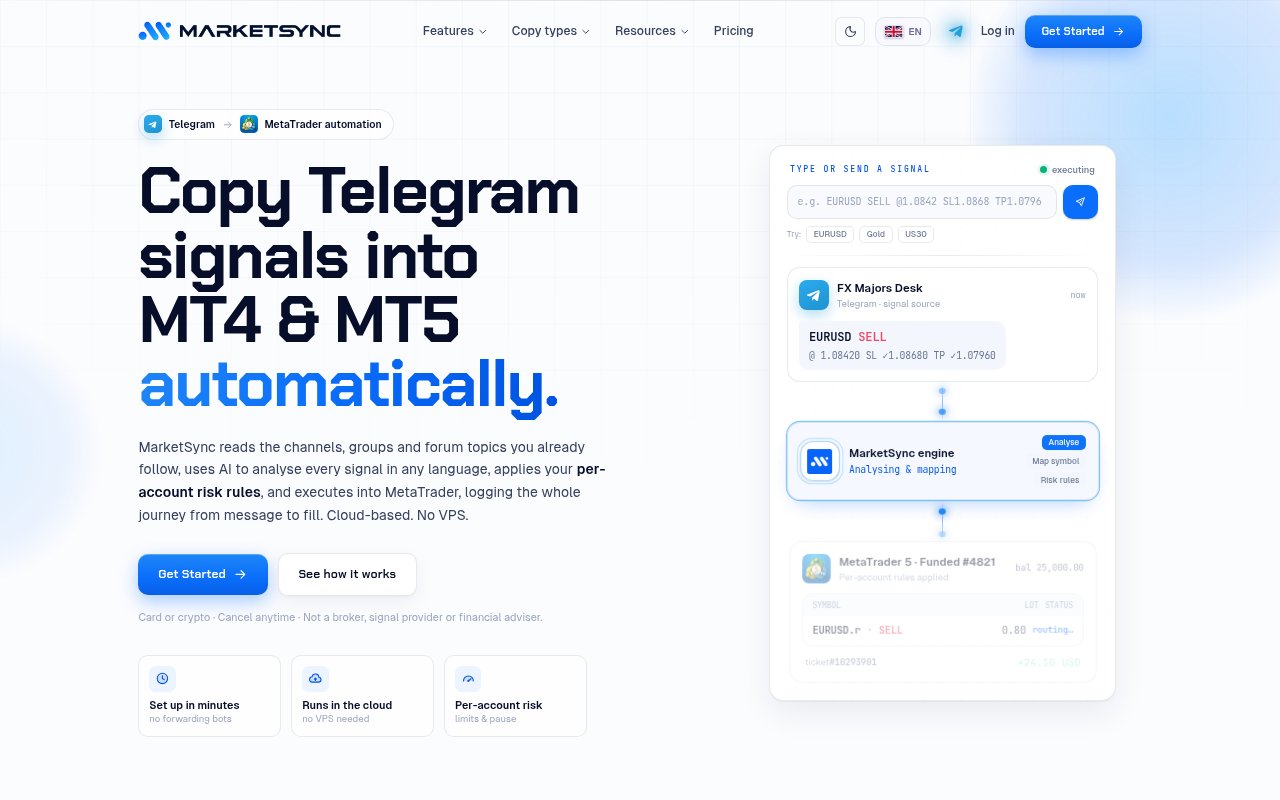
About MarketSync
MarketSync is a cloud service that copies trading signals from Telegram into MetaTrader accounts automatically. You connect the Telegram channels or groups you follow and one or more MT4 or MT5 accounts, set the copy and risk rules for each account, and MarketSync reads the messages, works out which ones are trade signals, and places and manages the orders. It runs in the cloud, so there's no VPS to rent and nothing to install on your own machine. Every signal it processes and every order it places is logged, so you can see afterwards why a trade happened the way it did.
The problem is the gap between a signal arriving and a trade being placed. Signals are posted as free text in whatever format and language the provider uses, entries and stops get edited after the fact, and take-profit levels arrive as follow-up messages. Copying that by hand means watching Telegram all day and still being late. MarketSync's parsing understands signals in any language, tracks message edits and reactions, and picks up follow-ups such as stop-loss adjustments and partial closes, then executes within milliseconds. Speed matters here because signal providers often post entries at market, and a few minutes of delay can turn a reasonable entry into a poor one.
Risk control is the heart of it, and it's set per account. Position sizing can be a fixed lot, a percentage of the account at risk, or a fixed dollar amount, with the lot computed from the stop-loss distance in the risk-based modes. A daily loss limit pauses copying when losses cross a set percentage of balance. Symbol restrictions block instruments an account isn't allowed to trade, a cap on open trades queues new signals once the limit is hit, and equity protection can react to drawdown or profit thresholds by disabling copying, closing only the copied trades, or closing everything.
Execution has some depth too. The layered entry system can split one signal into two to six orders across its price range for a better average fill, optionally dividing the total volume evenly and cancelling unfilled layers once one hits its target. After entry, the service manages take-profit ladders, stop-loss stepping and trailing, moves the stop forward as each take-profit is reached, and handles partial closes. Connecting an account uses a broker-server search so you pick the exact server your broker runs.
It's aimed at traders who follow Telegram signal providers and want disciplined, hands-off execution, and in particular at people trading prop-firm challenges, where a blocked symbol or an overnight loss limit can end the evaluation. The dashboard shows connection status, balance, equity, margin, open trades and pending orders refreshed every few seconds, and the analytics break performance down by growth, time of day, win and loss ratio, and profitability per signal source, so you can see which channels are actually worth following. Notifications keep you informed without keeping you glued to the screen, which is the whole point of copying automatically in the first place.
What sets it apart from the crowd of copier bots is that it treats the account rules as the product. Plenty of tools will forward a signal. Fewer let you say this account risks one percent per trade, never touches gold, stops for the day at a three percent loss, and closes everything at a ten percent drawdown, and then log every decision. Notifications by app, email and browser push cover trade events, connection drops and billing, with broker error codes translated into plain language. It also handles the mechanics that trip up simpler tools, such as the exact broker server name, a clear message when an order is rejected, and what to do when a signal message is edited after the trade is already open.
Pricing is paid, with no free tier or trial mentioned. The Starter plan is $39 a month billed monthly and the Elite plan works out around $29 a month billed yearly. Both include one MT4 or MT5 account and unlimited signal groups, with extra accounts at $9 to $12 a month each depending on billing term, and there are no per-trade fees. Card and crypto payments are accepted. Getting started runs through an online signup where you connect Telegram and your MetaTrader account and set the rules for each account before any signal is copied. Only MetaTrader is supported today, with cTrader, DXtrade, TradeLocker and MT-to-MT copying on the roadmap, and the usual caveat applies that automated copying of anyone's signals carries the same risk as the signals themselves.
Key Features
- Telegram signal parsing in any language
- Automatic execution on MT4 and MT5
- Per-account lot sizing and daily loss limits
- Layered entries across a signal's price range
- Take-profit ladders, trailing and partial closes
- Live dashboard with per-source analytics
Pros & Cons
What we like
- No VPS or local software to run
- Risk rules are set per account, useful for prop-firm limits
- Handles edited signals and follow-up messages
- Unlimited signal groups on every plan
Room for improvement
- No free tier or trial
- MetaTrader only, other platforms are roadmap
- Extra accounts cost more each month
- Results depend entirely on the quality of the signals you copy
Frequently Asked Questions
What is MarketSync?
Is MarketSync free?
Which trading platforms does it support?
Do I need a VPS?
Best For
Featured in
Alternatives to MarketSync
View all


Our take
Tool Index Editorial · Sep 2026· 3.0/5
MarketSync copies Telegram trading signals into MT4 or MT5 accounts while applying separate risk rules to each account. The site shows fixed or risk-based sizing, source mapping, layered entries, trade lifecycle handling and detailed logs. It is aimed at active signal followers and prop-firm traders who need automation to respect account limits.
Starter is $39 a month, while Elite is $348 a year, and both include one account, unlimited signal groups and no per-trade fee. We like that risk controls and audit logs are treated as core features. There is no free trial, other trading platforms are absent, and the advertised execution speed is a vendor claim we did not independently test. Most importantly, automation improves consistency, not signal quality. A bad source can still lose money faster, so this deserves a demo account and strict limits before real funds.
Editorial opinion from the Tool Index team, written from the public product pages. Not a user review.
Reviews (0)
Badge builder
Add MarketSync to your website
Choose a badge style and size, preview it here, then copy the generated HTML. Badge images are self-contained SVGs and do not require an external script.

<a href="https://toolindex.net/tools/marketsync?ref=badge" target="_blank" rel="noopener">
  <img src="https://toolindex.net/badge/marketsync/medium.svg" alt="MarketSync - Listed on Tool Index" width="180" height="50" />
</a>How to use the badge
- 1. Pick the style, size, and theme that fit your layout.
- 2. Copy the generated HTML from the code block.
- 3. Paste it into your footer, homepage, or press page.
Standard badge available
The standard listing badge is available now. Score and circle badges are limited to tools currently ranked in the top 10 of a category.
Badge clicks return visitors to this profile with a referral tag so the source remains identifiable.
Related Tools

Simple RMD
Calculate, aggregate, and manage your annual IRA required minimum distributions.
FreshBooks
Cloud accounting designed for service-based small businesses and freelancers
Deel
Global payroll, contractor, and EOR platform
Chargebee
Subscription billing and revenue management for B2B SaaS
Work on MarketSync? Request listing access or correction