
Moxie Docs
Free Mermaid diagram editor plus living docs generated from your GitHub repo
Gallery
About Moxie Docs
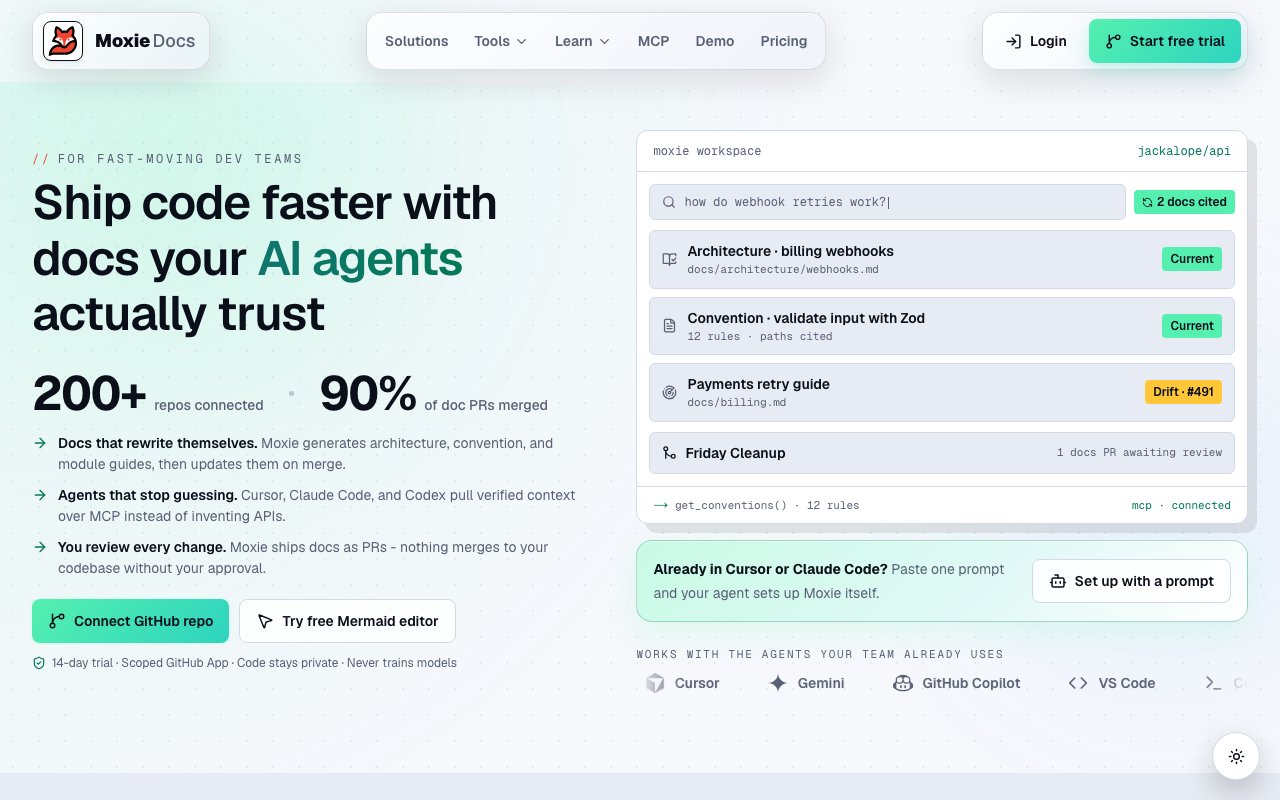
Moxie Docs is a documentation platform for GitHub repositories, and the most accessible piece of it is a free Mermaid diagram editor that anyone can open and use in the browser. The editor puts a Mermaid syntax panel on one side and a live rendering of the diagram on the other, and it asks for nothing in return, no sign-up, no watermark stamped across the export, and no cap on how many diagrams you draw.
The editor supports the diagram types developers actually reach for, including flowcharts, sequence diagrams, entity relationship diagrams, class diagrams, state diagrams, mindmaps, Gantt charts, pie charts, and gitGraph. Because the preview updates instantly as you type, you can shape a diagram by feel and see each change land right away instead of saving and reloading between edits. Common patterns are available as snippets, so you are not starting from a blank page every single time.
When a diagram looks right, getting it out is simple. You can export it as an SVG or a PNG to drop straight into a README, a wiki, or a slide, or you can share it through a link that encodes the entire diagram in the URL itself. That URL-based sharing means a teammate can open exactly what you drew without any server storing it in between, which keeps collaboration lightweight and avoids yet another account to manage.
Working in Mermaid also means your diagrams are really code. Because each diagram is defined in plain text rather than dragged around a canvas, it lives comfortably in version control, travels inside a pull request, and diffs like any other file. For developer teams that is a meaningful advantage over point-and-click diagram tools, since the picture evolves alongside the code it describes and nobody has to hunt down the original editor file to make a change.
Privacy is a real part of the pitch rather than an afterthought. Everything in the editor runs on your own machine and the diagrams never leave the browser, so you can sketch out internal architecture, private infrastructure, or an unreleased feature without wondering where that data ends up. For plenty of teams that alone makes it a more comfortable default than tools that quietly persist whatever you draw on someone else's servers.
The free editor is really the front door to the larger Moxie Docs product, which is built around the idea of keeping documentation alive instead of letting it quietly rot. Once you connect a GitHub repository, Moxie can generate architecture diagrams and documentation from the actual code, then keep them current as the repository changes over time. That is the living-documentation promise, so the picture of your system stays close to what the code really does rather than describing how it looked several sprints ago.
Moxie Docs also fits the way software gets written now, with coding agents doing more of the work. It exposes searchable documentation and provides MCP context, so an agent can pull accurate, up-to-date information about a codebase while it is actively working rather than guessing from stale files. That turns documentation from something a human skims once into something both people and agents can query on demand, which becomes more valuable as more of the coding is automated.
Where Moxie Docs separates itself from the many free Mermaid editors floating around is that connection back to the repository. A standalone editor only ever renders what you type, so it goes stale the instant the code moves on. Moxie instead reads the codebase and produces the diagrams and docs from it, then keeps them in step, which is the difference between a drawing you maintain forever and documentation that maintains itself.
The natural audience is developers and teams who maintain code on GitHub and are tired of diagrams and docs that fall out of date the week after they are written. The free editor suits anyone who just needs a quick, private Mermaid diagram for a pull request or a design note, while the connected product suits teams that would rather have their documentation generated and refreshed straight from the source than rebuild it by hand every release.
On cost, the split is easy to reason about. The standalone Mermaid editor is free and unlimited with nothing to sign up for, so it stands on its own as an everyday diagramming tool. The repository-connected features, where Moxie generates and maintains documentation and diagrams from your GitHub code, sit behind a paid tier, which means you can lean on the free diagramming indefinitely and only pay once you want the automated, living-documentation side wired into your own repos.
Key Features
- Live Mermaid diagram preview
- SVG and PNG diagram export
- Shareable URL-encoded diagrams
- Runs entirely in the browser
- GitHub repo documentation generation
- MCP context for coding agents
Pros & Cons
What we like
- Free Mermaid editor with no sign-up
- Diagrams stay on your device and stay private
- Generates diagrams from your actual codebase
- Docs refresh as the repository changes
Room for improvement
- Diagram generation needs a GitHub connection
- Repo-connected features sit behind a paid tier
- Younger product with a smaller community
- Automated docs focus on GitHub specifically
Frequently Asked Questions
What is Moxie Docs?
Is the Mermaid editor free?
Is my diagram data private?
Who is Moxie Docs for?
Best For
Featured in
Alternatives to Moxie Docs

1Lookup
Real-time data verification API for phone, email, IP, and domain validation to fight fraud

Codedex
A gamified, story-driven platform that teaches Python, web dev, and more like an RPG quest
Hack2hire
Practice real SDE interview questions from top tech companies with expert worked solutions
Cloudflare Pages
Free Jamstack hosting on Cloudflares edge with unlimited bandwidth and tight integration with Workers.
Reviews (8)
Decent with some rough edges
Picked Moxie Docs for the price, stayed for the quality. Where it really wins is svg and png diagram export. Found it works best for exporting a diagram for a readme. It would be a five if not for diagram generation needs a github connection.
Genuinely impressed
Have been running Moxie Docs for a while, here is where I land. It slotted into my routine without much fuss. Found it works best for generating architecture diagrams from a repo. Worth it for what I get out of it.
It just works
Moxie Docs has quietly become part of my daily flow. It handles the boring parts so I can focus on the work that matters. It fits well for exporting a diagram for a readme. Hard to imagine going back to my old setup.
Worth a look
Three months of Moxie Docs later, here is what holds up. What stands out is how little babysitting it needs. The defaults are sensible, so I was not fighting settings on day one. Easy yes for anyone weighing the same trade offs.
Pulled its weight from week one
Moxie Docs has quietly become part of my daily flow. Where it really wins is mcp context for coding agents. Found it works best for generating architecture diagrams from a repo.
Pulled its weight from week one
Have been running Moxie Docs for a while, here is where I land. What stands out is how it handles runs entirely in the browser. The defaults are sensible, so I was not fighting settings on day one. It earns its place in my stack.
Pulled its weight from week one
Picked Moxie Docs for the price, stayed for the quality. What stands out is how it handles shareable url-encoded diagrams. It just works, day after day, without surprises. Mostly using it for generating architecture diagrams from a repo. Easy yes for anyone weighing the same trade offs.
Solid daily driver
Tried Moxie Docs on a side project first, then rolled it out everywhere. The shareable url-encoded diagrams is more useful than I expected. The interface stays out of my way, which I appreciate. It fits well for exporting a diagram for a readme. Hard to imagine going back to my old setup.
Badge builder
Add Moxie Docs to your website
Choose a badge style and size, preview it here, then copy the generated HTML. Badge images are self-contained SVGs and do not require an external script.

<a href="https://toolindex.net/tools/moxiedocs?ref=badge" target="_blank" rel="noopener">
  <img src="https://toolindex.net/badge/moxiedocs/medium.svg" alt="Moxie Docs - Listed on Tool Index" width="180" height="50" />
</a>How to use the badge
- 1. Pick the style, size, and theme that fit your layout.
- 2. Copy the generated HTML from the code block.
- 3. Paste it into your footer, homepage, or press page.
Standard badge available
The standard listing badge is available now. Score and circle badges are limited to tools currently ranked in the top 10 of a category.
Badge clicks return visitors to this profile with a referral tag so the source remains identifiable.
Related Tools

Kevin Gabeci
Solo developer building web apps, cozy browser games, and AI creator toolkits.

Coolify
Self-hostable, open source alternative to Heroku and Netlify

Warp
The modern terminal reimagined with AI and collaboration

Bolt.new
Prompt-to-deployed full-stack app inside the browser
Work on Moxie Docs? Request listing access or correction