Nexmy
Offline Android finance tracker with AI assistant and local-only data storage
Gallery
About Nexmy
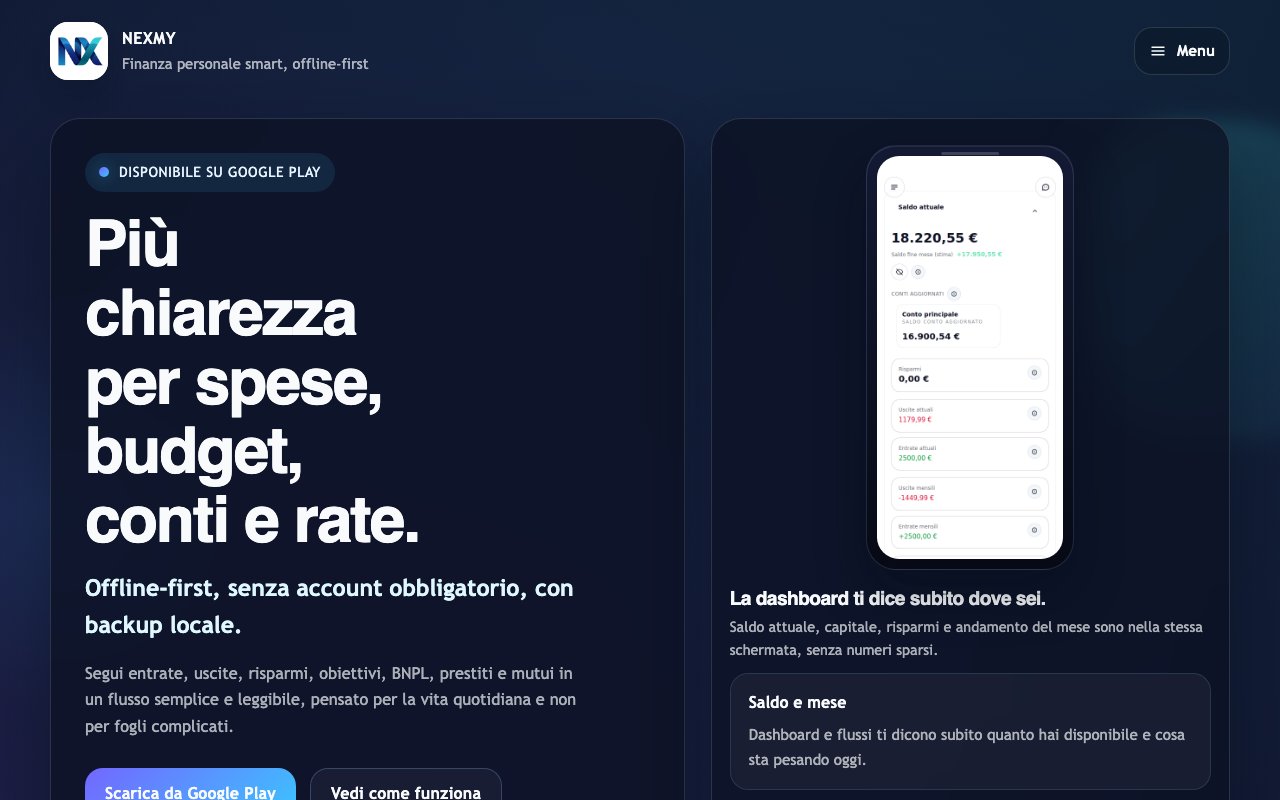
Nexmy is an Android app for personal finance tracking that prioritizes offline functionality and simplicity over feature bloat. It handles spending, budgets, accounts, installments, savings goals, and due dates within a single interface. The app is designed to be readable at a glance, with a unified dashboard that shows balances, budget progress, and upcoming payment deadlines without requiring you to dig through nested menus or learn a complex system. The positioning is clear: an app that stays understandable from day one, reducing friction rather than maximizing features for the sake of a longer marketing checklist.
The offline-first architecture means Nexmy works without an internet connection. Your financial data stays on your device with local backup capabilities, so you're not dependent on cloud sync or account creation to use the core features. This matters for users who want to track finances privately without uploading sensitive information to external servers, or who simply need an app that works reliably regardless of connectivity. You can manage your entire financial picture on an airplane, in a subway, or anywhere else without worrying about whether you have signal. The local backup option provides protection against data loss while keeping everything under your control rather than stored on someone else's servers.
Beyond basic expense tracking, Nexmy handles the ongoing payment structures that dominate modern personal finance. Buy now pay later plans, loans, mortgages, and installment payments all get their own tracking within the app. You can see exactly when payments are due and how they fit into your overall financial picture. The app organizes data by month automatically, making it easy to review spending patterns and plan ahead without manual categorization work. This monthly organization aligns with how most people actually think about their finances, tied to pay cycles and billing periods rather than arbitrary date ranges.
The app separates capital accounts from savings accounts, helping users keep track of money they can spend versus money they're setting aside for specific goals. This distinction matters because it prevents the common mistake of seeing your total balance and thinking you have more spending flexibility than you actually do. When your savings goals have their own dedicated tracking, you can monitor progress toward them independently of your day-to-day cash flow. The separation also makes it easier to understand your actual financial position at any given moment without mental math to subtract money you've already committed to other purposes.
Nexmy includes an AI assistant called Smarty that lets you query your finances using natural language. Instead of navigating through reports, applying filters, and interpreting charts, you can ask questions directly and get answers based on your actual data. This conversational interface makes financial information more accessible, especially for users who find traditional budgeting app interfaces overwhelming or tedious to navigate. You can ask about spending trends, upcoming obligations, or goal progress without learning the app's specific navigation patterns. The natural language interface removes the learning curve that typically comes with financial software.
The analysis tools go beyond simple reporting by including scenario simulation. You can model what happens if you change spending habits, take on new financial commitments, or adjust your savings rate before committing to real decisions. This forward-looking capability helps with planning major purchases, evaluating whether you can afford new recurring expenses, or understanding the long-term impact of financial choices. Rather than just showing you what happened, Nexmy helps you think through what might happen next. This makes the app useful not just for tracking but for planning, which is where most people actually need help with their finances.
The target user is someone who wants clear, understandable finance tracking without the overhead of complex accounting software or the privacy concerns of cloud-based platforms. Nexmy appeals to people who want to read their financial month quickly, reduce friction in tracking, and use an app that doesn't require a learning curve to master. The focus on offline functionality and local storage resonates with users who are cautious about where their financial data lives. It also works well for anyone frustrated by finance apps that require account creation before you can even explore the interface.
Pricing is straightforward: the app is completely free with no mandatory account required. You can start using it immediately without signing up for anything, entering an email, or connecting external accounts. This removes the typical barriers of freemium finance apps that gate useful features behind subscriptions or require account creation before you can even see what the app does. The lack of mandatory accounts also reinforces the privacy-focused, local-first approach that defines how Nexmy positions itself in the crowded personal finance app space. You get the full feature set without having to commit to anything upfront.
Key Features
- Offline expense and income tracking
- Installment and loan payment management
- Local AI assistant with natural language input
- Budget planning with progress tracking
- Spending charts and category breakdowns
- Local export and import for backups
Pros & Cons
What we like
- Completely offline with data stored only on your device
- No account required to use the full app
- AI assistant works without an internet connection
- Free with no in-app purchases or subscriptions
Room for improvement
- Android only with no iOS or web version
- No cloud sync means you manage your own backups
- Newer app with a smaller user base and fewer reviews
- AI assistant quality depends on local device capabilities
Frequently Asked Questions
What is Nexmy?
Does Nexmy require an internet connection?
Is Nexmy free?
Is Nexmy available on iPhone?
Best For
Featured in
Alternatives to Nexmy
View all

Our take
Tool Index Editorial · Oct 2026· 3.5/5
Nexmy is an Android personal finance app built around offline tracking for income, spending, budgets, savings, loans, mortgages, and installment plans. Its public page shows a practical dashboard, separate spending and savings views, local backup, recurring entries, scenario modeling, and an offline assistant called Smarty. It also says no account is mandatory, though the captured page did not state a price.
We like the local-first posture for sensitive financial records and the attention paid to installments, which many simple budget apps treat poorly. The cost of that independence is manual backup and no visible cross-device sync. It is Android only, and we could not judge the assistant's accuracy from the public page, so users should treat its answers as a convenience rather than financial advice.
Editorial opinion from the Tool Index team, written from the public product pages. Not a user review.
Reviews (0)
Badge builder
Add Nexmy to your website
Choose a badge style and size, preview it here, then copy the generated HTML. Badge images are self-contained SVGs and do not require an external script.

<a href="https://toolindex.net/tools/nexmy?ref=badge" target="_blank" rel="noopener">
  <img src="https://toolindex.net/badge/nexmy/medium.svg" alt="Nexmy - Listed on Tool Index" width="180" height="50" />
</a>How to use the badge
- 1. Pick the style, size, and theme that fit your layout.
- 2. Copy the generated HTML from the code block.
- 3. Paste it into your footer, homepage, or press page.
Standard badge available
The standard listing badge is available now. Score and circle badges are limited to tools currently ranked in the top 10 of a category.
Badge clicks return visitors to this profile with a referral tag so the source remains identifiable.
Related Tools

Simple RMD
Calculate, aggregate, and manage your annual IRA required minimum distributions.
FreshBooks
Cloud accounting designed for service-based small businesses and freelancers
Deel
Global payroll, contractor, and EOR platform
Chargebee
Subscription billing and revenue management for B2B SaaS
Work on Nexmy? Request listing access or correction