
NoMac
Build, sign, and ship iOS apps to the App Store without owning a Mac
Gallery
About NoMac
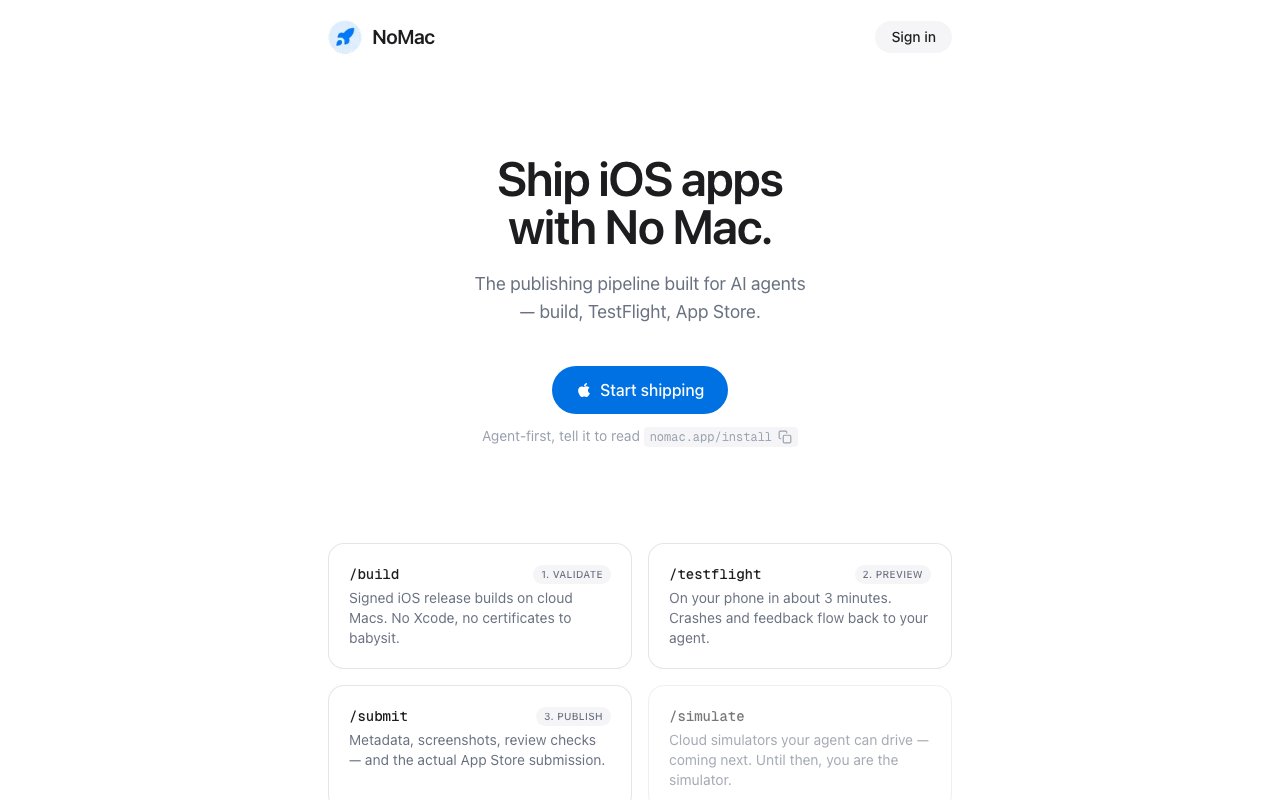
NoMac is a cloud iOS publishing pipeline that builds, signs, tests, and submits iPhone apps without you ever touching a Mac. It runs the entire release chain on hosted cloud Macs, so the machine that compiles your code, manages your certificates, and pushes to the App Store lives on someone else's hardware instead of your desk. The name is the whole pitch. If you write iOS code on Linux or Windows, or you're an AI agent with no desktop at all, NoMac is what stands between your source and a live App Store listing.
The workflow splits into three stages the site calls Validate, Preview, and Publish. Validate produces signed iOS release builds on cloud Macs with no Xcode to install and no certificates to babysit. Preview gets that build onto your phone in about three minutes through TestFlight, and any crashes or tester feedback flow back to whatever agent or tool kicked off the run. Publish handles the unglamorous last mile, meaning metadata, screenshots, review checks, and the actual App Store submission. Everything the pipeline does in between, from provisioning and signing to cloud builds and crash collection, happens without you opening a single Apple tool. Because the builds run on real Apple hardware in the cloud, what comes out is a proper signed release rather than an unsigned simulator build.
What sets NoMac apart is who it's built for. The product is aimed squarely at AI coding agents as much as at humans, and it works with any agent that speaks MCP or can run a CLI, naming Claude Code, Codex, and Cursor as examples. In practice that means an agent can write an app, trigger a build, read back the crash report, fix the bug, and resubmit, all through the same interface a person would use. You can reach it through a CLI, a plain HTTP API, or the MCP protocol, so it slots neatly into scripted and agent-driven pipelines rather than forcing you through a graphical interface. That framing is a real shift from the usual assumption that a human sits at Xcode driving every release by hand.
There's still some one-time setup that NoMac can't do for you, because Apple owns those pieces. You bring your own Apple Developer account, hand over an App Store Connect API key, answer the App Privacy questions once, and install TestFlight on your iPhone. After that the company's line is that everything, every build and every release, runs hands-off. The goal isn't to hide Apple's requirements, it's to automate every step that doesn't legally require your name on the developer account, so the parts that stay manual are the ones Apple insists a real person completes.
The reason a service like this exists is that iOS has always been the one platform you could not fully escape a Mac for. Signing, notarization, and App Store submission historically meant owning Apple hardware or renting a flaky remote machine and driving Xcode by hand. NoMac turns that grind into an API call. For indie developers on non-Apple machines, for small teams that don't want to hand every engineer a laptop, and increasingly for agents that ship software on their own, that removes a barrier that used to be genuinely painful and expensive to work around. It also means you can develop and ship iOS apps from the same Linux or Windows box you already use for everything else, keeping your whole toolchain in one place.
The build limits are worth understanding, since they're how the plans are metered. A build is one run of the pipeline, so a busy day of fixing crashes and resubmitting can burn through several of them. The lower tier gives you enough headroom for a single app in active development, while the higher tier is sized for someone maintaining many apps at once or an agent iterating quickly through releases. Either way there's no CI runner to configure, no Xcode version to keep current, and no signing certificate to renew by hand, which are the chores that usually eat an afternoon whenever Apple changes something.
Pricing is straightforward and cheap for what it replaces. Starter is $5 a month, covers one app, and includes 50 builds a month with both TestFlight and App Store submission. Pro is $20 a month, lifts the app cap to unlimited, and raises the ceiling to 300 builds a month. Both plans still require the Apple Developer Program membership, which is $99 a year paid directly to Apple and not to NoMac. There's no Mac to buy and no build farm to run, which is the entire point of paying for the service instead of assembling it yourself. Set against buying a Mac and keeping it patched, the monthly fee is easy to justify for anyone shipping more than the occasional app.
Key Features
- Cloud iOS builds on hosted Macs
- Automatic code signing and provisioning
- TestFlight distribution in minutes
- App Store submission handling
- MCP, CLI, and API access
- Crash and feedback reporting to agents
Pros & Cons
What we like
- Ships iOS apps without owning a Mac
- Works with AI coding agents over MCP
- Handles certificates and signing automatically
- Cheap monthly pricing versus buying a Mac
Room for improvement
- Still requires a paid Apple Developer account
- No free tier, paid from the first plan
- Starter plan is capped at a single app
- A few Apple setup steps you must do yourself
Frequently Asked Questions
What is NoMac?
Do I still need an Apple Developer account?
Is NoMac free?
Can AI agents use NoMac?
Best For
Featured in
Alternatives to NoMac

1Lookup
Real-time data verification API for phone, email, IP, and domain validation to fight fraud

Codedex
A gamified, story-driven platform that teaches Python, web dev, and more like an RPG quest
Hack2hire
Practice real SDE interview questions from top tech companies with expert worked solutions
Cloudflare Pages
Free Jamstack hosting on Cloudflares edge with unlimited bandwidth and tight integration with Workers.
Reviews (9)
Two months in, no regrets
NoMac has quietly become part of my daily flow. Got real value out of app store submission handling. It fits well for distributing testflight builds without xcode. No regrets so far.
Pulled its weight from week one
Tried NoMac on a side project first, then rolled it out everywhere. Got real value out of handles certificates and signing automatically. It has shaved real time off my week. Hard to imagine going back to my old setup.
Two months in, no regrets
Found NoMac on a Show HN thread and I am glad I clicked. The interface stays out of my way, which I appreciate. Support actually answered when I had a question, which surprised me. Mostly using it for shipping an ios app from a linux machine. Hard to imagine going back to my old setup.
Exactly what I needed
NoMac solves a real problem for me without making a fuss about it. What stands out is how little babysitting it needs. Mostly using it for shipping an ios app from a linux machine. No regrets so far.
Genuinely impressed
NoMac has quietly become part of my daily flow. It does what it says, which is rarer than it should be. Recommending it to people in a similar spot.
Exactly what I needed
Picked NoMac for the price, stayed for the quality. Their take on testflight distribution in minutes is genuinely good. Setup was painless and I was productive the same day. It earns its place in my stack.
Recommended without reservation
Three months of NoMac later, here is what holds up. The automatic code signing and provisioning is more useful than I expected. Worth it for what I get out of it.
Finally something that fits
Tried NoMac on a side project first, then rolled it out everywhere. The defaults are sensible, so I was not fighting settings on day one. Support actually answered when I had a question, which surprised me. It fits well for automating app store releases in a pipeline. Would sign up again without thinking twice.
Powerful once it clicks
Picked NoMac for the price, stayed for the quality. What stands out is how it handles mcp, cli, and api access. Mostly using it for shipping an ios app from a linux machine. My only gripe is a few apple setup steps you must do yourself. It earns its place in my stack.
Badge builder
Add NoMac to your website
Choose a badge style and size, preview it here, then copy the generated HTML. Badge images are self-contained SVGs and do not require an external script.

<a href="https://toolindex.net/tools/nomac?ref=badge" target="_blank" rel="noopener">
  <img src="https://toolindex.net/badge/nomac/medium.svg" alt="NoMac - Listed on Tool Index" width="180" height="50" />
</a>How to use the badge
- 1. Pick the style, size, and theme that fit your layout.
- 2. Copy the generated HTML from the code block.
- 3. Paste it into your footer, homepage, or press page.
Standard badge available
The standard listing badge is available now. Score and circle badges are limited to tools currently ranked in the top 10 of a category.
Badge clicks return visitors to this profile with a referral tag so the source remains identifiable.
Related Tools

Kevin Gabeci
Solo developer building web apps, cozy browser games, and AI creator toolkits.

Coolify
Self-hostable, open source alternative to Heroku and Netlify

Warp
The modern terminal reimagined with AI and collaboration

Bolt.new
Prompt-to-deployed full-stack app inside the browser
Work on NoMac? Request listing access or correction