
OpenParser
Document parsing API that extracts structured data from PDFs and images using open weights OCR
Gallery
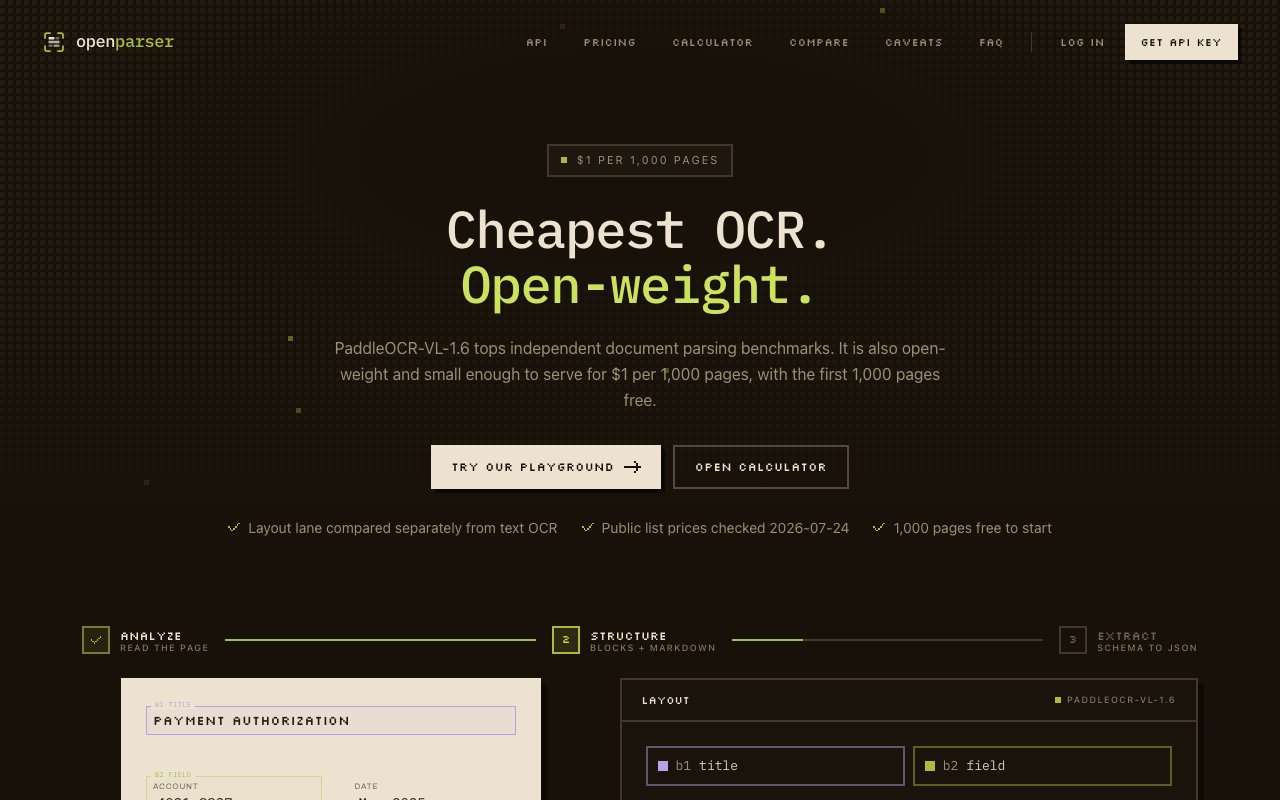
About OpenParser
OpenParser is a hosted API for extracting text and structured data from PDFs and images. It uses PaddleOCR-VL-1.6, an open weights vision language model, to analyze documents and return normalized layout blocks, markdown, or JSON with field level citations pointing back to the source. If you are building document processing into a product and need something more structured than raw text extraction, this is the kind of service that sits between basic OCR and a full document intelligence platform. It handles the parsing infrastructure, the GPU provisioning, and the model serving so you can focus on what to do with the extracted data rather than maintaining inference pipelines.
The core workflow has three steps. First, the parser analyzes your document and identifies content like headings, paragraphs, tables, figures, signatures, and other structural elements. It returns typed layout blocks with bounding box coordinates and per block confidence scores, so you know exactly where each piece of content sits on the page and how reliable the recognition is. This granularity is useful when you need to extract specific regions or verify that critical fields were read correctly. Second, it can render those results as markdown or structured blocks, depending on what you need downstream. Markdown is useful for feeding into LLMs, rendering in an interface, or producing human readable documentation from scanned pages. Structured blocks are better for programmatic processing where you need to access specific content types directly. Third, if you define a JSON schema, it extracts specific fields and includes citations that link each value back to its source block in the document. This last part is useful when you need to audit where extracted data came from, explain to a user why a field was populated with a particular value, or debug extraction issues by tracing back to the original content.
Technically, the API supports synchronous, asynchronous, and batch processing modes. Synchronous is straightforward for small jobs where you can wait for the response to return in the same request. Asynchronous returns a job ID so you can poll for results later, which is better for larger documents, multi page files, or when you are processing in the background without blocking your main application flow. Batch mode handles multiple files in a single request, which reduces overhead when you are ingesting a queue of documents from an upload folder or processing a backlog of historical records. The API lives at api.openparser.dev with endpoints for parsing, extraction, job management, and file retrieval. The documentation covers authentication, rate limits, and error handling.
For extraction, you bring your own LLM. The service supports Claude, GPT-4o, Llama, or self hosted models through an API compatible interface. This means you are not locked into a specific provider for the intelligence layer, and token costs depend on which model you choose and how verbose your prompts are. The parser itself charges per page rather than per token, which makes cost estimation simpler when you are budgeting for document volumes and trying to forecast monthly spend. The output contract is normalized, so you can switch models or even underlying parser implementations without breaking your integration. If you start with GPT-4o and later move to a self hosted Llama, the schema stays the same.
Pricing is transparent and scales with usage. The first 1,000 pages are free, which is enough to build and test an integration, run it against your real document corpus, and validate that the extraction quality meets your requirements without committing money upfront. After that it is one dollar per 1,000 pages, which is competitive with other parsing services and significantly cheaper than building and maintaining your own OCR infrastructure. Extraction adds whatever your selected LLM costs in tokens, which varies by provider and model tier. There are no seat fees, no minimums, and no enterprise contracts required to get started. This makes it accessible for early stage projects and startups that need to process documents but cannot commit to the pricing models and sales cycles of larger document intelligence platforms.
The target audience is developers building automation around documents. Invoice processing, receipt parsing, contract analysis, PDF to markdown pipelines, form digitization, and anything else where you need structured output from unstructured files. The studio at openparser.dev includes a playground for testing documents interactively before writing code, API key management for multiple environments, usage monitoring and billing dashboards, and team collaboration with role based access. You can invite teammates as owners, admins, or members depending on what level of control they need over keys and billing.
What sets it apart is the focus on citations and consistency. A lot of extraction tools give you fields but no way to trace them back to the source. OpenParser ties each extracted value to a specific block ID in the parsed document, which matters for compliance workflows, audit trails, dispute resolution, or just debugging why a field came out wrong. The schema stays consistent across parser updates, so integrations do not break when the model improves or the underlying OCR engine gets upgraded. If you have tried stitching together OCR plus prompting and found the results unreliable or difficult to verify, this is a more structured approach to the same problem that builds traceability into the output from the start.
Key Features
- PaddleOCR powered document parsing
- Markdown and JSON output formats
- Block level citations for traceability
- Sync, async, and batch processing modes
- Per block confidence scoring
- Bring your own LLM for extraction
Pros & Cons
What we like
- First 1,000 pages free with simple per page pricing after
- Citations link extracted fields back to source locations
- Supports multiple LLMs without vendor lock in
- Consistent schema across parser updates
Room for improvement
- Extraction costs depend on third party LLM token pricing
- Requires API integration, no drag and drop interface
- Newer service with a smaller user community
- Best suited for developers, not end users
Frequently Asked Questions
What is OpenParser?
How much does OpenParser cost?
What LLMs can I use for extraction?
Can I trace extracted fields back to their source?
Best For
Featured in
Alternatives to OpenParser
View all
1Lookup
Real-time data verification API for phone, email, IP, and domain validation to fight fraud

Kevin Gabeci
Solo developer building web apps, cozy browser games, and AI creator toolkits.

Codedex
A gamified, story-driven platform that teaches Python, web dev, and more like an RPG quest
Hack2hire
Practice real SDE interview questions from top tech companies with expert worked solutions
Our take
Tool Index Editorial · Sep 2026· 4.0/5
OpenParser is a document parsing API that routes PDFs and images through hosted OCR models and returns markdown, typed blocks, coordinates, confidence, or schema driven JSON with citations. We found a concrete API contract, sync and batch modes, a playground, and unusually transparent model pricing. New accounts receive $10 in credits, with PaddleOCR VL starting at $1 per 1,000 pages and eight other engines available at higher rates.
The normalized output and block citations are the strongest reasons to consider it for invoices, forms, search ingestion, or auditable extraction. Developers can switch OCR engines without redesigning the whole integration. It isn't a turnkey end user app, though, and extraction adds separate LLM token charges. Accuracy will still vary with document quality and layout, so confidence scores and citations need to feed an actual review path.
Editorial opinion from the Tool Index team, written from the public product pages. Not a user review.
Reviews (0)
Badge builder
Add OpenParser to your website
Choose a badge style and size, preview it here, then copy the generated HTML. Badge images are self-contained SVGs and do not require an external script.

<a href="https://toolindex.net/tools/openparser?ref=badge" target="_blank" rel="noopener">
  <img src="https://toolindex.net/badge/openparser/medium.svg" alt="OpenParser - Listed on Tool Index" width="180" height="50" />
</a>How to use the badge
- 1. Pick the style, size, and theme that fit your layout.
- 2. Copy the generated HTML from the code block.
- 3. Paste it into your footer, homepage, or press page.
Standard badge available
The standard listing badge is available now. Score and circle badges are limited to tools currently ranked in the top 10 of a category.
Badge clicks return visitors to this profile with a referral tag so the source remains identifiable.
Related Tools
Kevin Gabeci
Solo developer building web apps, cozy browser games, and AI creator toolkits.

Coolify
Self-hostable, open source alternative to Heroku and Netlify

Warp
The modern terminal reimagined with AI and collaboration

Bolt.new
Prompt-to-deployed full-stack app inside the browser
Work on OpenParser? Request listing access or correction