
Post Bridge
Schedule and cross-post content to up to nine social platforms from one simple dashboard
Gallery
About Post Bridge
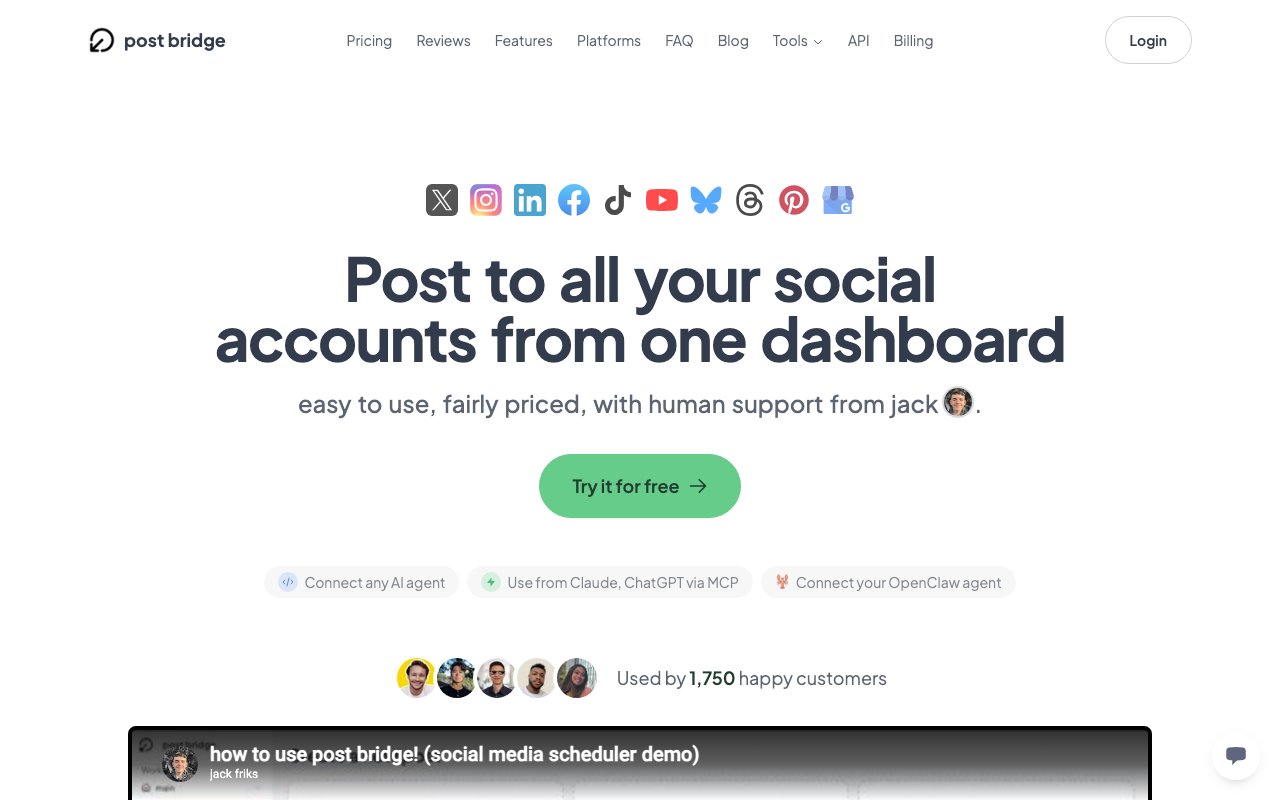
Post Bridge is a social media scheduling tool built for creators and small teams who want to publish content across multiple platforms without jumping between apps or paying enterprise prices. It connects to nine networks, including Instagram, Twitter/X, Facebook, LinkedIn, TikTok, YouTube, Threads, Bluesky, and Pinterest, and lets users write a post once and send it everywhere at the same time. The pitch is simple: create in one place, schedule it, and move on with your day. Unlike the legacy tools that grew up serving marketing departments at Fortune 500 companies, Post Bridge is designed and priced for independent creators, solopreneurs, and small teams who need reliability without the bloat. It strips away the features most individuals never touch and focuses on what actually matters: getting content published consistently across the platforms where your audience lives.
The problem it solves is the daily grind of cross-posting. Anyone managing more than two or three social accounts knows the routine of opening each app, copying the same text, adjusting the format, uploading the same image again, and hoping nothing gets missed. Multiply that by five days a week and the time adds up fast. Post Bridge collapses that into a single workflow. You connect your accounts, write the post, pick your platforms, choose whether to publish immediately or schedule for later, and the tool handles the rest. There is also a content calendar view so you can see what is going out and when, plus the ability to edit scheduled posts before they go live. For creators who batch their content creation into a single session each week, this is the difference between an hour of busywork and ten minutes of setup. The time saved compounds, and for solo operators, that time is the difference between sustainable and burnt out.
One detail that sets it apart from the crowded scheduling market is the MCP integration. Post Bridge exposes its functionality to AI assistants like Claude and ChatGPT through the Model Context Protocol, meaning you can draft and schedule posts from inside an AI conversation without ever opening the Post Bridge dashboard. It ships with eleven MCP tools and a full REST API, which opens up automation possibilities for people who want to build their own workflows or connect it to other systems. This is a niche feature, but for the growing number of creators who run their businesses through AI assistants, it removes another layer of friction. You can go from idea to scheduled post without leaving the chat window. For developers and technically inclined creators, the API also means Post Bridge can plug into custom automations, internal tools, or content pipelines that would otherwise require manual copy-paste steps.
The audience is independent creators, solopreneurs, and small marketing teams who do not need the analytics dashboards, approval chains, and multi-seat features that push enterprise tools into the hundreds of dollars per month. Tools like Buffer and Hootsuite have their place, but they charge seventy-five to two hundred dollars a month for features most individual creators never touch. Post Bridge positions itself as the lightweight alternative, and the pricing reflects that. Plans start at nine dollars a month, with a free tier available for trying it out. Annual billing drops the cost even further. The trade-off is that you can only connect one account per platform to a single post, so agencies juggling many client accounts on the same network will need to look elsewhere. For the solo creator or small team managing their own brand, that limitation rarely matters.
There are also built-in templates and a basic drag-and-drop editor for creating short videos, which is useful for formats like TikTok or Reels where quick visual content performs well. It is not a full-blown video editor, but it covers the essentials for someone who wants to turn a few images and text into something scrollable without opening a separate app. The templates are designed to get you to a finished piece quickly, not to offer infinite customization. If you already have your own editing workflow, you can skip this feature entirely and just use Post Bridge for scheduling and publishing. It is a nice-to-have that rounds out the feature set without adding complexity for people who do not need it.
In practice, Post Bridge fits best for people who want reliability and speed over feature depth. It does not try to be an analytics suite or a social listening platform. It does not offer competitive analysis or hashtag research or audience insights. It focuses on one job, getting content out the door to multiple networks on schedule, and keeps the interface clean enough that you can move through a week of posts in a few minutes. The free tier lets you test whether it fits your workflow before committing, and the paid plans stay affordable even for creators who are not yet earning from their content. For anyone tired of the overhead that comes with legacy social tools, Post Bridge is worth a serious look.
Key Features
- Cross-post to up to nine platforms
- Upload once, publish everywhere
- TikTok carousel scheduling with trending audio
- Edit and manage scheduled posts
- Multiple accounts per platform
- Single unified scheduling dashboard
Pros & Cons
What we like
- Far cheaper than mainstream schedulers, built for solo creators
- Genuinely fast, post to nine platforms in a couple of minutes
- Transparent founder and a clear product philosophy
- Handles TikTok carousels and trending audio that rivals skip
Room for improvement
- No AI features on any plan
- Limited integrations and customization compared to bigger suites
- Light on analytics and engagement or monitoring tools
- Lower tiers cap how many accounts you can connect
Frequently Asked Questions
How many platforms can Post Bridge post to?
Does Post Bridge have AI features?
How much does it cost compared to Buffer or Hootsuite?
What's the catch with such low pricing?
Who is Post Bridge best for?
Best For
Featured in
Alternatives to Post Bridge
Postiz
Open-source social media scheduling across 30-plus platforms with AI drafting and an MCP server

Buffer
Social media scheduling tool with a clean queue, multi-channel posting, and analytics for small teams and creators.

Typefully
Distraction-free composer for X and LinkedIn posts with drafts, threads, scheduling, analytics, and AI writing helpers.

Supergrow
AI LinkedIn content tool that interviews you to write posts in your own voice and schedules them
Our take
Tool Index Editorial · Jun 2026· 4.1/5
Post Bridge knows exactly what it is: a cheap, fast, no-frills cross-poster for solo creators who put the same content everywhere. Upload once, hit up to nine platforms, pay a fraction of what Buffer or Hootsuite charge. The TikTok carousel and trending-audio handling is a nice touch that pricier rivals skip, and the founder's transparency about the philosophy is genuinely refreshing.
Just go in clear-eyed about the deliberate gaps. No AI features anywhere, analytics still in beta, limited integrations, and email-only support. Those aren't bugs, they're the trade you make for the low price. If you want a posting workhorse and nothing more, it delivers. If you need analytics depth or AI assistance, look elsewhere.
Editorial opinion from the Tool Index team, written from the public product pages. Not a user review.
Reviews (8)
Wanted to love it, couldn't
Started using Post Bridge casually, now it's pinned in my dock. Where it really wins is genuinely fast, post to nine platforms in a couple of minutes. Probably better for someone with different needs.
Pros
- Handles TikTok carousels and trending audio that rivals skip
Cons
- Lower tiers cap how many accounts you can connect
It just works
First impression of Post Bridge was 'huh, this is actually thought through.' The thing I keep coming back to: genuinely fast, post to nine platforms in a couple of minutes. Multiple accounts per platform works the way you'd hope. Mostly using it for solo creators repurposing one video across every platform. Sticking with Post Bridge.
Recommended without reservation
Hadn't planned on switching, but Post Bridge was hard to ignore. Genuine strength: handles TikTok carousels and trending audio that rivals skip. Mostly using it for indie founders posting product clips to TikTok, Reels, and Shorts at once. Hard to imagine going back to my previous setup.
Useful but pricey
Adopted Post Bridge for one project, ended up using it for more. The biggest win has been handles TikTok carousels and trending audio that rivals skip. Mostly using it for creators who want carousel and trending-audio support on TikTok. One thing that bugs me: no AI features on any plan. Worth a trial if you're in the same boat.
Pros
- Transparent founder and a clear product philosophy
- Genuinely fast, post to nine platforms in a couple of minutes
- Far cheaper than mainstream schedulers, built for solo creators
Quietly excellent
Tried half a dozen options before landing on Post Bridge. Where it really wins is far cheaper than mainstream schedulers, built for solo creators. Worth calling out the upload once, publish everywhere too. Worth the price for what I get out of it.
Pros
- Far cheaper than mainstream schedulers, built for solo creators
Two months in, no regrets
Been using Post Bridge for about half a year now. Genuine strength: far cheaper than mainstream schedulers, built for solo creators. Worth calling out the cross-post to up to nine platforms too.
Pros
- Handles TikTok carousels and trending audio that rivals skip
- Far cheaper than mainstream schedulers, built for solo creators
- Genuinely fast, post to nine platforms in a couple of minutes
Did exactly what I needed
Picked Post Bridge for the lower price, stayed for the actual quality. What stands out is how transparent founder and a clear product philosophy. Multiple accounts per platform works the way you'd hope. Found it works best for indie founders posting product clips to TikTok, Reels, and Shorts at once.
Onboarded the team in a day
Picked Post Bridge for the lower price, stayed for the actual quality. Genuine strength: handles TikTok carousels and trending audio that rivals skip. Tiktok carousel scheduling with trending audio works the way you'd hope. It fits well for creators who want carousel and trending-audio support on TikTok. One thing that bugs me: no AI features on any plan.
Cons
- Light on analytics and engagement or monitoring tools
Badge builder
Add Post Bridge to your website
Choose a badge style and size, preview it here, then copy the generated HTML. Badge images are self-contained SVGs and do not require an external script.

<a href="https://toolindex.net/tools/post-bridge?ref=badge" target="_blank" rel="noopener">
  <img src="https://toolindex.net/badge/post-bridge/medium.svg" alt="Post Bridge - Listed on Tool Index" width="180" height="50" />
</a>How to use the badge
- 1. Pick the style, size, and theme that fit your layout.
- 2. Copy the generated HTML from the code block.
- 3. Paste it into your footer, homepage, or press page.
Standard badge available
The standard listing badge is available now. Score and circle badges are limited to tools currently ranked in the top 10 of a category.
Badge clicks return visitors to this profile with a referral tag so the source remains identifiable.
Related Tools

Apatero AI
The creator studio for AI image, video, audio, 3D, and avatars, now at apatero.ai.

SEObot
Autonomous AI SEO agent that runs your blog and link building on autopilot

Substack
Hosted newsletter and publication platform with built-in payments, recommendations, and an audience network for writers.
MailerLite
Friendly, affordable email marketing tool with newsletters, automations, landing pages, and a growing creator toolkit.
Work on Post Bridge? Request listing access or correction