Post2Song
Paste an X post URL, get an original song back using ACE-Step AI composition
Gallery
About Post2Song
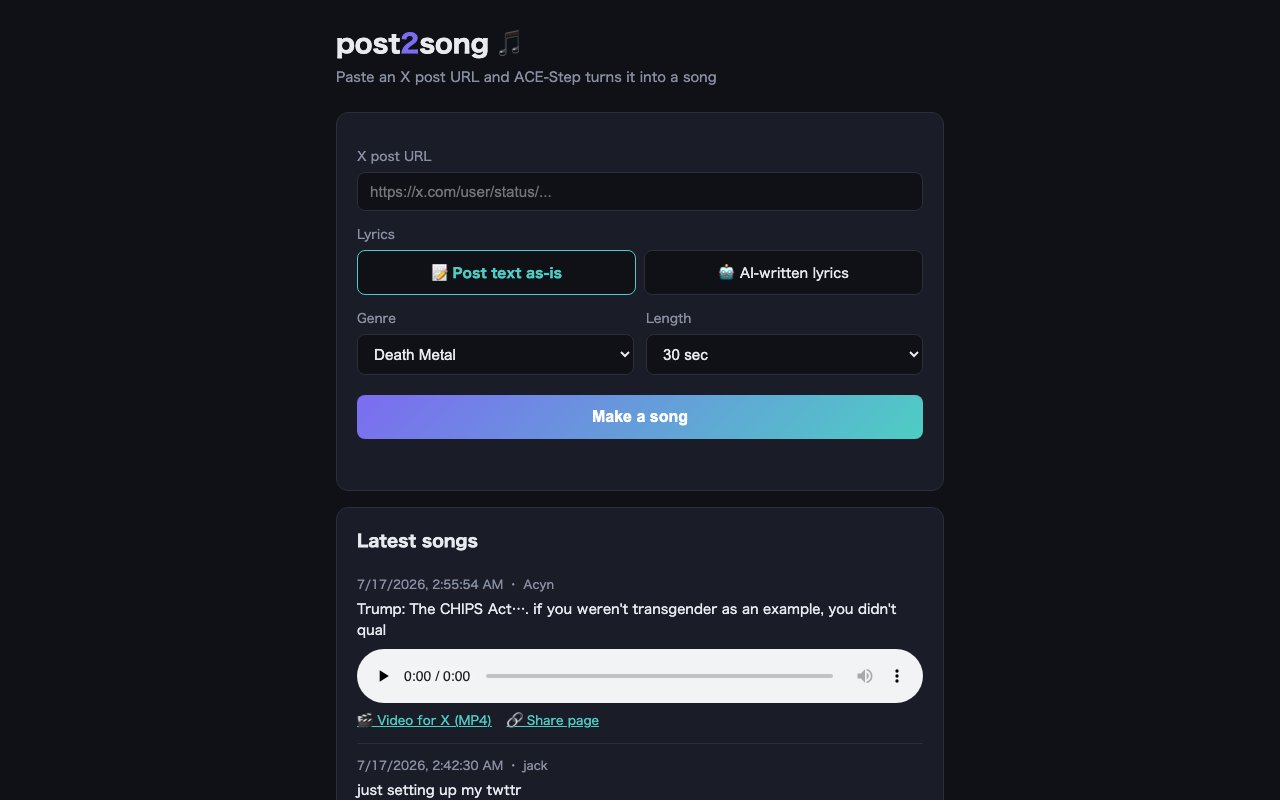
Post2Song is a novelty tool that converts X (formerly Twitter) posts into short musical tracks across various genres. You paste a post URL, pick a musical style, and it generates an audio clip with the post's content transformed into lyrics set to music. The output comes as both an MP3 download and an MP4 video formatted for sharing back to X with visuals and text overlay. It's a playful utility for content creators who want to turn social media moments into something more memorable, shareable in a different format, or simply entertaining in a way that plain text sitting in a timeline can't achieve.
The conversion process offers two distinct modes for handling the source text, and the choice between them affects how closely the output resembles the original post. The original mode keeps the post content intact and sets it directly to music, which means the lyrics are exactly what was written even if it doesn't scan perfectly as traditional song structure. The AI-enhanced mode rewrites the text into something that flows better as song lyrics while keeping the core meaning and emotional tone. This matters because tweets and posts often don't work well as verses on their own. They're written for reading in a feed, not for singing or performing. The rewrite option gives the output a more natural musical structure without losing what made the post worth converting in the first place.
Genre selection determines the overall sound, feel, and production aesthetic of the generated track. Death metal is the name that shows up prominently in the branding and gives the tool its distinctive personality, but the platform supports multiple musical styles beyond just aggressive metal. The genre you pick shapes everything from the instrumentation to the vocal delivery style to the mixing and production aesthetic. Duration options let you choose between fifteen-second and thirty-second clips depending on whether you want a quick punchy hit or something with more room to develop musically. If the first result doesn't land the way you wanted, you can regenerate to get different takes on the same input with different arrangements and delivery. That variation system acknowledges that AI-generated music is inherently hit or miss, and having multiple options increases the chance you'll get something worth sharing rather than settling for a mediocre first attempt.
The output formats reflect how people actually share this kind of content on social media platforms. The MP3 works for anyone who wants just the audio file to use however they like, whether that's adding it to a video they're editing or just keeping it as a novelty file. The MP4 is optimized specifically for posting to X with visuals and the lyrics displayed on screen as the track plays, which makes it significantly more engaging in a feed than a bare audio file would be. Videos with text overlay perform better on social platforms because they work with sound off and give viewers something to read while they listen, capturing attention in the scroll. Each generated song also gets its own shareable page with an embedded player, so you can send someone a link rather than attaching a file directly when you want to share outside of X.
The interface is bilingual, supporting both English and Japanese text and navigation throughout. The casual, irreverent tone of the branding suggests the target audience is content creators, memers, and social media users looking for creative ways to remix their posts, call attention to something funny or memorable someone else posted, or just make their followers laugh with an unexpected format. It's not a serious music production tool, and it doesn't pretend to be anything other than what it is. It's a gimmick, but a well-executed one that produces results people actually share rather than immediately delete because they're embarrassing.
There's no visible pricing or account requirement on the platform, which suggests the tool is free to use without restrictions or credit limits. The lack of a signup flow means you can test it immediately without any commitment or even providing an email address. That low barrier makes it easy to try on a whim, which is probably how most people discover it in the first place. Someone shares a death metal version of a tweet, you wonder how they made it, you find Post2Song, and ten seconds later you're making your own. The virality potential is built directly into the product design and the shareability of its outputs.
Post2Song fits a specific niche: turning ephemeral social media content into something with a different kind of impact and staying power. A tweet disappears in a timeline within hours, buried under the endless scroll of new content. A death metal track of that same tweet is harder to forget and more likely to get reshared because it's genuinely unusual and entertaining. For creators who live on X and want another way to engage their audience or call attention to specific posts that deserve a second life, this is a strange little tool that delivers on exactly what it promises without any unnecessary complexity or friction standing in the way.
Key Features
- X post URL to song conversion
- Verbatim or AI-written lyrics modes
- Genre selection and length options
- MP3 and MP4 download formats
- Shareable song pages
- Community history timeline
Pros & Cons
What we like
- Turns social content into music with one URL paste
- MP4 output pre-formatted for sharing back on X
- No account or setup required
- Bilingual English and Japanese interface
Room for improvement
- Song length capped at 30 seconds
- Only works with X posts, not other platforms
- Genre options limited to what the model supports
- Queue times vary depending on demand
Frequently Asked Questions
What is Post2Song?
Is Post2Song free?
Can I use my own lyrics instead of a post?
What formats can I download?
Best For
Featured in
Alternatives to Post2Song
View all
Suno
Generate full songs from a prompt, including vocals, lyrics, and all.

Stable Audio
Stability AI's text-to-audio model for generating original music and sound effects from a written prompt

Melodusk
AI music generator with lyrics, stems, MIDI editing, and music videos in the browser
Udio
AI music generator that leans into mixing fidelity and stems
Reviews (11)
Recommended without reservation
Post2Song has quietly become part of my daily flow. Got real value out of mp3 and mp4 download formats. The interface stays out of my way, which I appreciate. No regrets so far.
Solid but not perfect
Hadn't planned on switching, but Post2Song was hard to ignore. The interface stays out of my way, which I appreciate. It does what it says, which is rarer than it should be. It would be a five if not for genre options limited to what the model supports. Would sign up again without thinking twice.
Recommended without reservation
Picked Post2Song for the price, stayed for the quality. Their take on shareable song pages is genuinely good.
Exactly what I needed
Started using Post2Song casually, now it is pinned in my dock. It handles the boring parts so I can focus on the work that matters. Would sign up again without thinking twice.
It just works
Tried Post2Song on a side project first, then rolled it out everywhere. The no account or setup required is more useful than I expected. Worth it for what I get out of it.
Two months in, no regrets
Came to Post2Song after getting frustrated with what I had before. The bilingual english and japanese interface is more useful than I expected. It slotted into my routine without much fuss. Found it works best for turning a viral x post into a shareable song.
Powerful once it clicks
Have been running Post2Song for a while, here is where I land. The defaults are sensible, so I was not fighting settings on day one. The catch is genre options limited to what the model supports.
Pulled its weight from week one
Found Post2Song on a Show HN thread and I am glad I clicked. Where it really wins is community history timeline. The thing I keep coming back to is how reliable it is. Worth it for what I get out of it.
Exactly what I needed
Three months of Post2Song later, here is what holds up. Their take on no account or setup required is genuinely good. Found it works best for creating short audio clips for social engagement.
Solid daily driver
Hadn't planned on switching, but Post2Song was hard to ignore. What stands out is how it handles turns social content into music with one url paste. Found it works best for creating short audio clips for social engagement. It earns its place in my stack.
Recommended without reservation
Started using Post2Song casually, now it is pinned in my dock. What stands out is how it handles genre selection and length options. It fits well for creating short audio clips for social engagement. Easy yes for anyone weighing the same trade offs.
Badge builder
Add Post2Song to your website
Choose a badge style and size, preview it here, then copy the generated HTML. Badge images are self-contained SVGs and do not require an external script.

<a href="https://toolindex.net/tools/post2song?ref=badge" target="_blank" rel="noopener">
  <img src="https://toolindex.net/badge/post2song/medium.svg" alt="Post2Song - Listed on Tool Index" width="180" height="50" />
</a>How to use the badge
- 1. Pick the style, size, and theme that fit your layout.
- 2. Copy the generated HTML from the code block.
- 3. Paste it into your footer, homepage, or press page.
Score badge available
Post2Song qualifies for the score and circle badges based on its current top-10 positionin AI Music Generators.
Badge clicks return visitors to this profile with a referral tag so the source remains identifiable.
Related Tools

Soundraw
AI music generator that builds royalty-free, fully customizable songs from a mood and genre in seconds
Stable Audio
Stability AI's text-to-audio model for generating original music and sound effects from a written prompt
Suno
Generate full songs from a prompt, including vocals, lyrics, and all.

Boomy
Make original AI songs in seconds and distribute them to Spotify, Apple Music, and 40+ streaming platforms
Work on Post2Song? Request listing access or correction