
Promptrack
Mac menu bar app that tracks your Claude Code usage without uploading anything to the cloud
Gallery
About Promptrack
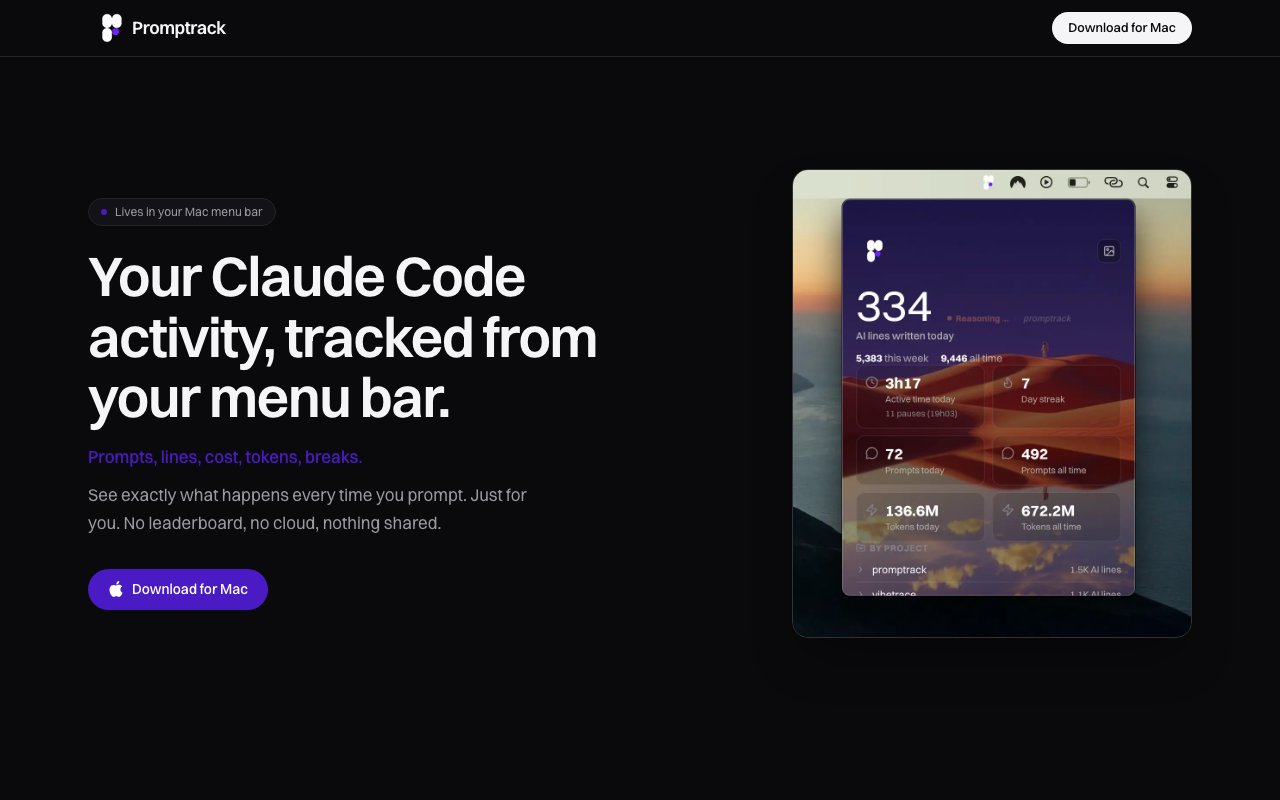
Promptrack is a macOS menu bar utility that monitors how you use Claude Code and gives you metrics about your coding sessions without sending any data outside your machine. It reads the session logs that Claude Code already writes to your local disk, extracts statistics like lines of code touched, prompts sent, tokens used, and time spent in active coding, then presents them in a compact interface that lives in your Mac's menu bar. Nothing is uploaded to a server. Nothing syncs to a cloud service. The app runs entirely offline with zero network requests, which addresses the privacy concern that comes with most productivity tracking tools that want you to send your work patterns to someone else's database.
The data sources are local files that already exist on your system and that you may not have known were there. Claude Code stores session data at paths like ~/.claude/projects and ~/.claude/history.jsonl, logging every interaction as structured JSON. Promptrack reads those files, parses the information, and calculates usage metrics from the raw logs. If you've been curious about how much you actually use Claude Code during a given day or week, how many tokens you're consuming on a particular project, or whether you're spending more time prompting than coding, Promptrack surfaces those numbers without requiring you to log anything manually, install a browser extension, or trust a third party with your work patterns. The logs are already there. This tool just makes them visible.
The metrics include daily, weekly, and all-time totals for lines of code modified or reviewed during Claude Code sessions, active coding time versus idle time, detected pauses between prompts, prompt counts, and token usage broken down by conversation. It also tracks usage by project, so you can see which codebases get the most AI assistance and which ones you're working on without much help from the model. Focused time detection happens automatically based on session activity patterns, so you don't need to start and stop timers, remember to click a button when you begin work, or manually log hours at the end of the day. The app watches what Claude Code logs in the background and derives all the numbers from that activity stream without you doing anything beyond installing it.
Privacy is the core promise and the primary differentiation from other developer productivity tools in a market where most options assume you're comfortable sending telemetry to a company. There's no account creation. No email required. No data synchronization to any cloud service. No leaderboards comparing you to other developers. No gamification that requires you to share your metrics. No anonymous telemetry uploads happening in the background. The app makes zero network requests during normal operation. Your usage data stays on your machine, in files you already have, and Promptrack just builds a dashboard on top of that existing local information. If you've avoided productivity tools because you don't want your work habits flowing to a company's servers or getting correlated with your identity, Promptrack is designed to eliminate that concern entirely while still giving you the visibility you wanted.
The app works on macOS 13 and later, supporting both Apple Silicon processors (M1, M2, M3, M4) and Intel Macs that can run current macOS versions. There's no Windows or Linux version available, which limits the audience to Mac users running relatively recent versions of the operating system. The application is lightweight enough to run constantly in the background without noticeable impact on performance or battery life, sitting quietly in the menu bar and updating metrics in real time as you work rather than requiring end-of-day syncs, manual refreshes, or any active intervention from you. It just runs and shows you the numbers when you click the icon.
Promptrack costs a flat $19 as a one-time purchase with lifetime access to all current and future features. There's no subscription, no annual renewal, no tier structure with basic versus pro features, and no upsells after purchase. The early access pricing is positioned as a limited-time offer, so the cost may increase once the product is more established and feature-complete. Support is available via email at feskpro@gmail.com for anyone who hits bugs, has feature requests, or runs into compatibility issues with specific Claude Code versions. The developer maintains an active presence on X at @extraction_moon for updates and discussions. The audience is developers who use Claude Code regularly on macOS and want visibility into their own usage patterns without any external monitoring, making it useful for personal productivity tracking, freelance time logging for client billing, or just satisfying curiosity about how much AI assistance factors into your daily coding workflow.
Key Features
- Local-only session log parsing
- Daily and weekly usage summaries
- Prompt and token usage tracking
- Per-project breakdown of activity
- Automatic focused time detection
- Zero network requests
Pros & Cons
What we like
- Completely offline with no data leaving your machine
- One-time purchase with lifetime updates
- No account or sign-up required
- Reads existing Claude Code logs automatically
Room for improvement
- Mac only, no Windows or Linux support
- Requires macOS 13 or later
- Only tracks Claude Code, not other AI tools
- Depends on Claude Code's log format staying stable
Frequently Asked Questions
What is Promptrack?
Does Promptrack upload my data?
How much does Promptrack cost?
Who is Promptrack for?
Best For
Featured in
Alternatives to Promptrack
View all
1Lookup
Real-time data verification API for phone, email, IP, and domain validation to fight fraud

Kevin Gabeci
Solo developer building web apps, cozy browser games, and AI creator toolkits.

Codedex
A gamified, story-driven platform that teaches Python, web dev, and more like an RPG quest
Hack2hire
Practice real SDE interview questions from top tech companies with expert worked solutions
Reviews (10)
Two months in, no regrets
Have been running Promptrack for a while, here is where I land. Their take on reads existing claude code logs automatically is genuinely good.
Exactly what I needed
Tried Promptrack on a side project first, then rolled it out everywhere. Their take on per-project breakdown of activity is genuinely good. No regrets so far.
Solid daily driver
Promptrack solves a real problem for me without making a fuss about it. It does what it says, which is rarer than it should be. The output quality holds up better than I expected. Hard to imagine going back to my old setup.
Pulled its weight from week one
Promptrack solves a real problem for me without making a fuss about it. Got real value out of zero network requests. Glad I made the switch.
Pulled its weight from week one
Started using Promptrack casually, now it is pinned in my dock. Where it really wins is local-only session log parsing. Recommending it to people in a similar spot.
Pulled its weight from week one
Three months of Promptrack later, here is what holds up. The core workflow is smooth once you are set up. Support actually answered when I had a question, which surprised me. No regrets so far.
It just works
Three months of Promptrack later, here is what holds up. What stands out is how it handles automatic focused time detection. Mostly using it for tracking personal claude code productivity.
Finally something that fits
Promptrack has quietly become part of my daily flow. Got real value out of automatic focused time detection. Mostly using it for understanding token usage across projects. Would sign up again without thinking twice.
Worth a look
Came to Promptrack after getting frustrated with what I had before. Where it really wins is zero network requests. Found it works best for tracking personal claude code productivity. Glad I made the switch.
Solid daily driver
Came to Promptrack after getting frustrated with what I had before. Performance has been steady even when I lean on it hard. Support actually answered when I had a question, which surprised me. Glad I made the switch.
Badge builder
Add Promptrack to your website
Choose a badge style and size, preview it here, then copy the generated HTML. Badge images are self-contained SVGs and do not require an external script.

<a href="https://toolindex.net/tools/promptrack?ref=badge" target="_blank" rel="noopener">
  <img src="https://toolindex.net/badge/promptrack/medium.svg" alt="Promptrack - Listed on Tool Index" width="180" height="50" />
</a>How to use the badge
- 1. Pick the style, size, and theme that fit your layout.
- 2. Copy the generated HTML from the code block.
- 3. Paste it into your footer, homepage, or press page.
Standard badge available
The standard listing badge is available now. Score and circle badges are limited to tools currently ranked in the top 10 of a category.
Badge clicks return visitors to this profile with a referral tag so the source remains identifiable.
Related Tools
Kevin Gabeci
Solo developer building web apps, cozy browser games, and AI creator toolkits.

Coolify
Self-hostable, open source alternative to Heroku and Netlify

Warp
The modern terminal reimagined with AI and collaboration

Bolt.new
Prompt-to-deployed full-stack app inside the browser
Work on Promptrack? Request listing access or correction