
RisingEdge
Browser based platform for learning VHDL and SystemVerilog with instant simulation and synthesis
Gallery
About RisingEdge
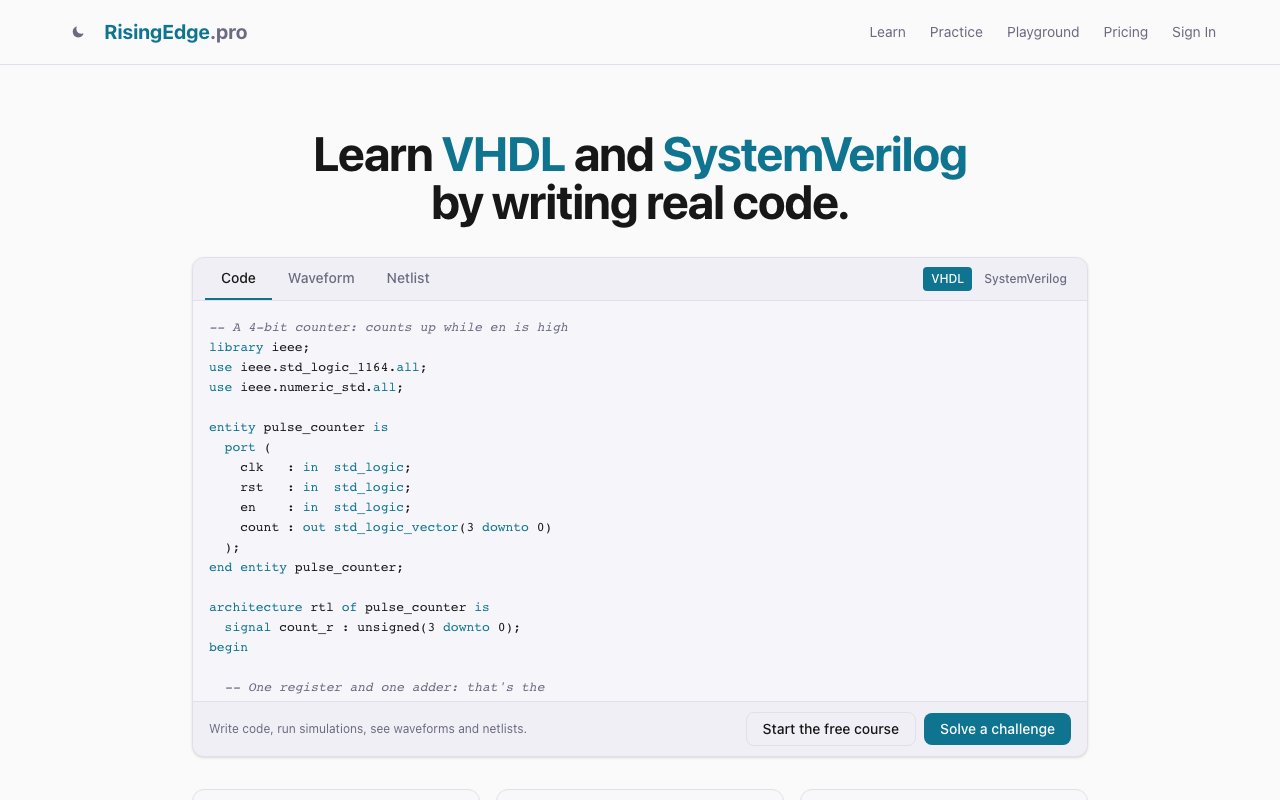
RisingEdge is a browser-based learning platform for hardware design that lets users write, simulate, and synthesize VHDL and SystemVerilog code without installing any software or purchasing expensive EDA licenses. The traditional path to learning hardware description languages involves acquiring access to professional tools that cost thousands of dollars annually, navigating complex academic licensing agreements, or setting up elaborate toolchains on personal computers. Many aspiring hardware engineers never start because the barrier to entry feels insurmountable compared to software development where free compilers and IDEs are everywhere. RisingEdge removes this barrier entirely by running real simulation and synthesis toolchains in the browser, making hardware design education accessible to anyone with an internet connection and curiosity about digital circuit design.
The learning workflow follows a three-step cycle that provides immediate feedback on every piece of code written. Users write code in a full-featured editor with real-time syntax feedback highlighting errors before they try to compile. The editor supports both VHDL and SystemVerilog with appropriate syntax highlighting, auto-completion, and error detection for each language. Running the design invokes GHDL for VHDL simulation or Icarus Verilog for SystemVerilog simulation, testing the code against testbenches that verify correct behavior. Yosys handles synthesis, converting the hardware description into a netlist that represents actual circuit implementation. All of these operations complete within seconds rather than the minutes often required by desktop tools, maintaining the rapid iteration cycle that effective learning requires.
Results display as interactive visualizations rather than cryptic text output. Waveform diagrams show signal behavior over time, letting learners see exactly when signals change value, how clock edges propagate through logic, and whether their designs produce expected outputs. Block diagrams visualize the synthesized circuit structure, showing how the HDL code translates into registers, multiplexers, adders, and other components. Clicking on components in these visualizations reveals the underlying code responsible for generating them, connecting abstract visual representations back to specific HDL constructs. This bidirectional connection between code and visualization helps learners build intuition for how textual descriptions become physical circuits.
The educational content spans 112 lessons, 121 live examples, 116 exercises, and 51 challenges structured from fundamentals through advanced topics. This isn't a documentation collection or a random assortment of tutorials but a curriculum designed to build hardware design competency progressively. Learners start with basic combinational logic, advance through sequential circuits with registers and state machines, and eventually tackle complex designs that integrate multiple subsystems. Story-driven challenges include real testbenches that validate whether designs meet specifications, providing the kind of concrete pass-fail feedback that accelerates learning far beyond reading explanations alone.
The practical orientation shows in user feedback. Testimonials from early users suggest that completing the course and practice problems prepares learners to pass most coding interviews for hardware design positions, indicating the content reaches professional competency levels rather than stopping at academic introduction. For career changers coming from software or students preparing for industry, this interview-readiness focus distinguishes RisingEdge from more theoretical resources.
Access follows a tiered model that keeps the entry point free. The entire Digital Foundations level covering core concepts is available without payment, allowing learners to evaluate the platform and build foundational skills before deciding whether to continue. This isn't a trial period but permanent free access to substantial content. Premium tiers unlock advanced modules for learners who complete fundamentals and want to go deeper into specialized topics. A playground tool operates free without account creation, letting anyone experiment with HDL code immediately without registration friction.
For aspiring hardware engineers, electrical engineering students, hobbyists curious about FPGA development, and software developers interested in hardware acceleration, RisingEdge provides a practical entry point that traditional educational paths often fail to offer. University courses require enrollment and fit into rigid semester schedules. Professional tools require budget approval and IT department cooperation. RisingEdge requires only opening a browser tab. The instant feedback loop of writing code, running simulation, and visualizing results in seconds supports the rapid iteration that effective skill development demands. By eliminating tool acquisition as a barrier, the platform lets anyone explore whether hardware design suits their interests and abilities before investing significant time or money in traditional education paths.
Key Features
- Browser based VHDL and SystemVerilog editor
- Instant simulation with GHDL and Icarus
- Yosys synthesis and block diagram generation
- Interactive waveform visualization
- Structured curriculum with lessons and challenges
- No local EDA installation required
Pros & Cons
What we like
- Eliminates EDA tool setup and licensing friction
- Real simulation and synthesis, not just syntax checking
- Structured lessons for progressive skill building
- Accessible from any browser on any machine
Room for improvement
- Free tier limited to Fundamentals content
- Not a substitute for production EDA tools
- Premium pricing not disclosed on site
- Focused on learning, not professional design work
Frequently Asked Questions
What is RisingEdge?
Is RisingEdge free?
What simulators does RisingEdge use?
Who is RisingEdge for?
Best For
Featured in
Alternatives to RisingEdge

1Lookup
Real-time data verification API for phone, email, IP, and domain validation to fight fraud

Kevin Gabeci
Solo developer building web apps, cozy browser games, and AI creator toolkits.

Codedex
A gamified, story-driven platform that teaches Python, web dev, and more like an RPG quest
Hack2hire
Practice real SDE interview questions from top tech companies with expert worked solutions
Reviews (10)
Two months in, no regrets
Picked RisingEdge for the price, stayed for the quality. Where it really wins is structured lessons for progressive skill building. Setup was painless and I was productive the same day. No regrets so far.
Quietly excellent
Came to RisingEdge after getting frustrated with what I had before. It handles the boring parts so I can focus on the work that matters. It has shaved real time off my week. Found it works best for teaching digital design in a browser based classroom.
Quietly excellent
RisingEdge has quietly become part of my daily flow. Their take on instant simulation with ghdl and icarus is genuinely good. It earns its place in my stack.
Solid daily driver
Three months of RisingEdge later, here is what holds up. What stands out is how little babysitting it needs. It has shaved real time off my week. Worth it for what I get out of it.
Two months in, no regrets
RisingEdge has quietly become part of my daily flow. Where it really wins is browser based vhdl and systemverilog editor. The output quality holds up better than I expected. It fits well for preparing for hardware engineering interviews. Would sign up again without thinking twice.
Worth a look
Tried RisingEdge on a side project first, then rolled it out everywhere. Their take on structured lessons for progressive skill building is genuinely good. It fits well for preparing for hardware engineering interviews. Glad I made the switch.
Genuinely impressed
RisingEdge has quietly become part of my daily flow. Got real value out of no local eda installation required. It fits well for preparing for hardware engineering interviews. It earns its place in my stack.
It just works
Three months of RisingEdge later, here is what holds up. The output quality holds up better than I expected. Found it works best for teaching digital design in a browser based classroom. Recommending it to people in a similar spot.
Does the job, a few gripes
Three months of RisingEdge later, here is what holds up. The defaults are sensible, so I was not fighting settings on day one. What stands out is how little babysitting it needs. It would be a five if not for not a substitute for production eda tools. Would sign up again without thinking twice.
Finally something that fits
Three months of RisingEdge later, here is what holds up. The interactive waveform visualization is more useful than I expected. It fits well for testing small hdl snippets without local toolchain. Recommending it to people in a similar spot.
Badge builder
Add RisingEdge to your website
Choose a badge style and size, preview it here, then copy the generated HTML. Badge images are self-contained SVGs and do not require an external script.

<a href="https://toolindex.net/tools/risingedge?ref=badge" target="_blank" rel="noopener">
  <img src="https://toolindex.net/badge/risingedge/medium.svg" alt="RisingEdge - Listed on Tool Index" width="180" height="50" />
</a>How to use the badge
- 1. Pick the style, size, and theme that fit your layout.
- 2. Copy the generated HTML from the code block.
- 3. Paste it into your footer, homepage, or press page.
Standard badge available
The standard listing badge is available now. Score and circle badges are limited to tools currently ranked in the top 10 of a category.
Badge clicks return visitors to this profile with a referral tag so the source remains identifiable.
Related Tools
Kevin Gabeci
Solo developer building web apps, cozy browser games, and AI creator toolkits.

Coolify
Self-hostable, open source alternative to Heroku and Netlify

Warp
The modern terminal reimagined with AI and collaboration

Bolt.new
Prompt-to-deployed full-stack app inside the browser
Work on RisingEdge? Request listing access or correction