SciStudio
Open-source visual workflow runtime for scientific analysis with AI assistance
Gallery
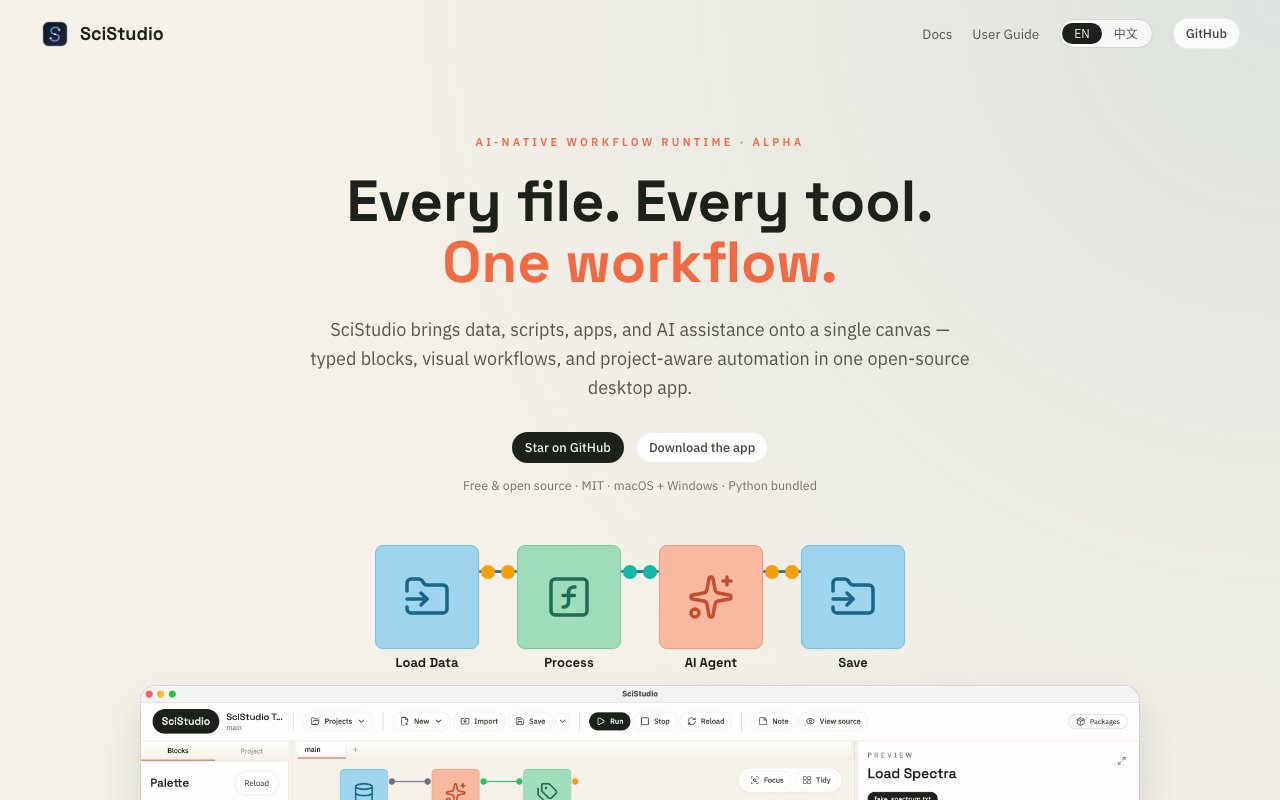
About SciStudio
Scientific research involves juggling files scattered across drives, switching between disconnected tools, and manually copying data from one application to another. SciStudio is a desktop application that consolidates this fragmented workflow into a single canvas where data, scripts, and AI assistance coexist. Instead of opening a spreadsheet here, running a Python script there, and then pasting results into yet another program, researchers can build visual pipelines where each step flows directly into the next. The application ships with Python bundled inside, so there's nothing extra to install or configure before getting started. This removes one of the biggest barriers that typically prevents researchers from adopting new tools, since Python environment management alone can consume hours of troubleshooting time.
The core concept revolves around typed blocks arranged on a canvas. Each block represents a specific operation, whether it's loading a dataset, running a transformation script, invoking an analysis tool, or calling an AI agent to interpret results. These blocks connect visually through explicit links that show how data flows through the pipeline. When something needs adjustment, the researcher can trace the flow backward, identify exactly which block produced unexpected output, modify that single step, and rerun the pipeline from that point forward. This visual approach eliminates the hidden handoffs that typically plague scientific work, where exporting to CSV, manual copy operations, and undocumented steps accumulate until nobody can reproduce the original analysis. Every connection becomes explicit rather than implicit, which transforms debugging from archaeology into straightforward inspection.
AI assistance is woven throughout the application rather than bolted on as an afterthought. A conversational assistant helps users build and debug their workflows, answering questions about why a particular step failed or suggesting how to restructure a pipeline for better performance. This isn't just a chatbot sitting in a sidebar waiting to be invoked. Beyond simple conversation, AI Agent blocks can be embedded directly into pipelines as first-class processing steps, inspecting raw input data and returning cleaned outputs as reusable components. This means decision logic that would normally require manual review can be automated while remaining transparent and editable. A researcher might configure an agent block to examine incoming data for quality issues, flag anomalies for review, or transform messy inputs into standardized formats. The agent becomes part of the reproducible pipeline rather than an invisible black box applied somewhere offstage.
Reproducibility sits at the center of the design philosophy. Every workflow can be rerun exactly as constructed, which matters enormously when submitting research for peer review or when a colleague needs to verify results months after the original analysis completed. The visual nature of the canvas makes documentation almost automatic, since the pipeline diagram itself serves as a record of what was done and in what order. There's no need to write lengthy methodology sections describing which buttons were clicked in which sequence when the workflow already shows the complete process in a format anyone can inspect. This addresses one of the persistent complaints about modern computational research, where methods sections rarely contain enough detail for true replication. With SciStudio, the workflow file becomes the methods section.
SciStudio runs on both macOS and Windows as a native desktop application rather than requiring browser access or cloud infrastructure. It's free and open source under the MIT License, with all code available for inspection and modification on GitHub. Downloads come through GitHub Releases, where users can grab pre-built binaries for immediate use or clone the repository to run from source if they prefer understanding exactly what they're executing. The open nature means researchers can extend the application with custom block types tailored to their specific domain, integrate it into existing laboratory information systems, or audit the code for security compliance without licensing concerns or vendor negotiations. Labs that need to justify every piece of software entering their infrastructure will appreciate having full source access rather than trusting opaque commercial products.
The target audience includes individual researchers who need a more coherent environment for their analysis work, as well as developers who want to contribute to or customize the platform for specific scientific domains. Research groups that have struggled with reproducibility issues or spent too much time on manual data wrangling between incompatible tools will find the unified canvas approach particularly valuable. Because Python ships bundled with the application, even users without programming backgrounds can start building visual pipelines immediately by connecting existing blocks. Meanwhile, those with development experience can drop into the underlying Python code whenever the visual interface doesn't quite fit their needs, creating custom blocks that become available for future pipelines. This flexibility bridges the gap between no-code accessibility and full programmatic control.
Key Features
- Visual canvas for typed workflow blocks
- Built-in conversational AI assistant
- AI agent blocks for automated decisions
- Project-aware context across files
- Bundled Python runtime
- Reproducible pipeline execution
Pros & Cons
What we like
- Open source under MIT license
- AI assistant knows full project context
- Visual blocks make pipelines easier to understand
- Consolidates scattered analysis tools
Room for improvement
- Desktop only, no web or cloud version
- Requires Claude Code or Codex for AI features
- Younger project with smaller community
- Learning curve for existing script-based workflows
Frequently Asked Questions
What is SciStudio?
Is SciStudio free?
What AI does SciStudio use?
Who is SciStudio for?
Best For
Featured in
Alternatives to SciStudio

1Lookup
Real-time data verification API for phone, email, IP, and domain validation to fight fraud

Kevin Gabeci
Solo developer building web apps, cozy browser games, and AI creator toolkits.

Codedex
A gamified, story-driven platform that teaches Python, web dev, and more like an RPG quest
Hack2hire
Practice real SDE interview questions from top tech companies with expert worked solutions
Reviews (11)
Pulled its weight from week one
Tried SciStudio on a side project first, then rolled it out everywhere. Got real value out of bundled python runtime. It fits well for using ai to debug and extend workflows. Glad I made the switch.
Recommended without reservation
Found SciStudio on a Show HN thread and I am glad I clicked. Their take on consolidates scattered analysis tools is genuinely good. Worth it for what I get out of it.
Two months in, no regrets
Three months of SciStudio later, here is what holds up. What stands out is how it handles built-in conversational ai assistant. Recommending it to people in a similar spot.
Worth a look
Three months of SciStudio later, here is what holds up. Where it really wins is consolidates scattered analysis tools. Glad I made the switch.
Powerful once it clicks
SciStudio has quietly become part of my daily flow. Performance has been steady even when I lean on it hard. The thing I keep coming back to is how reliable it is. One thing that bugs me is requires claude code or codex for ai features.
Recommended without reservation
Came to SciStudio after getting frustrated with what I had before. The core workflow is smooth once you are set up. Hard to imagine going back to my old setup.
Good, with a few caveats
Have been running SciStudio for a while, here is where I land. Where it really wins is visual blocks make pipelines easier to understand. The catch is desktop only, no web or cloud version. Worth it for what I get out of it.
Two months in, no regrets
SciStudio solves a real problem for me without making a fuss about it. What stands out is how it handles visual blocks make pipelines easier to understand. The output quality holds up better than I expected. It fits well for automating repetitive data processing steps. It earns its place in my stack.
Solid daily driver
Came to SciStudio after getting frustrated with what I had before. What stands out is how it handles open source under mit license. Easy yes for anyone weighing the same trade offs.
Finally something that fits
Picked SciStudio for the price, stayed for the quality. Got real value out of ai agent blocks for automated decisions. It fits well for using ai to debug and extend workflows. Worth it for what I get out of it.
Exactly what I needed
Picked SciStudio for the price, stayed for the quality. Got real value out of ai assistant knows full project context. Recommending it to people in a similar spot.
Badge builder
Add SciStudio to your website
Choose a badge style and size, preview it here, then copy the generated HTML. Badge images are self-contained SVGs and do not require an external script.

<a href="https://toolindex.net/tools/scistudio?ref=badge" target="_blank" rel="noopener">
  <img src="https://toolindex.net/badge/scistudio/medium.svg" alt="SciStudio - Listed on Tool Index" width="180" height="50" />
</a>How to use the badge
- 1. Pick the style, size, and theme that fit your layout.
- 2. Copy the generated HTML from the code block.
- 3. Paste it into your footer, homepage, or press page.
Standard badge available
The standard listing badge is available now. Score and circle badges are limited to tools currently ranked in the top 10 of a category.
Badge clicks return visitors to this profile with a referral tag so the source remains identifiable.
Related Tools
Kevin Gabeci
Solo developer building web apps, cozy browser games, and AI creator toolkits.

Coolify
Self-hostable, open source alternative to Heroku and Netlify

Warp
The modern terminal reimagined with AI and collaboration

Bolt.new
Prompt-to-deployed full-stack app inside the browser
Work on SciStudio? Request listing access or correction