
Simple Analytics
Privacy-friendly web analytics with a clean dashboard, event tracking, and a strong stance against personal data collection.
Gallery
About Simple Analytics
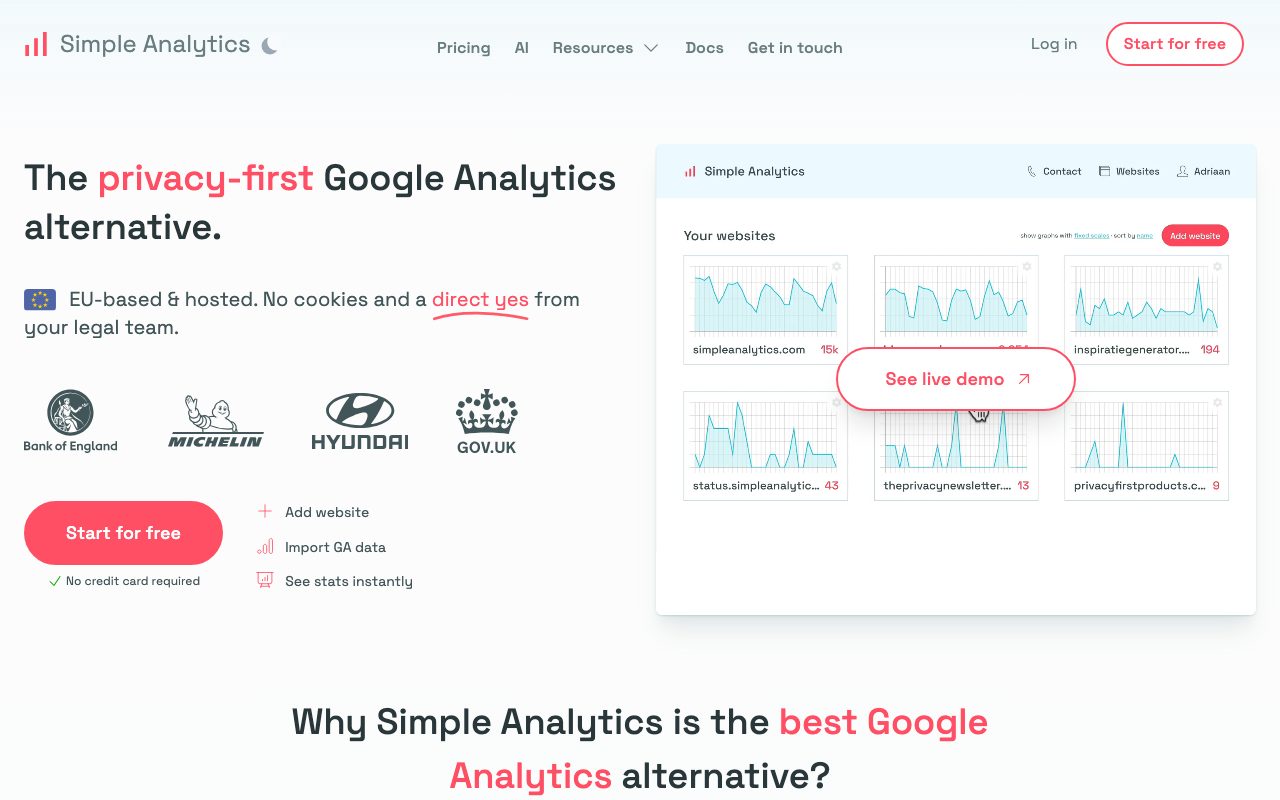
Simple Analytics is privacy-friendly web analytics that doesn't track personal data, doesn't need a cookie banner, and doesn't bury you in dashboards you'll never read.
The product reads like a manifesto. No personal data, no ads, no third-party scripts. The dashboard shows you what matters: pageviews, referrers, top pages, and event counts.
If you've used Google Analytics and felt morally and aesthetically conflicted, Simple Analytics is the antidote.
What Simple Analytics actually does
You drop a small script on your site, and Simple Analytics counts pageviews and events without setting cookies or tracking individual visitors. The data shows up in a clean dashboard you can share publicly if you want.
It tracks the basics: pageviews, unique visitors (in a privacy-preserving way), referrers, top pages, devices, countries, and custom events. That's it. No funnels, no session replays, no cohort analysis.
The shareable dashboard
Simple Analytics dashboards can be made public with one toggle. Indie hackers love this. It's a transparency move that builds trust with your audience.
Who Simple Analytics is for
Indie creators, small businesses, privacy-conscious teams, and anyone who'd rather know what's working than have a thousand metrics they ignore. EU companies that want to skip the cookie banner conversation entirely.
It's not for marketing teams running heavy attribution work. If you need multi-touch attribution and detailed funnels, Simple Analytics is too thin.
The GDPR escape hatch
Because Simple Analytics doesn't collect personal data, you don't need cookie consent banners under GDPR. That's a real UX and legal win for European sites.
Pricing breakdown
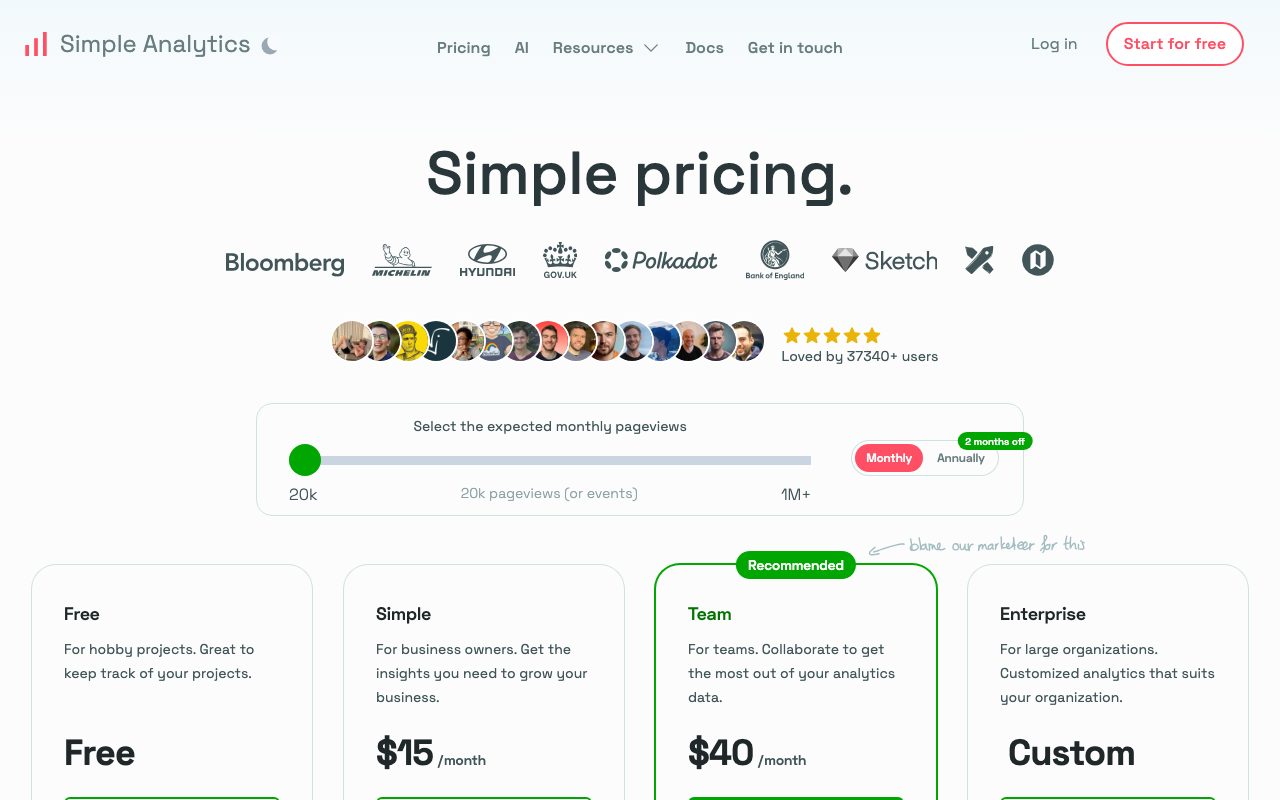
Plans are based on monthly pageviews. There's a free trial, then paid tiers that scale with traffic. No free forever tier, but the entry pricing is reasonable.
Compared to Google Analytics, you're paying real money for what was free. The trade is privacy posture, simpler UX, and zero cookie pain. For many sites, the trade is worth it.
What you don't pay for
Onboarding, support, dashboard sharing, custom events, and integrations. These come standard rather than as add-ons.
Standout features of Simple Analytics
The simplicity is the feature. The dashboard fits on one screen. You can scan it in ten seconds and know if the week's going well.
Public dashboards. Not many tools let you make analytics shareable as a marketing move. Simple Analytics treats it as native.
Goals and events
You can track custom events without setting up complex configurations. Email signups, button clicks, and conversions all work via simple JS calls.
Honest tradeoffs with Simple Analytics
The data is shallower. You don't get user-level paths or session recordings. That's the design, but it means certain marketing questions can't be answered.
Free tier is missing. The trial is generous but eventually you need to pay. Compared to GA's free everything, that's a friction point.
Simple Analytics is the rare product that's better because it does less. The constraint is the value, and the design respects your time.
Simple Analytics vs alternatives
Simple Analytics vs Google Analytics: GA is free and powerful and creepy. Simple Analytics is paid and minimal and respectful.
Simple Analytics vs Plausible: Plausible is the closest competitor. Both are privacy-first. Plausible has open-source self-hosting. Simple Analytics has shareable dashboards.
Simple Analytics vs Fathom: Fathom is another privacy-friendly option. Pick on dashboard preference and integrations.
For the broader category, see the best web analytics tools or check Google Analytics alternatives and Simple Analytics vs Plausible.
When Simple Analytics wins
You care about privacy. You hate cookie banners. You want clean data without the dashboard maze.
Bottom line on Simple Analytics
Simple Analytics is the analytics tool for people who'd rather see ten useful numbers than a thousand vanity metrics. The pricing is reasonable for what it offers.
If you need deep funnel analysis, look elsewhere. For most blogs, indie SaaS, and content sites, Simple Analytics is more than enough. See tools for indie hackers for adjacent picks.
The case for less data
Most teams collect ten times more analytics than they ever review. The dashboard becomes wallpaper. People stop trusting numbers because there are too many. Simple Analytics flips this. Less data, more attention.
The discipline of fewer metrics forces you to know which numbers actually matter. That clarity often surfaces ignored truths. Many teams realize they were drowning in data they couldn't act on.
Privacy as a feature
Privacy isn't just a regulatory checkbox. It's a positioning choice. Telling visitors you don't track them builds trust. For some audiences, especially privacy-aware ones, this is a real conversion lever, not just a moral position.
Simple Analytics for different sites
Indie blogs use it because the dashboard is shareable and clean. SaaS marketing sites use it because cookie banners hurt conversion. EU companies use it because it removes a regulatory headache.
The common thread is teams that don't need user-level tracking. Many sites, particularly content sites, fit this profile and don't realize it.
Events without complexity
Custom events in Simple Analytics are simple JS calls or URL parameters. You can track signups, purchases, and conversions without building a measurement plan. The tradeoff is depth: you get counts, not user paths.
Common Simple Analytics questions
Does it replace Google Analytics for SEO? Mostly yes, with cleaner referrer data. Does it work without cookies? Yes, that's the entire point. Can you self-host? No, it's a SaaS product.
For more, see tools for bloggers and Simple Analytics vs Fathom.
Final take on Simple Analytics
Simple Analytics is a clean, focused, privacy-first answer to the analytics-overload problem. For most content sites and indie SaaS, it's enough and arguably better. The constraint is the value.
Simple Analytics's privacy stance in detail
No personal data is collected. No cookies. No fingerprinting. No cross-site tracking. The platform identifies pageviews via session-based heuristics that don't persist. This satisfies GDPR, CCPA, and other privacy regulations without consent banners.
For European sites especially, this matters every day. Cookie banners hurt conversion measurably. Removing them recovers a few percent of pageviews and improves the visitor experience. Simple Analytics enables that without losing the data you actually need.
What you sacrifice
You give up user-level tracking. You can't see one specific user's path through your site. You can't build cohorts based on individual behavior. You can't remarket via attribution. For sites that don't need these capabilities, the trade is fine. For sites that do, look at GA4 or Plausible.
Simple Analytics events and goals
Custom events let you track meaningful actions: signups, purchases, button clicks, form submissions. The setup is a JS function call or URL parameter. No measurement plan required. Events show up as counts in the dashboard.
For most content sites and indie SaaS, this depth is sufficient. You know how many signups happened, where they came from, and what content drove them. That's enough for most decision-making.
The shareable dashboard angle
Public dashboards are a marketing move. You make your stats visible as a transparency play. Indie hackers and bootstrapped SaaS love this. It builds trust with the audience and gives them a reason to share your numbers.
Not every site benefits from public stats. Established companies usually keep them private. For new sites trying to build community, the public dashboard adds personality and accountability.
Data export and ownership
Your data is yours. You can export it any time. Simple Analytics doesn't lock you in. If you ever want to migrate, the export is straightforward. This contrasts with Google Analytics where exporting raw data is non-trivial.
Performance impact on sites
The tracking script is small and fast. It doesn't block rendering. It doesn't slow down page loads measurably. For performance-conscious teams (which is most modern teams), this matters. Heavy analytics scripts have been a real performance drag for years.
The script also doesn't load third-party content. No external CDN dependencies, no cross-site requests beyond your tracking endpoint. This simplicity helps both privacy and performance.
Integration with email and other tools
Simple Analytics integrates with email tools, Slack, and webhook destinations. You can pipe pageview alerts, weekly summaries, or goal completions into your existing tools. The integration list isn't huge but it covers the common cases.
The future of privacy-friendly analytics
The category is growing. More teams want privacy-respecting tools. More regulations require them. Simple Analytics is well-positioned for that direction. The bet on privacy as a feature is paying off, year over year.
For teams that haven't reconsidered their analytics setup in a while, this is a good moment. The tools have matured. The privacy concerns are real. The cost is reasonable. Worth a fresh look.
Simple Analytics wrap-up
The privacy-first positioning matters more every year. Regulations tighten. User awareness grows. Cookie banners hurt conversions visibly. Simple Analytics's bet on a future where privacy is the default looks more correct each quarter.
For sites considering the migration from Google Analytics, the practical advice is parallel-running for a month. Add Simple Analytics alongside GA, compare numbers, and see which dataset feels more useful for your decision-making. Many teams realize they were drowning in GA data they couldn't act on, while Simple Analytics surfaces the few numbers that actually matter.
The shareable dashboard angle
If you're a transparent operator who wants to show your numbers publicly, the public dashboard feature is unique enough to be a marketing tool itself. Indie hackers and bootstrapped operators benefit most. Established companies usually keep stats private, but the option is there if your positioning calls for transparency.
Tutorial / Demo
Key Features
- Cookie-free privacy-friendly tracking
- Simple single-page dashboard
- Event and goal tracking with API
- Automatic outbound link and file tracking
- Public dashboards and shareable links
- Tracks social and HN mentions for context
Pros & Cons
What we like
- Calm, low-noise analytics experience
- Clear and consistent privacy stance
- Easy to set up and maintain
Room for improvement
- Lacks deep product analytics features
- Pricier than self-hosted options for large traffic
Frequently Asked Questions
Simple Analytics vs Plausible, which one?
How much does Simple Analytics cost?
Is it really cookieless?
Can I self-host Simple Analytics?
Does it track events and conversions?
Best For
Featured in
Tags
Alternatives to Simple Analytics
View all
Plausible
Privacy-friendly Google Analytics alternative

Fathom Analytics
Privacy-first website analytics that show real traffic, sources, and conversions on a single page without cookie banners.
Notionlytics
Page-view analytics and reader feedback widgets for public Notion pages

Simple Analytics
Cookieless, GDPR-friendly web analytics that needs no consent banner
Our take
Tool Index Editorial · May 2026· 4.5/5
What Simple Analytics is really selling — beyond the marketing copy — is privacy-friendly web analytics with a clean dashboard, event tracking, and a strong stance against personal data collection.
The standout points: Calm, low-noise analytics experience, Clear and consistent privacy stance, and Easy to set up and maintain. Where it stumbles: Lacks deep product analytics features and Pricier than self-hosted options for large traffic.
Recommendation: this is a strong default when you need privacy-compliant analytics for blogs and marketing sites. If lacks deep product analytics features would be a dealbreaker, the alternatives section below is worth a scroll.
Editorial opinion from the Tool Index team, written from the public product pages. Not a user review.
Reviews (2)
The kind of tool you forget you're paying for
Simple Analytics isn't perfect but it's the best I've used in this category. Where it really wins is easy to set up and maintain. Found it works best for multi-site setups for agencies. Worth the price for what I get out of it.
Pros
- Clear and consistent privacy stance
- Calm, low-noise analytics experience
Caveats: good ones and frustrating ones
Came to Simple Analytics after frustration with what I had before. The thing I keep coming back to: calm, low-noise analytics experience. It would be a 5 if not for pricier than self-hosted options for large traffic. Decent value once you accept the rough edges.
Pros
- Clear and consistent privacy stance
- Easy to set up and maintain
Cons
- Lacks deep product analytics features
Badge builder
Add Simple Analytics to your website
Choose a badge style and size, preview it here, then copy the generated HTML. Badge images are self-contained SVGs and do not require an external script.

<a href="https://toolindex.net/tools/simple-analytics?ref=badge" target="_blank" rel="noopener">
  <img src="https://toolindex.net/badge/simple-analytics/medium.svg" alt="Simple Analytics - Listed on Tool Index" width="180" height="50" />
</a>How to use the badge
- 1. Pick the style, size, and theme that fit your layout.
- 2. Copy the generated HTML from the code block.
- 3. Paste it into your footer, homepage, or press page.
Standard badge available
The standard listing badge is available now. Score and circle badges are limited to tools currently ranked in the top 10 of a category.
Badge clicks return visitors to this profile with a referral tag so the source remains identifiable.
Related Tools

Sleep Suivour
Track your sleep, improve your rest
Notionlytics
Page-view analytics and reader feedback widgets for public Notion pages
Mixpanel
Product analytics tool for tracking user events, funnels, retention, and cohorts to understand how people use your app.

PostHog
All-in-one product analytics, feature flags, and session replay
Work on Simple Analytics? Request listing access or correction