
SnapTrade MenuBar
Check connected brokerage balances and holdings from the Mac menu bar
Gallery
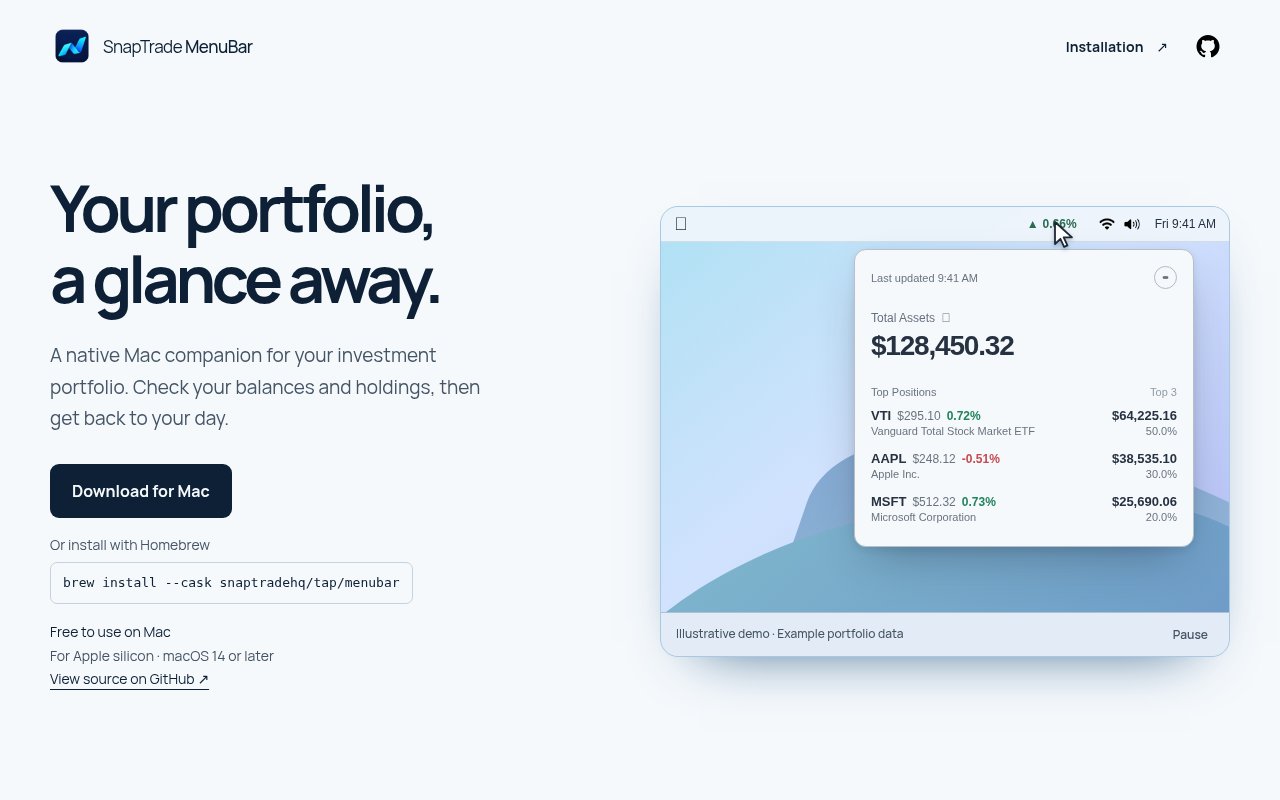
About SnapTrade MenuBar
SnapTrade MenuBar is a free native Mac app that keeps an investment portfolio within reach from the menu bar. It brings connected brokerage accounts into one compact view, so an investor can check total net worth, holdings, asset allocation, and recent activity without opening several broker websites. The product is built for quick awareness rather than an elaborate workstation. Its public examples show a focused popover with the essential portfolio numbers and charts, giving Mac users a low friction way to answer familiar questions about overall value, what they own, and what has changed. It is especially relevant to people whose investments are split across more than one supported account or broker.
The app uses SnapTrade to connect brokerage data. Once accounts are connected, it consolidates them into one overview rather than treating each broker as a separate destination. The result can show every account and broker together, along with the portfolio's net worth and holdings. A donut chart breaks allocation down by asset and can highlight the cash portion, helping a user see concentration without reading a long position table. This is a monitoring interface, so its value comes from making already connected investment information easier to inspect. The official product description doesn't position it as a brokerage, an advice service, or a replacement for the original institutions where accounts are held.
Market context appears alongside the account snapshot. SnapTrade's official showcase describes a live view of portfolio value, holdings, allocation, and market movement. A net worth trend chart provides time range controls, which makes the current balance more meaningful than an isolated number. That history can help someone distinguish a daily move from a broader direction, while the allocation view provides a separate look at how the portfolio is distributed. The menu bar placement matters here because portfolio checking becomes a short desktop interaction instead of another tab, login, or phone session. Investors who want occasional visibility can open the popover, scan the relevant view, and return to other work.
An activity feed gathers several kinds of account events in one chronological snapshot. The published interface includes trades, interest, dividends, contributions, deposits, withdrawals, income, and checking account expenses. Seeing those events together can make it easier to explain why a balance changed or confirm that an expected payment appeared. The feed is useful when accounts at different institutions would otherwise require separate histories. It also gives the app a little more depth than a simple ticker showing one headline total. The public materials don't describe order entry or automated actions in the MenuBar app, so it should be understood as a clear viewing layer for connected information rather than a tool for placing trades.
The product has a narrow audience by design. It requires a Mac and centers on the menu bar, which makes it a natural fit for investors who spend much of the day on macOS and want portfolio data nearby. The compact format won't replace a full research terminal, detailed tax package, retirement planner, or broker portal. It does reduce the routine work of visiting multiple institutions to get a combined snapshot. People with one account may still appreciate the quick view, but the consolidation benefit becomes clearer when holdings, balances, and activity are scattered. Anyone considering it should also confirm that the brokerages they use can be connected through the underlying SnapTrade service.
SnapTrade MenuBar is presented as free, with no paid upgrade described on its public page. That makes the decision less about subscription value and more about whether the focused Mac workflow matches the investor's habits. Its strongest qualities are immediacy, consolidated viewing, and a clean division between summary, allocation, history, and activity. The separate views also make it possible to move from a headline net worth figure to allocation, historical direction, and the underlying account events without leaving the utility. Its boundaries are equally clear. It is a native Mac utility, it depends on connected account data, and it is meant for checking a portfolio rather than building a comprehensive financial plan. For the right user, that restraint is useful. It puts current brokerage information a click away without trying to turn a small menu bar window into every kind of investing product.
Key Features
- Consolidated brokerage account overview
- Portfolio net worth snapshot
- Holdings and allocation views
- Net worth trend chart
- Unified investment activity feed
- Native Mac menu bar access
Pros & Cons
What we like
- Keeps portfolio data one click away
- Combines accounts from multiple brokers
- Shows balances and activity together
- Free native Mac experience
Room for improvement
- Available only for Mac users
- Requires compatible brokerage connections
- Compact view limits deeper analysis
- Doesn't replace full broker tools
Frequently Asked Questions
What is SnapTrade MenuBar?
Is SnapTrade MenuBar free?
What activity does the app show?
Can SnapTrade MenuBar place trades?
Best For
Featured in
Alternatives to SnapTrade MenuBar



Our take
Tool Index Editorial · Oct 2026· 3.5/5
SnapTrade MenuBar is a small Mac portfolio viewer for investors who want balances and top holdings without opening a brokerage dashboard. It combines supported accounts through SnapTrade, refreshes hourly, shows data age, and cannot place trades. We found the narrow native interface and published installer checksum appropriate for a tool meant to be checked briefly and closed.
It is free to use and its source is public, but it requires a SnapTrade account, Apple Silicon, and macOS 14 or later. Brokerage support depends on institution and region, and data can be delayed between refreshes. There are no charts, alerts, tax tools, or deep performance analytics. It is a convenient glance, not a portfolio analysis product.
Editorial opinion from the Tool Index team, written from the public product pages. Not a user review.
Reviews (0)
No reviews yet
Be the first to share your experience with SnapTrade MenuBar
Sign in to write a reviewBadge builder
Add SnapTrade MenuBar to your website
Choose a badge style and size, preview it here, then copy the generated HTML. Badge images are self-contained SVGs and do not require an external script.

<a href="https://toolindex.net/tools/snaptrade-menubar?ref=badge" target="_blank" rel="noopener">
  <img src="https://toolindex.net/badge/snaptrade-menubar/medium.svg" alt="SnapTrade MenuBar - Listed on Tool Index" width="180" height="50" />
</a>How to use the badge
- 1. Pick the style, size, and theme that fit your layout.
- 2. Copy the generated HTML from the code block.
- 3. Paste it into your footer, homepage, or press page.
Standard badge available
The standard listing badge is available now. Score and circle badges are limited to tools currently ranked in the top 10 of a category.
Badge clicks return visitors to this profile with a referral tag so the source remains identifiable.
Related Tools

Simple RMD
Calculate, aggregate, and manage your annual IRA required minimum distributions.
FreshBooks
Cloud accounting designed for service-based small businesses and freelancers
Deel
Global payroll, contractor, and EOR platform
Chargebee
Subscription billing and revenue management for B2B SaaS
Work on SnapTrade MenuBar? Request listing access or correction