
Speechify
Text-to-speech reader that turns documents, PDFs and webpages into natural audio, plus a voiceover studio
Gallery
About Speechify
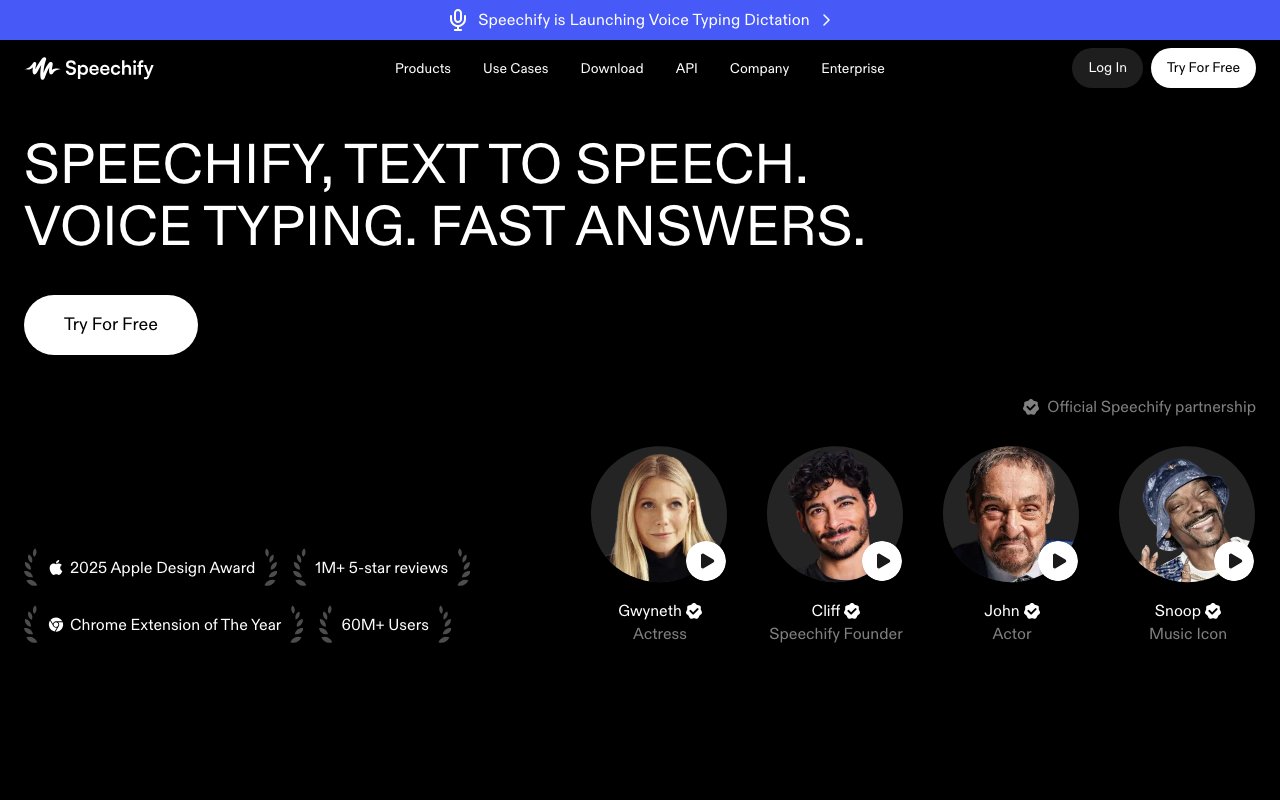
Speechify converts written text into spoken audio using artificial intelligence, serving as both a reading tool and a production platform for voiceovers. It started as an accessibility solution helping people with dyslexia and visual impairments consume written content, but has evolved into a broader platform used by content creators, students, busy professionals, and anyone who prefers listening over reading. The core technology synthesizes natural sounding speech from text input, handling documents, web pages, ebooks, and any other text you throw at it.
The voice selection runs deeper than most text to speech tools. Speechify offers over a thousand AI voices across more than sixty languages, with regional accent variations for major languages. You can choose between different age ranges, speaking styles, and tonal qualities to match the content you're working with. The library includes licensed celebrity voices from recognizable figures, adding a novelty option for personal projects. More practically, the range of standard voices means you can find something that sounds natural for your specific use case rather than settling for a generic robotic output.
Playback speed control is where Speechify shows its focus on practical consumption. You can adjust from three quarter speed for complex material up to five times normal speed for familiar content, with the speech remaining intelligible throughout the range. This matters for people using text to speech as a productivity tool rather than just an accessibility aid. Students can power through assigned readings. Researchers can scan papers faster. Professionals can catch up on industry newsletters during commutes. The speed control combined with natural sounding voices makes extended listening sessions less fatiguing than older generation text to speech systems.
The platform works across essentially every device you might use. Browser extensions for Chrome and Edge let you highlight any web content and have it read aloud. Desktop applications for Mac and Windows handle local documents. Mobile apps for iOS and Android turn your phone into a portable reader. The cross platform sync means you can start a document on your laptop and continue listening on your phone, picking up exactly where you left off. This portability is crucial for the core use case of fitting reading into otherwise dead time like commutes, workouts, and household tasks.
Beyond personal reading, Speechify offers voice generation tools for content production. You can create voiceovers for videos, podcasts, and presentations without recording your own voice or hiring talent. The AI voice cloning feature lets you train a synthetic version of your own voice, maintaining your personal sound while automating the production process. Video dubbing capabilities translate and re voice video content into different languages, useful for creators expanding to international audiences. These production features position Speechify as more than a consumption tool, making it relevant for YouTube creators, course makers, and anyone producing audio content at scale.
The accessibility focus remains central to how Speechify presents itself. The company highlights support for users with dyslexia, ADHD, and visual impairments, designing the interface to be straightforward for people who may struggle with conventional reading. The product has grown to serve over sixty million users, a scale that reflects both the broad need for text to speech tools and the specific quality improvements that make modern AI voices acceptable for extended listening. Earlier generation text to speech was usable for specific needs but unpleasant for casual use. Current voice quality is close enough to human that most people can listen for hours without the uncanny valley effect that made older systems tiring.
Speechify operates on a freemium model with limited free access and premium subscriptions unlocking the full voice library, faster speeds, and production features. The pricing positions it as an everyday tool rather than a professional service, accessible enough for students while scaling up for creators who need voice production capabilities. For people who consume a lot of written content but have limited time or reading challenges, the value proposition is straightforward. For content creators, it competes with dedicated voiceover services and recording setups, offering a faster path to audio content at the cost of the authenticity that comes from human performance.
Key Features
- Reader app converts PDFs, docs, emails and webpages to audio with word-level highlighting
- OCR scanning reads physical pages and images aloud
- Speechify Studio adds AI voice generation, voice cloning, dubbing and a voice changer
- 1,000+ voices across 60+ languages, including celebrity voices like Snoop Dogg and Gwyneth Paltrow
- Text-to-speech API at $10 per 1M characters with SSML, streaming and ~300ms latency
- Apps on web, iOS, Android, Mac and Windows plus Chrome and Edge browser extensions
Pros & Cons
What we like
- Strong accessibility and productivity fit for dyslexia, ADHD and heavy reading loads
- Genuinely natural voices with adjustable speed up to 4.5x
- One brand covers both listening (Reader) and content creation (Studio and API)
- Usage-based API pricing with no monthly minimums is friendly to developers
Room for improvement
- Reader Premium and Studio are separate paid subscriptions, so one does not include the other
- Premium Reader runs about $139/year, pricier than some single-purpose TTS apps
- Celebrity voices and the deepest voice library sit behind paid tiers
- Studio commercial rights require at least the Starter plan
Frequently Asked Questions
What is Speechify?
Is Speechify free?
What is Speechify best for?
Can Speechify read PDFs and scanned pages?
Best For
Featured in
Alternatives to Speechify
View all
Murf AI
AI voiceover and text to speech studio with 200+ realistic voices across 35+ languages for business content

Listnr
Ultra-realistic AI text-to-speech and voiceover platform with 1,000+ voices across 142+ languages

LOVO AI
AI voice generator and video studio with 500+ voices across 100+ languages, plus voice cloning
ElevenLabs
The voice cloning and text-to-speech service everyone benchmarks against
Reviews (9)
Best decision this quarter
Started using Speechify casually, now it is pinned in my dock. It has shaved real time off my week.
Bought it for one feature, stayed for ten
Started using Speechify casually, now it is pinned in my dock. Genuine strength is that it gets out of the way and lets me work. Recommending it to people in a similar spot.
Good, with a few caveats
Speechify solves a real problem for me without making a fuss about it. The core workflow is smooth once you are set up. The interface stays out of my way, which I appreciate. Mostly using it for accessibility support for dyslexic, low-vision or adhd readers. It would be a five if not for reader premium and studio are separate paid subscriptions, so one does not include the other. Hard to imagine going back to my old setup.
Solid daily driver
Speechify solves a real problem for me without making a fuss about it. Their take on ocr scanning reads physical pages and images aloud is genuinely good. I expected to churn off it in a week and I am still here. It fits well for producing voiceovers for videos, podcasts and e-learning in speechify studio. Glad I made the switch.
Exactly what I needed
Speechify has quietly become part of my daily flow. The thing I keep coming back to is how reliable it is. It slotted into my routine without much fuss. Mostly using it for accessibility support for dyslexic, low-vision or adhd readers. It earns its place in my stack.
Worth the price of admission
Tried Speechify on a side project first, then rolled it out everywhere. Got real value out of ocr scanning reads physical pages and images aloud.
Finally something that fits
Three months of Speechify later, here is what holds up. Got real value out of ocr scanning reads physical pages and images aloud. It slotted into my routine without much fuss. Glad I made the switch.
Pulled its weight from week one
Onboarded the whole team to Speechify in an afternoon. The genuinely natural voices with adjustable speed up to 4.5x is more useful than I expected. Mostly using it for adding text-to-speech to an app or product via the developer api. Worth the price for what I get out of it.
Does the job, a few gripes
Have been running Speechify for a while, here is where I land. Their take on ocr scanning reads physical pages and images aloud is genuinely good. The catch is premium reader runs about 139/year, pricier than some single-purpose tts apps. Glad I made the switch.
Badge builder
Add Speechify to your website
Choose a badge style and size, preview it here, then copy the generated HTML. Badge images are self-contained SVGs and do not require an external script.

<a href="https://toolindex.net/tools/speechify?ref=badge" target="_blank" rel="noopener">
  <img src="https://toolindex.net/badge/speechify/medium.svg" alt="Speechify - Listed on Tool Index" width="180" height="50" />
</a>How to use the badge
- 1. Pick the style, size, and theme that fit your layout.
- 2. Copy the generated HTML from the code block.
- 3. Paste it into your footer, homepage, or press page.
Score badge available
Speechify qualifies for the score and circle badges based on its current top-10 positionin AI Voice Generators.
Badge clicks return visitors to this profile with a referral tag so the source remains identifiable.
Related Tools

NexSub
Offline real time subtitle translation using local Whisper models for any video source
Listnr
Ultra-realistic AI text-to-speech and voiceover platform with 1,000+ voices across 142+ languages
List55
Voice transcription app that converts audio recordings into formatted text lists

WellSaid Labs
Enterprise text-to-speech with studio-quality AI voice avatars trained on consenting voice actors
Work on Speechify? Request listing access or correction