
TensorSharp
Native .NET engine for running local LLMs on your own hardware
Gallery
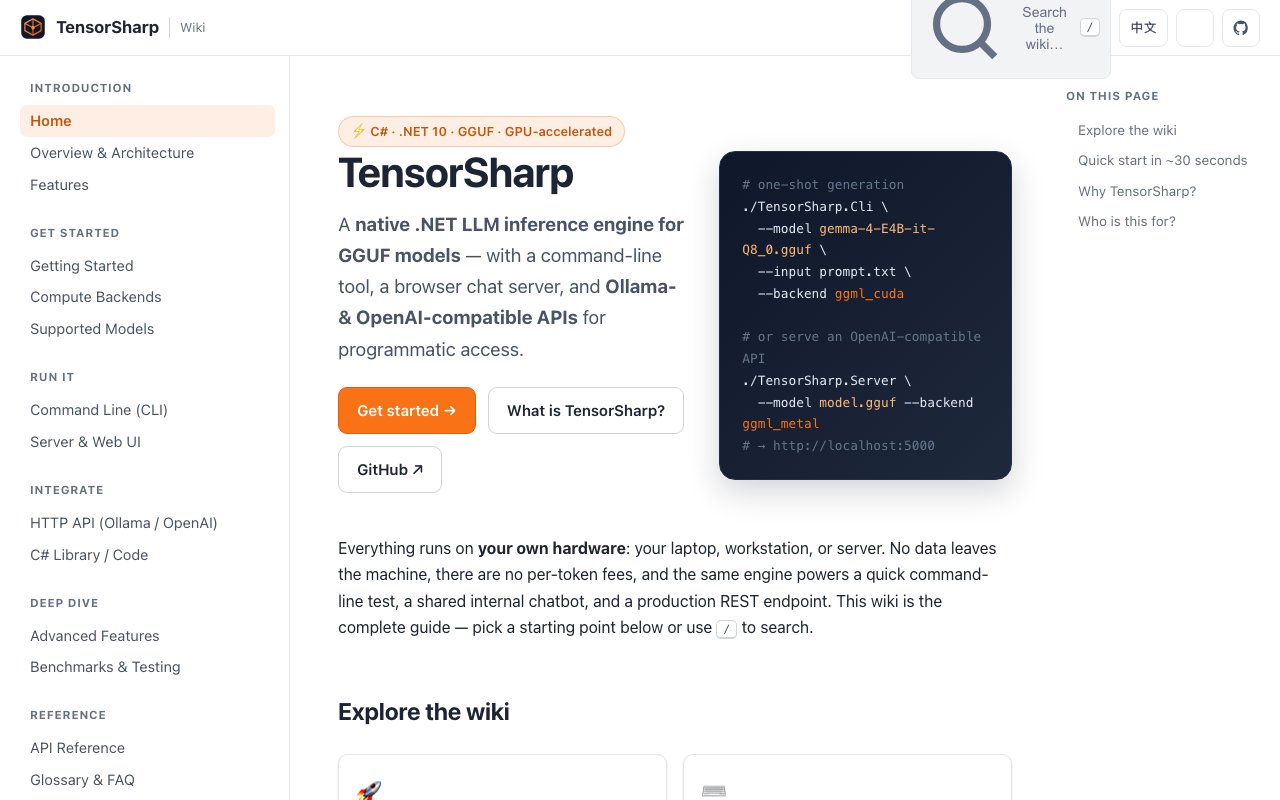
About TensorSharp
TensorSharp is a native .NET inference engine for running large language models locally, on hardware you already own. It loads models in the GGUF format and gives you three ways to work with them, a command-line tool, a browser-based chat server, and a set of HTTP APIs. Everything runs on your own machine, so prompts, documents, and images never leave it, and there are no per-token fees to keep an eye on.
The problem it goes after is the cost and privacy tax that comes with cloud inference. Most teams that want a language model reach for a hosted API, then pay for every token and hand their data to someone else's servers. Running models locally answers both of those concerns, but the tooling has historically lived in C++ or Python. TensorSharp is written natively in C# on .NET 10, which means a .NET shop can run and embed local inference without stepping outside the stack it already knows.
In day-to-day use you pick whichever interface suits the task. The CLI handles one-shot generation along with image prompts, audio prompts, batch jobs, and benchmarks, so it's a natural fit for scripting, automation, and quick tests from the shell. The server stands up a local chatbot in the browser for people who'd rather just open a page and talk to a model. The HTTP layer exposes REST endpoints you can call from curl, Python, or any compatible client, which is the path most applications will take. And because the engine ships as a C# library, you can embed it straight inside a .NET application instead of shelling out to a separate process, which keeps everything in one runtime.
One of the more practical touches is that the APIs are Ollama- and OpenAI-compatible. Tools and SDKs written for either of those services work against TensorSharp without changes, so you can point an existing integration at a local backend and keep your code as it is. That matters because it turns a migration into a config change rather than a rewrite. An app that already talks to a paid cloud endpoint can be redirected at a local instance and behave the same way, which makes trying local inference a low-risk experiment instead of a rebuild.
The engine also reaches well past plain text. It handles vision, audio, reasoning, and tool use in the same place, so one setup can describe an image, work with audio, run step-by-step reasoning, or call out to tools. Running all of that locally has a knock-on benefit that's easy to underrate. Because prompts, documents, and images never leave the machine, sensitive material stays put, which is the kind of thing that matters for regulated data, private work, or simply keeping proprietary content off third-party servers. It also means inference keeps working offline, since there's no external service in the loop.
Performance is where the project plants its flag. On identical GGUF files it reports a 26B-A4B mixture-of-experts model prefilling about 1.32 times faster than llama.cpp, with first tokens arriving roughly 1.30 times sooner, a 12B model that wins or ties every decode scenario it was tested in, and JSON-mode decoding that streams several times faster on one of its models. Those figures are the maker's own, so they're worth checking against your own workload, but they show speed is a real focus. Hardware coverage is broad, with GPU acceleration on NVIDIA through CUDA, on AMD, Intel, or NVIDIA through Vulkan, and on Apple Silicon through Metal and MLX, plus a pure CPU fallback when there's no GPU to lean on.
The audience is deliberately wide, spanning beginners who want a private chatbot on their own laptop through developers, engineers, and researchers who need scriptable local inference they can wire into other software. What separates it from the usual options is that it's native .NET rather than a wrapper around a C++ library, so it feels at home for anyone already building on the Microsoft stack. If you've wanted local models but didn't want to adopt a Python or C++ toolchain to get them, that's the gap it fills, and it does so with the compatibility layer that lets it slot into tooling built for the bigger names.
TensorSharp is open source, with a public GitHub repository, and it's free to run because the compute is yours. There's no subscription and nothing metered, so the only real cost is the hardware you point it at and the time to set it up. For a team weighing a hosted API against keeping inference in-house, it's a way to do the latter while staying inside a familiar .NET world, with the CLI, server, and API all available out of the same project.
Key Features
- Native C# and .NET inference engine
- GGUF model support
- Ollama and OpenAI-compatible APIs
- GPU acceleration on CUDA, Vulkan, and Metal
- Multimodal vision, audio, and tool use
- Embeddable C# library
Pros & Cons
What we like
- Runs entirely on your own hardware with no per-token fees
- Drop-in compatible with existing Ollama and OpenAI clients
- Fully open source with a public GitHub repository
- Native .NET code rather than a wrapper around a C++ library
Room for improvement
- Requires technical setup and .NET familiarity
- Younger project with a smaller community
- Limited to GGUF-format models
- Local hardware caps how large a model you can run
Frequently Asked Questions
What is TensorSharp?
Is TensorSharp free?
How is TensorSharp different from Ollama or llama.cpp?
Who is TensorSharp for?
Best For
Featured in
Alternatives to TensorSharp

1Lookup
Real-time data verification API for phone, email, IP, and domain validation to fight fraud

Codedex
A gamified, story-driven platform that teaches Python, web dev, and more like an RPG quest
Hack2hire
Practice real SDE interview questions from top tech companies with expert worked solutions
Cloudflare Pages
Free Jamstack hosting on Cloudflares edge with unlimited bandwidth and tight integration with Workers.
Reviews (12)
Worth a look
Found TensorSharp on a Show HN thread and I am glad I clicked. Got real value out of embeddable c# library. It fits well for benchmarking gguf models on your own gpu. Worth it for what I get out of it.
Exactly what I needed
TensorSharp has quietly become part of my daily flow. What stands out is how it handles native .net code rather than a wrapper around a c++ library. It does what it says, which is rarer than it should be. Mostly using it for benchmarking gguf models on your own gpu. Glad I made the switch.
Solid but not perfect
Picked TensorSharp for the price, stayed for the quality. The thing I keep coming back to is how reliable it is. The defaults are sensible, so I was not fighting settings on day one. Found it works best for running a private chatbot on a workstation. The catch is requires technical setup and .net familiarity. It earns its place in my stack.
Recommended without reservation
Found TensorSharp on a Show HN thread and I am glad I clicked. What stands out is how it handles gguf model support. Found it works best for swapping a cloud api for a self-hosted backend. Hard to imagine going back to my old setup.
Solid but not perfect
Picked TensorSharp for the price, stayed for the quality. What stands out is how it handles ollama and openai-compatible apis. Performance has been steady even when I lean on it hard. It would be a five if not for local hardware caps how large a model you can run. It earns its place in my stack.
Solid daily driver
Found TensorSharp on a Show HN thread and I am glad I clicked. Got real value out of gpu acceleration on cuda, vulkan, and metal. Found it works best for adding local inference to a .net application. Would sign up again without thinking twice.
Two months in, no regrets
Have been running TensorSharp for a while, here is where I land. The gguf model support is more useful than I expected. It has shaved real time off my week. Found it works best for benchmarking gguf models on your own gpu. Easy yes for anyone weighing the same trade offs.
Solid daily driver
TensorSharp has quietly become part of my daily flow. Where it really wins is native .net code rather than a wrapper around a c++ library. Mostly using it for benchmarking gguf models on your own gpu.
Decent with some rough edges
Three months of TensorSharp later, here is what holds up. The fully open source with a public github repository is more useful than I expected. The output quality holds up better than I expected. Mostly using it for benchmarking gguf models on your own gpu. One thing that bugs me is requires technical setup and .net familiarity. It earns its place in my stack.
Finally something that fits
Found TensorSharp on a Show HN thread and I am glad I clicked. What stands out is how it handles embeddable c# library. What stands out is how little babysitting it needs.
Exactly what I needed
TensorSharp has quietly become part of my daily flow. The native .net code rather than a wrapper around a c++ library is more useful than I expected. Recommending it to people in a similar spot.
Quietly excellent
Found TensorSharp on a Show HN thread and I am glad I clicked. What stands out is how it handles native .net code rather than a wrapper around a c++ library. Support actually answered when I had a question, which surprised me. Mostly using it for adding local inference to a .net application. No regrets so far.
Badge builder
Add TensorSharp to your website
Choose a badge style and size, preview it here, then copy the generated HTML. Badge images are self-contained SVGs and do not require an external script.

<a href="https://toolindex.net/tools/tensorsharp?ref=badge" target="_blank" rel="noopener">
  <img src="https://toolindex.net/badge/tensorsharp/medium.svg" alt="TensorSharp - Listed on Tool Index" width="180" height="50" />
</a>How to use the badge
- 1. Pick the style, size, and theme that fit your layout.
- 2. Copy the generated HTML from the code block.
- 3. Paste it into your footer, homepage, or press page.
Standard badge available
The standard listing badge is available now. Score and circle badges are limited to tools currently ranked in the top 10 of a category.
Badge clicks return visitors to this profile with a referral tag so the source remains identifiable.
Related Tools

Kevin Gabeci
Solo developer building web apps, cozy browser games, and AI creator toolkits.

Coolify
Self-hostable, open source alternative to Heroku and Netlify

Warp
The modern terminal reimagined with AI and collaboration

Bolt.new
Prompt-to-deployed full-stack app inside the browser
Work on TensorSharp? Request listing access or correction