Token Time
Screen Time for your AI tokens, live in the macOS menu bar
Gallery
About Token Time
Token Time is a macOS menu-bar app that keeps a running tally of how many AI tokens you burn through and what that's costing you, updated live. The framing the makers reach for is deliberately familiar, it's Screen Time but for your tokens. The idea is to take a number that normally hides inside a provider's billing dashboard and park it at the top of your screen, where you'll actually glance at it during the day. The problem it targets is quiet drift. When you spend a full day working alongside Claude or another model, tokens leave in a steady trickle rather than one visible chunk. A single long, looping session can cost more than an ordinary week, and most people don't notice until the invoice lands. Token Time pulls that feedback forward to the moment it's happening, so a heavy afternoon reads as a climbing meter instead of an end-of-month shock.
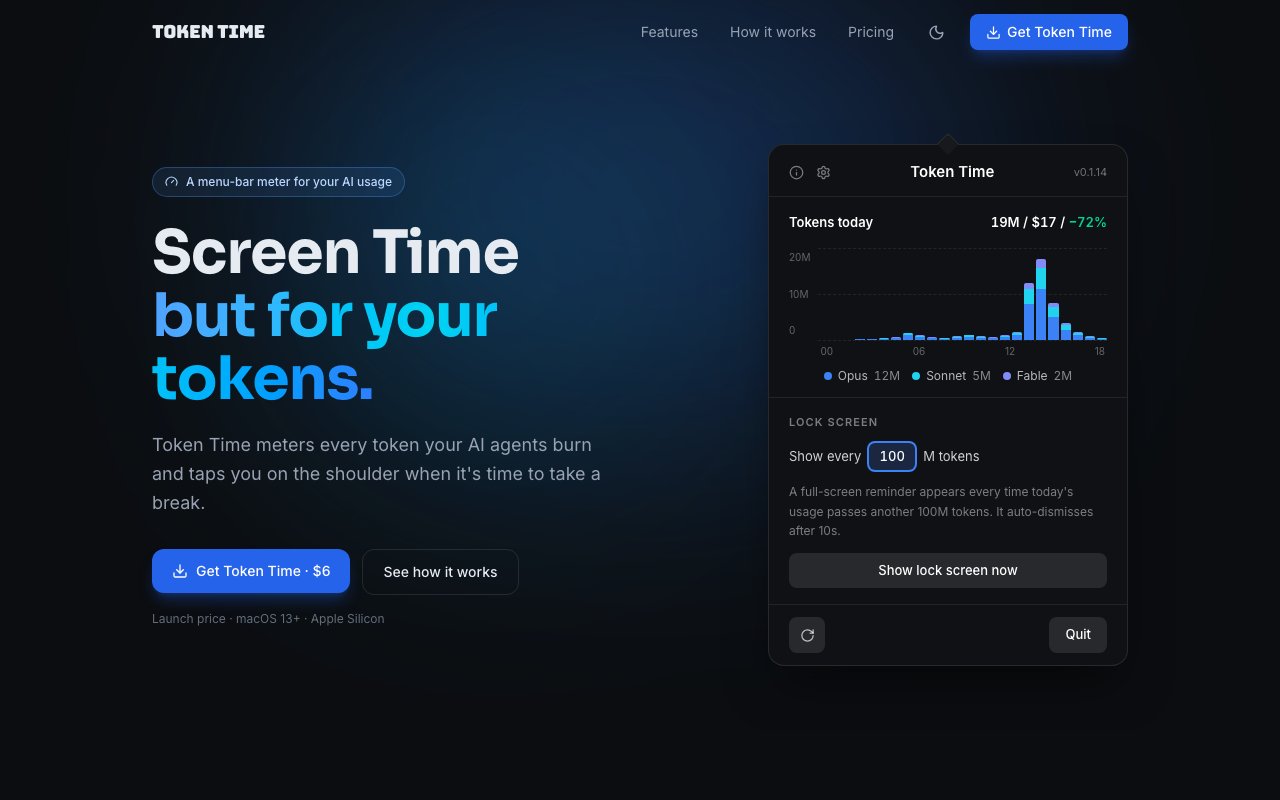
The core of it is the menu-bar meter, which shows a live token count and the current day's spend without you opening anything. Click into it and the usage is laid out by the hour across the day, which is exactly where the runaway sessions stand out. Instead of one flat total, you get a shape for the day, and a spike at two in the afternoon tells you more than a single figure ever could. It also breaks cost down by model and holds the current day up against your usual baseline. That split matters when you juggle a cheap model for drafts and an expensive one for the hard problems, because it shows you where the money is actually going rather than lumping everything together. The baseline comparison is the part that flags trouble early, since a day that runs well above your normal pattern is usually a sign that something looped or an agent went off on its own.
That hourly and per-model view earns its keep once you start running agents or background jobs that keep working while your attention is elsewhere. An agent that retries, re-reads a long context, or loops on a task can quietly move a lot of tokens in a short window, and a flat monthly total would never show you which hour it happened in. Watching the shape of the day turns that from a mystery into something you can trace back to a specific run, so you can change how you set it up the next time instead of guessing.
For the stretches where you get absorbed and stop checking, there are full-screen reminders. When you cross a threshold you've set, a reminder briefly takes over the screen and then clears itself after ten seconds, so it interrupts just enough to register without derailing your work. You decide how often those nudges fire, tuned in steps of a few million tokens, which lets a light user and someone running heavy batch jobs both settle on a rhythm that doesn't grate. The reminders are a nudge rather than a hard cap, and that distinction is deliberate. Token Time doesn't cut you off or throttle anything, it simply makes sure you know where you stand, so the choice to keep going or ease off stays with you. Because you tune how often it fires in steps of a few million tokens, the same app can sit quietly in the background for someone who mostly chats and speak up often for someone pushing large jobs through all day. It's a meter and a gentle alarm, not a gatekeeper.
Privacy isn't an afterthought here. There's no account to create, nothing syncs to a cloud service, and the app sends no telemetry, so the record of how you use AI never leaves your machine. For anyone who'd rather not hand a running log of their model usage to yet another third party, that local-only posture is a genuine part of the appeal, and it means the app behaves the same whether or not you happen to be online.
The audience is developers and AI power users, the people who keep a chat or an agent open next to the editor and quietly rack up tokens all day. If you've ever reached the end of a billing cycle with no clear idea where the spend actually went, this is built to answer that question while you can still do something about it, rather than weeks later once the money is already gone. It fits neatly into a workflow where you're moving fast and don't want to keep tabbing over to a usage page to check yourself.
What sets it apart from a provider's own dashboard is immediacy and independence. It watches usage across your work instead of living behind a login you have to remember to open, and it does that without collecting anything about you. Access is a one-time purchase rather than a subscription, which is worth noting on its own since so many small utilities lean on recurring fees. It's listed at six dollars at launch against a regular price of eight, so once you own it there's nothing to renew. It runs on macOS 13 and later on Apple Silicon, and the makers publish a support address for questions.
Key Features
- Live menu-bar token and spend meter
- Hourly usage breakdown across the day
- Cost split by model
- Baseline comparison to spot spikes
- Full-screen threshold reminders
- Local only, no account or telemetry
Pros & Cons
What we like
- Surfaces token spend in real time instead of after the invoice
- Runs entirely on-device with no account or cloud sync
- One-time purchase rather than a subscription
- Configurable reminders that auto-dismiss quickly
Room for improvement
- macOS only, and needs Apple Silicon
- Menu-bar utility with a narrow, single-purpose focus
- No team or multi-machine reporting
- Younger product with a small footprint
Frequently Asked Questions
What is Token Time?
Does Token Time send my data anywhere?
Is Token Time free?
What do I need to run it?
Best For
Featured in
Alternatives to Token Time

1Lookup
Real-time data verification API for phone, email, IP, and domain validation to fight fraud

Codedex
A gamified, story-driven platform that teaches Python, web dev, and more like an RPG quest
Hack2hire
Practice real SDE interview questions from top tech companies with expert worked solutions
Cloudflare Pages
Free Jamstack hosting on Cloudflares edge with unlimited bandwidth and tight integration with Workers.
Reviews (10)
Two months in, no regrets
Picked Token Time for the price, stayed for the quality. Where it really wins is cost split by model. It earns its place in my stack.
Decent with some rough edges
Started using Token Time casually, now it is pinned in my dock. Their take on cost split by model is genuinely good. The thing I keep coming back to is how reliable it is. It fits well for setting spend nudges for heavy batch jobs. The catch is no team or multi-machine reporting.
Recommended without reservation
Hadn't planned on switching, but Token Time was hard to ignore. It handles the boring parts so I can focus on the work that matters. It fits well for watching daily ai token spend while you work. No regrets so far.
Exactly what I needed
Started using Token Time casually, now it is pinned in my dock. It does what it says, which is rarer than it should be. Glad I made the switch.
Pulled its weight from week one
Three months of Token Time later, here is what holds up. Got real value out of live menu-bar token and spend meter. The core workflow is smooth once you are set up. Easy yes for anyone weighing the same trade offs.
Two months in, no regrets
Found Token Time on a Show HN thread and I am glad I clicked. It just works, day after day, without surprises. The interface stays out of my way, which I appreciate. Hard to imagine going back to my old setup.
Exactly what I needed
Picked Token Time for the price, stayed for the quality. Where it really wins is configurable reminders that auto-dismiss quickly. No regrets so far.
Finally something that fits
Found Token Time on a Show HN thread and I am glad I clicked. Their take on configurable reminders that auto-dismiss quickly is genuinely good. It just works, day after day, without surprises. Mostly using it for catching a runaway or looping model session early. It earns its place in my stack.
Recommended without reservation
Came to Token Time after getting frustrated with what I had before. The local only, no account or telemetry is more useful than I expected. It fits well for watching daily ai token spend while you work. Worth it for what I get out of it.
Genuinely impressed
Found Token Time on a Show HN thread and I am glad I clicked. Where it really wins is one-time purchase rather than a subscription.
Badge builder
Add Token Time to your website
Choose a badge style and size, preview it here, then copy the generated HTML. Badge images are self-contained SVGs and do not require an external script.

<a href="https://toolindex.net/tools/token-time?ref=badge" target="_blank" rel="noopener">
  <img src="https://toolindex.net/badge/token-time/medium.svg" alt="Token Time - Listed on Tool Index" width="180" height="50" />
</a>How to use the badge
- 1. Pick the style, size, and theme that fit your layout.
- 2. Copy the generated HTML from the code block.
- 3. Paste it into your footer, homepage, or press page.
Standard badge available
The standard listing badge is available now. Score and circle badges are limited to tools currently ranked in the top 10 of a category.
Badge clicks return visitors to this profile with a referral tag so the source remains identifiable.
Related Tools

Kevin Gabeci
Solo developer building web apps, cozy browser games, and AI creator toolkits.

Coolify
Self-hostable, open source alternative to Heroku and Netlify

Warp
The modern terminal reimagined with AI and collaboration

Bolt.new
Prompt-to-deployed full-stack app inside the browser
Work on Token Time? Request listing access or correction