
Tools Berry
Free browser based calculators for taxes, finance, and everyday conversions
Gallery
About Tools Berry
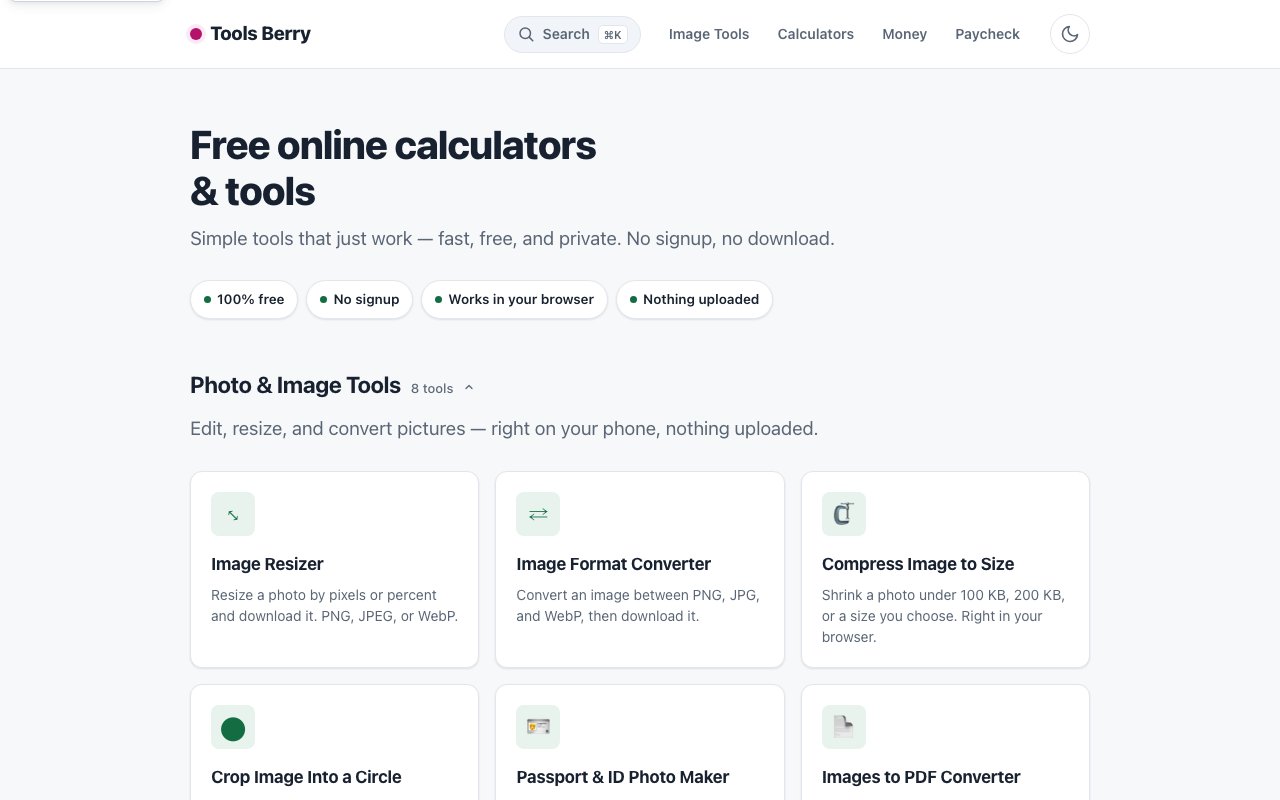
Tools Berry operates on a simple premise that shouldn't feel novel but often does in a web landscape dominated by account requirements and data collection. The calculators and converters run entirely in your browser, require no account creation whatsoever, and don't upload anything to external servers for processing. Your data stays on your device throughout every calculation and conversion. The platform covers an unusually broad range of utility tools spanning financial calculators, image processors, developer utilities, and everyday converters, all accessible without the friction of signup flows or concerns about where your inputs end up after you leave the page.
The financial and tax calculator section runs particularly deep, with over 40 tools addressing scenarios that generic calculator apps tend to ignore entirely. Paycheck calculators cover all 50 US states plus the District of Columbia with 2026 versions that account for current federal and state tax brackets. More notably, the platform includes calculators specifically for 2025 and 2026 tax law changes that many established tax tools haven't incorporated yet. These specialized calculators cover overtime deductions, tip income deductions, SALT cap adjustments, student loan interest deduction changes, and charitable contribution rule updates. The financial category extends further into mortgage calculators, auto loan calculators, and debt payoff planning tools for people managing multiple obligations. Retirement planning through 401k projections, compound interest modeling for investment scenarios, and inflation adjustment tools round out the financial section. State by state data studies and Treasury occupation code lookups support specialized tax situations that don't fit neatly into standard calculator templates.
Image and photo tools provide 13 utilities addressing the manipulation needs that arise constantly for anyone working with visual content. Resizing, cropping, and format conversion between PNG, JPG, and WebP handle the basics you encounter most frequently. Compression reduces file sizes for web usage where bandwidth and loading speed matter. A circle cropping tool produces the circular profile images that social platforms commonly require. A passport and ID photo maker formats images to meet official government requirements with specific dimension and background expectations. The PDF suite covers conversion between formats, merging multiple documents, splitting large files, and compression for easier sharing. All of these tools run locally in the browser without server upload, which matters considerably when you're processing sensitive documents, identification photos, or business materials you don't want passing through external infrastructure.
The everyday calculator collection spans over 30 tools for situations that arise regularly in normal life but don't justify installing specialized applications. Percentage calculators, tip calculators, and discount calculators handle commerce math. Unit conversions and cooking measurement translations address kitchen and workshop needs. BMI calculators, ideal weight calculators, and calorie calculators support health tracking without requiring fitness app subscriptions. Time utilities include hours calculators for tracking work, timers and stopwatches for productivity, age calculators for precise age computation, countdown timers for events, and time zone converters for coordinating across locations. Specialized options extend into niche but practical territory with pace calculators for runners, paint calculators for renovation projects, tile calculators for flooring estimation, and recipe scalers for adjusting ingredient quantities.
Developer and text tools add 11 utilities aimed at people who work with code and written content throughout their day. JSON formatting and validation catches syntax errors and makes nested data structures readable. Base64 encoding and decoding handles the data transformation that appears constantly in web development and API work. Text utilities cover case conversion between formats, diff checking to compare versions, and character counting for platforms with length limits. UUID generation and QR code creation produce commonly needed outputs without requiring separate tools. A Morse code translator exists for the rare occasions anyone needs one. Password generation, invoice creation, and word counting fill out the utility tools category with additional practical functionality.
The privacy first approach isn't just marketing positioning here. Running everything client side through browser JavaScript means your salary numbers, tax information, personal photos, identification documents, and business files never leave your machine for processing elsewhere. For freelancers, employees, students, and homeowners who need quick calculations without creating accounts or sharing personal data with third party services, this execution model delivers meaningful privacy protection without sacrificing the functionality these tools provide. The dark and light theme toggle with automatic system preference detection handles the visual customization that users expect from contemporary web applications. Everything remains completely free to use with non intrusive advertising that doesn't block access to core functionality or interrupt your workflow with overlay prompts.
Key Features
- Paycheck calculators for all 50 US states
- Federal and state tax withholding for 2025 and 2026
- Mortgage and loan calculators
- Client side processing with no data uploads
- Image resize and format conversion tools
- Developer utilities like JSON formatting
Pros & Cons
What we like
- Completely free with no signup required
- All calculations run locally in the browser
- Tax figures traced to primary IRS and state sources
- Corrections log and responsive support via email
Room for improvement
- Not a substitute for professional tax advice
- Ad supported, so you will see ads on pages
- Focused on US taxes, less useful internationally
- Simpler tools without advanced customization
Frequently Asked Questions
What is Tools Berry?
Is my data safe on Tools Berry?
Are the tax calculators accurate?
Is Tools Berry free?
Best For
Featured in
Alternatives to Tools Berry
View all


Reviews (12)
Two months in, no regrets
Have been running Tools Berry for a while, here is where I land. Got real value out of completely free with no signup required. Would sign up again without thinking twice.
Pulled its weight from week one
Tools Berry has quietly become part of my daily flow. Their take on completely free with no signup required is genuinely good. It fits well for calculating take home pay for a new job offer.
Solid but not perfect
Found Tools Berry on a Show HN thread and I am glad I clicked. Where it really wins is client side processing with no data uploads. It just works, day after day, without surprises. One thing that bugs me is ad supported, so you will see ads on pages. Would sign up again without thinking twice.
Worth a look
Three months of Tools Berry later, here is what holds up. Where it really wins is mortgage and loan calculators. Setup was painless and I was productive the same day. It fits well for estimating mortgage payments before applying. It earns its place in my stack.
Quietly excellent
Three months of Tools Berry later, here is what holds up. The core workflow is smooth once you are set up. It handles the boring parts so I can focus on the work that matters.
Genuinely impressed
Started using Tools Berry casually, now it is pinned in my dock. Where it really wins is mortgage and loan calculators. It earns its place in my stack.
Recommended without reservation
Found Tools Berry on a Show HN thread and I am glad I clicked. What stands out is how it handles all calculations run locally in the browser. It has shaved real time off my week. It fits well for estimating mortgage payments before applying. Would sign up again without thinking twice.
It just works
Found Tools Berry on a Show HN thread and I am glad I clicked. It has shaved real time off my week. It does what it says, which is rarer than it should be. No regrets so far.
Solid but not perfect
Tried Tools Berry on a side project first, then rolled it out everywhere. Where it really wins is mortgage and loan calculators. Found it works best for estimating mortgage payments before applying. One thing that bugs me is ad supported, so you will see ads on pages. Hard to imagine going back to my old setup.
Pulled its weight from week one
Tools Berry solves a real problem for me without making a fuss about it. It handles the boring parts so I can focus on the work that matters. Found it works best for estimating mortgage payments before applying. Worth it for what I get out of it.
Does the job, a few gripes
Picked Tools Berry for the price, stayed for the quality. Their take on paycheck calculators for all 50 us states is genuinely good. It fits well for converting image formats without installing software. My only gripe is focused on us taxes, less useful internationally.
Exactly what I needed
Have been running Tools Berry for a while, here is where I land. Got real value out of federal and state tax withholding for 2025 and 2026. It slotted into my routine without much fuss. Found it works best for converting image formats without installing software. Worth it for what I get out of it.
Badge builder
Add Tools Berry to your website
Choose a badge style and size, preview it here, then copy the generated HTML. Badge images are self-contained SVGs and do not require an external script.

<a href="https://toolindex.net/tools/tools-berry?ref=badge" target="_blank" rel="noopener">
  <img src="https://toolindex.net/badge/tools-berry/medium.svg" alt="Tools Berry - Listed on Tool Index" width="180" height="50" />
</a>How to use the badge
- 1. Pick the style, size, and theme that fit your layout.
- 2. Copy the generated HTML from the code block.
- 3. Paste it into your footer, homepage, or press page.
Standard badge available
The standard listing badge is available now. Score and circle badges are limited to tools currently ranked in the top 10 of a category.
Badge clicks return visitors to this profile with a referral tag so the source remains identifiable.
Related Tools

Simple RMD
Calculate, aggregate, and manage your annual IRA required minimum distributions.
FreshBooks
Cloud accounting designed for service-based small businesses and freelancers
Deel
Global payroll, contractor, and EOR platform
Chargebee
Subscription billing and revenue management for B2B SaaS
Work on Tools Berry? Request listing access or correction