
Trylle
Modern Git platform with native stacked PRs, GitHub-compatible CI, and unified workflows
Gallery
About Trylle
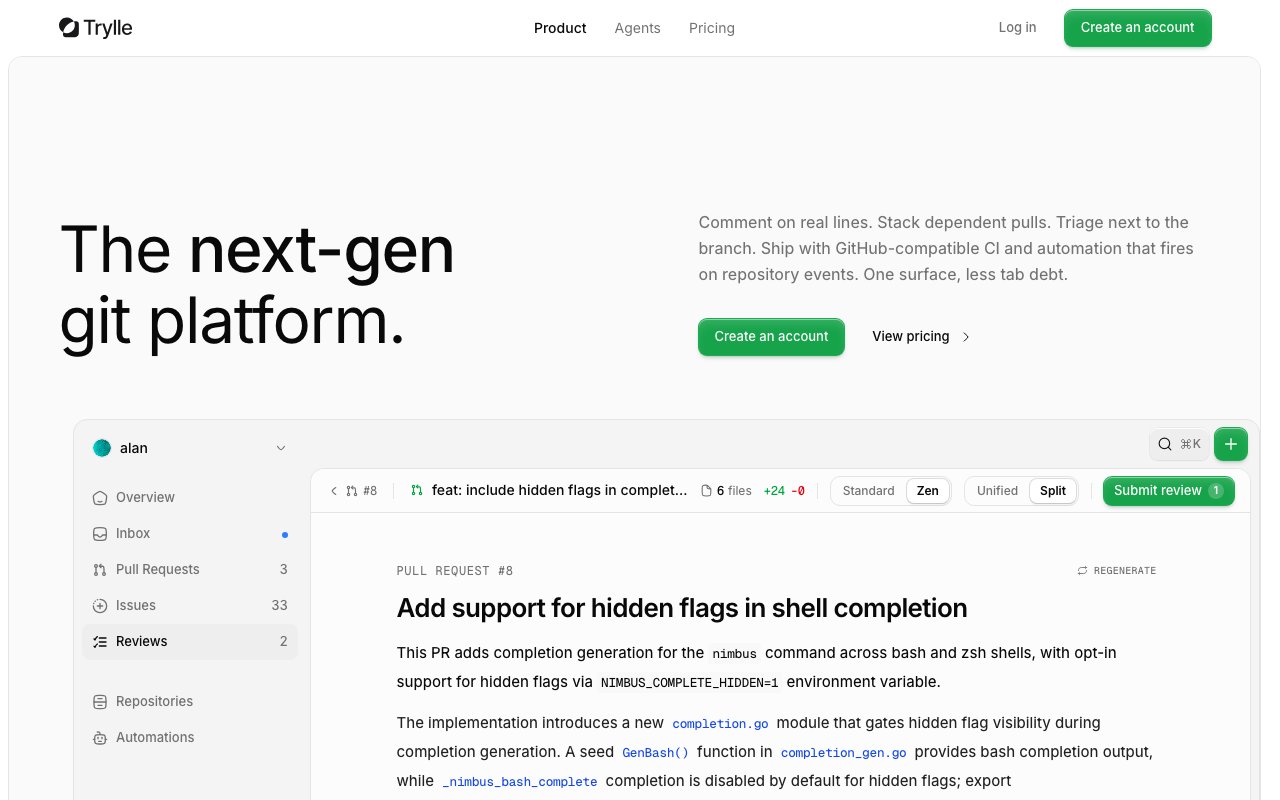
Trylle is a Git platform built as a modern alternative to GitHub, designed around the core idea that code review and repository management shouldn't require constant tab switching and context loss. The entire workflow from pull requests to issue tracking to CI runs happens in a single interface where context follows you naturally as you move between tasks. If you've ever felt like GitHub spreads your attention across too many separate pages and forces you to hold mental state while jumping between reviews, branches, and build logs, Trylle consolidates that experience so reviewing code, triaging issues, and monitoring builds all happens alongside the branch you're actively shipping.
The standout feature is native support for stacked pull requests, which changes how teams handle dependent changes that need to land in sequence. Instead of managing dependent branches manually through careful rebasing and hoping you merge them in the right order without breaking the chain, Trylle groups related PRs into a stack that stays synchronized automatically. When earlier changes in the stack update, dependent branches rebase accordingly without manual intervention. The platform keeps the visual grouping clear in the interface so you always see how changes relate, and provides CLI tools for creating, restacking, and submitting entire stacks without juggling raw git commands. This workflow matters for teams that break large changes into reviewable chunks rather than dumping everything into a single massive PR that nobody wants to review thoroughly.
Pull requests include inline commenting on actual code lines with threaded conversations that stay attached to the relevant context even as code evolves through revisions. The review queue integrates directly with your branch view, so triaging feedback never pulls you away from the code itself into a separate review interface. You comment, request changes, and approve without loading additional pages or losing your place. This tight coupling between the code view and the review conversation reduces the friction that makes thorough reviews feel like a chore and encourages more engaged feedback than systems where reviewing requires deliberate context switching.
CI runs on GitHub Actions compatible runners, which means your existing workflow YAML files work without modification when you migrate. Trylle provides Linux x86 and ARM64 runners along with macOS options, covering the common build environments for web applications, mobile development, and backend services. You get secrets and variables management for storing credentials safely, artifact storage for build outputs, and release publishing through the same Actions API patterns you already know from GitHub. Migration doesn't require rewriting your automation layer, which removes one of the biggest obstacles to trying a new platform.
Automations trigger on repository events like PR opens, push events, CI success, and other lifecycle moments with explicit permission scoping and full audit trails showing exactly what ran and why. You can wire up notifications, enforce quality policies, or kick off downstream processes without installing separate integration apps or configuring external webhook receivers. The automation layer lives inside the platform rather than requiring external services for basic workflow coordination, which simplifies administration and reduces the number of systems that need monitoring.
Repository migration from GitHub preserves full commit history, so you don't lose the context that blame information provides or the ability to bisect issues back to their introduction. The CLI works for developers who prefer terminal workflows, offering commands for common operations without requiring the web interface for basic tasks. Issues and releases round out the project management layer, giving teams a complete development environment rather than just version control with code review bolted on as an afterthought.
Pricing starts with a free tier that includes fifteen dollars in CI compute credit and ten dollars in AI feature credit per month, which covers light usage for personal projects and evaluation. The Pro plan at four dollars monthly increases those allocations modestly, while Max at twenty dollars monthly provides the highest credit levels for heavier usage. All tiers support personal workspaces with the core platform features included, so you aren't locked out of stacked PRs or automations at lower price points. Teams evaluating Trylle can start without payment and scale into paid tiers as their CI usage and project complexity grow beyond what free credits cover.
Key Features
- Native stacked pull request support
- GitHub-compatible CI with YAML workflows
- Integrated issue tracking with labels
- Secret detection in diffs
- Push mirroring to original remotes
- Zen mode for narrative code review
Pros & Cons
What we like
- Stacked PRs are first-class without third-party tools
- Existing GitHub workflows work without rewriting
- Code review, CI, and issues share a single timeline
- Migration from GitHub preserves full history
Room for improvement
- Smaller ecosystem and community than GitHub
- AI and CI credits may run out on the free tier
- Fewer third-party integrations available
- Newer platform with less production mileage
Frequently Asked Questions
What is Trylle?
Is Trylle free?
Can I migrate from GitHub to Trylle?
Does Trylle support my existing GitHub Actions workflows?
Best For
Featured in
Alternatives to Trylle
View all
1Lookup
Real-time data verification API for phone, email, IP, and domain validation to fight fraud

Kevin Gabeci
Solo developer building web apps, cozy browser games, and AI creator toolkits.

Codedex
A gamified, story-driven platform that teaches Python, web dev, and more like an RPG quest
Hack2hire
Practice real SDE interview questions from top tech companies with expert worked solutions
Reviews (0)
Badge builder
Add Trylle to your website
Choose a badge style and size, preview it here, then copy the generated HTML. Badge images are self-contained SVGs and do not require an external script.

<a href="https://toolindex.net/tools/trylle?ref=badge" target="_blank" rel="noopener">
  <img src="https://toolindex.net/badge/trylle/medium.svg" alt="Trylle - Listed on Tool Index" width="180" height="50" />
</a>How to use the badge
- 1. Pick the style, size, and theme that fit your layout.
- 2. Copy the generated HTML from the code block.
- 3. Paste it into your footer, homepage, or press page.
Standard badge available
The standard listing badge is available now. Score and circle badges are limited to tools currently ranked in the top 10 of a category.
Badge clicks return visitors to this profile with a referral tag so the source remains identifiable.
Related Tools
Kevin Gabeci
Solo developer building web apps, cozy browser games, and AI creator toolkits.

Coolify
Self-hostable, open source alternative to Heroku and Netlify

Warp
The modern terminal reimagined with AI and collaboration

Bolt.new
Prompt-to-deployed full-stack app inside the browser
Work on Trylle? Request listing access or correction