
ViewKit
Browser-based dataset viewer for ML researchers with full client-side processing
Gallery
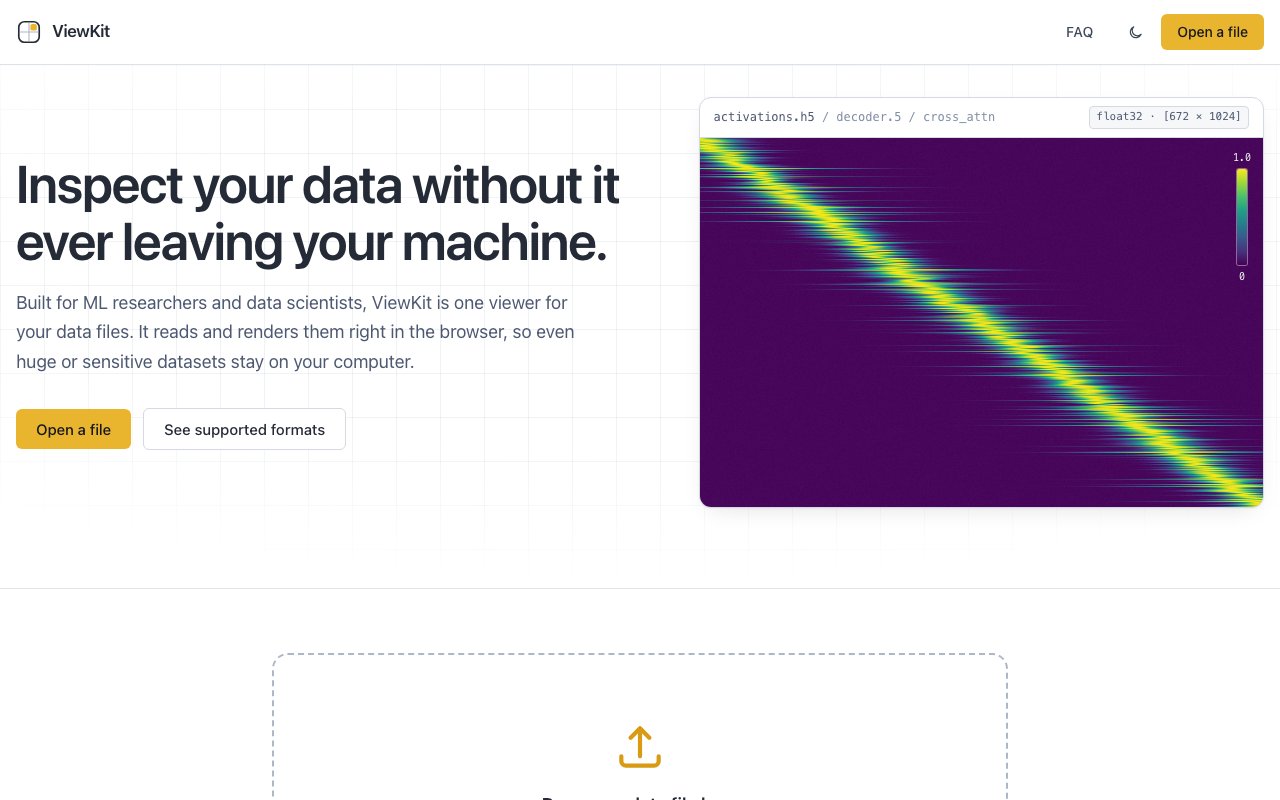
About ViewKit
ViewKit is a browser-based file viewer built specifically for machine learning researchers and data scientists who need to inspect complex data formats without writing throwaway scripts or spinning up notebooks. It runs entirely in the browser, which means files never leave your machine. There's no upload step, no server-side processing, and no account required. You open a file, and it renders locally using your browser's capabilities. Once the application loads initially, it even works offline, which makes it useful on flights or in environments with restricted network access where you still need to work with data.
The format coverage is unusually broad for a tool in this space. It handles HDF5, Parquet, Zarr in both v2 and v3, Apache Arrow, Feather, CSV, TSV, Excel, JSON Lines, NumPy arrays in .npy and .npz containers, safetensors, TFRecord, and even WebDataset tarballs. On the audio side it supports WAV, MP3, FLAC, OGG, and M4A. That range makes it genuinely useful across different workflows rather than forcing you to switch tools depending on what you're looking at. If you work with multiple frameworks or collaborate with researchers using different ecosystems, having one viewer that handles the entire spread removes a surprising amount of friction from daily work.
What sets it apart technically is how it handles large files. Traditional viewers choke on multi-gigabyte datasets because they try to load everything into memory before rendering anything useful. ViewKit uses selective byte-range reading, pulling only the portions you're actually viewing at any moment. That means you can open a massive HDF5 file and browse its structure without waiting for the whole thing to download into your browser's memory. For researchers working with datasets that exceed available RAM, this isn't a nice-to-have feature. It's the difference between the tool being usable and being useless.
The interface lets you explore the internal structure of these formats in ways that are usually hidden behind programmatic access. For HDF5, you can browse groups, datasets, and attributes in a tree view, expanding and collapsing hierarchies without writing any code. For Parquet, you can read schemas, inspect row groups, and view column statistics to understand how the data is organized before you decide how to query it. For N-dimensional arrays, you can slice through dimensions interactively and render heatmaps to get a visual sense of what the data looks like. It turns inspection into something visual and navigable rather than requiring you to remember the right function calls in Python or R and interpret printed output.
The target audience is clear: ML practitioners who regularly deal with research datasets, model weights, and training data in specialized formats. If you've ever found yourself writing a quick script just to check what's in a .npy file or digging through HDF5 attributes to understand someone else's dataset structure before you can use it, this is meant to replace that friction. It's particularly useful when you're working with data you didn't create and need to understand its organization before deciding how to process it. The visual approach catches structural issues and data characteristics that are easy to miss when you're staring at printed array shapes and dtype strings in a terminal.
ViewKit publishes technical articles alongside the tool that explain the layout and storage decisions behind these formats. That educational angle makes it more than just a viewer. It's also a reference for understanding why these formats exist and what tradeoffs they represent. If you've ever wondered why HDF5 is structured the way it is, how Parquet handles compression at the column level, or what makes Zarr suitable for distributed storage, the accompanying content goes into that depth. For people learning these formats, the combination of the viewer and the explanatory content accelerates understanding in a way that documentation alone often doesn't.
The tool is completely free with no hidden tiers or upgrade prompts. There's no sign-up, no installation beyond opening a webpage, and no data leaving your machine under any circumstances. The privacy guarantee is absolute because the architecture makes server-side processing impossible. It's one of those rare tools that does exactly what it claims without any surrounding friction, which makes it worth bookmarking even if you only need it occasionally. When you do need it, you'll be glad it's there and that it just works without any prerequisites.
Key Features
- Full client-side data processing
- Support for HDF5, Parquet, Zarr, safetensors, and more
- NumPy array inspection for npy and npz files
- Audio file preview for WAV, MP3, FLAC, OGG, M4A
- No installation or account required
- Light and dark mode with persistence
Pros & Cons
What we like
- Data never leaves your machine because everything runs in the browser
- Supports over a dozen ML and data science file formats
- No setup or installation needed on any operating system
- Completely free with no paywalls or usage limits
Room for improvement
- Performance depends on browser and local hardware for large files
- No editing or transformation capabilities, read-only inspection only
- Newer tool with a smaller community and fewer resources
- Limited documentation for advanced use cases
Frequently Asked Questions
What is ViewKit?
Does ViewKit upload my data anywhere?
Is ViewKit free?
What file formats does ViewKit support?
Best For
Featured in
Alternatives to ViewKit
View all
1Lookup
Real-time data verification API for phone, email, IP, and domain validation to fight fraud

Kevin Gabeci
Solo developer building web apps, cozy browser games, and AI creator toolkits.

Codedex
A gamified, story-driven platform that teaches Python, web dev, and more like an RPG quest
Hack2hire
Practice real SDE interview questions from top tech companies with expert worked solutions
Reviews (0)
Badge builder
Add ViewKit to your website
Choose a badge style and size, preview it here, then copy the generated HTML. Badge images are self-contained SVGs and do not require an external script.

<a href="https://toolindex.net/tools/viewkit?ref=badge" target="_blank" rel="noopener">
  <img src="https://toolindex.net/badge/viewkit/medium.svg" alt="ViewKit - Listed on Tool Index" width="180" height="50" />
</a>How to use the badge
- 1. Pick the style, size, and theme that fit your layout.
- 2. Copy the generated HTML from the code block.
- 3. Paste it into your footer, homepage, or press page.
Standard badge available
The standard listing badge is available now. Score and circle badges are limited to tools currently ranked in the top 10 of a category.
Badge clicks return visitors to this profile with a referral tag so the source remains identifiable.
Related Tools
Kevin Gabeci
Solo developer building web apps, cozy browser games, and AI creator toolkits.

Coolify
Self-hostable, open source alternative to Heroku and Netlify

Warp
The modern terminal reimagined with AI and collaboration

Bolt.new
Prompt-to-deployed full-stack app inside the browser
Work on ViewKit? Request listing access or correction