
YAML2JSON
Free in-browser YAML to JSON converter with real-time validation and API access
Gallery
About YAML2JSON
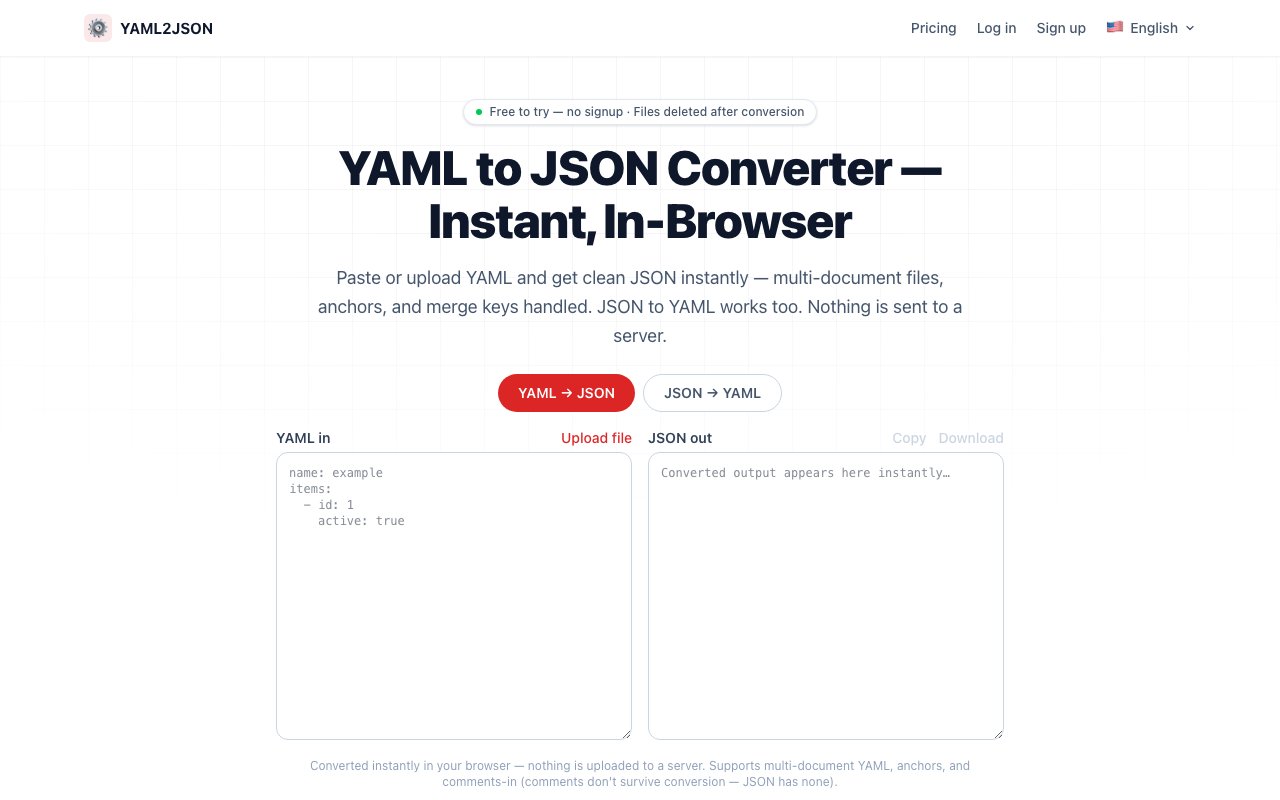
YAML2JSON is a browser based converter that transforms YAML configuration files into JSON format and handles the reverse direction just as easily. The entire conversion runs client side in your browser, meaning nothing you paste gets transmitted, logged, or stored on any server. You can actually disconnect from the internet and keep converting files, which matters when you're working with sensitive configuration that shouldn't leave your machine. For developers constantly juggling Kubernetes manifests, Docker Compose files, GitHub Actions workflows, and CI/CD pipelines, having a reliable conversion tool that respects privacy removes friction from an otherwise tedious task. The alternative of piping through command line tools works but breaks flow when you're already in a browser based workflow and would rather not context switch to a terminal window.
The technical implementation supports full YAML 1.2 parsing including anchors, aliases, and merge keys, which covers the more advanced YAML features that trip up simpler converters. Multi document YAML streams get handled properly, converting to JSON arrays when a single file contains multiple documents separated by the standard triple dash delimiter. Conversion happens in real time as you type, with line specific error messages that point directly to syntax problems rather than leaving you to hunt through hundreds of lines guessing where things went wrong. The immediate feedback loop makes debugging malformed YAML significantly faster than waiting for a deployment to fail and parsing the cryptic error message afterward. You see problems the moment you type them, which shortens the fix cycle considerably and catches simple mistakes before they cost you a failed deploy.
Getting started requires no signup or account creation whatsoever. The free anonymous tier offers unlimited conversions right in the browser, which handles most casual use cases without asking for email addresses or creating yet another password to manage. File upload and download functionality lets you work with local files rather than copy pasting blocks of text, and the bidirectional conversion means you can take JSON output from an API response and convert it to YAML for your config files just as easily as going the other direction. The tool does note that JSON will strip YAML comments since the JSON spec doesn't support them, so be aware if you're converting commented configuration where those notes matter for future maintainers. Anchor and alias references get resolved to their actual values in the JSON output, which is usually what you want when you need the flattened final configuration rather than the templated source.
Paid tiers exist for users who need API access or higher volume programmatic conversion. Starter runs fifteen dollars monthly for a hundred API conversions, Professional costs twenty nine dollars for three hundred monthly conversions plus API access, and Business at forty nine dollars monthly adds team features with a thousand conversions. The API enables integrating conversion into automated pipelines, scripts, or internal tools without building your own parser from scratch. A referral program offers ten free credits per successful signup, though most individual developers will find the unlimited free browser tier sufficient for their daily needs without ever paying a cent. The paid tiers target teams building tooling that needs reliable format conversion as a backend service at scale rather than one off manual conversions.
The target audience spans developers, DevOps engineers, and anyone managing configuration across systems that expect different formats. OpenAPI specifications, infrastructure as code templates, application configs, deployment manifests, and Helm charts all benefit from quick format conversion without leaving the browser or installing additional tooling on your machine. The emphasis on client side processing and zero data transmission positions YAML2JSON as a privacy conscious alternative to converters that upload your config to parse it server side, where you have no visibility into whether they log inputs or retain data. For shops with strict data handling requirements or developers who simply don't want their AWS credentials, database connection strings, or infrastructure secrets passing through unknown servers, that distinction matters more than a few dollars in subscription fees. Sometimes the right tool is the one that doesn't require trusting anyone else with your data, and that's exactly what purely local conversion provides.
Key Features
- Bidirectional YAML and JSON conversion
- Full YAML 1.2 support with anchors and aliases
- Real-time validation with line-number errors
- Multi-document YAML to JSON array
- 100% client-side, no data transmitted
- API access on paid plans
Pros & Cons
What we like
- Conversion runs entirely in your browser, nothing uploaded
- Precise error messages with line numbers
- Free unlimited use for browser conversions
- Handles advanced YAML features like merge keys
Room for improvement
- YAML comments are stripped since JSON has no comment syntax
- API access requires a paid subscription
- No desktop app or CLI included
- Business tier pricing may be steep for solo developers
Frequently Asked Questions
What is YAML2JSON?
Is YAML2JSON free?
Does YAML2JSON upload my data?
What YAML features does it support?
Best For
Featured in
Alternatives to YAML2JSON

1Lookup
Real-time data verification API for phone, email, IP, and domain validation to fight fraud

Kevin Gabeci
Solo developer building web apps, cozy browser games, and AI creator toolkits.

Codedex
A gamified, story-driven platform that teaches Python, web dev, and more like an RPG quest

ShippingSZN
Pre-launch scanner that finds security and readiness gaps in AI-built apps
Reviews (11)
Exactly what I needed
Started using YAML2JSON casually, now it is pinned in my dock. Setup was painless and I was productive the same day. Performance has been steady even when I lean on it hard.
Good, with a few caveats
Hadn't planned on switching, but YAML2JSON was hard to ignore. Setup was painless and I was productive the same day. The interface stays out of my way, which I appreciate. Mostly using it for transforming ci/cd pipeline configs between formats. It would be a five if not for yaml comments are stripped since json has no comment syntax.
Genuinely impressed
Came to YAML2JSON after getting frustrated with what I had before. It slotted into my routine without much fuss. The defaults are sensible, so I was not fighting settings on day one. Would sign up again without thinking twice.
Recommended without reservation
Started using YAML2JSON casually, now it is pinned in my dock. The conversion runs entirely in your browser, nothing uploaded is more useful than I expected. The core workflow is smooth once you are set up. It fits well for debugging yaml syntax errors with line-level feedback. Recommending it to people in a similar spot.
It just works
Picked YAML2JSON for the price, stayed for the quality. Got real value out of conversion runs entirely in your browser, nothing uploaded. Mostly using it for debugging yaml syntax errors with line-level feedback. No regrets so far.
Solid daily driver
Found YAML2JSON on a Show HN thread and I am glad I clicked. Got real value out of full yaml 1.2 support with anchors and aliases. Mostly using it for validating yaml config files before deployment. Easy yes for anyone weighing the same trade offs.
It just works
Found YAML2JSON on a Show HN thread and I am glad I clicked. Where it really wins is bidirectional yaml and json conversion. Found it works best for debugging yaml syntax errors with line-level feedback. Would sign up again without thinking twice.
Finally something that fits
YAML2JSON solves a real problem for me without making a fuss about it. Performance has been steady even when I lean on it hard. Found it works best for converting kubernetes manifests to json for api calls.
Good, with a few caveats
YAML2JSON solves a real problem for me without making a fuss about it. Where it really wins is conversion runs entirely in your browser, nothing uploaded. My only gripe is no desktop app or cli included. Would sign up again without thinking twice.
Genuinely impressed
Have been running YAML2JSON for a while, here is where I land. The thing I keep coming back to is how reliable it is. The defaults are sensible, so I was not fighting settings on day one. It fits well for transforming ci/cd pipeline configs between formats. Glad I made the switch.
It just works
Started using YAML2JSON casually, now it is pinned in my dock. Where it really wins is handles advanced yaml features like merge keys.
Badge builder
Add YAML2JSON to your website
Choose a badge style and size, preview it here, then copy the generated HTML. Badge images are self-contained SVGs and do not require an external script.

<a href="https://toolindex.net/tools/yaml2json?ref=badge" target="_blank" rel="noopener">
  <img src="https://toolindex.net/badge/yaml2json/medium.svg" alt="YAML2JSON - Listed on Tool Index" width="180" height="50" />
</a>How to use the badge
- 1. Pick the style, size, and theme that fit your layout.
- 2. Copy the generated HTML from the code block.
- 3. Paste it into your footer, homepage, or press page.
Standard badge available
The standard listing badge is available now. Score and circle badges are limited to tools currently ranked in the top 10 of a category.
Badge clicks return visitors to this profile with a referral tag so the source remains identifiable.
Related Tools
Kevin Gabeci
Solo developer building web apps, cozy browser games, and AI creator toolkits.

Coolify
Self-hostable, open source alternative to Heroku and Netlify

Warp
The modern terminal reimagined with AI and collaboration

Bolt.new
Prompt-to-deployed full-stack app inside the browser
Work on YAML2JSON? Request listing access or correction