
YVD AI Studio
Create short AI videos, images, and music with multiple models in one browser studio
Gallery
About YVD AI Studio
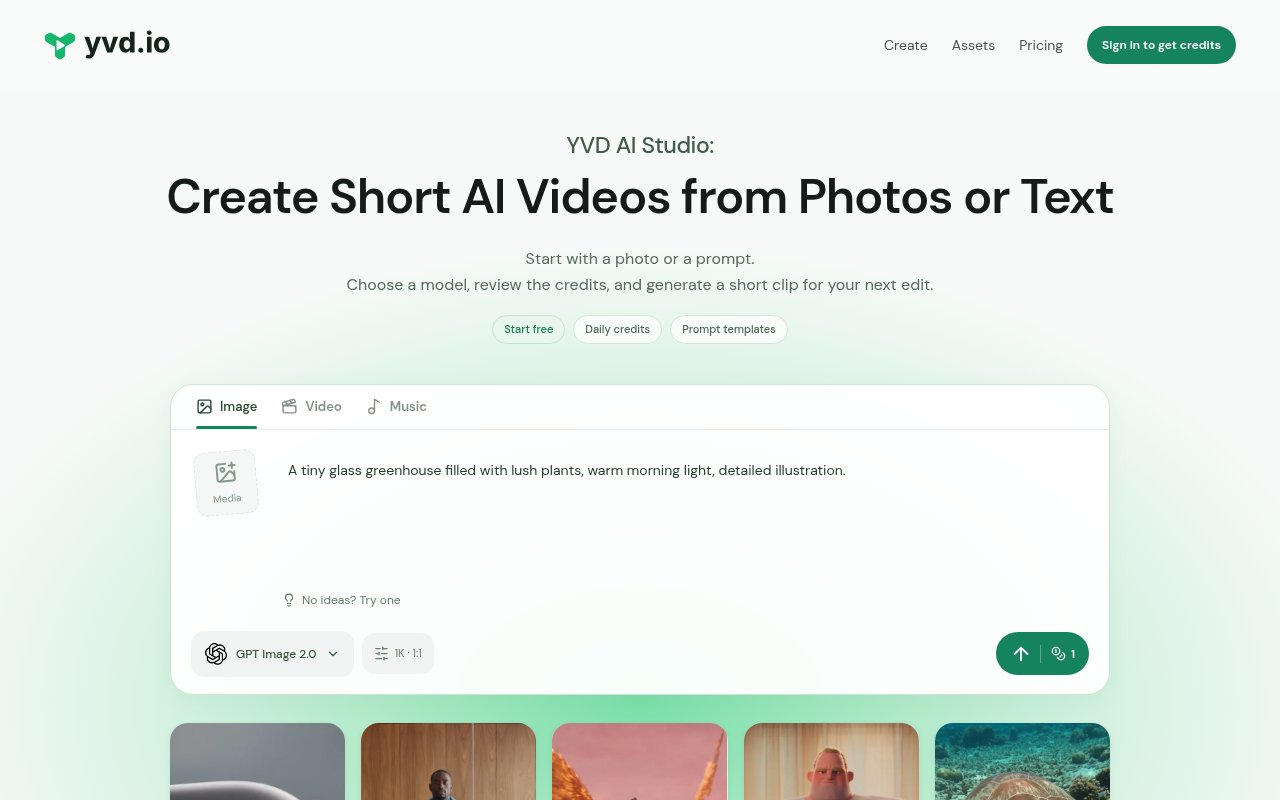
YVD AI Studio is a browser workspace for generating short videos, images, and music from prompts and reference media. Video is the center of the product, with paths for text-to-video and image-to-video creation, but the same account can also produce still images and songs. The studio is aimed at creators who want to try several current generation models without moving between separate provider interfaces. A user starts with a prompt or photo, chooses a compatible model, reviews the available settings and credit quote, then generates a result that can be previewed, downloaded, and found again in the account history. Prompt examples and templates help turn a vague idea into a more specific first attempt.
The video workflow supports different starting materials depending on the selected model. Some scenes begin from text, others animate a first-frame image, and compatible tools can accept additional reference images, source clips, or audio. Model families shown in the studio include Grok, Kling, Seedance, Veo, Wan, Hailuo, MiniMax, and Gemini Omni, with controls that vary by family. Rather than implying that every model accepts every input, YVD exposes the relevant references, framing, duration, and output choices for the current selection. The credit cost is shown before submission, which helps users compare a quick experiment with a longer or higher-setting generation before committing their balance.
Templates cover practical short-form concepts such as product scenes, cinematic shots, animated stories, nature clips, fashion images, and vertical social video. There are also guided photo tools for ideas such as outfit changes, headshots, portrait sets, and themed scenes. A template loads its prompt, model, and settings into a draft but does not start a paid generation automatically, so the user can revise it first. For image work, the studio offers model families such as GPT Image, Nano Banana, Seedream, and Qwen, including reference-led workflows. Music creation uses Suno models and begins with a brief describing the mood, instruments, and vocal direction.
This range makes YVD useful during exploration and preproduction. A marketer can sketch product imagery or an advertising scene, a social creator can generate a vertical opening shot, and a storyteller can establish a character or location before animating it. The assets are intended to be downloaded and assembled in the creator's wider editing workflow. YVD itself advises users making YouTube Shorts to add narration, captions, music, and final cuts in editing software before publishing. It also describes generated advertising examples as concepts rather than real endorsements or guaranteed product footage. That is a sensible boundary for a generator that creates ingredients and short scenes, not a complete factual campaign.
Reference media needs care. The studio accepts common image formats and, when a model supports them, video and audio files, but the user must have permission to upload the material. Commercial use depends on the selected model's terms as well as rights to any likenesses, logos, images, and soundtrack. YVD does not promise clearance, factual product claims, or a specific advertising outcome, so generated work still needs human review. Failed generations that the system confirms return the credits used with their original expiration, while provider media links can expire. Completed files worth keeping should therefore be downloaded rather than treated as permanent cloud storage.
The service is freemium. New accounts receive 20 welcome credits, and users can claim 10 daily promotional credits after each 24-hour wait. Those daily grants expire 24 hours after they are issued, and missed days do not accumulate. Images, videos, and music draw from the same balance, while the required amount depends on the model, settings, and number of outputs. Paid access is available through Lite, Pro, and Ultra memberships, with monthly or annual billing, and users can also buy one-time credit packs that do not expire. Subscription credits arrive at the start of the paid term and expire when that term ends.
YVD works best for creators who value model choice and a shared asset history more than deep timeline editing. Its prompt templates, visible credit quotes, reference workflows, and mix of media types make it approachable for testing a concept across stills, motion, and sound. The main tradeoffs come from the same breadth. Controls and costs differ by model, free credits are short-lived, and a polished multi-shot project still needs selection, editing, and review outside the generator. For short creative experiments and source assets, it offers a clear starting point with enough free access to understand the workflow before choosing a plan or credit pack.
Key Features
- Text and image video generation
- Multiple current AI model families
- AI image and music creation
- Editable prompts and creative templates
- Reference media input workflows
- Upfront generation credit quotes
Pros & Cons
What we like
- Combines video, image, and music workflows
- Shows the credit cost before generation
- Includes daily credits for free exploration
- Keeps finished creations in one history
Room for improvement
- Free daily credits expire after 24 hours
- Controls and costs vary between models
- Finished projects still need external editing
- Commercial rights require model-specific review
Frequently Asked Questions
What is YVD AI Studio?
Is YVD AI Studio free?
Which media can YVD create?
Can YVD output be used commercially?
Best For
Featured in
Alternatives to YVD AI Studio
View allKling AI
Kuaishou's video model that punches above its weight on motion
Luma Dream Machine
Fast, photoreal video generation from the team behind Genie 3D
HeyGen
Generate talking-head avatar videos in dozens of languages

Runway
Video generation, editing, and effects in one creative suite
Reviews (0)
Badge builder
Add YVD AI Studio to your website
Choose a badge style and size, preview it here, then copy the generated HTML. Badge images are self-contained SVGs and do not require an external script.

<a href="https://toolindex.net/tools/yvd?ref=badge" target="_blank" rel="noopener">
  <img src="https://toolindex.net/badge/yvd/medium.svg" alt="YVD AI Studio - Listed on Tool Index" width="180" height="50" />
</a>How to use the badge
- 1. Pick the style, size, and theme that fit your layout.
- 2. Copy the generated HTML from the code block.
- 3. Paste it into your footer, homepage, or press page.
Standard badge available
The standard listing badge is available now. Score and circle badges are limited to tools currently ranked in the top 10 of a category.
Badge clicks return visitors to this profile with a referral tag so the source remains identifiable.
Related Tools
Pika
Playful AI video generator known for fun effects and short clips

Vidu
AI video generator built around reference-to-video, keep characters, props and styles consistent across every clip
Luma Dream Machine
Fast, photoreal video generation from the team behind Genie 3D
Seedance
ByteDance's benchmark-leading AI video model that delivers cinematic, audio-synced clips at a fraction of rival pricing
Work on YVD AI Studio? Request listing access or correction