A1Lab
Learn programming through structured tutorials and runnable examples
Gallery
About A1Lab
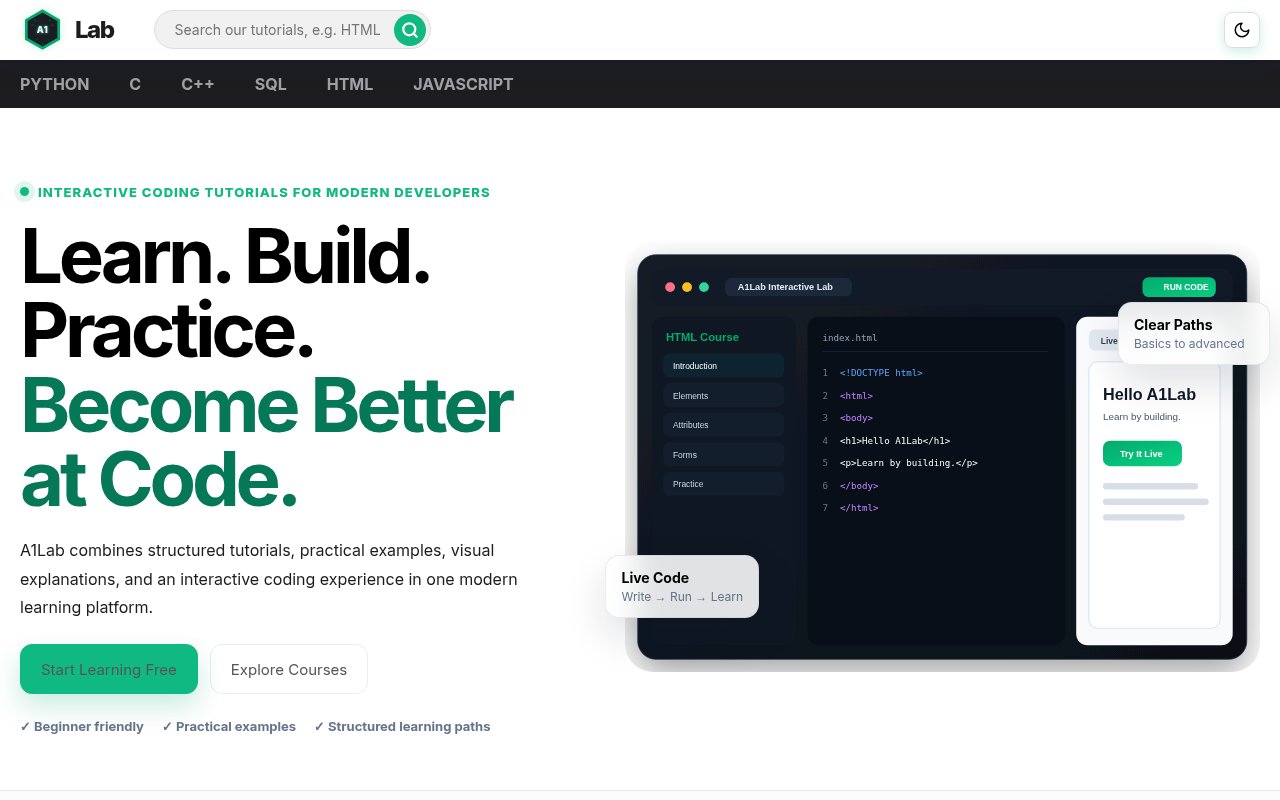
A1Lab is a browser based programming education platform that brings structured tutorials, code examples, visual explanations, practice prompts, and quizzes into one learning flow. It is designed to replace the common habit of jumping among disconnected articles whenever a learner meets a new concept. The home page organizes material into courses and technology paths, while each live course presents a sequence that can be followed from introductory ideas into more specific language features. HTML, JavaScript, Python, C, C++, and SQL are highlighted as the main live courses. Many additional technologies appear as paths to explore, including CSS, TypeScript, Java, PHP, Go, Rust, Git, React, Node.js, databases, and data structures.
Course pages use a persistent topic navigation that makes the scope visible before the learner begins. The HTML path covers page structure, formatting, links, images, lists, layouts, tables, forms, semantic elements, metadata, media, SVG, and canvas. The JavaScript path moves through syntax, values, operators, control flow, functions, arrays, objects, dates, the document model, and browser events. Python ranges from syntax and basic data types through object oriented programming, decorators, context managers, type hints, functional programming, pattern matching, and small projects. That breadth gives a learner a map of what comes next and makes it easier to continue in sequence instead of searching for every topic separately.
Inside a lesson, A1Lab usually introduces the concept in plain language, shows its syntax, breaks down important parts, and presents working code. Copy buttons make examples easy to move elsewhere. JavaScript lessons include Run Code controls and show the resulting console output or page behavior near the example. HTML practice can render a browser preview, while explanations connect individual tags and attributes to the visible page. Lessons also call out common beginner errors and explain why a particular structure works. Visual guides and comparison tables are used when a concept benefits from seeing relationships, such as the distinct jobs of HTML, CSS, JavaScript, and browser interfaces.
Practice is placed close to the explanation rather than separated into a distant exercise catalog. The HTML introduction, for example, includes runnable practice tasks followed by an eight question quiz that checks definitions, tag behavior, nesting, attributes, file extensions, and document structure. Interactive quizzes require JavaScript in the browser. The site also provides next lesson navigation and breadcrumbs, so a learner can move forward or return to the wider course. A search field is available for finding tutorials directly. These details make A1Lab best suited to beginners and early stage developers who want a guided reference they can read in short sessions and immediately test.
The lesson style also works as a reference after the first read. Topic pages separate definitions, syntax, working examples, explanations, common mistakes, and quick checks, making it possible to return to one concept without repeating a whole course. Python pages link through a particularly broad outline that continues into advanced language mechanics and small projects. JavaScript pages distinguish core language ideas from browser features, while HTML pages connect markup structure with what the browser renders. The material favors clarity and coverage over long form instruction or instructor led critique.
The wider catalog shows ambition beyond the six featured live courses, but availability isn't uniform. Some technologies are marked Live and link to active learning paths, while others are labeled Explore and lead to previews rather than a complete course. That distinction matters for someone choosing the platform for a particular stack. The community area provides categories for questions, ideas, and showcases, plus search and discussion tools, though it currently shows no published discussions. A login and registration interface is present for learners who want an account, but much of the tutorial content can be opened directly from the public site without signing in.
A1Lab promotes starting free and doesn't publish a pricing page or paid plan on the pages reviewed, so the listing treats the current public learning experience as free. The site doesn't clearly explain whether paid access may be introduced for future courses, and its title uses the word premium without showing a purchase path. For now, the practical value is the public course material itself, especially the large topic indexes, concise examples, runnable JavaScript snippets, HTML previews, practice sections, and lesson quizzes. It won't replace project experience or instructor feedback, but it gives self directed learners an organized way to build foundational knowledge and keep moving from one related concept to the next.
Key Features
- Structured programming course paths
- Runnable browser code examples
- Visual concept explanations
- Lesson practice and quizzes
- Broad searchable tutorial library
- Developer question and discussion forum
Pros & Cons
What we like
- Course indexes make progression easy to follow
- Examples sit directly beside their explanations
- Several core languages have substantial live paths
- Public lessons open without mandatory sign in
Room for improvement
- Many listed technology paths are previews only
- The community forum is currently sparse
- Interactive quizzes require browser JavaScript
- Future access and pricing terms aren't fully explained
Frequently Asked Questions
What is A1Lab?
Which courses are live on A1Lab?
Can learners run code on A1Lab?
Is A1Lab free?
Best For
Featured in
Alternatives to A1Lab
View all
Kevin Gabeci
Solo developer building web apps, cozy browser games, and AI creator toolkits.

SoloDevStack
A solo developer blog built on head-to-head tool comparisons, 580+ posts deep.

Codedex
A gamified, story-driven platform that teaches Python, web dev, and more like an RPG quest

Vibe Built
Building real apps with agentic AI. What worked, what broke, what shipped.
Our take
Tool Index Editorial · Sep 2026· 3.5/5
A1Lab is a free browser learning site that combines structured programming lessons, examples, visual explanations, practice, and quizzes. We found substantial live paths for HTML, JavaScript, Python, C, C++, and SQL, with runnable browser examples placed close to the explanation. That is a clearer beginner experience than bouncing among unrelated reference pages.
The public lessons open without a required login, and the course outlines make progression easy to understand. Coverage across the wider catalog is uneven, though. Many technologies are still preview paths rather than complete courses, the community area is sparse, and the site doesn't clearly explain whether future material will stay free. It is a useful guided reference, but it can't replace projects, review, or instructor feedback.
Editorial opinion from the Tool Index team, written from the public product pages. Not a user review.
Reviews (0)
Badge builder
Add A1Lab to your website
Choose a badge style and size, preview it here, then copy the generated HTML. Badge images are self-contained SVGs and do not require an external script.

<a href="https://toolindex.net/tools/a1lab?ref=badge" target="_blank" rel="noopener">
  <img src="https://toolindex.net/badge/a1lab/medium.svg" alt="A1Lab - Listed on Tool Index" width="180" height="50" />
</a>How to use the badge
- 1. Pick the style, size, and theme that fit your layout.
- 2. Copy the generated HTML from the code block.
- 3. Paste it into your footer, homepage, or press page.
Standard badge available
The standard listing badge is available now. Score and circle badges are limited to tools currently ranked in the top 10 of a category.
Badge clicks return visitors to this profile with a referral tag so the source remains identifiable.
Related Tools
Kevin Gabeci
Solo developer building web apps, cozy browser games, and AI creator toolkits.

Coolify
Self-hostable, open source alternative to Heroku and Netlify

Warp
The modern terminal reimagined with AI and collaboration

Bolt.new
Prompt-to-deployed full-stack app inside the browser
Work on A1Lab? Request listing access or correction