AI Text To Handwriting
Convert typed text into realistic handwritten pages with customizable fonts and paper styles
Gallery
About AI Text To Handwriting
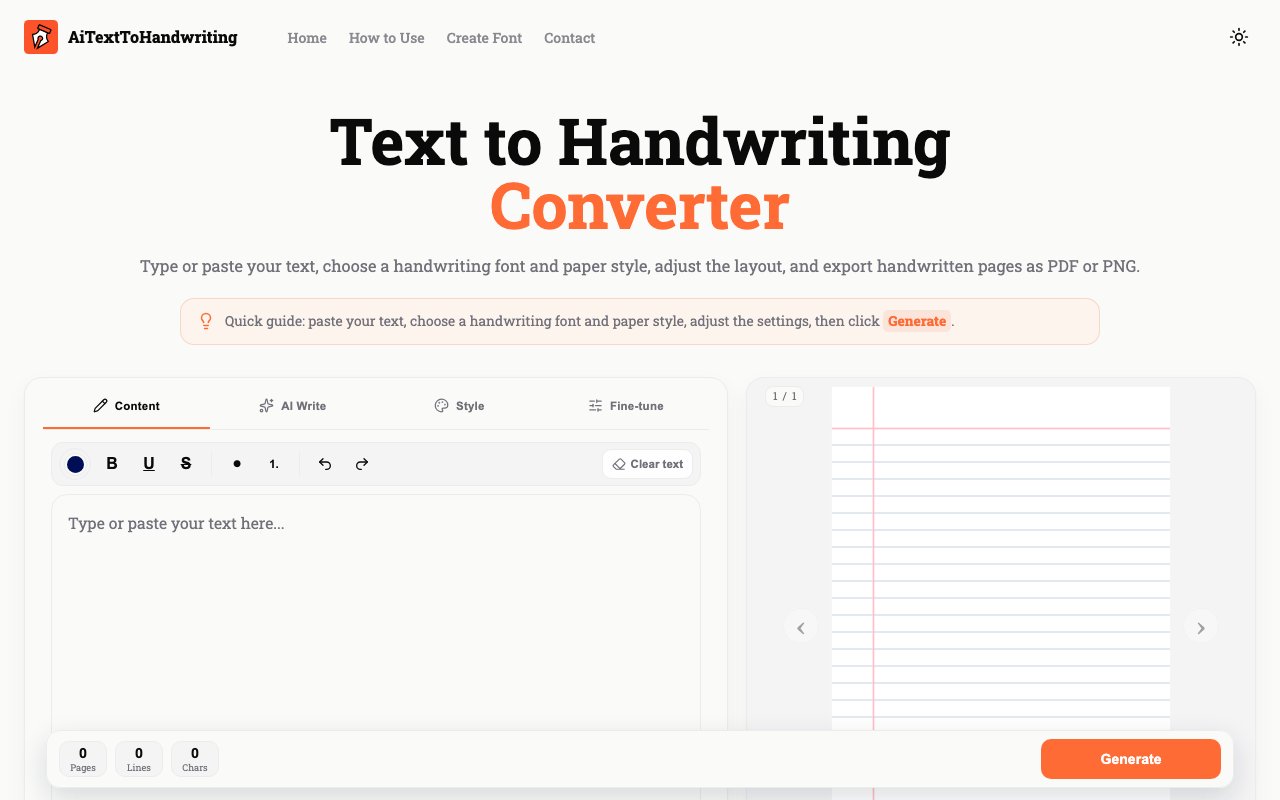
AI Text to Handwriting converts typed or pasted text into pages that look handwritten. Users input their content, select from styling options, preview the results, and export finished documents as PNG images, multi-page PDFs, or ZIP files containing multiple PNGs. The tool addresses the gap between digital text and situations where handwritten appearance matters, from study notes and personal letters to printable worksheets and creative projects that benefit from a more personal aesthetic. The workflow stays entirely browser-based, requiring no software installation or account creation to produce finished documents that look convincingly handwritten.
The font library includes over 30 handwriting styles spanning formal cursive, casual scripts, and character-specific options for different languages and aesthetics. Styles range from Homemade Apple and Caveat to Dancing Script and Kruti-dev for Hindi text. Users who want their own handwriting represented can upload custom fonts, extending the library beyond the built-in selections to match their personal writing style. Each font renders differently depending on the paper style beneath it, so the same text takes on distinct personalities when placed on aged paper versus engineering graph versus a simple dot grid. The combination of font choice and paper background determines the overall character of the finished document.
Paper options cover the common formats that handwritten documents typically appear on: plain white, 5mm and 1cm grids, notebook cream, aged paper with yellowing and wear marks, recycled paper texture, wide ruled, college ruled, narrow ruled, dot grid, engineering graph, legal pad yellow, and Cornell letter format for structured notes. The combination of font and paper creates the context for the handwritten appearance. A journal entry on cream notebook paper with a casual script looks entirely different from technical notes on engineering graph with a more structured hand. Users working on period pieces or vintage aesthetics can lean on the aged paper option while modern note-taking projects might favor clean grid layouts.
Customization extends beyond font and paper selection into detailed typography controls that affect every aspect of the rendered text. Users can choose ink color from blue, black, red, green, purple, brown, and gray options to match their aesthetic preferences or replicate specific pen types. Font size starts at 10 points and scales up from there for larger, more legible handwriting. Line spacing defaults to 1.5x but adjusts to tighter or looser settings depending on the density desired. Margin controls and letter and word spacing adjustments let users dial in the density and layout of text on the page. Effects like soft shadow, scanner contrast, and clean page modify the final appearance to simulate different reproduction methods, from fresh ink on paper to a document that has been scanned and photocopied multiple times.
Documents support up to 30 handwritten pages per export. Longer content needs splitting into separate segments, which keeps processing manageable but requires planning for book-length projects or lengthy manuscripts. The preview updates as users adjust settings, showing exactly how the final export will look before committing to a format. Single pages export as PNG for quick sharing or embedding in other documents. Multi-page documents export as PDF for printing or distribution as complete files. Bulk exports as ZIP archives serve users who need individual images of each page for further editing or sequenced import into video or presentation software where frame-by-frame control matters.
The platform currently operates as a free tool with no account required for any features. Users access all styling options, paper types, and export formats without registration, simplifying the workflow for one-off projects and removing friction for first-time users who want to test the output quality before investing time in longer documents. The roadmap mentions AI Write, a planned writing assistant that would help draft text before conversion, though that feature isn't available yet and there's no timeline for its release. The current focus remains on the conversion itself: taking whatever text users provide and rendering it in a handwritten style across their chosen paper format with their selected customization settings. Users who want AI assistance with the writing itself would need to draft elsewhere and paste the finished text into the converter for transformation into handwritten pages.
Key Features
- 30+ handwriting font styles
- Multiple paper backgrounds including lined and aged
- Adjustable ink color, spacing, and margins
- PDF and PNG export formats
- Instant preview before download
- Scanner contrast and shadow effects
Pros & Cons
What we like
- Free to use with no account required
- Wide variety of fonts and paper styles
- Multi page PDF export for longer documents
- Instant preview shows results before download
Room for improvement
- 30 page limit per document export
- No actual AI text generation yet
- Web only with no desktop app
- Effects may not fool close inspection
Frequently Asked Questions
What is AI Text To Handwriting?
Is AI Text To Handwriting free?
What file formats can I export?
Can I customize the handwriting style?
Best For
Featured in
Alternatives to AI Text To Handwriting
View all
SoloDevStack
A solo developer blog built on head-to-head tool comparisons, 580+ posts deep.

Confluence
Atlassian's long-running team wiki that anchors many enterprise knowledge stacks

Lunchbreak AI
Run text through six AI detectors at once, then humanize whatever gets flagged
Postdex
An exclusive marketplace for finished, human-made articles. Every piece sells once.
Reviews (0)
No reviews yet
Be the first to share your experience with AI Text To Handwriting
Sign in to write a reviewBadge builder
Add AI Text To Handwriting to your website
Choose a badge style and size, preview it here, then copy the generated HTML. Badge images are self-contained SVGs and do not require an external script.

<a href="https://toolindex.net/tools/ai-text-to-handwriting?ref=badge" target="_blank" rel="noopener">
  <img src="https://toolindex.net/badge/ai-text-to-handwriting/medium.svg" alt="AI Text To Handwriting - Listed on Tool Index" width="180" height="50" />
</a>How to use the badge
- 1. Pick the style, size, and theme that fit your layout.
- 2. Copy the generated HTML from the code block.
- 3. Paste it into your footer, homepage, or press page.
Standard badge available
The standard listing badge is available now. Score and circle badges are limited to tools currently ranked in the top 10 of a category.
Badge clicks return visitors to this profile with a referral tag so the source remains identifiable.
Related Tools
Confluence
Atlassian's long-running team wiki that anchors many enterprise knowledge stacks
SoloDevStack
A solo developer blog built on head-to-head tool comparisons, 580+ posts deep.

Logseq
An open-source outliner notes app where every bullet is a first-class block

Bear
A beautiful Markdown notes app for Apple devices that doubles as a writing tool
Work on AI Text To Handwriting? Request listing access or correction