
Confluence
Atlassian's long-running team wiki that anchors many enterprise knowledge stacks
Gallery
About Confluence
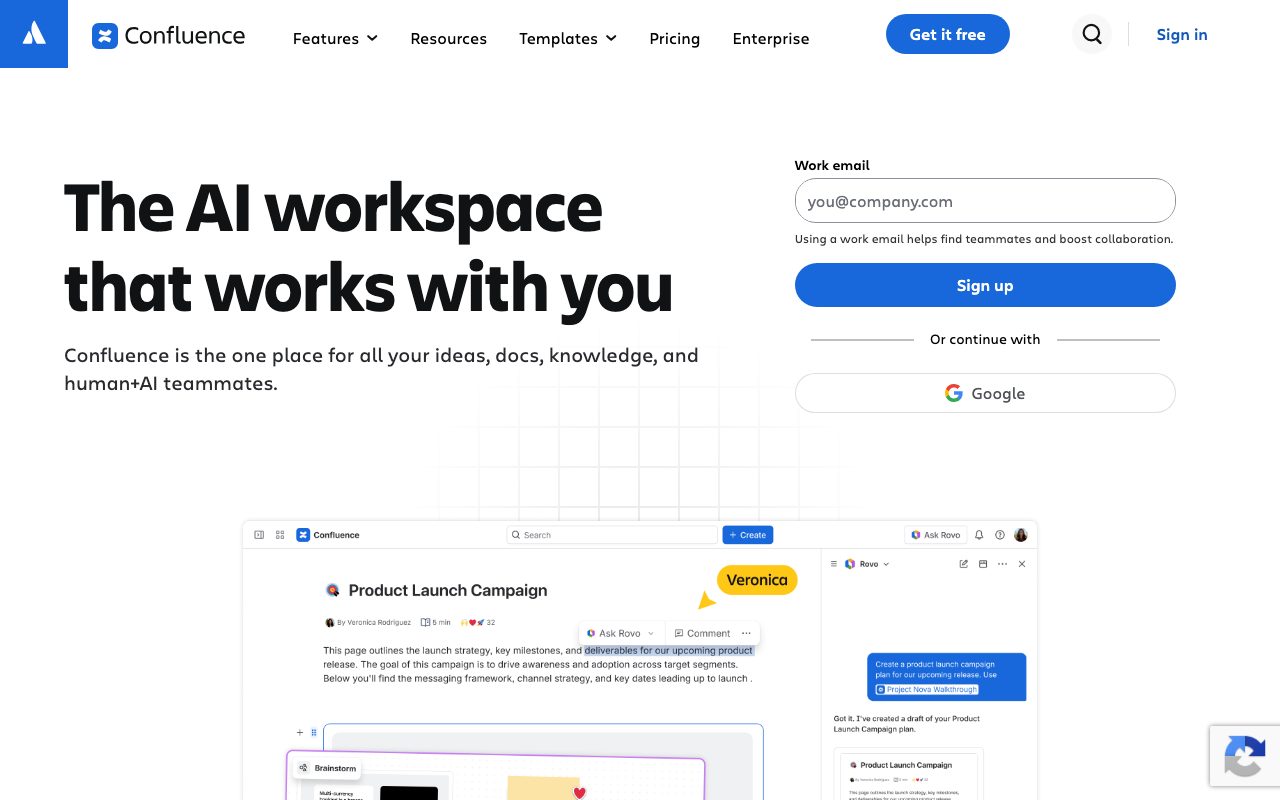
Confluence is the team wiki that anchors a generation of enterprise knowledge stacks. Atlassian's long-running documentation product, paired tightly with Jira, used by millions across companies that have outgrown shared drives and Slack scrollback.
You don't pick Confluence because it's the most modern editor. You pick it because every other engineer in your industry has used it, your security team already approved it, and Jira sits next to it. That gravity matters.
Newer competitors like Notion, Outline, and Slite are eating into Confluence's lead. But for organizations already living in the Atlassian ecosystem, the inertia is real and rational.
What Confluence actually does
Confluence organizes content into spaces, which are collections of pages. Pages can nest, link, and reference each other. Templates exist for common doc types like meeting notes, retros, runbooks, and product requirements.
The editor is block-based. Whiteboards, databases, and inline code blocks have arrived in recent updates. It's no longer the stiff, table-heavy thing it was five years ago.
Two-way Jira linking is the real superpower. Mention a Jira ticket on a page, the relationship surfaces in both places. Sprint retros, design docs, RFCs all benefit from the link without manual maintenance.
Who Confluence is for
Mid-size to enterprise companies already on Jira. Engineering organizations with formal RFC processes. HR teams maintaining handbooks for hundreds of employees. Compliance-bound industries that need granular permissions and audit logs.
Companies with tight Atlassian integration get more value than the standalone wiki suggests. The whole stack (Jira, Bitbucket, Confluence, Compass) shares user, project, and security models.
If you're a 10-person startup, Confluence is overkill. Use Notion or Outline. If you're 5,000 employees and procurement is a thing, Confluence's enterprise story wins.
Pricing breakdown
Confluence has a free tier for up to 10 users with basic features. It's enough to evaluate. Real teams need a paid plan.
Standard runs about $6 per user per month. Premium adds advanced permissions, analytics, and support tiers. Enterprise unlocks data residency, audit logs, and unlimited storage.
Pricing scales linearly with seats. For organizations already paying for Jira, the marginal Confluence cost is manageable. Standalone Confluence-only adoption is rarer.
Standout features in Confluence
Permissions and governance are the strongest part. Space-level, page-level, and inline restrictions, role-based access, audit logs. Compliance teams sleep easier here than they do on most newer tools.
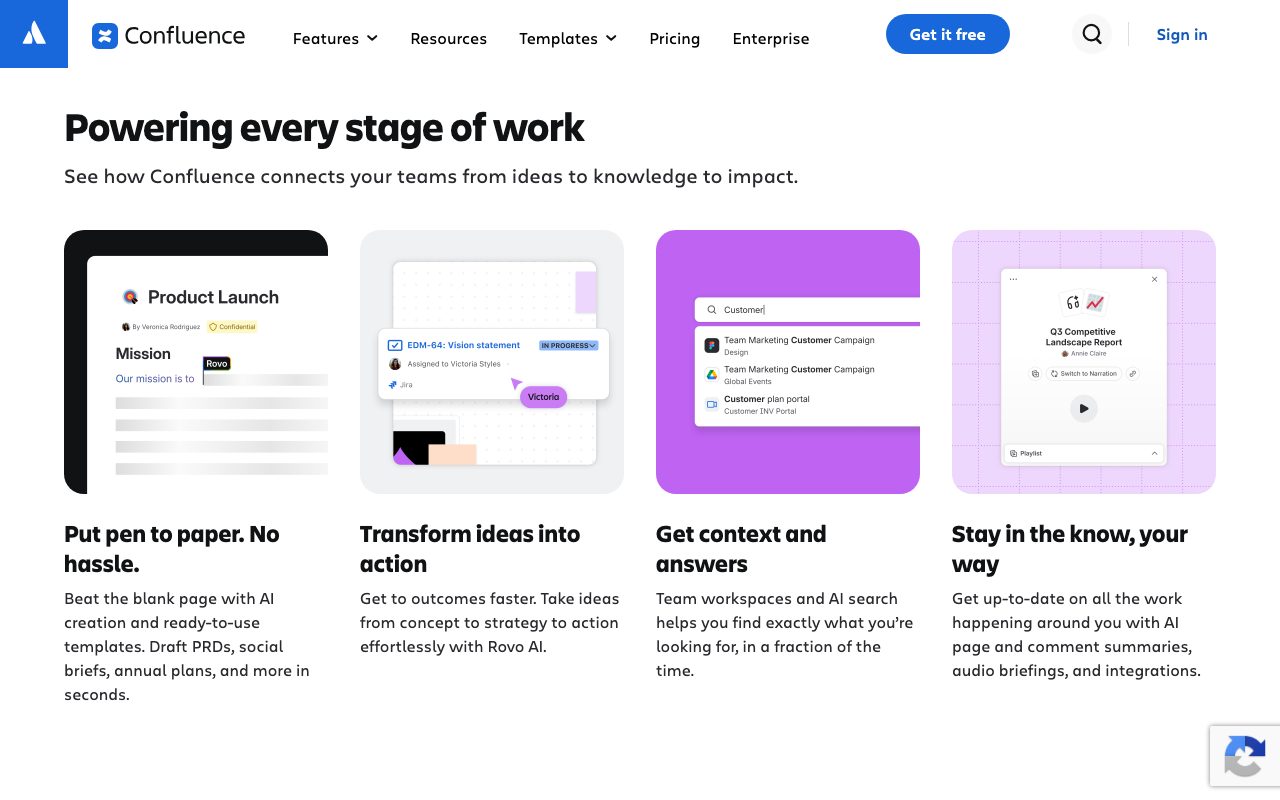
Templates are a hidden productivity multiplier. Atlassian ships dozens, plus the marketplace adds hundreds more. Engineering teams can standardize their RFC format in an afternoon.
Whiteboards and databases caught Confluence up to the modern bar. They're not as elegant as Notion's, but they exist and they integrate with the rest of the wiki.
Jira integration
The Jira link is what keeps Confluence sticky. Macros embed live Jira filters. Roadmaps display from queries. PRDs reference epics. The two products were built to assume each other's existence and it shows.
Honest tradeoffs
The editor still feels less modern than Notion, Outline, or Slite. Block manipulation works. The polish gap is real.
Search has historically been Confluence's weak spot. Atlassian Intelligence and recent updates help. Older Confluence instances often surface stale results before fresh ones.
Page sprawl is a chronic problem. Without active gardening, Confluence spaces accumulate dead pages, conflicting docs, and abandoned templates. The tool doesn't enforce discipline; humans do.
Confluence rewards organizations that invest in information architecture. It punishes the ones that don't. That's the whole story.
Confluence vs alternatives
Versus Notion, Confluence wins on enterprise governance, Jira ties, and admin tooling. Notion wins on editor polish, databases, and modern UX. Many teams run both. See the head-to-head.
Versus Outline, Confluence wins on integrations and enterprise-readiness. Outline wins on speed and the option to self-host.
Versus Slite, Confluence covers more enterprise scenarios. Slite is more focused and the AI verification model is genuinely better for keeping docs trustworthy.
Browse more options at the best team wikis and the Confluence alternatives page.
Bottom line
Confluence is the right wiki for organizations already in the Atlassian ecosystem or where enterprise governance is non-negotiable. The editor isn't the prettiest, but the integration story, permissions model, and stability earn their keep.
Pair it with regular content audits. Build templates that reflect how your team actually works. If you're starting from scratch with a small team, look at lighter alternatives first; if you're enterprise on Jira, Confluence is the obvious answer.
Setting up Confluence well
The information architecture decides whether your Confluence becomes useful or chaotic. Spend the first month thinking about spaces, naming conventions, and page hierarchy. Once people start using it, restructuring is hard.
One space per major function (engineering, design, HR, sales) is a reasonable starting point. Subpages within spaces follow predictable patterns: handbook, runbooks, projects, archives.
Templates are essential. Standardize the meeting notes template, the RFC template, the postmortem template. Without templates, every page becomes its own snowflake and search rots.
Migrating to Confluence
From Google Docs, expect to manually copy content. The importer handles basic formatting; complex tables and inline comments often need rework.
From Notion, the migration tools have improved. Database content rarely translates cleanly; you'll restructure as you go.
Plan a content audit before migrating. Old, stale, redundant content shouldn't make the trip. Migrating cleanup is the cleanup that gets done.
Confluence Cloud vs Data Center
Cloud is the default in 2026. Atlassian shut down Server in 2024; Data Center remains for organizations with strict residency or compliance needs.
Cloud features ship faster and integrate with newer Atlassian Intelligence features. Data Center stays back a release or two but offers more control.
For most companies, Cloud is the right answer. The exceptions are large enterprises with specific compliance, residency, or air-gap requirements.
Common Confluence questions
Does Confluence include AI features? Atlassian Intelligence ships across the suite. Smart search, page summarization, and writing help are included on Premium and above.
Can Confluence handle external sharing? Yes, with public-link sharing, password-protected links, and customer-facing knowledge bases via Atlassian's customer portal.
How well does Confluence integrate with Slack? The integration shows page mentions, search results, and notifications in Slack. It's solid but not best-in-class compared to newer wikis.
Browse more options at tools for documentation.
Confluence and the broader Atlassian story
Confluence pulls weight when the rest of the Atlassian suite is in play. Jira issues link both directions, Compass services map to docs, Trello (where it lingers) connects too.
For organizations not on Jira, Confluence's value drops noticeably. The standalone wiki feels heavier than Notion or Outline; the cross-product magic is what justifies the platform.
Atlassian Intelligence ships AI features across the suite. Smart search, page summaries, writing help. They've improved meaningfully but still trail dedicated AI-first tools like Slite for grounded Q and A.
Confluence at scale
The biggest Confluence instances host hundreds of thousands of pages across thousands of users. Search performance, permissions complexity, and information architecture all matter at this scale.
Plan a content lifecycle. Pages should be created, used, archived, and eventually deleted. Without a lifecycle, Confluence accumulates abandoned content faster than you'd believe.
Invest in a knowledge management role at scale. Someone whose job is to keep the wiki coherent. Without that role, even great tools rot under neglect.
Confluence tips for new admins
Limit space creation. Most companies don't need 200 spaces. A handful of well-curated spaces beats sprawl.
Audit user permissions quarterly. Permission drift is real and creates security risk over time.
Final thoughts on Confluence
Confluence is the conservative pick. It won't surprise you with features, won't delight you with polish, won't suddenly disappear. Those properties matter to enterprise buyers more than the feature comparisons suggest.
For organizations already on Jira, Confluence is the path of least resistance. For greenfield wiki decisions, look at the modern alternatives first. The right answer depends on what you're already running.
Browse alternative options at the best wiki software and knowledge base tools.
Quick recap
Confluence fits enterprises already on Jira, regulated industries with strict permissions needs, and organizations large enough to justify dedicated knowledge-management investment.
It struggles for small teams who'd be better served by lighter tools. The friction of Confluence's depth doesn't pay back at small scale.
Atlassian Intelligence keeps catching up to standalone AI-first wikis. The gap is closing; for now, dedicated tools like Slite still lead on grounded Q and A specifically.
Browse more options at the best wiki tools, the team knowledge category, and Confluence alternatives.
Confluence closing notes
For organizations on Jira, Confluence is the path of least resistance. The cross-product magic justifies what feels like an aging editor on its own. The Atlassian ecosystem is the moat.
Modern competitors keep eating the standalone-wiki use case. For greenfield decisions, evaluate Notion, Outline, and Slite seriously before committing to Confluence. The right answer depends on your existing stack.
Atlassian Intelligence keeps shipping features. Smart search, summarization, writing help. The gap to dedicated AI-first tools is closing; for now, focused tools still lead on specific AI capabilities.
Browse more options at the best Atlassian alternatives and the broader enterprise wiki category.
Tutorial / Demo
Key Features
- Spaces and nested pages
- Page templates for common doc types
- Two-way linking with Jira issues
- Comments, mentions and inline tasks
- Whiteboards and databases
- Marketplace of add-ons
Pros & Cons
What we like
- Familiar to most enterprise users
- Strong governance and permissions
- Deep ties to Jira and the Atlassian stack
- Mature and stable
Room for improvement
- Editor feels less modern than Notion or Outline
- Search has historically been a sore point
- Cluttered when many spaces accumulate
Frequently Asked Questions
How much does Confluence cost?
Confluence vs Notion, which should we use?
Can I self-host Confluence?
Does Confluence integrate with Jira?
Is Confluence outdated?
Best For
Featured in
Tags
Alternatives to Confluence
View all
Notion
All-in-one workspace for notes, docs, and collaboration

Heptabase
Visual knowledge base for research, learning, and connected note cards

Bear
A beautiful Markdown notes app for Apple devices that doubles as a writing tool

Outline
A team wiki that feels lightweight enough to actually keep up to date
Our take
Tool Index Editorial · May 2026· 4.8/5
Confluence positions itself as atlassian's long-running team wiki that anchors many enterprise knowledge stacks, and on the whole it earns the framing.
On the strengths side: Familiar to most enterprise users, Strong governance and permissions, and Deep ties to Jira and the Atlassian stack. Honest gripes: Editor feels less modern than Notion or Outline and Search has historically been a sore point.
In short: Confluence is a strong pick when you need engineering RFCs and design docs, and a harder sell if editor feels less modern than Notion or Outline would be a dealbreaker.
Editorial opinion from the Tool Index team, written from the public product pages. Not a user review.
Reviews (8)
Pulled its weight from week one
Hadn't planned on switching, but Confluence was hard to ignore. Genuine strength: mature and stable. Still recommending it to people in similar setups.
Pros
- Deep ties to Jira and the Atlassian stack
Surprised how much we use this
Took a few weeks for Confluence to click, then it stuck. What stands out is how deep ties to Jira and the Atlassian stack. Worth calling out the marketplace of add-ons too. It would be a 5 if not for search has historically been a sore point. Hard to imagine going back to my previous setup.
Pros
- Strong governance and permissions
- Familiar to most enterprise users
Cons
- Editor feels less modern than Notion or Outline
Solid product, even better support
Have been using Confluence for a while, here's where I land. The thing I keep coming back to: familiar to most enterprise users. Worth the price for what I get out of it.
Pros
- Familiar to most enterprise users
- Deep ties to Jira and the Atlassian stack
Surprised how much we use this
Hadn't planned on switching, but Confluence was hard to ignore. Real selling point: familiar to most enterprise users. Worth calling out the whiteboards and databases too. Main use case: engineering RFCs and design docs. That said, search has historically been a sore point is a real gripe. Hard to imagine going back to my previous setup.
Pros
- Familiar to most enterprise users
- Strong governance and permissions
Cons
- Cluttered when many spaces accumulate
Hit the Confluence sweet spot
Picked Confluence for the lower price, stayed for the actual quality. Genuine strength: strong governance and permissions. Worth calling out the page templates for common doc types too. Hard to imagine going back to my previous setup.
Quietly excellent
Confluence isn't perfect but it's the best I've used in this category. Where it really wins is deep ties to Jira and the Atlassian stack. Worth calling out the page templates for common doc types too. Found it works best for companies already on Jira. Glad I made the switch.
Pros
- Mature and stable
- Strong governance and permissions
Solid daily driver
The last quarter of using Confluence, here's what holds up. What stands out is how familiar to most enterprise users. Worth calling out the comments, mentions and inline tasks too. One thing that bugs me: search has historically been a sore point. Sticking with Confluence.
Cons
- Editor feels less modern than Notion or Outline
- Cluttered when many spaces accumulate
Confluence, better than expected
Confluence solves a real problem for me, but it's not magic. Where it really wins is strong governance and permissions. Got real value out of whiteboards and databases.
Pros
- Familiar to most enterprise users
- Mature and stable
Badge builder
Add Confluence to your website
Choose a badge style and size, preview it here, then copy the generated HTML. Badge images are self-contained SVGs and do not require an external script.

<a href="https://toolindex.net/tools/confluence?ref=badge" target="_blank" rel="noopener">
  <img src="https://toolindex.net/badge/confluence/medium.svg" alt="Confluence - Listed on Tool Index" width="180" height="50" />
</a>How to use the badge
- 1. Pick the style, size, and theme that fit your layout.
- 2. Copy the generated HTML from the code block.
- 3. Paste it into your footer, homepage, or press page.
Score badge available
Confluence qualifies for the score and circle badges based on its current top-10 positionin Writing.
Badge clicks return visitors to this profile with a referral tag so the source remains identifiable.
Related Tools
Asana
Project management for teams that live in projects, tasks and dependencies
Kevin Gabeci Toolkits
Seven AI toolkits for writing books, making music, cutting video, and building agents.

SoloDevStack
A solo developer blog built on head-to-head tool comparisons, 580+ posts deep.

Logseq
An open-source outliner notes app where every bullet is a first-class block
Work on Confluence? Request listing access or correction