Cal.com
Open source scheduling infrastructure for everyone
Gallery
About Cal.com
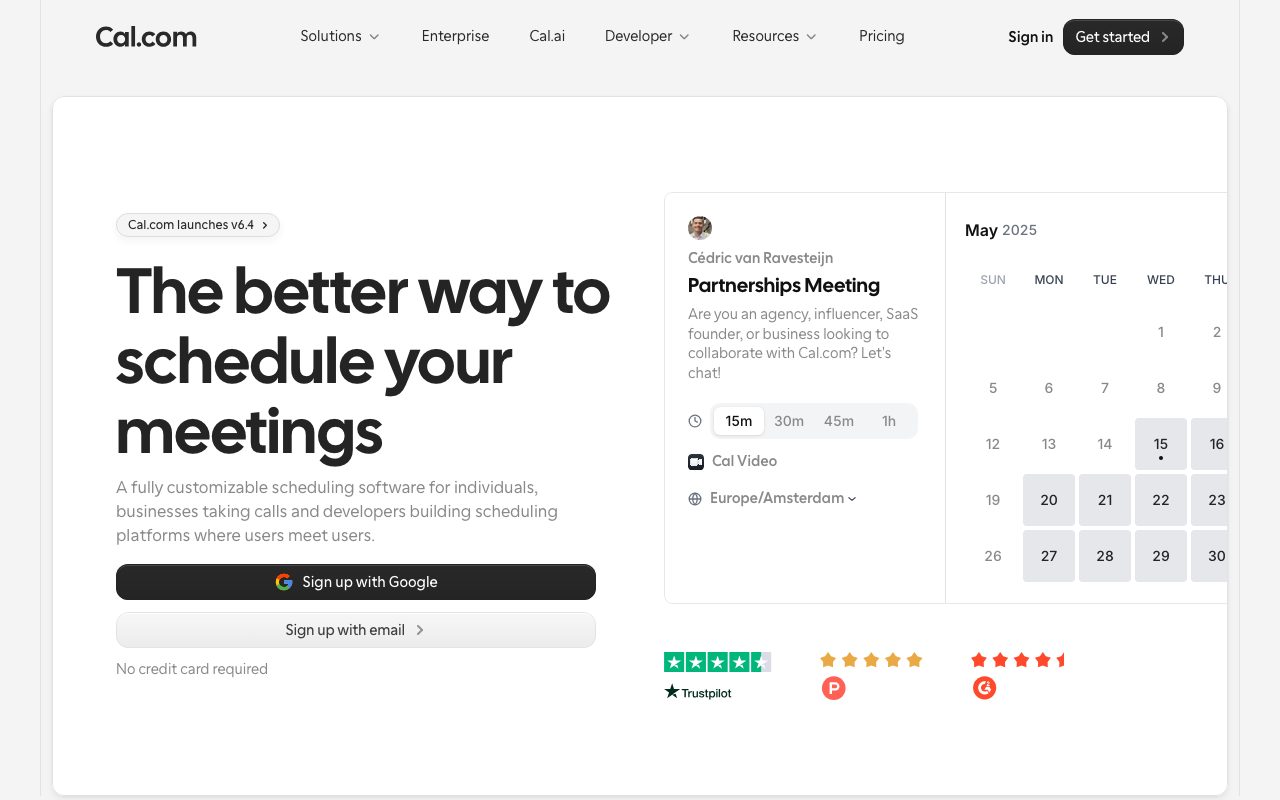
Cal.com is what Calendly would look like if it had been born after the open-source era. It is a scheduling tool for booking meetings, demos, podcast guests, and anything else that lives on a calendar. Cal.com runs as a hosted SaaS or, if you want, fully self-hosted on your own infrastructure.
If you have ever sent that "what time works for you" email more than three times in a week, you already know the problem this category solves. The reason Cal.com matters is that it solves it without locking your data inside a vendor.
The branding is sharp, the embed widget is fast, and the integrations actually work. After two years of using it daily, I have one persistent complaint, and I will get to it.
What Cal.com does
Cal.com lets you publish a personal scheduling page, a team round-robin page, or a routing form that asks a few questions and books the right person. You connect Google, Microsoft, Apple, or self-hosted CalDAV calendars, and Cal.com walks the union of busy times before offering slots.
Event types support per-meeting durations, buffer times, minimum notice, daily caps, and conditional logic via routing forms. You can collect payment at booking through Stripe, Paypal, or alternative processors. Custom email and SMS reminders are included.
Workflows are the part that earns its keep. After a booking, you can fire a Slack message, an email sequence, a Zapier hook, or a webhook to your own backend. The integration list spans the usual video tools, CRMs, and analytics platforms.
Who Cal.com is for
Solo founders use Cal.com for sales calls and customer interviews. Sales teams use it for round-robin lead routing. Recruiters use it for interview scheduling. Podcasters use it to book guests without three rounds of email.
It also fits regulated environments where data sovereignty matters, because of the self-hosted option. If your security review will not approve another US SaaS, Cal.com can sit inside your VPC.
Pricing
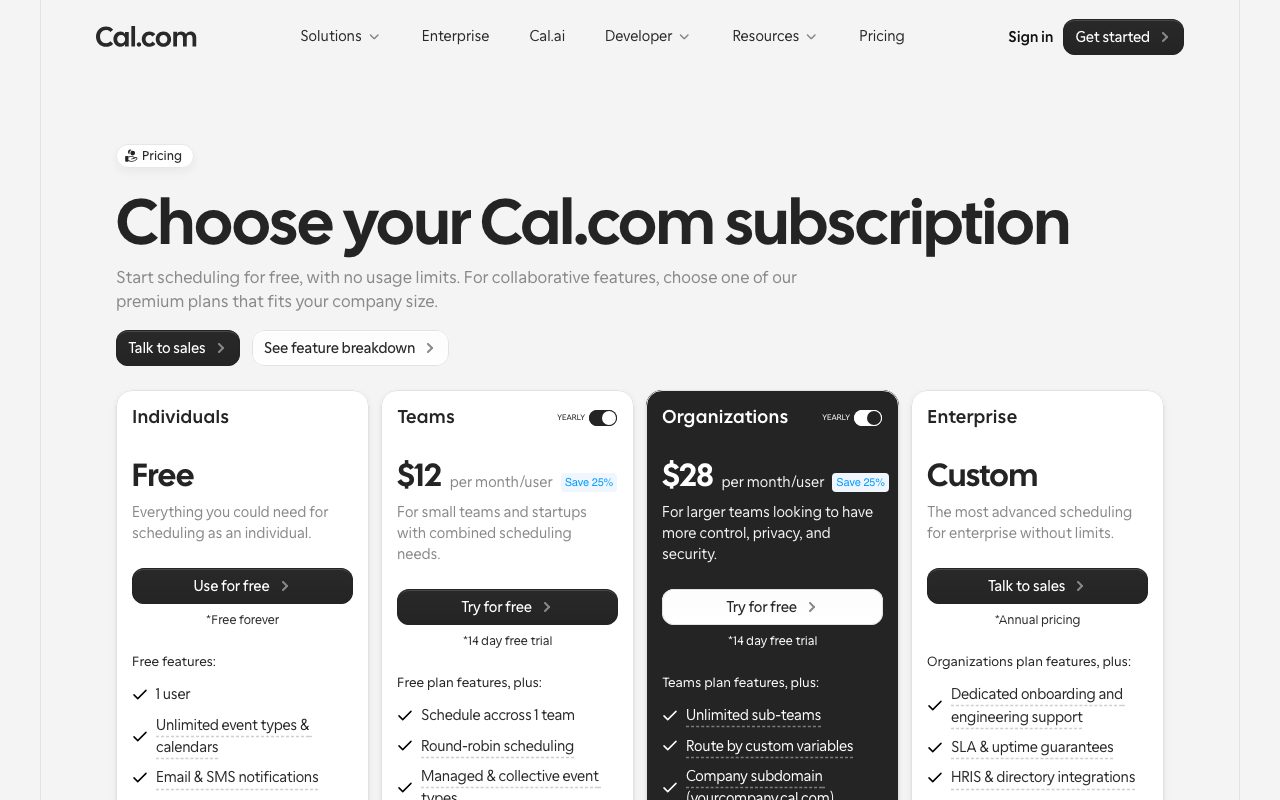
Individuals get unlimited bookings, unlimited event types, and core integrations free, which is generous and intentional. Teams pay per seat for round-robin, collective booking, routing forms, and admin controls.
Self-hosting is free in code, with a license key needed only for some enterprise features. The hosted option scales to organizations and enterprises with audit logs, SSO, and SCIM provisioning.
Features worth knowing
Routing forms ask a series of conditional questions and route the booker to the right team or person. This replaces a chunk of what some teams build in HubSpot. A marketing landing page can drop a routing form and pre-qualify leads before a call.
Collective and round-robin events handle the team scenarios most schedulers fumble. Collective requires everyone to be free; round-robin distributes by load or priority. Both respect timezone differences and per-person buffers.
The embed is the cleanest in the category. Inline, popup, or floating button, all configurable via copy-paste. Page weight is small and the iframe is fast on mobile.
Tradeoffs
The UI moves quickly, which is good for momentum and bad for muscle memory. Settings sometimes shift locations release to release. Power users will sigh occasionally.
The mobile app is functional, not delightful. Most scheduling work happens on desktop anyway, but if you live on phone, expect rough edges.
Self-hosting is real but not zero-effort. You need Postgres, a secrets manager, and the ability to run Next.js in production. It is one Docker compose file away if you are comfortable, and a real project if you are not.
Cal.com is the obvious pick if you care about owning your data, integrating with your stack, or simply paying less than Calendly's escalating tiers.
Cal.com vs alternatives
Versus Calendly, Cal.com is open source, often cheaper at the team tier, and shipping faster. Calendly has a longer track record and slightly slicker workflow polish in places. Pick Calendly if you want zero-think enterprise procurement; pick Cal.com if you care about flexibility and price.
Versus Microsoft Bookings, Cal.com is calendar-agnostic and more flexible. Microsoft Bookings is included in many Microsoft 365 plans, which is hard to beat on procurement.
Versus SavvyCal, Cal.com is more of a platform; SavvyCal has a better consumer-grade feel for picking times. Different shapes of the same problem.
See best scheduling tools, Calendly alternatives, and the Cal.com vs Calendly deep dive.
Common questions
Is Cal.com really open source? Yes, AGPL-licensed, with the full app available on GitHub. Can Cal.com replace Calendly? Yes, with feature parity for most teams. Does Cal.com support payments? Yes, via Stripe and a few alternatives. Can I self-host? Yes, with Docker and Postgres.
Bottom line
Cal.com is the modern open-source default for scheduling. It is the right pick for teams that want flexibility, ownership, and a platform that is still improving. Stay on Calendly if you have heavy enterprise procurement and your stack already centers on it.
For everyone else, Cal.com is faster, cheaper, and not going anywhere. Browse tools for sales teams and the Cal.com profile for current details.
Common workflows
Sales discovery: a 30-minute meeting with prospects, routed by company size. Routing form asks "what is your team size" and routes accordingly. Smaller teams to the founder, larger ones to the head of sales. The form qualifies before the call so the salesperson is not learning basics live.
Recruiter screens: 15-minute calls with candidates, with auto-rejection if the candidate has already booked once. Cal.com's per-attendee booking limit handles this without a workflow tool.
Podcast guests: 60-minute recordings with a longer buffer before and after for setup. Workflow sends the guest a prep email with show notes and recording instructions a day before. After the call, a follow-up email with the rough cut goes out.
Office hours: collective availability across two co-founders, requiring both to be free. Cal.com's collective event handles this; the booking holds both calendars.
Setup notes
Calendar connection is step one. Google or Microsoft via OAuth, Apple via app password, or self-hosted CalDAV via URL. The Cal.com app respects busy times in all connected calendars by default.
Default event length usually wants tweaking. Cal.com defaults to 30 minutes; most teams pick 45 for a real meeting and 15 for a quick check-in.
Buffer times matter. Five-minute buffers before and after avoid back-to-back meetings with no breathing room. The buffer applies in addition to other meetings already on your calendar.
The self-hosting decision
Self-hosting Cal.com is real but real work. You need Postgres, Node hosting, a secrets store, email sending, and an OAuth setup for each calendar provider you want to support. The Cal.com team publishes a Docker compose file that gets you running in an evening if you are comfortable with the stack.
Most users should start on Cal.com Cloud. Move to self-hosted only if data residency or cost at scale forces it. The marginal value of self-hosting for a small team is rarely worth the operational cost.
Cal.com extras
The team plan unlocks routing forms with conditional logic, round-robin event types, collective events, and managed event types administrators control across the team. For sales orgs, this is the tier that earns the upgrade.
Webhooks fire on bookings, cancellations, and reschedules. Wire them to your CRM, your data warehouse, or your custom backend. The schema is documented and stable.
API access is included for self-hosted and cloud. Build integrations, custom flows, programmatic event creation. The API matches the platform's openness.
Cal.com supports Stripe, Paypal, and a few alt processors for paid bookings. Useful for coaches, consultants, and anyone selling time directly.
Cal.com vs the do-nothing default
The do-nothing default is "email back and forth to find a time." Cal.com replaces ten minutes of email with one shared link. Multiply across a year of meetings; the time math is dramatic.
Calendar conflicts get resolved automatically. Buffer time between meetings keeps your day livable. Reminders prevent no-shows. These are small wins; together they reshape how your week feels.
The platform has stayed friendly to non-technical users while keeping depth for power users. That balance is rare and is why Cal.com keeps winning categories of customer.
Cal.com integration depth
HubSpot and Salesforce sync log meetings as activities in the CRM. The sales pipeline gets data without manual entry.
Zoom, Google Meet, Microsoft Teams, and Daily integrations create the video link automatically. The booker gets a calendar invite with the meeting link; no manual setup.
The Zapier and Make integrations cover the long tail of "I want to send this to that other tool." Most flows are doable.
Custom webhooks fire on every event lifecycle, which is the building block for any custom integration you want.
Cal.com privacy and compliance
Self-hosted Cal.com keeps booking data inside your network. Required for some industries; nice to have for others.
GDPR-compliant by default. Data export and deletion are first-class.
SOC 2 and ISO certifications on the cloud product, with documentation available for security reviews.
Cal.com event types worth setting up
30-minute discovery call: the default for most sales conversations.
15-minute coffee chat: for casual networking, podcast pitches, and quick check-ins.
60-minute deep dive: for technical demos, customer success calls, and longer interviews.
Office hours: a recurring slot every week where anyone can book without back-and-forth.
Internal team sync: a private link for team members to grab time on your calendar without competing with external bookings.
Each event type has its own buffer, location, reminder, and integration settings.
Tutorial / Demo
Key Features
- Individual and team event scheduling
- Round-robin and collective booking
- Google Calendar, Outlook, and Apple Calendar sync
- Customizable booking pages and forms
- Workflow automations and reminders
- Embeddable scheduling widgets
- API-first with webhooks
Pros & Cons
What we like
- Open source with self-hosting option
- Free for individuals on the hosted version
- Highly customizable booking flows
- Active development and growing community
- No branding on free tier
Room for improvement
- Team features require paid plans
- Self-hosting setup can be complex
- Mobile experience could be improved
- Some integrations are still in beta
Frequently Asked Questions
Is Cal.com really free?
Cal.com vs Calendly, which should I pick?
Can I self-host Cal.com?
Does Cal.com support routing forms and round-robin?
Does it integrate with Zoom, Google Meet, and HubSpot?
Best For
Featured in
Tags
Alternatives to Cal.com

CalendHub
Smart scheduling and calendar management for teams
Motion
An AI calendar that automatically schedules your tasks around your meetings

Reclaim AI
AI scheduling that defends your focus time and adapts when meetings move
Akiflow
A keyboard-first daily planner that pulls every notification into one inbox
Our take
Tool Index Editorial · May 2026· 4.6/5
Cal.com sits in a crowded category, differentiating itself as open source scheduling infrastructure for everyone.
On the strengths side: Open source with self-hosting option, Free for individuals on the hosted version, and Highly customizable booking flows. Honest gripes: Team features require paid plans and Self-hosting setup can be complex.
Bottom line: pick Cal.com when you need scheduling client meetings and consultations; look elsewhere if team features require paid plans would be a dealbreaker.
Editorial opinion from the Tool Index team, written from the public product pages. Not a user review.
Reviews (5)
Quietly excellent
Cal.com solves a real problem for me, but it's not magic. Real selling point: open source with self-hosting option. Their take on customizable booking pages and forms is solid. Main use case: embedding booking widgets on websites. Honest gripe: self-hosting setup can be complex. Glad I made the switch.
Pros
- No branding on free tier
Cons
- Team features require paid plans
Stuck the landing for our team
First impression of Cal.com was 'huh, this is actually thought through.' The biggest win has been active development and growing community. Workflow automations and reminders works the way you'd hope. Easy yes for anyone weighing the same trade-offs.
Pros
- Free for individuals on the hosted version
- No branding on free tier
- Active development and growing community
Cons
- Team features require paid plans
- Mobile experience could be improved
Cal.com, better than expected
Cal.com is one of those tools you stop noticing because it just works. Honestly impressed by how highly customizable booking flows. The round-robin and collective booking is more useful than I expected. Glad I made the switch.
Pros
- Free for individuals on the hosted version
- No branding on free tier
Finally something that fits
Cal.com is one of those tools you stop noticing because it just works. The biggest win has been active development and growing community. Their take on workflow automations and reminders is solid. Hard to imagine going back to my previous setup.
Cons
- Some integrations are still in beta
- Mobile experience could be improved
Mixed feelings, but mostly positive
Cal.com solves a real problem for me, but it's not magic. Genuine strength: open source with self-hosting option. Worth calling out the google Calendar, Outlook, and Apple Calendar sync too. It fits well for scheduling client meetings and consultations. Not perfect: some integrations are still in beta. Worth a trial if you're in the same boat.
Cons
- Some integrations are still in beta
Badge builder
Add Cal.com to your website
Choose a badge style and size, preview it here, then copy the generated HTML. Badge images are self-contained SVGs and do not require an external script.

<a href="https://toolindex.net/tools/cal-com?ref=badge" target="_blank" rel="noopener">
  <img src="https://toolindex.net/badge/cal-com/medium.svg" alt="Cal.com - Listed on Tool Index" width="180" height="50" />
</a>How to use the badge
- 1. Pick the style, size, and theme that fit your layout.
- 2. Copy the generated HTML from the code block.
- 3. Paste it into your footer, homepage, or press page.
Standard badge available
The standard listing badge is available now. Score and circle badges are limited to tools currently ranked in the top 10 of a category.
Badge clicks return visitors to this profile with a referral tag so the source remains identifiable.
Related Tools

Confluence
Atlassian's long-running team wiki that anchors many enterprise knowledge stacks
Asana
Project management for teams that live in projects, tasks and dependencies
Kevin Gabeci Toolkits
Seven AI toolkits for writing books, making music, cutting video, and building agents.

Logseq
An open-source outliner notes app where every bullet is a first-class block
Work on Cal.com? Request listing access or correction