Akiflow
A keyboard-first daily planner that pulls every notification into one inbox
Gallery

About Akiflow
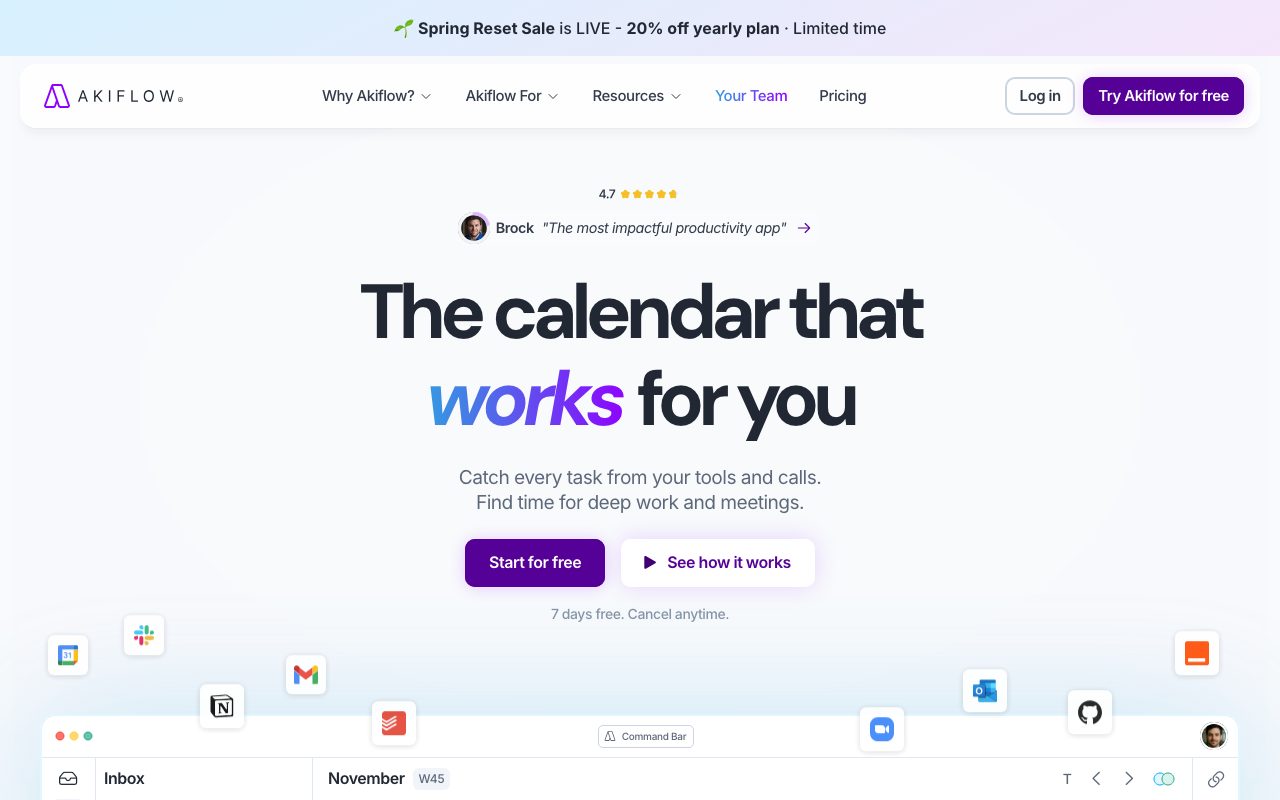
Akiflow is a desktop time blocking app that pulls tasks from your other tools into one daily plan. It works on Mac, Windows, iOS, and Android, and it sits between your inbox, your calendar, and your scattered to-do lists. The pitch is simple: stop juggling tabs, and start dragging tasks onto a calendar where they actually get time.
If you live in Gmail, Slack, Notion, Asana, ClickUp, Todoist, and Trello at once, Akiflow tries to be the one window where they meet. You triage tasks in a single inbox, then schedule each one as a real time block. The app keeps your Google or Outlook calendar in sync the whole way through.
What Akiflow actually does
The Akiflow flow is built around three surfaces. There's a unified inbox that collects tasks from connected apps, a command bar for keyboard-driven capture, and a calendar that doubles as your planner. You drag a task onto a slot, and Akiflow turns it into an event with the task details attached.
Integrations are the core feature. Akiflow connects to Gmail, Outlook, Slack, Notion, Todoist, Asana, ClickUp, Trello, Linear, Jira, Zoom, Google Meet, Superhuman, and a longer list. New emails or Slack messages can flow into your task inbox without copy paste. The two-way sync means changes in either place stay aligned.
Who Akiflow is built for
Akiflow is for people who already accepted that time blocking is the move. It's not a casual to-do list, and it's not a project tracker for whole teams. The target user is a knowledge worker who runs their own day on a calendar grid.
Founders, consultants, engineers, designers, and operations leads all show up in Akiflow case studies. The common thread is owning a personal workload across many tools. If you don't feel that pain yet, Akiflow is overkill.
Akiflow pricing
There's a free tier that's mostly a trial of the full product. Paid plans run on a monthly or annual subscription, with the annual price working out lower per month. Pricing has shifted a few times, so check the live page when you sign up.
The paid plan unlocks unlimited integrations, full inbox triage, recurring task templates, and priority support. It's positioned as a productivity investment rather than a cheap utility, and the price reflects that.
Features people actually use
The command bar is the most loved feature in user reviews. You hit a shortcut, type the task, set a time, and it lands on your calendar. Power users live inside that bar instead of clicking around the UI.
Time blocks come with focus mode, deadlines, priorities, labels, and recurring options. There's also a daily plan view that shows what you intended to do versus what actually happened. Rituals like a morning planning session and an evening shutdown are baked in.
Akiflow rewards the kind of person who already plans their day in 30 minute blocks. If your calendar is empty by Tuesday afternoon, the tool will feel oversized for what you need.
Tradeoffs and rough edges
Akiflow can feel heavy on day one. The desktop app is electron-based, and a busy inbox plus a packed calendar takes a moment to render. People with low-end laptops sometimes notice the memory footprint.
Some integrations are richer than others. Gmail and Slack feel native, while a few smaller connectors only support one-way sync. Read the integration docs before you commit to a workflow that depends on a specific app.
Akiflow vs alternatives
The closest competitors are Sunsama, Motion, and Reclaim AI. Sunsama leans into a slower, more reflective daily ritual, while Motion uses AI to auto-schedule for you. Reclaim AI is closer to a calendar assistant for habits and meetings.
Akiflow sits in the middle. It gives you manual control like Sunsama, with a faster keyboard interface and a wider integration list. Browse the best time blocking apps if you want a side by side breakdown.
Common questions about Akiflow
Is Akiflow worth it for solo users? Yes, if you already lose hours triaging across apps. The price stings until you count the tabs you stop opening.
Does Akiflow replace Todoist or Asana? Not really. It pulls from them and gives you a planner on top, so you keep the system of record where it lives.
Can teams use Akiflow together? It's a single-player tool by design. You can share calendars, but there's no shared project view.
Bottom line on Akiflow
Akiflow is one of the more polished time blocking tools on the market. It nails the daily planning loop and saves real triage time for people drowning in tools. Compare it against Akiflow alternatives before you commit.
If your problem is fragmentation across Gmail, Slack, Notion, and a project tracker, Akiflow is worth the trial. See how it stacks up in Akiflow vs Sunsama and explore tools for founders for adjacent options.
Where Akiflow fits in your stack
Akiflow is downstream from your task systems. Tasks usually start in Asana, Linear, Todoist, or your inbox, and Akiflow becomes the place you decide when to actually do them. That separation keeps your project tools clean and your day plan honest.
For founders who context switch hourly, Akiflow's command bar is the small win that adds up. Capturing tasks fast prevents the "I'll remember it" lie. Most heavy users say the keyboard interface is the thing they miss when they leave Akiflow.
Tips for getting the most out of Akiflow
Set a morning planning ritual at the same time every day. Five to ten minutes drag-and-dropping tasks into the calendar pays off across the rest of the day. Weekly review on Friday or Sunday keeps the system honest.
Don't try to schedule every micro task. Use rough time blocks of 30 to 90 minutes for deep work, and let small tasks batch into a triage block. Akiflow rewards that kind of structured day.
Lean into the integrations that match your real inputs. If most tasks come from Slack, wire that up first. If you live in Gmail, the Gmail integration earns its keep on day one.
Tutorial / Demo
Key Features
- Unified inbox from many tools
- Time blocking on a calendar canvas
- Keyboard-first command bar
- Integrations with Slack, Notion, Gmail, Asana, Jira
- Smart suggestions for daily planning
- Recurring tasks and rituals
Pros & Cons
What we like
- Genuinely fast for keyboard users
- Integrations cover most modern stacks
- Single place to triage all incoming work
- Calm, focused UI
Room for improvement
- No real free plan beyond a trial
- Less collaborative than team-first tools
- Some integrations feel one-directional
Frequently Asked Questions
Does Akiflow have a free tier?
What does Akiflow actually do?
Akiflow vs Sunsama, which one wins?
Does Akiflow work on mobile?
Is Akiflow worth it if I already use a calendar and a task manager?
Best For
Featured in
Alternatives to Akiflow
View allMotion
An AI calendar that automatically schedules your tasks around your meetings

Sunsama
A daily planner that makes you slow down and pick what actually fits today

Reclaim AI
AI scheduling that defends your focus time and adapts when meetings move

TickTick
A todo app that quietly bundles a calendar, habit tracker and Pomodoro timer
Our take
Tool Index Editorial · May 2026· 4.5/5
Akiflow sits in a crowded category, differentiating itself as a keyboard-first daily planner that pulls every notification into one inbox.
What it actually does well: Genuinely fast for keyboard users, Integrations cover most modern stacks, and Single place to triage all incoming work. Less impressive: No real free plan beyond a trial and Less collaborative than team-first tools.
Verdict: Akiflow cleanly earns its spot in the category — a smart default when you need power users running their day from a command bar.
Editorial opinion from the Tool Index team, written from the public product pages. Not a user review.
Reviews (2)
Almost perfect, almost
Came to Akiflow after frustration with what I had before. Where it really wins is single place to triage all incoming work. Honest gripe: less collaborative than team-first tools. Solid pick for my use case, your mileage may vary.
Cons
- Some integrations feel one-directional
Did exactly what I needed
Took a few weeks for Akiflow to click, then it stuck. Where it really wins is genuinely fast for keyboard users. Got real value out of unified inbox from many tools. Main use case: consultants juggling many client tools. Not perfect: no real free plan beyond a trial. Hard to imagine going back to my previous setup.
Pros
- Single place to triage all incoming work
Cons
- No real free plan beyond a trial
- Some integrations feel one-directional
Badge builder
Add Akiflow to your website
Choose a badge style and size, preview it here, then copy the generated HTML. Badge images are self-contained SVGs and do not require an external script.

<a href="https://toolindex.net/tools/akiflow?ref=badge" target="_blank" rel="noopener">
  <img src="https://toolindex.net/badge/akiflow/medium.svg" alt="Akiflow - Listed on Tool Index" width="180" height="50" />
</a>How to use the badge
- 1. Pick the style, size, and theme that fit your layout.
- 2. Copy the generated HTML from the code block.
- 3. Paste it into your footer, homepage, or press page.
Standard badge available
The standard listing badge is available now. Score and circle badges are limited to tools currently ranked in the top 10 of a category.
Badge clicks return visitors to this profile with a referral tag so the source remains identifiable.
Related Tools

Confluence
Atlassian's long-running team wiki that anchors many enterprise knowledge stacks
Asana
Project management for teams that live in projects, tasks and dependencies
Kevin Gabeci Toolkits
Seven AI toolkits for writing books, making music, cutting video, and building agents.

Logseq
An open-source outliner notes app where every bullet is a first-class block
Work on Akiflow? Request listing access or correction