
Sunsama
A daily planner that makes you slow down and pick what actually fits today
Gallery
About Sunsama
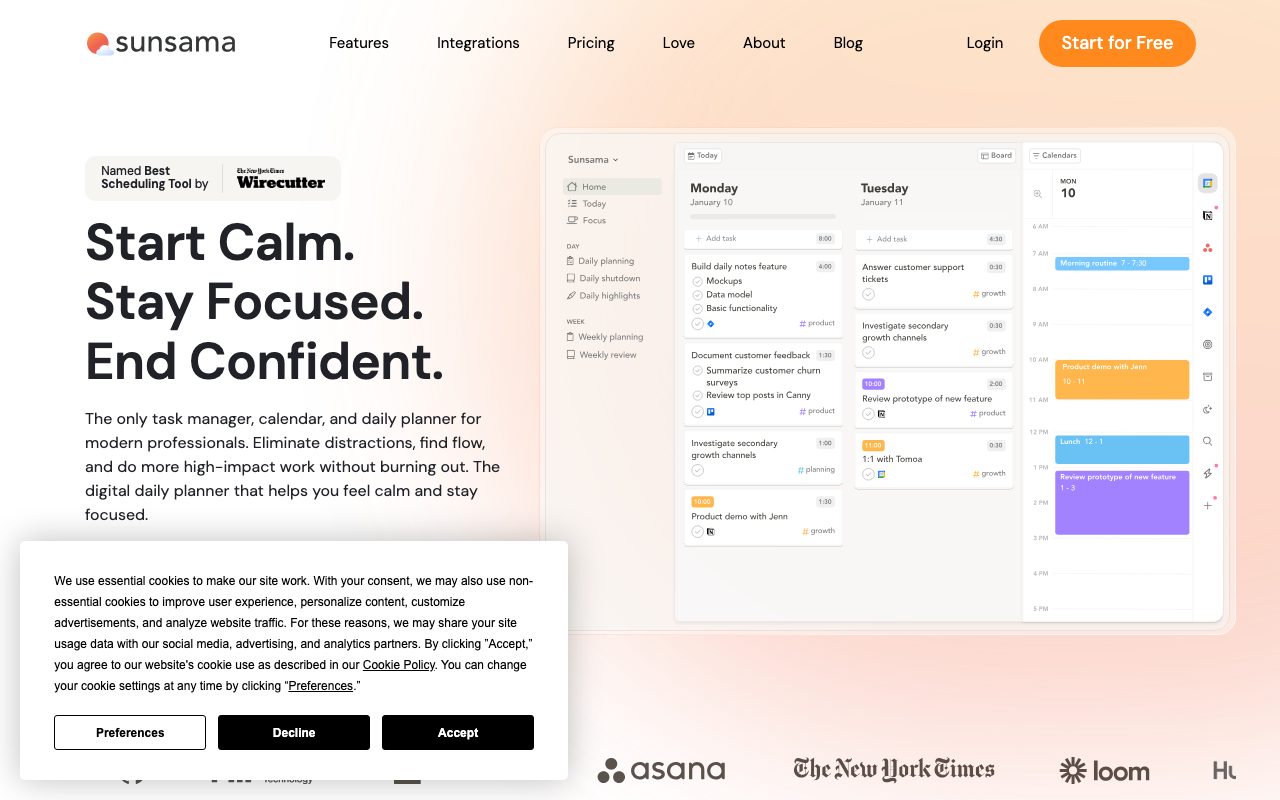
Sunsama is a daily planner that forces you to slow down and pick what actually fits in today. The product opens with a planning ritual: review yesterday, pull tasks from your tools, estimate time on each one, fit them into a calendar shape that respects your meetings. Then close the planner and work.
For knowledge workers who keep overcommitting because they can't visually see how full the day already is, Sunsama is a behavior change disguised as a software tool. The friction is the feature.
What Sunsama does
Sunsama is a daily planning app that pulls tasks from your existing tools (Asana, Linear, Trello, Jira, Todoist, Gmail, Slack, GitHub, Notion) and asks you to plan them onto a daily timeline. Each task gets a time estimate. The app shows your calendar alongside, so you can't ignore the meetings eating your day.
The morning ritual takes ten minutes. The evening ritual is a brief reflection: what got done, what didn't, what carries over. The whole loop is opinionated. You can't easily skip steps. The opinion is exactly the value.
The planning ritual
Sunsama's planning flow is structured. You see yesterday's incomplete tasks, your inbox, your calendar, and any task lists from connected tools. You drag what you want into today, estimate how long each will take, and watch the time bucket fill up. When the bucket overflows, you've found tomorrow's work.
Who Sunsama is for
Sunsama fits independent professionals, knowledge workers, founders, designers, engineers, writers, and anyone whose calendar is half meetings and half deep work. The shared pattern is: too much input, not enough conscious choice about what to do today.
Sunsama isn't for traditional task management at team level. It's not a Trello replacement or a project tracker. It assumes your project work lives elsewhere and you're using Sunsama to mediate between tools and your actual day.
Sunsama pricing
Sunsama costs $20 per month or $192 per year. There's a 14-day free trial without a credit card. There isn't a free tier. The pricing is high for an individual planner, and that's deliberate; the team filters for users who'll actually engage with the system.
The price compares unfavorably to free options like TickTick or Todoist Free. It compares reasonably to other premium productivity tools like Reclaim and Akiflow. The case for Sunsama at $20 is the change in behavior, not the feature count.
Sunsama features that matter
The integrations are the unsung backbone. Sunsama pulls live data from over a dozen tools, so you can see all your tasks in one planning view. Changes sync back, so completing a Sunsama task closes a Trello card. The two-way sync feels seamless once configured.
The auto-scheduling and time blocking features push tasks into your calendar with respect for existing meetings. Time tracking on each task is automatic, so you learn over weeks how long things actually take. The reflection prompts at week and month boundaries push you toward review habits.
The daily and weekly reviews
Sunsama's weekly review is short and structured. You pick a few things you want to focus on for the week, and they propagate into the daily planner as priority candidates. The monthly review is similar at a higher altitude. These rituals would happen on paper for some people; Sunsama just makes them easier to maintain.
Tradeoffs
Sunsama is opinionated and slow on purpose. If you want to add a task in two seconds and ignore it for a week, Sunsama will fight you. The morning planning ritual takes time. Some days you don't have ten minutes, and you'll find yourself skipping. When the ritual breaks, the rest of the system loses force.
The price is the other obvious friction. $240 a year for a planner sounds steep until you compare it to a coaching session or a productivity course. The math works for some people and doesn't for others. Trial it before subscribing.
Sunsama is the rare productivity tool where the constraints are the value. If you find yourself fighting the workflow, you might be the kind of person who needs it most.
Sunsama vs alternatives
Compared to Todoist, Sunsama is more deliberate and less feature-rich. Todoist is a great task list; Sunsama is a daily planner. Compared to Notion with calendar templates, Sunsama is purpose-built and just works.
Compared to Akiflow, both are time-blocking planners with similar integrations. Akiflow leans toward keyboard shortcuts and speed; Sunsama leans toward reflection and intentionality. Compared to Reclaim, Reclaim auto-schedules around your habits while Sunsama makes you choose. See our best daily planning apps roundup and Todoist alternatives guide.
Bottom line on Sunsama
Sunsama works for people who admit they can't trust themselves to plan well without a structure. The daily ritual is the active ingredient. The integrations and time blocking are nice but secondary. If you skip the ritual, the tool collapses into another expensive task list.
Try the free trial honestly for two weeks. Plan every morning. Reflect every evening. If at the end you feel different about how you spend your time, $20 a month is cheap. If it feels like work, Todoist Free will serve you fine.
Sunsama for different work patterns
Sunsama works best for knowledge workers with high meeting load and scattered task sources. Founders fit this profile particularly well. So do consultants, designers, engineers in roles with many cross-team dependencies, and writers balancing multiple ongoing projects. The common factor is too many input streams and not enough conscious choice about where time goes.
Sunsama works less well for people with very predictable schedules. Software engineers in pure individual contributor roles who spend most days in deep work on one project benefit less from Sunsama's daily ritual. Their day plans itself naturally. The structure adds friction without proportional benefit.
The integrations that matter
The Sunsama integrations cover most major task and communication tools. Asana, Trello, Linear, Jira, Todoist, GitHub Issues, Gmail, Slack, Notion, Google Calendar. Each integration pulls items into the planning view. The integration with email matters most. Emails that need action become tasks with one click; you can plan reply work as deliberately as project work.
The Calendar integration is two-way. Sunsama tasks scheduled with time estimates appear on your calendar as time blocks. Calendar events imported into Sunsama can have task lists attached. The result is a unified view of what your day actually contains, with both meetings and intentional work both visible.
Sunsama habit building
The realistic experience: the first two weeks of Sunsama are easy because everything is novel. The third and fourth week are when habits either stick or break. The morning planning ritual either becomes automatic or becomes another notification you dismiss.
The teams that succeed with Sunsama treat the morning ritual as non-negotiable. Calendar block 10 minutes at the start of the day. No Slack, no email, just Sunsama. The compounding benefit is real, but only if the habit holds. The 14-day trial isn't enough to fully test this; honest evaluation requires at least a month of consistent use.
Common Sunsama questions
Is Sunsama worth $20 a month? Depends entirely on whether you do the planning ritual consistently. If you skip planning half the time, Todoist Free serves better. If you actually plan every morning and reflect every evening, $20 is cheap for the behavioral shift. Be honest about which user you'll be.
How does Sunsama compare to Akiflow? Akiflow has more keyboard shortcuts and feels faster for power users. Sunsama leans more into the reflection and intentionality side. Both pull from similar tool integrations. The choice usually comes down to whether you want speed-optimized planning or reflection-optimized planning.
Does Sunsama work for teams? It has team features like shared workspaces, but it's primarily a personal planning tool. For collaborative project planning, Sunsama isn't the right tool. For each individual on the team to plan their own day better, it can work as a team-wide rollout.
Sunsama and the broader productivity stack
Sunsama doesn't replace your task management tool, your project tracking tool, or your calendar. It's the layer that consolidates all of them into a daily plan. The mental model: keep using Asana or Linear for project work, keep your calendar in Google or Outlook, and let Sunsama be the morning consolidation point.
The realistic stack for someone using Sunsama heavily: tasks live in Notion or Linear by project. Calendar in Google. Email in Gmail. Slack for chat. Sunsama pulls from all of these into one daily view. The other tools aren't replaced; they're orchestrated. That orchestration role is what Sunsama charges $20 a month to provide.
Final take on Sunsama
Sunsama is a productivity tool that succeeds by forcing constraints rather than offering features. The daily ritual is the entire product. Everything else (integrations, time blocking, reflections) supports the ritual. For users who actually engage with that ritual consistently, the behavioral change is significant. For users who skip planning days, Sunsama becomes an expensive task list.
The pricing keeps Sunsama in a specific user segment. People who pay $20 a month for a planner tend to be people who genuinely care about how they spend their time and have the discipline to maintain habits. The price functions as filter as much as revenue model. The team seems to understand this and prices accordingly rather than chasing volume with a free tier.
For knowledge workers struggling with overcommitment, scattered priorities, and meeting-heavy schedules, Sunsama is worth honest evaluation. The 14-day trial gives you enough time to test whether the ritual fits your work pattern. If you complete two weeks of consistent morning planning and feel different about your time, the subscription pays for itself in clarity. If you skip days and feel friction, save the money and use Todoist Free with a calendar.
Tutorial / Demo
Key Features
- Guided daily planning and shutdown rituals
- Two-way sync with task tools and Gmail
- Time estimates and time blocking
- Calendar overlay with Google and Outlook
- Weekly review with carry-over
- Channels for shared team rituals
Pros & Cons
What we like
- Forces healthy planning habits
- Reduces overcommitment
- Pulls work in from existing tools
- Calm, focused interface
Room for improvement
- Premium-priced for a personal tool
- No free plan, only a trial
- Some users find the rituals too prescriptive
Frequently Asked Questions
How much does Sunsama cost?
Sunsama vs Motion, what's the difference?
What does Sunsama integrate with?
Is Sunsama worth $20 a month?
Does Sunsama work offline or have a mobile app?
Best For
Featured in
Alternatives to Sunsama
View all
Akiflow
A keyboard-first daily planner that pulls every notification into one inbox

TickTick
A todo app that quietly bundles a calendar, habit tracker and Pomodoro timer
Motion
An AI calendar that automatically schedules your tasks around your meetings

Reclaim AI
AI scheduling that defends your focus time and adapts when meetings move
Our take
Tool Index Editorial · May 2026· 4.5/5
Sunsama positions itself as a daily planner that makes you slow down and pick what actually fits today, and on the whole it earns the framing.
On the strengths side: Forces healthy planning habits, Reduces overcommitment, and Pulls work in from existing tools. Honest gripes: Premium-priced for a personal tool and No free plan, only a trial.
Bottom line: pick Sunsama when you need knowledge workers fighting overload; look elsewhere if premium-priced for a personal tool would be a dealbreaker.
Editorial opinion from the Tool Index team, written from the public product pages. Not a user review.
Reviews (3)
Underrated honestly
Sunsama is one of those tools you stop noticing because it just works. The biggest win has been forces healthy planning habits. Main use case: teams adopting a shared shutdown ritual. Not perfect: premium-priced for a personal tool. Glad I made the switch.
Pros
- Forces healthy planning habits
Sunsama, better than expected
Sunsama isn't perfect but it's the best I've used in this category. Where it really wins is calm, focused interface. Worth the price for what I get out of it.
Pros
- Pulls work in from existing tools
- Forces healthy planning habits
Solid daily driver
Picked Sunsama for the lower price, stayed for the actual quality. The biggest win has been reduces overcommitment. It fits well for knowledge workers fighting overload. One thing that bugs me: premium-priced for a personal tool. Still recommending it to people in similar setups.
Pros
- Forces healthy planning habits
- Calm, focused interface
Badge builder
Add Sunsama to your website
Choose a badge style and size, preview it here, then copy the generated HTML. Badge images are self-contained SVGs and do not require an external script.

<a href="https://toolindex.net/tools/sunsama?ref=badge" target="_blank" rel="noopener">
  <img src="https://toolindex.net/badge/sunsama/medium.svg" alt="Sunsama - Listed on Tool Index" width="180" height="50" />
</a>How to use the badge
- 1. Pick the style, size, and theme that fit your layout.
- 2. Copy the generated HTML from the code block.
- 3. Paste it into your footer, homepage, or press page.
Standard badge available
The standard listing badge is available now. Score and circle badges are limited to tools currently ranked in the top 10 of a category.
Badge clicks return visitors to this profile with a referral tag so the source remains identifiable.
Related Tools

Confluence
Atlassian's long-running team wiki that anchors many enterprise knowledge stacks
Asana
Project management for teams that live in projects, tasks and dependencies
Kevin Gabeci Toolkits
Seven AI toolkits for writing books, making music, cutting video, and building agents.

Logseq
An open-source outliner notes app where every bullet is a first-class block
Work on Sunsama? Request listing access or correction