
ClickUp
One workspace that tries to absorb every other project tool you use
Gallery
About ClickUp
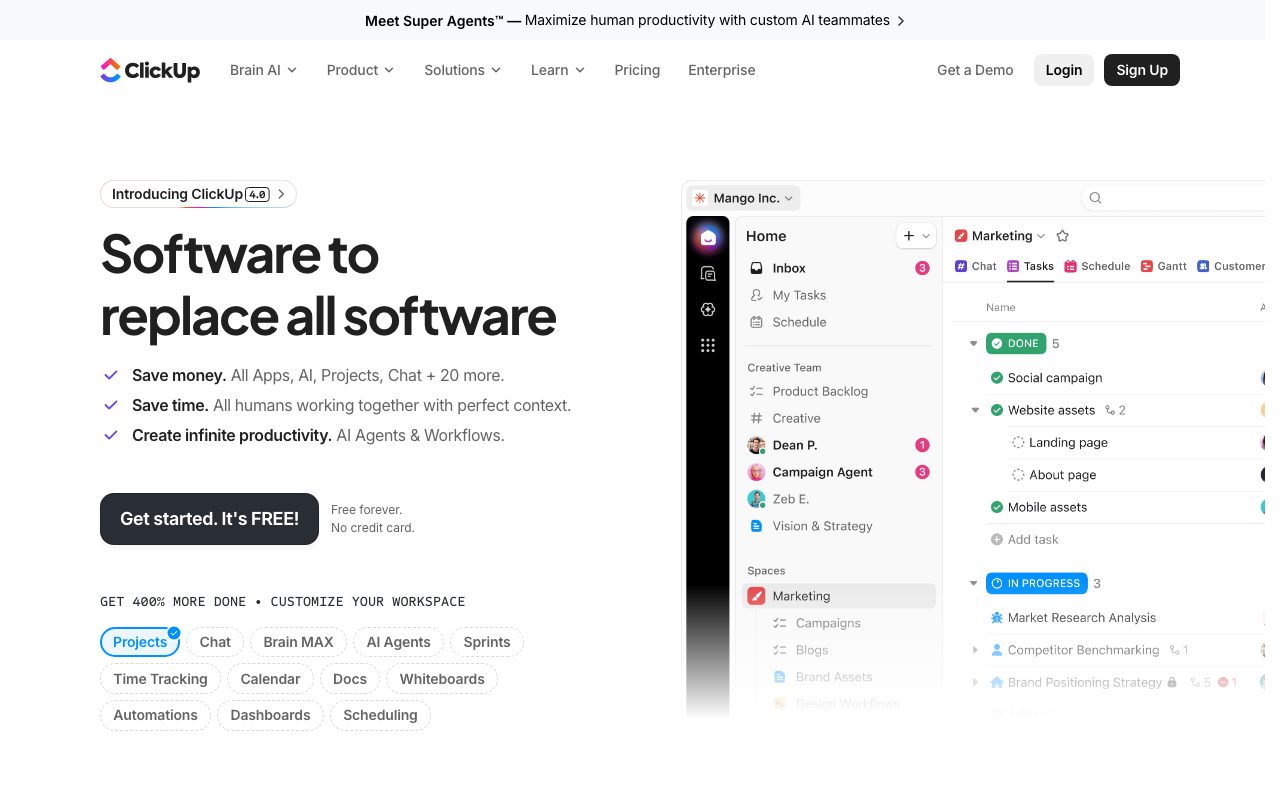
ClickUp is the project management tool that decided "do one thing well" was a coward's strategy. It's a workspace that wants to absorb tasks, docs, chat, goals, time tracking, and whiteboards into one app.
You either love this or you hate it. There's no middle ground. People who pick ClickUp usually do so because they're tired of paying for five separate SaaS subscriptions and watching context bounce between them.
It's the loudest competitor to Asana and Monday, and it's gunning for parts of Notion too.
What ClickUp actually does
At the core, ClickUp is task management. You make tasks, assign them, set due dates, group them into lists, lists into folders, folders into spaces. The hierarchy is deeper than most competitors.
Around that core, you get docs, chat threads, sprint tracking, goals with progress rollups, time tracking, dashboards, and AI features. It's a buffet, and ClickUp keeps adding dishes.
Views are the magic trick
Same data, multiple views: list, board, gantt, calendar, timeline, mind map. You're not committing to one paradigm. The team can switch perspectives without anyone having to migrate data.
Who ClickUp is for
Operations-heavy teams. Marketing agencies juggling 30 client deliverables. Product teams that want sprints and docs without buying Jira plus Confluence. Startups trying to delay buying more SaaS.
It's overkill for a four-person team that just needs a shared todo list. ClickUp rewards people who like to configure systems. If "configure" sounds like work, you'll probably hate it.
The "consolidate three tools" pitch
Most ClickUp converts came from running Trello plus Notion plus Toggl, and got tired. ClickUp lets them stop juggling tabs without sacrificing too much depth on any one feature.
Pricing breakdown
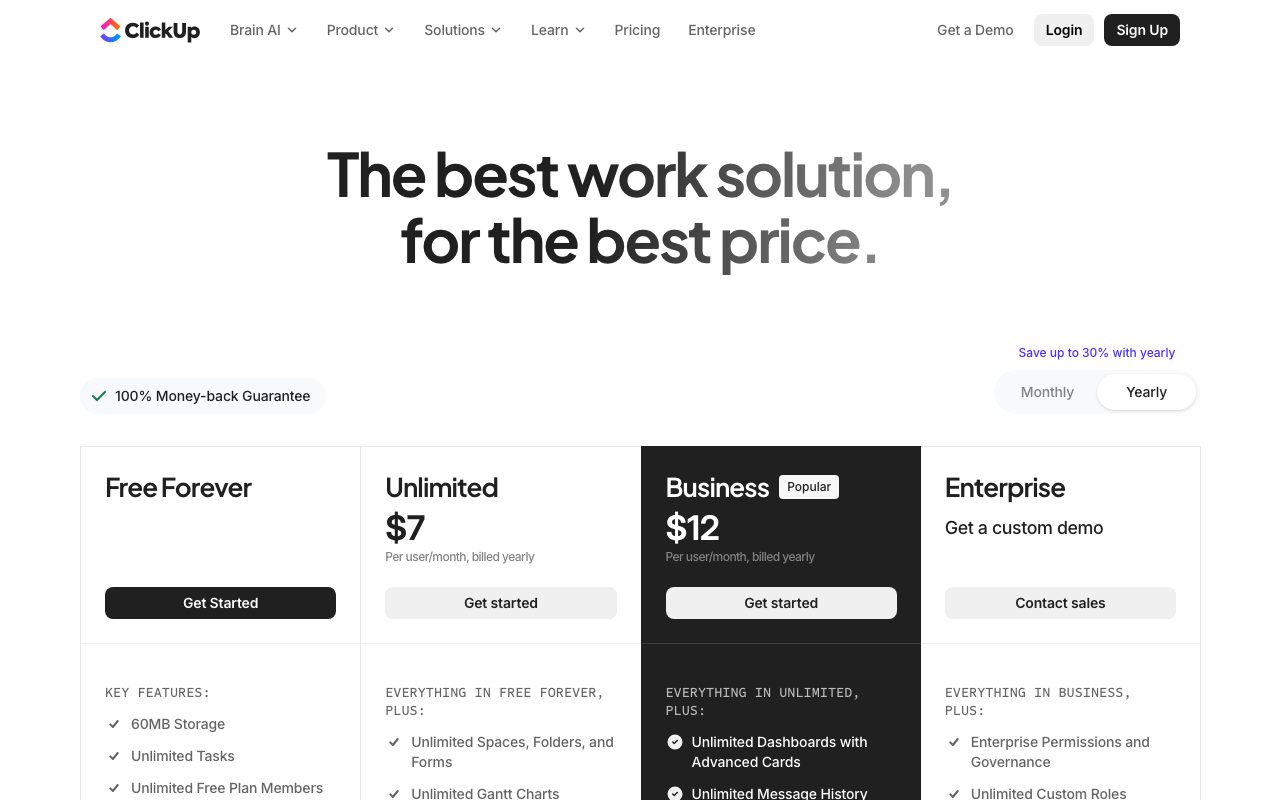
Free Forever plan that's genuinely usable. Unlimited starts cheap per user. Business and Business Plus add advanced features. Enterprise for SSO and security needs.
The free tier is one of the most generous in this category. You'll hit storage and dashboard limits before you hit feature paywalls, which is the right kind of constraint.
The hidden cost
Configuration time. ClickUp doesn't have strong opinions, so you're going to spend a few weekends figuring out your hierarchy, your statuses, and your automations. Budget for setup.
Standout features of ClickUp
Custom statuses per list. Most tools force one global status set. ClickUp lets you say "this list uses to-do/doing/done" while another uses "draft/review/published."
Automations are deep. Triggers and actions cover most of what you'd otherwise build in Zapier, and they're free to configure within ClickUp itself.
ClickUp AI
The AI features are surprisingly useful for project work: summarize comment threads, generate task drafts, write docs from a prompt. It's not earth-shattering but it removes some of the busywork.
Honest tradeoffs with ClickUp
It's heavy. The app feels slower than minimal competitors like Linear. There's a lot to render, and you'll feel it on older laptops.
The breadth comes at the cost of depth. ClickUp's docs aren't as nice as Notion. Its chat isn't as nice as Slack. Its sprints aren't as nice as Linear. It's a B+ at many things rather than an A at one.
ClickUp is the all-in-one workspace for teams that hate the all-in-one workspace category but secretly need one. It's chaotic in the best way.
ClickUp vs alternatives
ClickUp vs Asana: Asana is more polished and opinionated. ClickUp is more configurable and cheaper at scale.
ClickUp vs Monday: Monday is prettier and easier for non-technical users. ClickUp has more depth for power users.
ClickUp vs Notion: Notion is better for docs and wikis. ClickUp is better for actual project execution.
For broader views, see the best project management tools or check Asana alternatives and ClickUp vs Asana.
When ClickUp wins
You're consolidating tools. Your team includes both technical and non-technical people. You want flexibility without writing code.
Bottom line on ClickUp
ClickUp is the right call when you want one tool that can flex into many shapes. It's the wrong call when you want minimalism or speed above all.
If you're already happy with a focused tool, don't switch. If you're paying for four overlapping SaaS products and feeling the friction, ClickUp deserves a trial. Browse tools for agencies for adjacent options.
ClickUp's hierarchy explained
The ClickUp hierarchy goes Workspace, Space, Folder, List, Task, Subtask. That's a lot of nesting. Most teams use four of those layers and ignore the rest. Some teams use all six and look organized.
The flexibility is genuinely powerful but it's also where new users get lost. The trick is to pick a hierarchy and commit. Trying to use everything optimally on day one is the path to abandonment.
Custom fields done right
ClickUp lets you add custom fields per list. Numbers, dropdowns, dates, formulas, relationships to other tasks. The data model under the hood is closer to Airtable than to traditional project tools.
ClickUp for different roles
Marketing teams use it for campaign tracking, content calendars, and asset management. Engineering teams use it for sprints and bug tracking, though Linear is often preferred. Operations teams use it for SOPs and recurring workflows.
The common thread is structured work that benefits from views. If your team's work fits a board, a list, a timeline, and a calendar all at once, ClickUp shines.
Templates and ClickApps
ClickApps are toggleable feature modules. Time tracking, sprints, dependencies, and others can be turned on per workspace. This is how ClickUp keeps the kitchen-sink feature set from drowning every workspace.
Common ClickUp questions
Is ClickUp good for sprints? Yes, with the Sprints ClickApp enabled, though Linear is more focused. Does ClickUp have a docs feature? Yes, ClickUp Docs replaces some Notion use cases. Is ClickUp free? Yes, the Free Forever plan is real.
For broader views, see tools for operations teams and ClickUp vs Monday.
Final take on ClickUp
ClickUp is the project tool for people who'd rather configure than buy more SaaS. It's chaotic, capable, and divisive. Plan to invest a weekend in setup, and you'll get years of value. Skip that step and you'll bounce within a month.
ClickUp's documents and wiki story
ClickUp Docs lets you write rich documents inside the same workspace as your tasks. You can link tasks into docs, embed views, and reference content across spaces. It's not as polished as Notion but it's serviceable.
For teams already living in ClickUp, the convenience of one tool wins over the polish of separate tools. For teams that prize writing experience above all, Notion still wins on the docs side. Pick based on which gets used more.
The chat feature reality
ClickUp Chat exists. It's not Slack. Most teams keep Slack and use ClickUp's chat for task-specific discussions only. The vision of replacing Slack hasn't materialized for most users, but the in-task comments are excellent.
ClickUp at scale
Small teams (under twenty) configure ClickUp once and ride. Medium teams (twenty to a hundred) need explicit governance: who creates spaces, who sets statuses, who approves automations. Without governance, ClickUp becomes a maze.
Larger orgs need an admin who treats ClickUp like a system, not a tool. Permissions, templates, naming conventions, and review cadences all matter. Skip this and you'll have parallel hierarchies that don't talk to each other.
ClickUp integrations and API
The integration list covers most major SaaS tools. Slack, Google Drive, GitHub, Figma, and Zapier all connect cleanly. The native API and webhook system support custom workflows for teams that outgrow stock integrations.
The automation engine plus integrations means ClickUp can be the central hub for cross-tool workflows. Teams that lean into this get serious leverage. Teams that don't end up using ClickUp as a fancier todo list, which works but undersells the platform.
Performance considerations
ClickUp's web app is feature-dense, which means it's slower than minimalist competitors. On older laptops or slow connections, you'll feel it. The desktop app helps somewhat. Mobile is good for quick updates but not deep work.
The decision framework
If your team is small and tightly aligned, Linear or Trello might serve better. If your team spans multiple functions and you want one tool, ClickUp wins. If your team needs maximum customization without writing code, ClickUp wins again.
ClickUp wrap-up
The platform's biggest risk to your team isn't features, it's discipline. ClickUp will let you build a hierarchy that nobody understands, a status set that varies between lists, and an automation graph that nobody can debug. That's the price of flexibility.
The teams that succeed with ClickUp tend to have a single power user who owns the configuration. They set conventions, enforce them, and prune complexity when it grows. Without that role, ClickUp drifts. With it, ClickUp scales remarkably well.
For new adopters, start small. One space, a few lists, simple statuses. Add complexity only when you feel the pain of not having it. This counterintuitive approach saves the typical month of overbuilding that most ClickUp teams suffer through. Build for today, expand when tomorrow demands it, and you'll keep the system manageable for years.
Tutorial / Demo
Key Features
- Tasks, subtasks and checklists with custom fields
- Multiple views: list, board, Gantt, calendar, timeline, mind map
- Built-in docs and whiteboards
- Native time tracking and goals
- Automations and form intake
- Dashboards with chart widgets
Pros & Cons
What we like
- Genuinely replaces several point tools at once
- Free plan is unusually generous
- Highly customizable for opinionated teams
- Frequent shipping cadence
Room for improvement
- Sheer surface area can feel overwhelming
- Performance can lag in very large workspaces
- Teaching the hierarchy to new hires takes time
Frequently Asked Questions
Does ClickUp have a free tier?
ClickUp vs Notion vs Asana, which fits a small team?
Is ClickUp overwhelming?
Does ClickUp have a mobile app?
Can I migrate from Asana, Trello, or Jira?
Best For
Featured in
Tags
Alternatives to ClickUp
View allAsana
Project management for teams that live in projects, tasks and dependencies
monday.com
A flexible work OS built around colorful, spreadsheet-like boards
Trello
The kanban board that taught the rest of the industry what a card was

Notion
All-in-one workspace for notes, docs, and collaboration
Our take
Tool Index Editorial · May 2026· 4.8/5
If you're evaluating ClickUp, the headline is simple: one workspace that tries to absorb every other project tool you use, and most teams will get value out of the box.
What it actually does well: Genuinely replaces several point tools at once, Free plan is unusually generous, and Highly customizable for opinionated teams. Less impressive: Sheer surface area can feel overwhelming and Performance can lag in very large workspaces.
Recommendation: this is a strong default when you need cross-functional teams running multiple projects. If sheer surface area can feel overwhelming would be a dealbreaker, the alternatives section below is worth a scroll.
Editorial opinion from the Tool Index team, written from the public product pages. Not a user review.
Reviews (6)
ClickUp has been a quiet upgrade
ClickUp isn't perfect but it's the best I've used in this category. Where it really wins is genuinely replaces several point tools at once. Worth calling out the multiple views: list, board, Gantt, calendar, timeline, mind map too. It would be a 5 if not for performance can lag in very large workspaces.
Pros
- Frequent shipping cadence
- Highly customizable for opinionated teams
Surprised how much we use this
Got ClickUp on the recommendation of someone I trust. Genuine strength: free plan is unusually generous. Found it works best for agencies tracking client work and time.
Recommended without reservation
Got ClickUp on the recommendation of someone I trust. Genuine strength: genuinely replaces several point tools at once. The automations and form intake is more useful than I expected. It fits well for replacing a stack of Asana plus Notion plus Toggl. One thing that bugs me: teaching the hierarchy to new hires takes time.
Pros
- Genuinely replaces several point tools at once
Surprised how much we use this
Hadn't planned on switching, but ClickUp was hard to ignore. Genuine strength: frequent shipping cadence. Their take on tasks, subtasks and checklists with custom fields is solid. One thing that bugs me: performance can lag in very large workspaces. Still recommending it to people in similar setups.
Cons
- Performance can lag in very large workspaces
It just works
The past year of using ClickUp, here's what holds up. What stands out is how frequent shipping cadence. Got real value out of dashboards with chart widgets. Found it works best for solo founders who outgrew a simple todo app. It would be a 5 if not for sheer surface area can feel overwhelming. Would buy again without thinking twice.
Pros
- Genuinely replaces several point tools at once
- Frequent shipping cadence
Cons
- Teaching the hierarchy to new hires takes time
- Sheer surface area can feel overwhelming
Surprised how much we use this
ClickUp solves a real problem for me, but it's not magic. What stands out is how frequent shipping cadence. The multiple views: list, board, Gantt, calendar, timeline, mind map is more useful than I expected. Main use case: replacing a stack of Asana plus Notion plus Toggl. Sticking with ClickUp.
Badge builder
Add ClickUp to your website
Choose a badge style and size, preview it here, then copy the generated HTML. Badge images are self-contained SVGs and do not require an external script.

<a href="https://toolindex.net/tools/clickup?ref=badge" target="_blank" rel="noopener">
  <img src="https://toolindex.net/badge/clickup/medium.svg" alt="ClickUp - Listed on Tool Index" width="180" height="50" />
</a>How to use the badge
- 1. Pick the style, size, and theme that fit your layout.
- 2. Copy the generated HTML from the code block.
- 3. Paste it into your footer, homepage, or press page.
Standard badge available
The standard listing badge is available now. Score and circle badges are limited to tools currently ranked in the top 10 of a category.
Badge clicks return visitors to this profile with a referral tag so the source remains identifiable.
Related Tools

Confluence
Atlassian's long-running team wiki that anchors many enterprise knowledge stacks
Asana
Project management for teams that live in projects, tasks and dependencies
Kevin Gabeci Toolkits
Seven AI toolkits for writing books, making music, cutting video, and building agents.

Logseq
An open-source outliner notes app where every bullet is a first-class block
Work on ClickUp? Request listing access or correction