Asana
Project management for teams that live in projects, tasks and dependencies
Gallery
About Asana
Asana sits in that comfortable middle of project management software. It's not the lightest tool in the world. It's not the most database-flexible either. But for teams that genuinely live inside projects, tasks, and dependencies, Asana keeps getting picked.
The pitch is simple. You give every initiative a home with owners, due dates, and clear next steps. Then leadership gets a portfolio view that actually reflects reality. That second part matters more than people admit.
Founded in 2008 by Facebook alums Dustin Moskovitz and Justin Rosenstein, Asana went public in 2020. It's been polished for over a decade. That maturity shows up in the small details.
What Asana actually does
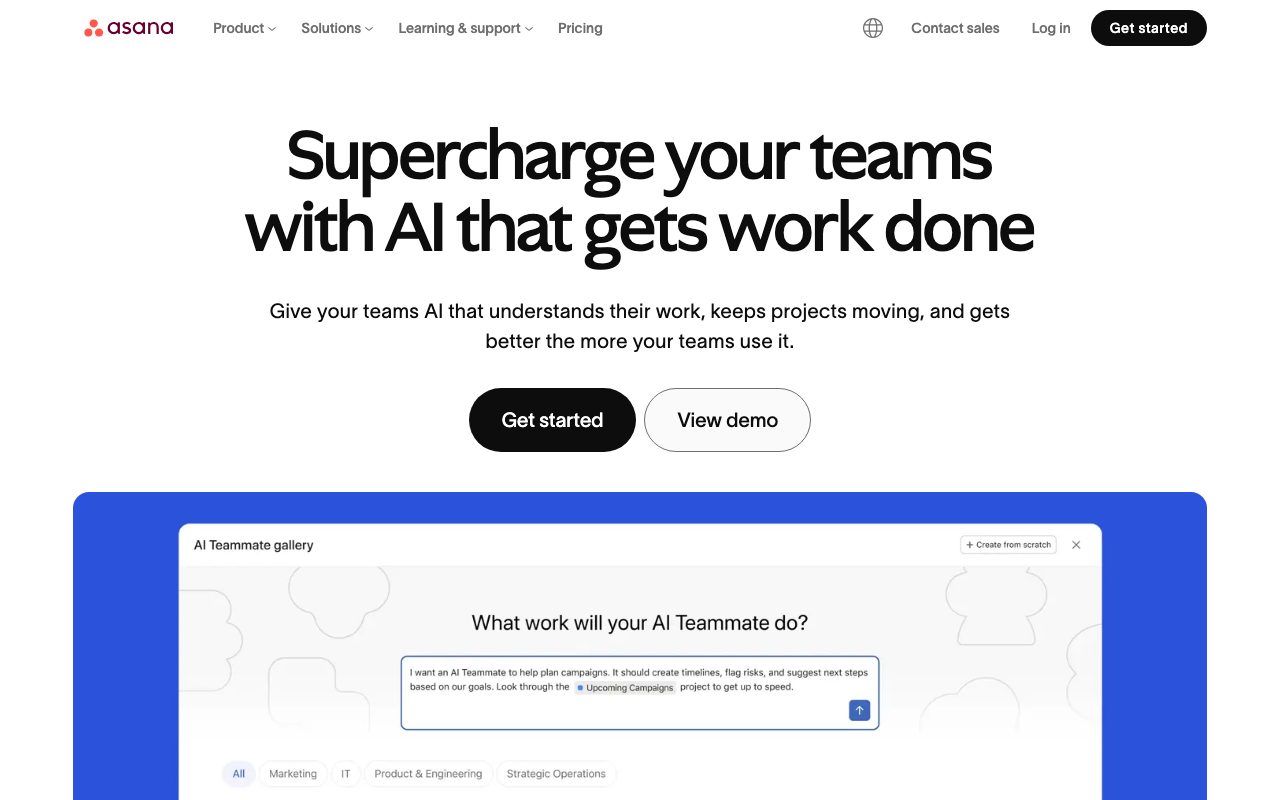
At its core, Asana is task tracking. You create tasks, assign owners, set due dates, and group them into projects. The interesting part is how those tasks render.
You can flip the same project between list, board, timeline, and calendar views. The Gantt-style timeline is genuinely useful for cross-team planning. Dependencies aren't an afterthought either.
Above projects sit Portfolios. These let leadership track ten or fifty active initiatives at a glance. Each rolls up status, owner, and progress without anyone manually updating a spreadsheet.
Who Asana is built for
Marketing teams love Asana. Operations teams love Asana. Product launches, content calendars, and campaign planning all map cleanly to its model. Engineering teams sometimes prefer Linear or Jira instead.
The non-engineering fit is the real moat here. Notion feels too freeform for a launch checklist. Monday.com leans heavier on visual customization than process. Asana hits a balance most ops folks can adopt without training.
Asana pricing breakdown
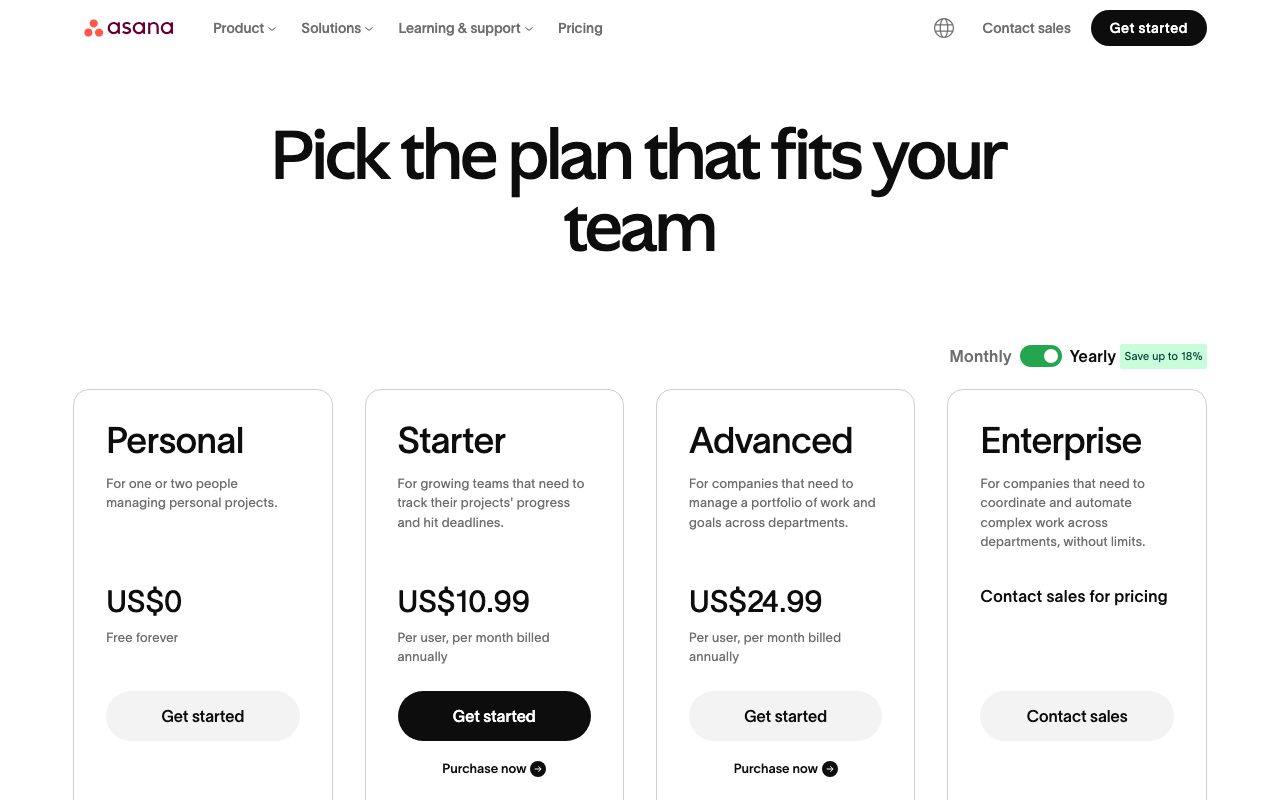
The free Personal plan covers up to fifteen members. You get unlimited tasks, projects, and the basic views. It's enough for a small team to actually use.
Starter runs around $10.99 per user per month billed annually. Advanced jumps to roughly $24.99 per user per month. Enterprise and Enterprise Plus require a sales conversation.
The Starter tier unlocks Timeline view, Dashboards, and unlimited free guests. Advanced adds Goals, Portfolios, and Workflow Bundles. Most growing teams land on Starter and stay there.
Standout Asana features
Goals are the underrated piece. You can set quarterly objectives at the company level, then tie them to portfolios and projects below. The OKR pattern works without bolting on a separate OKR tool.
Workflow rules are the second underrated piece. Triggers like "task moved to In Review" can auto-assign reviewers, set due dates, or notify a Slack channel. It saves real hours over a quarter.
Forms for intake are the third. Anyone can submit a request via a public form. The submission lands as a properly tagged task in the right project. No more "did you see my Slack DM?" rituals.
Honest tradeoffs
Asana isn't cheap once you cross fifteen users. The per-seat cost adds up fast at fifty or a hundred people. Companies that started on Asana sometimes look hard at alternatives at that point.
It's also less flexible than database-style tools. You can't build a custom CRM inside Asana the way you can in Notion or Airtable. The schema is opinionated.
And the UI, while polished, can feel cluttered when a project has hundreds of tasks. Filtering helps. Tags help more. New users still need a week to feel comfortable.
If your work has clear owners, deadlines, and dependencies, Asana works on day one. If your work is fluid and document-heavy, you'll fight it.
Asana vs the alternatives
The closest competitor is Monday.com. Monday leans more visual and customizable. Asana leans more structured. Power users tend to land on whichever tool their first project lead picked.
Against Notion, Asana is the better choice for execution and the worse choice for documentation. Most teams end up using both. Asana for tasks, Notion for the wiki.
For pure software teams, Linear and Jira are sharper tools. They model issues, sprints, and releases natively. Asana feels heavy in that context.
Comparison shopping? See best project management tools, Asana alternatives, and Asana vs Monday.com.
Bottom line on Asana
Asana earns its place. It's the safe pick for marketing, ops, and cross-functional teams that need real timelines and portfolio rollups. The pricing stings at scale, but the productivity payoff usually justifies it.
If you're hiring your tenth or twentieth employee and the spreadsheets are breaking, Asana deserves a fourteen-day trial. It's boring in the best way.
Asana in real teams
Adoption usually starts in marketing or operations and spreads from there. The pattern is consistent. One team finds Asana useful for a campaign, leadership notices the visibility, and within a quarter it's the default project tool company-wide.
The portfolio rollup is what sells leadership. Executives see a green-yellow-red status across thirty active initiatives without anyone updating a spreadsheet. That single view is worth the per-seat price for many companies.
Engineering teams sometimes resist the move. Linear and Jira fit issue tracking better. The compromise that works is "engineering uses Linear, everyone else uses Asana, with milestones synced both ways." Ugly but functional.
Asana integrations that matter
Slack integration is the most-used one. Asana tasks post into Slack channels on creation, completion, or status change. The bidirectional flow means most updates happen without leaving Slack.
Google Drive and Microsoft Office integrations attach files to tasks natively. The links stay live, so opening the file from inside Asana grabs the latest version.
Salesforce, HubSpot, and Zendesk integrations route customer-related work into Asana automatically. Sales-ops and customer-success teams especially benefit from those flows.
Zapier and the official API cover the long tail. If you have a custom internal tool, you can pipe events into Asana with a few hours of glue code.
Asana common questions
"Is Asana good for software teams?" Sometimes. Linear and Jira fit pure software work better. Asana works when software and non-software teams need to coordinate on shared timelines.
"Is the free plan enough?" For under fifteen users, yes. The basic views and unlimited tasks cover small-team needs. Goals and Portfolios require paid plans.
"How does Asana compare to Notion?" Different tools. Asana is for execution. Notion is for documentation. Most teams use both.
"Is Asana hard to learn?" Not really. Most users get comfortable in a week. Power features take longer.
Final word on Asana
Asana isn't trying to revolutionize project management. It's trying to be the boring, reliable choice that scales from ten people to ten thousand. After more than a decade in market, that bet has paid off.
If you're picking a project tool today, Asana belongs on your shortlist. The trial is fourteen days. That's enough to see whether it fits your team.
Asana for OKR-driven companies
Goals in Asana map to the OKR pattern most companies use. Set a top-level company objective. Cascade key results to teams. Tie underlying tasks and projects to specific KRs. Quarterly check-ins surface real progress.
Without a tool, OKRs decay into spreadsheets nobody opens. Asana's Goals keep the rituals alive because they live next to the work. Updating progress is one click while you're already in Asana for tasks.
Some teams run OKRs in dedicated tools (Lattice, 15Five, Mooncamp) and Asana for execution. The integration story is decent but not perfect. The all-in-one Asana approach trades some OKR depth for less context-switching.
Asana for agencies
Agencies running client work love Asana for the multi-client visibility. Each client gets a project. Portfolios group projects by client or by service line. Time tracking integrations pipe billable hours into the same workflow.
Templates for recurring engagements (website builds, brand identity work, retainer campaigns) save setup time on every new client. Spin up a new project from template, customize the dates, assign owners, you're running.
The Forms feature handles client intake. Public-facing forms collect briefs, with submissions landing as properly tagged tasks in the right project. Reduces "did you see my email?" friction substantially.
Asana migration tips
Coming from Trello: Asana boards map directly. List view replaces Trello's main UI. Power-Ups become Workflow rules.
Coming from Monday.com: similar visual model. Monday's groups become Asana sections. Item types become tasks with custom fields.
Coming from spreadsheets: import via CSV. Asana reads spreadsheet structure decently. Plan for some manual cleanup of the imported tasks.
Coming from Jira: harder migration. The schemas don't align cleanly. Most teams pick a date and run both in parallel for a quarter before fully cutting over.
Asana long-term value
Companies that adopt Asana early and stick with it tend to keep it for years. Once the rituals of project intake, status reporting, and quarterly planning live in Asana, switching costs grow significantly.
That stickiness cuts both ways. The product gets ingrained. Pricing increases at renewal feel painful but rarely trigger migrations.
For teams shopping for the first time, run trials of Asana, Monday.com, and ClickUp in parallel. Same project structure in each tool. Whichever feels most natural to your team after two weeks is probably the right pick.
The market has consolidated around a handful of leaders. Asana, Monday, ClickUp, and Notion handle most use cases. Niche tools like Linear and Jira win specific verticals.
Asana's bet has been "boring, polished, scalable." That bet has paid off across more than a decade. The product isn't going away.
Tutorial / Demo
Key Features
- List, board, timeline and calendar views
- Task dependencies and milestones
- Portfolios for tracking many projects at once
- Goals tied to underlying work
- Workflow rules and approvals
- Forms for intake requests
Pros & Cons
What we like
- Mature, polished UX without surprises
- Strong reporting at the portfolio level
- Wide ecosystem of integrations
- Genuinely good for non-engineering teams
Room for improvement
- Premium tiers get expensive per seat
- Free plan caps you at fifteen users
- Less flexible than database-style tools
Frequently Asked Questions
Does Asana have a free tier?
Asana vs ClickUp vs Monday, which should I pick?
Asana vs Linear, what's the difference?
Can Asana handle dependencies and Gantt charts?
Is Asana good for solo founders?
Best For
Featured in
Tags
Alternatives to Asana
View allTrello
The kanban board that taught the rest of the industry what a card was
monday.com
A flexible work OS built around colorful, spreadsheet-like boards

ClickUp
One workspace that tries to absorb every other project tool you use

Linear
Streamline software projects, sprints, and bug tracking
Our take
Tool Index Editorial · May 2026· 4.8/5
If you're evaluating Asana, the headline is simple: project management for teams that live in projects, tasks and dependencies, and most teams will get value out of the box.
The standout points: Mature, polished UX without surprises, Strong reporting at the portfolio level, and Wide ecosystem of integrations. The friction points: Premium tiers get expensive per seat and Free plan caps you at fifteen users.
Bottom line: pick Asana when you need marketing and ops teams running campaigns; look elsewhere if premium tiers get expensive per seat would be a dealbreaker.
Editorial opinion from the Tool Index team, written from the public product pages. Not a user review.
Reviews (8)
Solid product, even better support
Started using Asana casually, now it's pinned in my dock. Honestly impressed by how wide ecosystem of integrations. One thing that bugs me: premium tiers get expensive per seat. Still recommending it to people in similar setups.
Pros
- Strong reporting at the portfolio level
- Genuinely good for non-engineering teams
- Wide ecosystem of integrations
Cons
- Free plan caps you at fifteen users
Solid product, even better support
Asana isn't perfect but it's the best I've used in this category. Real selling point: genuinely good for non-engineering teams. Goals tied to underlying work works the way you'd hope.
Maybe in a year when they fix the basics
Asana solves a real problem for me, but it's not magic. Real selling point: strong reporting at the portfolio level. Portfolios for tracking many projects at once works the way you'd hope. Found it works best for companies that want governance plus simplicity. Not perfect: free plan caps you at fifteen users.
Pros
- Mature, polished UX without surprises
- Wide ecosystem of integrations
Solid daily driver
Adopted Asana for one project, ended up using it for more. Where it really wins is mature, polished UX without surprises. Worth calling out the task dependencies and milestones too. One thing that bugs me: less flexible than database-style tools. Sticking with Asana.
Pros
- Genuinely good for non-engineering teams
Worth the price of admission
Got Asana on the recommendation of someone I trust. The biggest win has been mature, polished UX without surprises.
Worth the price of admission
Honest take: Asana delivers most of what the marketing promises. Where it really wins is strong reporting at the portfolio level. It fits well for cross-team initiatives that need a real timeline. Sticking with Asana.
Pros
- Wide ecosystem of integrations
Onboarded the team in a day
First impression of Asana was 'huh, this is actually thought through.' Where it really wins is strong reporting at the portfolio level.
Pros
- Genuinely good for non-engineering teams
- Strong reporting at the portfolio level
Best decision this quarter
Started using Asana casually, now it's pinned in my dock. Honestly impressed by how genuinely good for non-engineering teams. The goals tied to underlying work is more useful than I expected. Worth the price for what I get out of it.
Pros
- Strong reporting at the portfolio level
Badge builder
Add Asana to your website
Choose a badge style and size, preview it here, then copy the generated HTML. Badge images are self-contained SVGs and do not require an external script.

<a href="https://toolindex.net/tools/asana?ref=badge" target="_blank" rel="noopener">
  <img src="https://toolindex.net/badge/asana/medium.svg" alt="Asana - Listed on Tool Index" width="180" height="50" />
</a>How to use the badge
- 1. Pick the style, size, and theme that fit your layout.
- 2. Copy the generated HTML from the code block.
- 3. Paste it into your footer, homepage, or press page.
Standard badge available
The standard listing badge is available now. Score and circle badges are limited to tools currently ranked in the top 10 of a category.
Badge clicks return visitors to this profile with a referral tag so the source remains identifiable.
Related Tools

Confluence
Atlassian's long-running team wiki that anchors many enterprise knowledge stacks
Kevin Gabeci Toolkits
Seven AI toolkits for writing books, making music, cutting video, and building agents.

Logseq
An open-source outliner notes app where every bullet is a first-class block
Cal.com
Open source scheduling infrastructure for everyone
Work on Asana? Request listing access or correction