
Bear
A beautiful Markdown notes app for Apple devices that doubles as a writing tool
Gallery
About Bear
Bear is the markdown notes app for people who care what their notes look like. It's Apple-only, opinionated, and quietly one of the prettiest writing tools shipping today. If you've bounced through Notion, Obsidian, and Apple Notes and felt nothing fit, Bear might.
The app launched in 2016 and rebuilt itself for Bear 2 in 2024 with a new editor, web links, and a real overhaul. The vibe stayed the same. Plain markdown, hashtag-based organization, and a focus on writing rather than databases or graphs.
Bear isn't trying to be your second brain or your project manager. It wants to be the place you write things down, fast and beautifully. That's a narrower goal than most note apps chase, and Bear nails it.
What Bear actually does
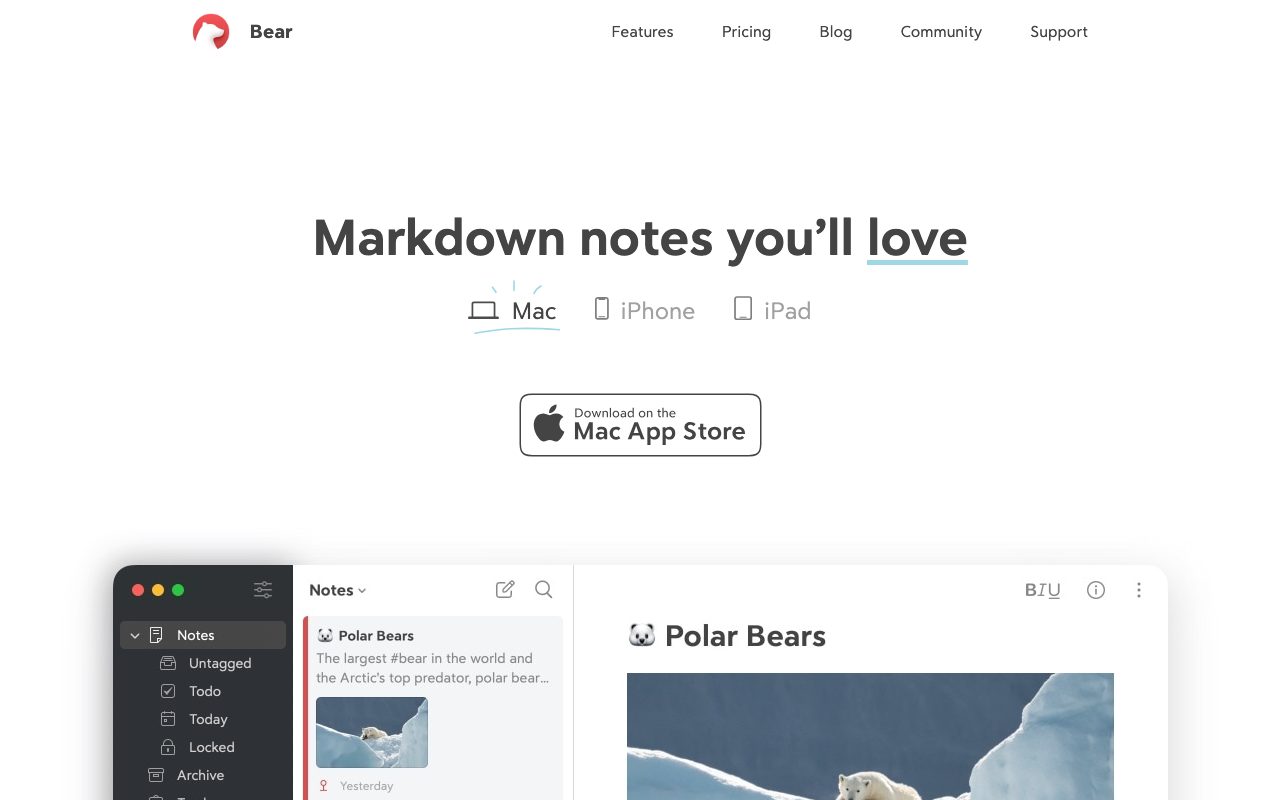
Bear is a markdown notes app. You write notes in markdown, organize them with hashtags, and search across everything. There's no folder system. Tags do the work, and they nest, so #work/clients/acme creates a tree.
The editor renders markdown as you type. Headings change size, links get styled, code blocks get syntax highlighting. It's not preview-and-edit like a lot of markdown tools. The styling happens inline as you type.
The Bear 2 upgrade
Bear 2 introduced web links you can paste into a note for inline previews, table editing, math equations via LaTeX, and a much faster editor. Sync got rebuilt on top of CloudKit. Performance on big libraries finally feels good.
The themes are still a thing. Bear ships a handful of beautiful typography-and-color themes, and Pro unlocks the rest. It sounds frivolous until you spend two hours a day in the app.
Bear is the rare productivity app that takes typography seriously. If reading your own notes is supposed to feel pleasant, that matters more than the marketing suggests.
Who Bear is for
Writers, journalists, researchers, students, and anyone who lives in the Apple ecosystem and wants a beautiful place to write. If you take a lot of notes by hand and want them searchable, Bear is great. If you want a wiki, a database, or a knowledge graph, look elsewhere.
Bear is also a solid drafting tool. Many writers use Bear to capture ideas, then export to their actual writing app. Markdown export is clean. PDF, HTML, and DOCX exports all work.
Bear pricing
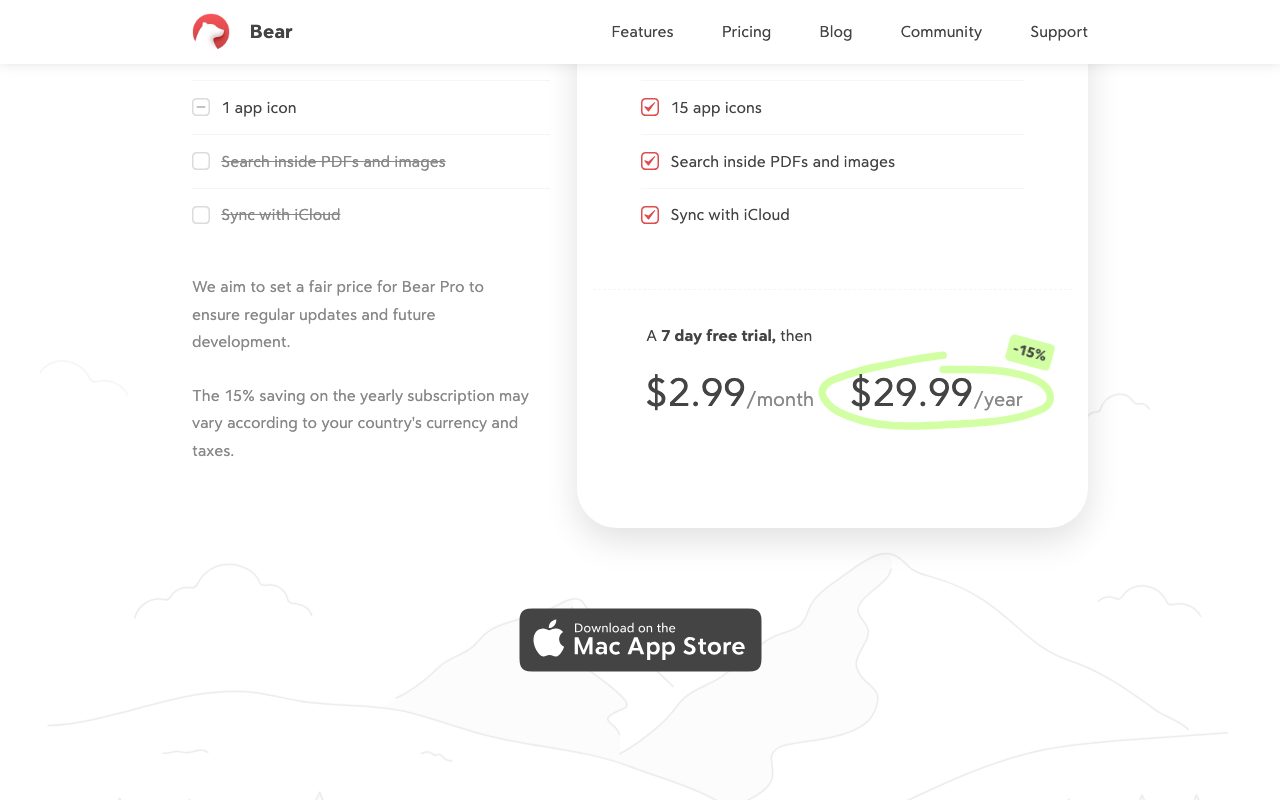
Bear is free to use without sync. Bear Pro costs $2.99 a month or $29.99 a year and unlocks sync across devices, themes, and export formats. There's no team plan. Bear is for one person.
The pricing is genuinely cheap for what you get. Most note apps run $8 to $15 a month. Bear's a steal if you write daily.
Features worth highlighting
Hashtag organization
You tag notes by typing #tag in the body. Tags nest with slashes. The sidebar builds itself from your tags. It's a great middle ground between rigid folders and chaotic flat lists.
Markdown editor
Live markdown rendering, code blocks with syntax highlighting, tables, math, and a clean focus mode. The editor is the best thing about Bear. It just feels good to type in.
Apple ecosystem integration
iCloud sync, Apple Pencil support on iPad, Shortcuts integration, and a Watch app. If you're all-in on Apple, Bear feels native in a way Notion and Obsidian don't.
Export and interoperability
Export to PDF, DOCX, HTML, JPG, and plain markdown. Notes are stored as markdown under the hood, so leaving Bear is straightforward. That alone earns trust.
The tradeoffs
Bear is Apple-only. No Windows, no Linux, no Android. That's a deal-breaker for plenty of people. The web app exists but is read-only. If you need cross-platform, Obsidian or Notion are better fits.
Bear also doesn't do databases, kanban boards, or backlinks the way Obsidian and Heptabase do. You won't build a Zettelkasten or a personal CRM in Bear. It's notes, full stop.
Bear vs alternatives
The usual comparisons are Bear vs Obsidian, Bear vs Apple Notes, and Bear vs Notion. Obsidian wins on extensibility and graph view. Apple Notes wins on price (free) and tight integration. Notion wins on databases and team features.
Bear wins on aesthetics, speed, and the writing experience. If those matter most, see Bear alternatives or browse the best notes apps.
Bottom line on Bear
Bear is a small, opinionated, beautiful markdown notes app for Apple users. The Bear 2 update brought it into the modern era. It's not the most featured tool, but it's possibly the most pleasant.
If you write a lot, you're on Apple gear, and you want notes to feel like an upgrade rather than a chore, Bear earns the $30 a year. Many users we know have stuck with Bear for half a decade. That's rare in this category.
Common Bear questions
Is Bear good for long-form writing? Yes, for drafts. The editor is comfortable for thousands of words. For final manuscripts you'd usually export to Scrivener, Ulysses, or a Word doc for editor markup.
Does Bear sync work reliably? It does in 2026. The Bear 1 sync was occasionally flaky. Bear 2's CloudKit-based sync is much better. Conflicts are rare and the worst-case is a duplicate note rather than data loss.
Can Bear handle thousands of notes? Yes. Bear 2's editor is fast even on libraries with 5,000+ notes. The search is instant. Tag navigation handles deep nesting without lag. Long-time Bear users routinely report libraries past 10,000 notes.
Bear vs Ulysses
Ulysses is Bear's closest sibling. Ulysses leans into long-form writing with goals, project structure, and publishing integrations. Bear leans into note-taking with tags, fast capture, and a leaner UI. If you write books, Ulysses. If you take notes plus draft posts, Bear. Both are Apple-only and beautiful.
Bear vs Apple Notes
Apple Notes is free, syncs everywhere Apple, and handles handwriting and shared notes. Bear is paid, prettier, markdown-native, and exports cleanly. If you live in Apple Notes already and don't write much markdown, stay there. If you want a writing tool, Bear is the upgrade.
Workflow tips for Bear
Use nested tags. Start broad (#work, #personal), nest as needed (#work/clients/acme). The sidebar reflects the structure and keeps things tidy without rigid folders.
Use the Today tag or a daily note tag for journaling. Bear doesn't have a built-in journal but the tag pattern works. You can quickly review what you wrote each day.
The export workflow matters. PDF export with the right theme produces share-ready documents. The DOCX export is fine for editor handoff. The HTML export keeps formatting for blog publishing.
Pair Bear with Drafts. Drafts handles voice capture, web clipping, and quick text from anywhere. Drafts can save into Bear via Shortcut. The combo covers most note workflows for Apple users. Browse tools for writers for more picks.
Real-world Bear scenarios
A journalist uses Bear as their interview notes hub. They tag by story and source. Pencil sketches go on the iPad. The export-to-Word workflow handles editor handoff. The whole writing flow lives in Bear except the final draft, which moves to Pages or Word for editing.
A grad student uses Bear for class notes. Tags by course. Daily notes capture lecture points. Markdown handles math via LaTeX (in Bear 2). At end of semester, they export to PDF and archive. Lighter than Notion, prettier than Apple Notes, more focused than Obsidian.
A solo developer uses Bear for technical notes and brain dumps. Code blocks render. Hashtags organize. The journal handles "what did I do today" entries. The export-to-markdown lets them publish select notes as blog posts on a static site. Minimal friction.
Bear setup tips for new users
Don't migrate everything from your old notes app on day one. Start fresh with new notes. Drag in old notes as needed. The friction of importing thousands of notes from Apple Notes is rarely worth the effort.
Use the Bear web clipper for capturing articles. The clipper saves cleanly to a note with the source link. Better than copy-paste for research.
Try a few themes before settling. The aesthetic matters more than you'd think. Default Bear is fine. Some of the Pro themes (Solarized Light, Gotham) are genuinely beautiful.
For Apple users who write often, Bear is one of the most pleasant tools you can adopt. The price is small. The aesthetic compounds. After a year you stop noticing the app and just notice the writing. Browse the Bear page for community reviews.
Why Bear keeps users for years
The retention story for Bear is interesting. Users sign up, often as a Notion or Apple Notes refugee, and then stay. Five years is common. Ten years happens. The reason isn't features; it's that Bear becomes part of how you write.
The aesthetic compounds. Beautiful tools get used more. Used more, they accumulate value. The notes you've taken in Bear over years become a real archive. Switching tools means abandoning that comfort. Most users don't.
The Apple-only constraint that bothers some users is what enables the polish. Cross-platform notes apps can't match Bear's typography or interaction speed. The team makes specific bets that pay off for Apple users.
For writers who live on Apple devices, Bear is one of those tools that quietly improves your work. You write more because the tool feels nice. You think more because the typography lets you read your old notes without dread. Small advantages, compounded daily, add up to a lot.
Tutorial / Demo
Key Features
- Markdown editor with inline preview
- Hashtag-based organization
- Note links and backlinks
- iCloud sync across Apple devices
- Custom themes and typography
- Export to PDF, HTML, DOCX, Markdown
Pros & Cons
What we like
- Gorgeous typography out of the box
- Fast and stable on Apple platforms
- Plain Markdown means no lock-in for content
- Reasonable subscription pricing
Room for improvement
- Apple-only, no Windows or Android
- Sync only via iCloud
- Less suited for team or workspace use
Frequently Asked Questions
Does Bear have a free tier?
Bear vs Apple Notes, why pay?
Bear vs Obsidian, what's the difference?
Is Bear available on Windows or Android?
Can I export my notes from Bear?
Best For
Featured in
Tags
Alternatives to Bear

Heptabase
Visual knowledge base for research, learning, and connected note cards

Confluence
Atlassian's long-running team wiki that anchors many enterprise knowledge stacks

Outline
A team wiki that feels lightweight enough to actually keep up to date

Slite
A focused team wiki that uses AI to keep your knowledge base actually trustworthy
Our take
Tool Index Editorial · May 2026· 4.5/5
Bear positions itself as a beautiful markdown notes app for apple devices that doubles as a writing tool, and on the whole it earns the framing.
What it actually does well: Gorgeous typography out of the box, Fast and stable on Apple platforms, and Plain Markdown means no lock-in for content. Less impressive: Apple-only, no Windows or Android and Sync only via iCloud.
In short: Bear is a solid pick when you need writers and journalists drafting on iPad, and a harder sell if apple-only, no Windows or Android would be a dealbreaker.
Editorial opinion from the Tool Index team, written from the public product pages. Not a user review.
Reviews (3)
The kind of tool you forget you're paying for
Started using Bear casually, now it's pinned in my dock. What stands out is how reasonable subscription pricing. Their take on note links and backlinks is solid.
Bear has been a quiet upgrade
Bear isn't perfect but it's the best I've used in this category. Where it really wins is plain Markdown means no lock-in for content. Found it works best for a pretty alternative to the default Notes app.
Pros
- Plain Markdown means no lock-in for content
- Fast and stable on Apple platforms
Best decision this quarter
Bear solves a real problem for me, but it's not magic. The biggest win has been reasonable subscription pricing. The custom themes and typography is more useful than I expected. Found it works best for writers and journalists drafting on iPad.
Badge builder
Add Bear to your website
Choose a badge style and size, preview it here, then copy the generated HTML. Badge images are self-contained SVGs and do not require an external script.

<a href="https://toolindex.net/tools/bear?ref=badge" target="_blank" rel="noopener">
  <img src="https://toolindex.net/badge/bear/medium.svg" alt="Bear - Listed on Tool Index" width="180" height="50" />
</a>How to use the badge
- 1. Pick the style, size, and theme that fit your layout.
- 2. Copy the generated HTML from the code block.
- 3. Paste it into your footer, homepage, or press page.
Score badge available
Bear qualifies for the score and circle badges based on its current top-10 positionin Writing.
Badge clicks return visitors to this profile with a referral tag so the source remains identifiable.
Related Tools
Confluence
Atlassian's long-running team wiki that anchors many enterprise knowledge stacks
Asana
Project management for teams that live in projects, tasks and dependencies
Kevin Gabeci Toolkits
Seven AI toolkits for writing books, making music, cutting video, and building agents.

SoloDevStack
A solo developer blog built on head-to-head tool comparisons, 580+ posts deep.
Work on Bear? Request listing access or correction