
AnVendor
Find the companies using a competitor's software and estimate what they spend on it
Gallery
About AnVendor
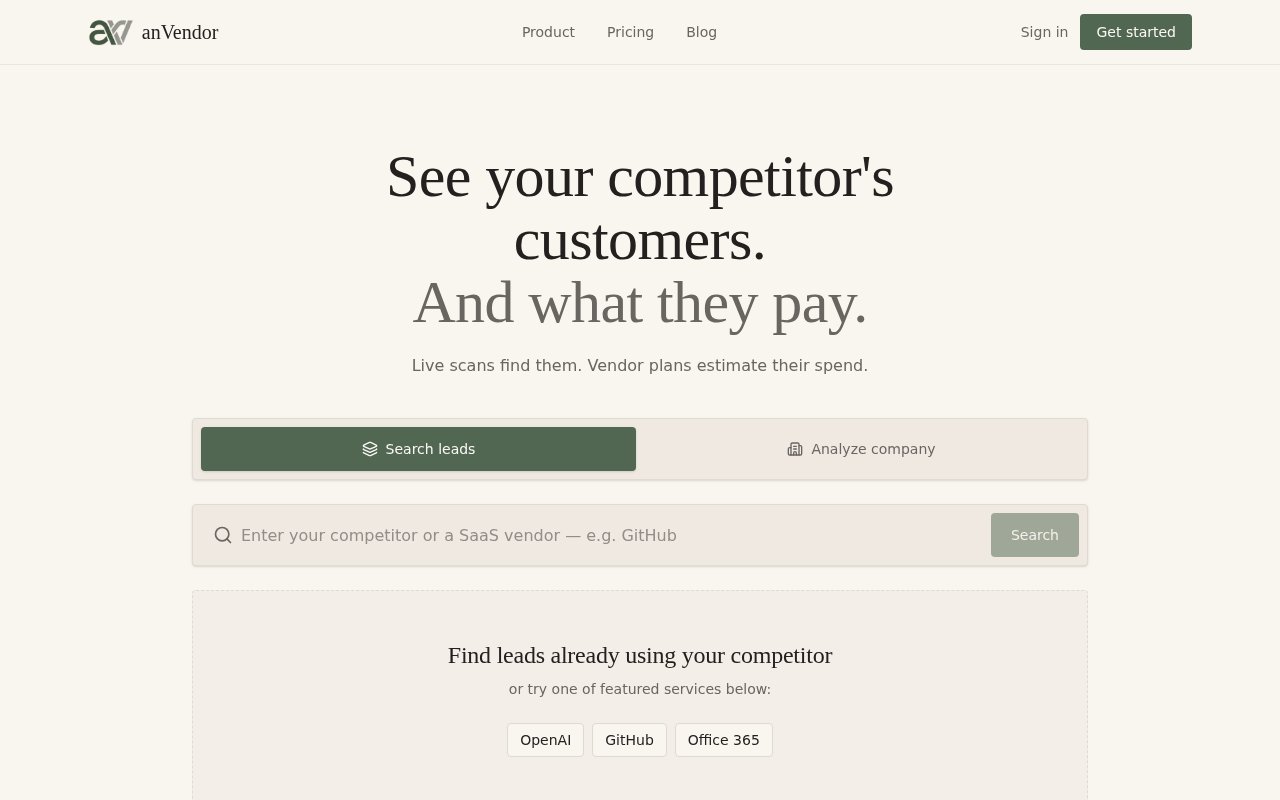
AnVendor is a sales intelligence tool built around one question that every B2B sales team keeps asking. Which companies are already paying a competitor for the thing we sell? You type in a competitor or any SaaS vendor, and it returns a list of companies that appear to use that product, along with an estimate of what each one spends on it per year. The logic is simple. A company already paying for a rival tool has a budget, a use case and a renewal date, which makes it a far warmer lead than a company that hasn't bought anything in the category yet.
The mechanism is a live scan rather than a static list that was accurate six months ago. When you search a vendor, AnVendor checks for signals that a company is a customer of that vendor and reports what it finds, then applies the vendor's published pricing to estimate annual spend. It also works in reverse. Give it a company name and it shows which software that company appears to run, which is handy when you're preparing for a call and want to know what's already in the stack before you dial. The site states that scans never reach into private, password-protected or access-restricted systems, so the results come from what's observable rather than anything pulled from behind a login.
Access is metered in credits. A lead scan costs a quarter of a credit and a full company analysis costs one, and scans that find no subscriptions are refunded, so you don't burn budget on empty results. Failed checks return their credits too. Lead discovery itself is unlimited; credits are what unlock the subscription results and the live scans behind each name on the list. Every plan keeps full history, so a scan you ran last quarter is still there when the account comes back around. A typical session looks like this. You search the vendor you displace most often and get back the companies detected as customers, each with an estimated annual spend. You skim the list for accounts that fit your ideal profile and run a full analysis on the handful worth pursuing to see the rest of their stack. That output goes into your CRM or sequencing tool, because AnVendor stops at the research step and doesn't try to write the email for you. Empty scans hand the credit back, so the cost of a wrong guess about a vendor is close to zero.
It's built for sales and business development teams doing competitive displacement, the kind of outbound where the opening line is that you already know what the prospect uses and roughly what it costs them. Founders doing their own prospecting will find it just as usable, since there's nothing to set up beyond typing a vendor name. Agencies that run outbound for several clients can point it at each client's competitors in turn. The reverse search also suits partnership and account teams who want a quick read on what a specific target already pays for before they propose anything.
Where it differs from the big contact databases is the starting point. Most prospecting tools begin with firmographics or job titles and leave you to guess at intent. AnVendor begins with an existing purchasing decision, the fact that a company chose a particular vendor, and treats that as the qualifying signal. The spend estimate adds a second dimension, because a company on a competitor's top tier deserves a different conversation than one on a free plan. Those estimates are derived from published pricing, so treat them as a guide for prioritising rather than a number to quote back at the prospect.
The limits are worth knowing before you subscribe. Detection depends on observable signals, so coverage will vary by vendor and some scans will come back empty, which is exactly why the refund on empty scans exists. The credit model means heavy users need to watch consumption, since a full analysis across a long list adds up quickly. And the product stays focused on this one job. It isn't a CRM or a sequencing tool, so the results need to flow into whatever you already use for the actual outreach.
Pricing is freemium. The free plan gives three credits every thirty days, enough to test whether detection works for the vendors you care about. Paid plans run from Starter at $99 a month for 30 credits through Growth at $299 for 100 and Scale at $999 for 400, and there are one-time credit packs at the same price points that never expire and stack with a subscription. The site publishes vendor comparison pages and a companies-using directory alongside the app, and support is reachable at support@anvendor.com.
Key Features
- Live scans of a vendor's customer base
- Annual spend estimates from published pricing
- Reverse lookup of a company's software stack
- Credit refunds on empty or failed scans
- Full scan history on every plan
- One-time credit packs that never expire
Pros & Cons
What we like
- Starts from a real purchasing decision, not a job title
- Spend estimates help prioritise the list
- Empty scans give the credit back
- Free plan is enough to test detection on your vendors
Room for improvement
- Coverage varies by vendor and some scans come back empty
- Credits add up quickly on long lists
- Spend figures are estimates from public pricing, not actuals
- No outreach features, results go to another tool
Frequently Asked Questions
What is AnVendor?
Is AnVendor free?
How does AnVendor find a competitor's customers?
Who is AnVendor for?
Best For
Featured in
Alternatives to AnVendor
View all
Close
Inside-sales CRM with calling and email built in
HubSpot
All-in-one CRM and growth platform for marketing, sales, and service teams

Upscale B2B
Done-for-you cold email and AI outreach agency that books qualified B2B meetings on your calendar

Prosp
AI LinkedIn outbound that personalizes messages, voice notes, and multi-account campaigns at scale
Our take
Tool Index Editorial · Oct 2026· 3.5/5
AnVendor finds companies that appear to use a competing SaaS product, then attaches adoption and spend estimates for sales research. We found the live-scan model, source history, REST API, and MCP access more useful than a static technographic list. The current free plan includes 20 credits every 30 days, while paid plans start at $99 for 100 monthly credits. Empty and failed scans are refunded.
The word confirmed needs care. AnVendor's own API documentation says a finding is not proof of a paid contract, and no detection does not prove non-use. Spend is estimated rather than observed, so it should prioritize outreach, not become a claim made to a prospect. At one credit per confirmed company-service match or company analysis, large lists can also get expensive. It is a focused research layer, not a CRM or outreach tool.
Editorial opinion from the Tool Index team, written from the public product pages. Not a user review.
Reviews (0)
Badge builder
Add AnVendor to your website
Choose a badge style and size, preview it here, then copy the generated HTML. Badge images are self-contained SVGs and do not require an external script.

<a href="https://toolindex.net/tools/anvendor?ref=badge" target="_blank" rel="noopener">
  <img src="https://toolindex.net/badge/anvendor/medium.svg" alt="AnVendor - Listed on Tool Index" width="180" height="50" />
</a>How to use the badge
- 1. Pick the style, size, and theme that fit your layout.
- 2. Copy the generated HTML from the code block.
- 3. Paste it into your footer, homepage, or press page.
Standard badge available
The standard listing badge is available now. Score and circle badges are limited to tools currently ranked in the top 10 of a category.
Badge clicks return visitors to this profile with a referral tag so the source remains identifiable.
Related Tools

Boilerroom
An all-in-one outbound sales platform for dialing, sequencing, and follow-up
Close
Inside-sales CRM with calling and email built in
Apollo.io
B2B prospecting database fused with a sales engagement platform
lemlist
Cold email and multichannel outreach with personalized images and video
Work on AnVendor? Request listing access or correction