
apfel-clip
macOS menu bar app that runs AI transformations on your clipboard locally
Gallery
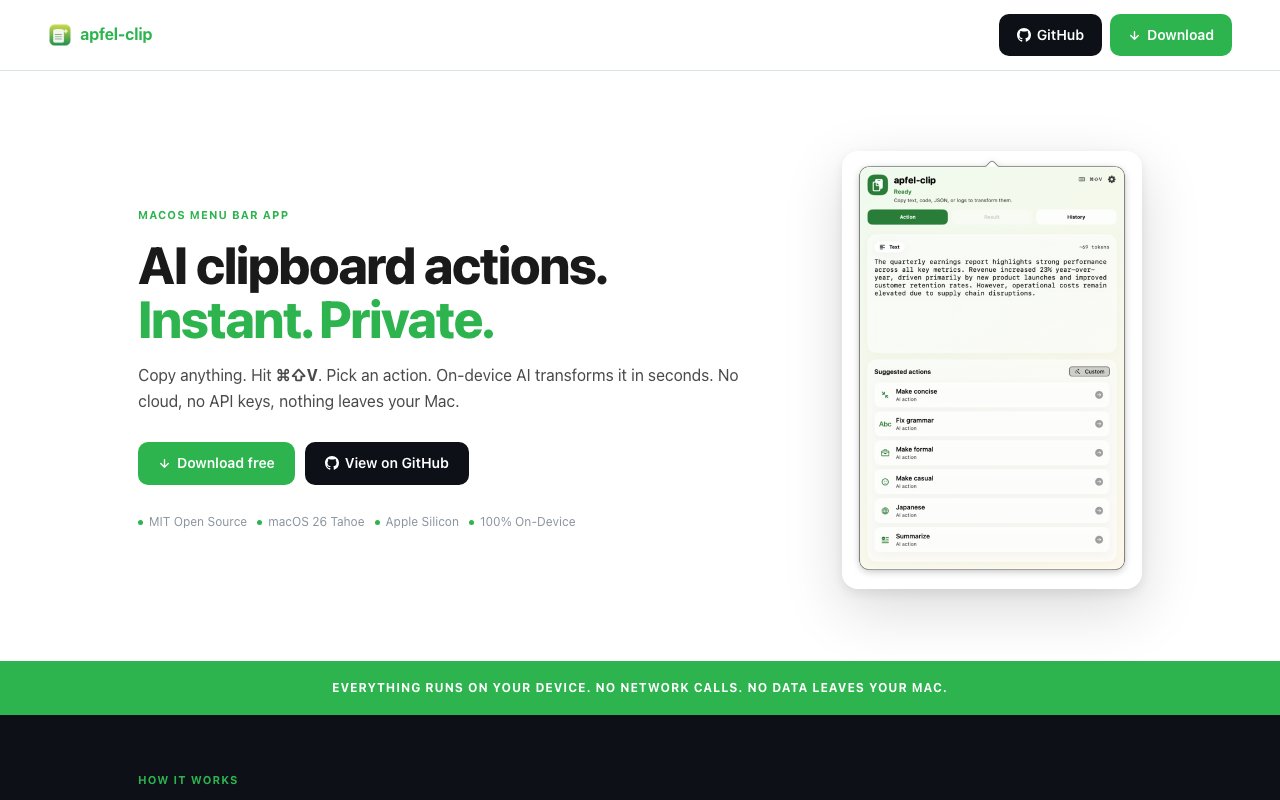
About apfel-clip
Apfel Clip is a macOS menu bar application that runs AI transformations on clipboard content entirely on-device using Apple Intelligence. The workflow integrates into existing habits without requiring new tools or context switching. Copy something, press Command-Shift-V from anywhere, select a transformation from the popup menu, and the result replaces your clipboard content ready to paste wherever you need it. The app detects whether you've copied text, code, JSON, or error messages and surfaces relevant actions automatically. Grammar fixes, tone rewrites, translations, summaries, and bullet point conversions handle everyday text. Code explanations, bug detection, comment addition, and simplification process programming content. Everything happens locally through Apple's on-device neural engine, meaning no data leaves the Mac and no API keys, subscriptions, or cloud accounts are required.
Local processing represents a fundamental architectural decision rather than a feature checkbox marketing point. Many clipboard enhancement tools route content through external servers for AI processing, creating privacy concerns for anyone copying sensitive information throughout their workday. Passwords, credentials, confidential business communications, proprietary source code, and personal information all pass through the clipboard regularly. Apfel Clip bundles its AI engine internally and runs exclusively on Apple Silicon neural engines without making network calls during transformation operations. For developers copying proprietary code, professionals handling confidential documents, healthcare workers subject to HIPAA requirements, or anyone who simply prefers their clipboard contents to remain private, this architecture eliminates the trust question that accompanies cloud-based alternatives.
The global hotkey works from any application without switching context or opening a separate window. Someone writing an email can copy a paragraph, transform it to a more professional tone, and paste the result without leaving their mail client. A developer debugging can copy an error message, get an AI-generated explanation of what went wrong, and continue working in their editor without opening a browser or chat interface. Someone preparing a presentation can copy rough notes, convert them to polished bullet points, and paste directly into slides. This system-wide integration distinguishes Apfel Clip from AI writing tools that require pasting into specific interfaces or switching to dedicated applications. The clipboard becomes the universal input mechanism for AI assistance across the entire macOS environment.
Persistent history stores all transformations locally for later retrieval, organized chronologically with search capability. This proves useful when you need to recover a previous version of something, reference how you phrased a tricky email earlier, or trace back through a chain of transformations to understand how a piece of text evolved. The history lives on your Mac rather than in cloud storage, maintaining the privacy commitment throughout the workflow. Custom actions let users create named prompts that appear in the action menu alongside built-in options, extending the tool's capabilities to specialized workflows without requiring code. A freelance translator might create custom actions for specific language pairs, while a social media manager might create tone presets for different brand voices.
Favorites, hiding, and drag-to-reorder functionality customize which actions appear prominently at the top of the menu versus which stay tucked away in overflow sections. Users who constantly fix grammar can surface that action first, while those who rarely translate can hide translation options entirely. An auto-copy option automatically places results in the clipboard upon transformation completion, streamlining the workflow to a single hotkey press followed by pasting rather than an additional manual copy step.
Requirements include macOS 26 (Tahoe) or later for Apple Intelligence support, Apple Silicon (M1 or newer) since Apple Intelligence runs on-chip only, and English device language for feature enablement. Installation happens through direct download (signed and notarized by Apple), Homebrew for command-line installation preference, or source build from the GitHub repository for those who want to inspect or modify the code. The application ships under the MIT license at no cost, with the complete codebase available for community review and contribution. For Mac users who want AI text and code transformations without cloud dependencies, monthly subscription fees, or privacy compromises, Apfel Clip provides a lightweight solution that integrates directly into existing clipboard workflows.
Key Features
- On device AI processing with no network calls
- Global hotkey access from any application
- Content aware action detection
- Custom action creation
- Persistent transformation history
- Auto copy results to clipboard
Pros & Cons
What we like
- Completely local processing keeps your data private
- Free and open source under MIT license
- Signed and notarized by Apple for clean installation
- Context aware actions based on clipboard content type
Room for improvement
- macOS only with no Windows or Linux version
- Local model capabilities limited compared to cloud AI
- Requires macOS system permissions for clipboard access
- Smaller community compared to commercial alternatives
Frequently Asked Questions
What is apfel-clip?
Is apfel-clip free?
Does apfel-clip send my data to the cloud?
Who is apfel-clip for?
Best For
Featured in
Alternatives to apfel-clip
View all
Reviews (0)
Badge builder
Add apfel-clip to your website
Choose a badge style and size, preview it here, then copy the generated HTML. Badge images are self-contained SVGs and do not require an external script.

<a href="https://toolindex.net/tools/apfel-clip?ref=badge" target="_blank" rel="noopener">
  <img src="https://toolindex.net/badge/apfel-clip/medium.svg" alt="apfel-clip - Listed on Tool Index" width="180" height="50" />
</a>How to use the badge
- 1. Pick the style, size, and theme that fit your layout.
- 2. Copy the generated HTML from the code block.
- 3. Paste it into your footer, homepage, or press page.
Standard badge available
The standard listing badge is available now. Score and circle badges are limited to tools currently ranked in the top 10 of a category.
Badge clicks return visitors to this profile with a referral tag so the source remains identifiable.
Related Tools

Apatero AI
The creator studio for AI image, video, audio, 3D, and avatars, now at apatero.ai.
Kevin Gabeci Toolkits
Seven AI toolkits for writing books, making music, cutting video, and building agents.

Warp
The modern terminal reimagined with AI and collaboration

Bolt.new
Prompt-to-deployed full-stack app inside the browser
Work on apfel-clip? Request listing access or correction