
Bento Term
Native tmux client for Mac, iPhone, and iPad that tracks coding agent states over SSH
Gallery
About Bento Term
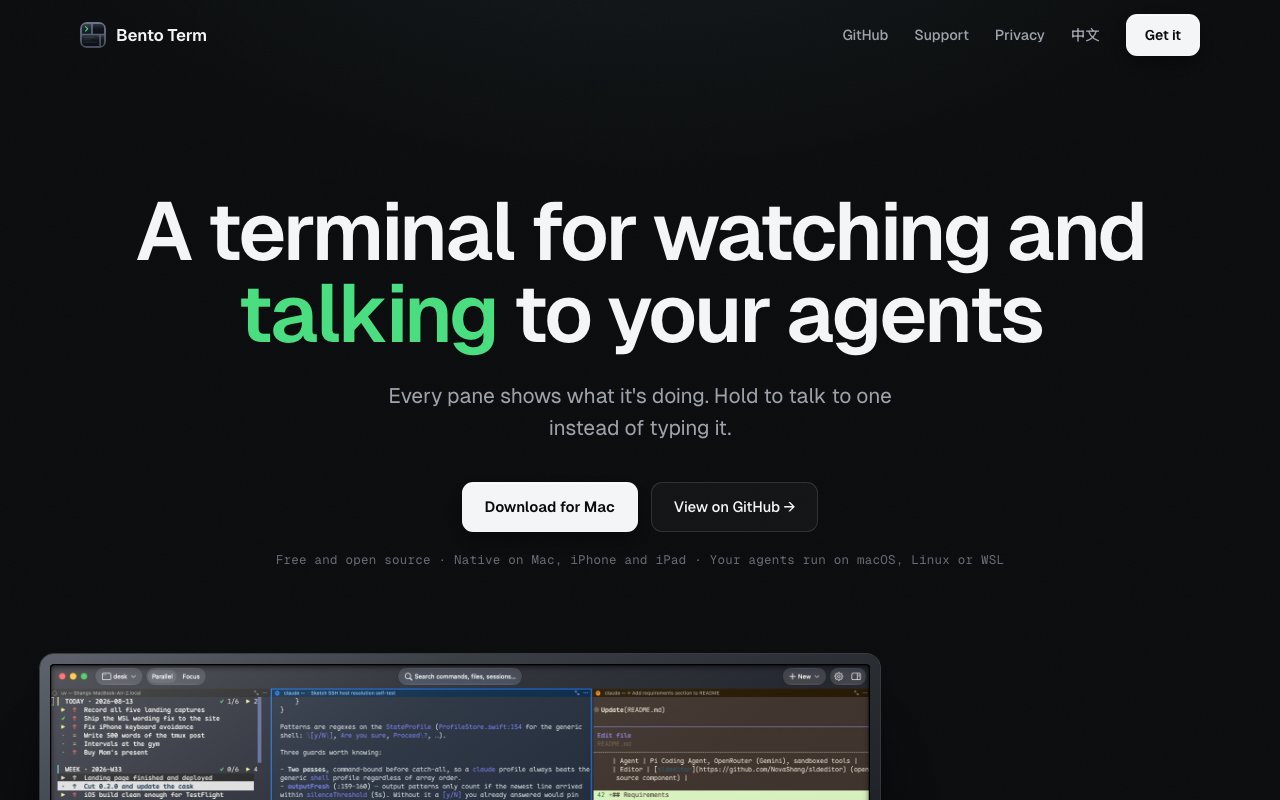
Bento Term is a native tmux client for Mac, iPhone, and iPad built around one specific job, watching the coding agents you already have running in terminal sessions. It attaches to remote machines over plain SSH, shows every pane in a multi-pane layout, and detects what each agent is doing so you can tell at a glance which one is waiting on you, which one is working, and which one is stuck. The key word is attach. It doesn't ask you to move your work into a new environment or run your agents through a wrapper. It connects to the tmux sessions your agents are already running in, which means adopting it costs nothing beyond installing the app. It's free and open source under the Apache-2.0 license, published by the developer behind the Bento project.
The problem it addresses is new but already familiar. Once a coding agent does the typing, your job shifts to supervision, and supervising several agents at once through a stack of ordinary terminal windows is miserable. You end up cycling through tabs looking for the one that stopped to ask a question. Bento Term makes agent state a first-class thing. It recognizes more than ten agent CLIs, including Claude Code, Gemini CLI, and Copilot CLI, and colors each pane by status automatically, so the session that needs attention stands out without you hunting for it. The parent project puts the shift plainly. The agent does the typing now, and the job that's left, watching several of them, noticing which one is stuck, answering it from wherever you are, needs different tools than the ones built for typing.
Under the hood it speaks tmux's control mode, the -CC protocol, over standard SSH. That design choice carries a lot of weight. There's nothing to install on the remote machine beyond SSH and tmux, which most development servers already have, and there's no server run by the Bento project sitting between you and your work. The site is explicit about this posture, no accounts and no middleman. State detection happens locally on your device by pattern matching the terminal output, so nothing about your sessions leaves your machines. Riding on tmux also brings the property that makes this whole model work, sessions keep running when the client disconnects. Close the laptop, lose the connection on a train, switch devices, and the agents keep going. You reattach and pick up where they are.
Beyond monitoring, it rounds out the workflow with a few native touches. Voice input lets you hold right-click on a pane and talk instead of typing, which is faster for the short conversational replies agents tend to need. An integrated file tree with syntax-highlighted preview and quick look support means you can inspect what an agent changed without leaving the client. Panes can be viewed in parallel or expanded into a focus mode when one session deserves your full attention. None of these features are revolutionary on their own, but together they cover the actual loop of supervising agents, notice, inspect, reply, without dropping into a separate editor or file manager between steps.
The cross-device story is where it separates from a plain terminal emulator. Because sessions live in tmux on the remote machine, the same sessions are reachable from your Mac at your desk, your iPhone on the couch, or your iPad on the road. An agent that stalls at nine in the evening can be unstuck from your phone with a spoken reply rather than a laptop retrieval. For anyone running long agent tasks on a home server or a cloud box, that continuity is the practical selling point.
It's aimed squarely at developers who work with AI coding agents, especially people running several in parallel across projects or machines. The parent Bento project frames it as the first of two tools, with Bento Term available now and a separate Bento Agents product, built on the open Agent Client Protocol, still in development. Remote machines can run macOS, Linux, or WSL on Windows, as long as SSH and tmux are present. That covers most setups where agents run somewhere other than the laptop in front of you, which is increasingly the norm for long unattended tasks. If your agents run purely locally in a single terminal window, the value is thinner, since the whole design assumes sessions you attach to rather than sessions you own.
Access is as simple as it gets. The client is free, open source under Apache-2.0, and carries no accounts or subscriptions. The current constraint is platform reach. The Mac app requires macOS 14 or later on Apple Silicon, with Intel Macs not currently supported, and the iPhone and iPad versions are described as coming to the App Store. If you live on Apple hardware and your agents live in tmux, there's nothing to lose by trying it, and the source is on GitHub if you want to see exactly how the state detection works before pointing it at your servers.
Key Features
- Native tmux control mode client
- Automatic agent state detection and coloring
- Hold-to-talk voice input per pane
- Multi-pane parallel and focus views
- File tree with syntax-highlighted preview
- Cross-device access to the same sessions
Pros & Cons
What we like
- Free and open source under Apache-2.0
- Plain SSH, nothing to install on remote machines
- Recognizes 10+ agent CLIs including Claude Code and Gemini CLI
- No accounts and no vendor server in the path
Room for improvement
- Apple platforms only, no Windows or Linux client
- Mac app requires Apple Silicon, Intel not supported
- Requires tmux on every remote machine
- iPhone and iPad App Store release still listed as upcoming
Frequently Asked Questions
What is Bento Term?
Is Bento Term free?
Do I need to install anything on my server?
Which platforms does Bento Term run on?
Best For
Featured in
Alternatives to Bento Term

Kevin Gabeci
Solo developer building web apps, cozy browser games, and AI creator toolkits.

SoloDevStack
A solo developer blog built on head-to-head tool comparisons, 580+ posts deep.

Codedex
A gamified, story-driven platform that teaches Python, web dev, and more like an RPG quest

Vibe Built
Building real apps with agentic AI. What worked, what broke, what shipped.
Reviews (0)
Badge builder
Add Bento Term to your website
Choose a badge style and size, preview it here, then copy the generated HTML. Badge images are self-contained SVGs and do not require an external script.

<a href="https://toolindex.net/tools/bento-term?ref=badge" target="_blank" rel="noopener">
  <img src="https://toolindex.net/badge/bento-term/medium.svg" alt="Bento Term - Listed on Tool Index" width="180" height="50" />
</a>How to use the badge
- 1. Pick the style, size, and theme that fit your layout.
- 2. Copy the generated HTML from the code block.
- 3. Paste it into your footer, homepage, or press page.
Standard badge available
The standard listing badge is available now. Score and circle badges are limited to tools currently ranked in the top 10 of a category.
Badge clicks return visitors to this profile with a referral tag so the source remains identifiable.
Related Tools
Kevin Gabeci
Solo developer building web apps, cozy browser games, and AI creator toolkits.

Coolify
Self-hostable, open source alternative to Heroku and Netlify

Warp
The modern terminal reimagined with AI and collaboration

Bolt.new
Prompt-to-deployed full-stack app inside the browser
Work on Bento Term? Request listing access or correction