
BuildCores
Plan a compatible custom PC and preview the finished build in interactive 3D
Gallery
About BuildCores
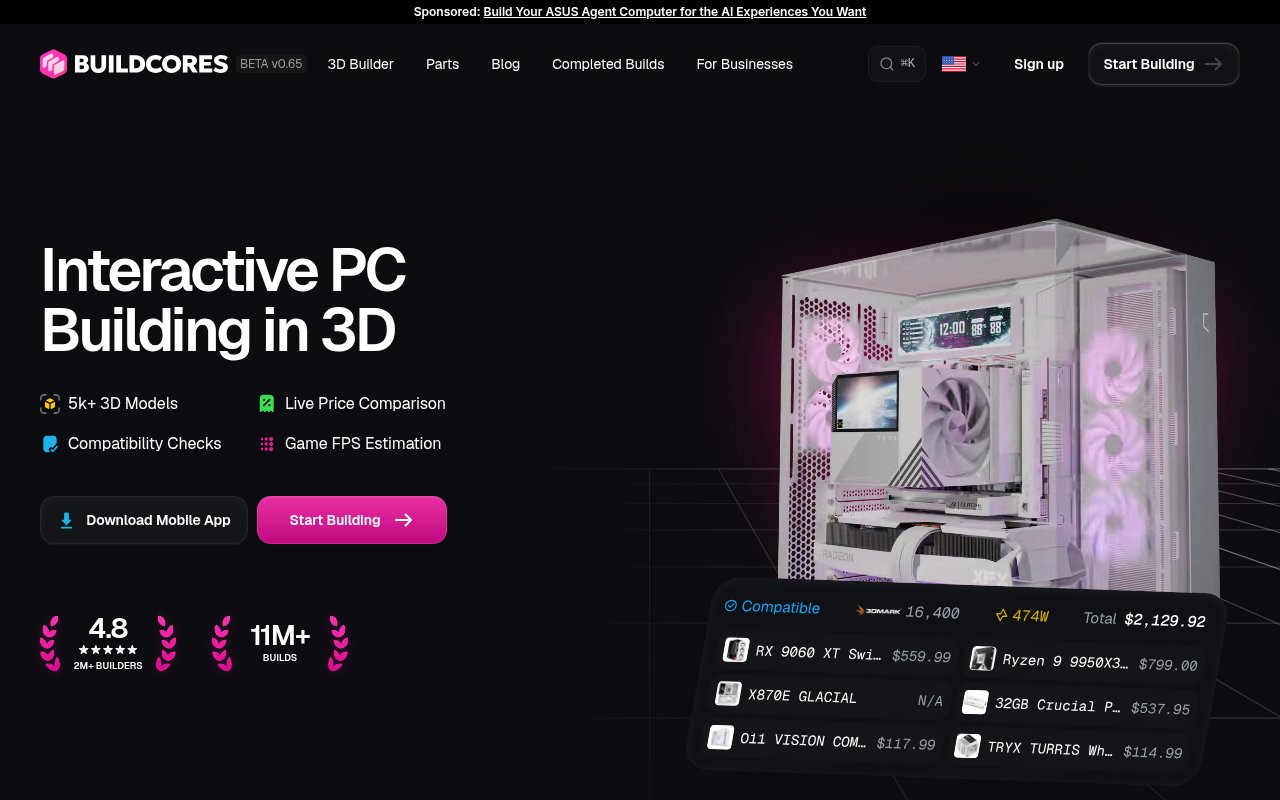
BuildCores is a PC part picker built around an interactive 3D model of the computer you're planning. It brings the jobs that usually happen across a spreadsheet, retailer tabs, compatibility forums, and imagination into one browser workflow. You choose a processor, motherboard, memory, graphics card, case, cooling, storage, power supply, and accessories, while the builder checks the combination and assembles a visual version of the machine. That makes it useful before money changes hands, when a wrong socket, tight clearance, or mismatched memory standard is much easier to fix.
The main workflow starts with a blank build or one of the site's quick-start configurations. BuildCores says its parts database covers more than 50,000 products and its homepage highlights more than 5,000 3D models, so not every catalog entry needs to be represented by a generic block. As parts are added, the compatibility system checks relationships such as the CPU socket, motherboard memory type, graphics card length, cooler height, and estimated power draw. The finished list also brings live prices from retailers together for comparison. It doesn't sell the hardware itself. The final purchase still happens with the selected retailer, which leaves the user free to compare stores and availability.
The 3D view is the part that separates BuildCores from a conventional table of components. A builder can rotate the machine, inspect it from different angles, try supported case configurations, preview RGB lighting, and see supported airflow or fan arrangements. The mobile apps add augmented reality for placing a build at scale. BuildCores also offers side-by-side, life-size 3D part comparison and community pages for sharing completed configurations. These views help with appearance and planning, but the site's own FAQ is appropriately cautious. Models can contain mistakes, missing parts, or texture issues, so the render shouldn't replace checking a manufacturer's current dimensions and manuals before purchase.
It fits first-time builders who want guardrails, enthusiasts comparing several aesthetic directions, and experienced users who would rather verify fit visually than juggle product pages. Game FPS estimation and component benchmarks give gaming buyers a rough performance reference, while price history and regional retailer coverage help people decide when and where to buy. The site labels FPS figures as illustrative estimates rather than live benchmark results, which is an important distinction. A forecast is handy for narrowing a shortlist, but it isn't a promise about a particular game patch, driver, cooling setup, or overclock.
There is also a business side for retailers and product teams. BuildCores offers a cloud-rendered viewer, a locally rendered SDK, structured product data, compatibility logic, and support for branded configuration experiences across web and mobile. That offering can render complete builds or individual products on catalog pages. For ordinary shoppers, however, the value is simpler. The builder combines compatibility, visualization, price comparison, and community inspiration without requiring an account just to begin. Builds can move from a rough idea to a realistic shopping list in the same interface.
The core builder stays free and the homepage explicitly says no account is needed to start. BuildCores Pro adds features such as augmented reality, airflow tools, game FPS estimates, and reduced advertising, with monthly and yearly options shown in the product. The site is still labelled beta and receives frequent model and feature updates. That active pace is encouraging, though it also means coverage and behavior can change. BuildCores is best treated as a strong planning companion, followed by a final check against official component specifications before ordering expensive hardware.
Regional support is another practical detail. BuildCores lists retailer pricing for the United States, Canada, the United Kingdom, Germany, France, Spain, Italy, Portugal, Finland, Poland, and Singapore. Price history covers recent 7, 30, and 60 day trends, and the sales feed can surface current deals. Those tools can reduce tab switching, but stock, shipping, taxes, and seller terms still belong to the retailer. Saved favorites and completed community builds make it easier to revisit ideas, while screenshots help share a configuration with someone who is reviewing the list. Together, these additions make the product useful through the research phase, not only during the first pass at choosing parts.
Key Features
- Interactive 3D PC builder
- Automatic component compatibility checks
- Live retailer price comparison
- Game FPS and power estimates
- RGB and airflow previews
- Community build sharing
Pros & Cons
What we like
- Combines part selection and 3D visualization in one workflow
- Checks key fit and specification relationships as parts change
- Core builder works free without an account
- Retailer comparisons keep purchasing choices open
Room for improvement
- Not every catalog part has an exact 3D model
- Models and compatibility data can still contain mistakes
- Performance figures are estimates rather than live benchmarks
- Some visual planning tools require Pro
Frequently Asked Questions
What is BuildCores?
Is BuildCores free?
Can BuildCores guarantee every part will fit?
Does BuildCores sell PC components?
Best For
Featured in
Alternatives to BuildCores
View all
Tailwind CSS
Rapidly build custom designs without leaving your HTML

Figma
Collaborative interface design tool

Apatero Studio
Creator studio for AI image, video, audio, 3D, and avatars. Every model worth using, in one workspace.

Pixel Painters
Unlimited graphic design subscriptions built only for churches and ministries
Reviews (0)
Badge builder
Add BuildCores to your website
Choose a badge style and size, preview it here, then copy the generated HTML. Badge images are self-contained SVGs and do not require an external script.

<a href="https://toolindex.net/tools/buildcores?ref=badge" target="_blank" rel="noopener">
  <img src="https://toolindex.net/badge/buildcores/medium.svg" alt="BuildCores - Listed on Tool Index" width="180" height="50" />
</a>How to use the badge
- 1. Pick the style, size, and theme that fit your layout.
- 2. Copy the generated HTML from the code block.
- 3. Paste it into your footer, homepage, or press page.
Standard badge available
The standard listing badge is available now. Score and circle badges are limited to tools currently ranked in the top 10 of a category.
Badge clicks return visitors to this profile with a referral tag so the source remains identifiable.
Related Tools
Apatero Studio
Creator studio for AI image, video, audio, 3D, and avatars. Every model worth using, in one workspace.
Tailwind CSS
Rapidly build custom designs without leaving your HTML
Figma
Collaborative interface design tool

Marvel
Lightweight prototyping platform for turning images and screens into clickable mobile and web prototypes.
Work on BuildCores? Request listing access or correction